
1. Introduction
This instruction manual provides comprehensive guidance for the safe and efficient operation, installation, and maintenance of your new Zomagas 24 Inch Single Wall Electric Oven. Please read this manual thoroughly before using the appliance and retain it for future reference. Proper use and care will ensure optimal performance and longevity of your oven.
2. Important Safety Instructions
WARNING: To reduce the risk of fire, electric shock, injury to persons, or damage when using the oven, follow basic precautions, including the following:
- Read all instructions before using the appliance.
- Ensure the oven is properly installed and grounded by a qualified technician. Refer to the installation section for electrical specifications.
- Do not touch hot surfaces. Use oven mitts or potholders.
- Never use the oven for warming or heating the room.
- Do not store flammable materials in or near the oven.
- Supervise children closely when the oven is in use.
- Do not repair or replace any part of the oven unless specifically recommended in this manual. All other servicing should be referred to a qualified technician.
- Always disconnect power to the oven before servicing.
- Do not use water on grease fires. Smother fire or flame or use a dry chemical or foam-type extinguisher.
- Clean the oven regularly to prevent grease buildup.
3. Product Overview
The Zomagas 24 Inch Single Wall Electric Oven is designed for versatile cooking with a spacious 2.8 cu. ft (80L) capacity and 9 cooking functions. It features mechanical knob controls for ease of use and a durable, easy-to-clean enamel interior.

Figure 3.1: Key design features including the anti-scald handle, 5-layer shelf system, built-in oven light, and overall contemporary appearance.
3.1 Key Features
- Powerful Performance: 3220W heating element for fast preheating and consistent temperatures up to 250°C.
- Large Capacity: 2.8 cu. ft (80 liters) black enamel cavity, accommodating multiple trays.
- 9 Cooking Functions: Includes baking, defrosting, convection, and 360° rotisserie.
- Convection Fan: Circulates heat for even cooking and reduced times.
- Triple-Layer Glass Door: Removable tempered glass door for heat retention, safety, and clear visibility.
- Easy-to-Clean Interior: Durable black enamel finish resists stains.
- Mechanical Knob Controls: Intuitive controls for temperature, function, and timer.

Figure 3.2: The 2.8 cubic feet (80 liters) large capacity oven, suitable for various cooking needs.

Figure 3.3: Illustration of the triple-layered glass door, designed for thermal insulation and safety.
4. Installation
Proper installation is crucial for the safe and efficient operation of your Zomagas electric oven. It is strongly recommended that installation be performed by a qualified electrician or appliance technician.
4.1 Dimensions and Cut-out Requirements
Ensure your cabinet opening meets the specified dimensions for a proper fit.
- Product Dimensions (W x D x H): 23.4" x 21.46" x 23.4"
- Recommended Cut-out Dimensions (W x D x H): 22.05" x 21.65" x 23.19"
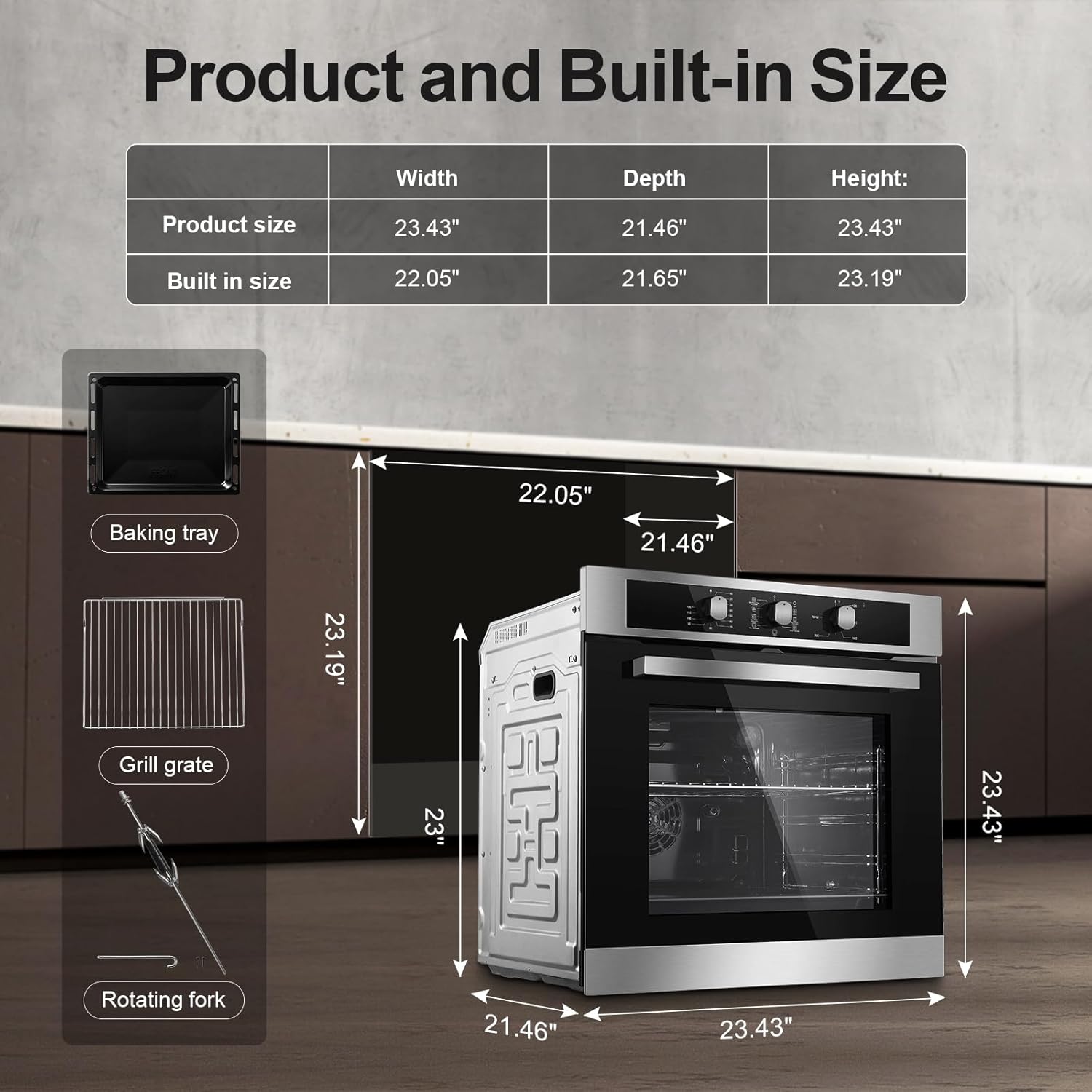
Figure 4.1: Product and recommended built-in dimensions.
4.2 Electrical Specifications and Wiring
The oven operates on a two-phase AC power supply. Incorrect wiring can lead to electric shock or fire. Consult a professional for electrical connections.
- Voltage: 220-240V/60Hz
- Wattage: 3220W
- Wiring: Match wires to oven type and power rating. The green ground wire is 0.39 inches longer for safety.
- For 110V Input: Connect black and white wires to live for 220V; green wire connects to both neutral and ground.
Refer to the detailed wiring diagram provided with your oven's physical manual for precise connection instructions.
5. Operating Instructions
Your Zomagas oven features intuitive mechanical knob controls for selecting cooking functions, temperature, and time.

Figure 5.1: Mechanical knob controls for function, temperature, and timer.
5.1 Control Panel Overview
- Left Knob (Timer): Sets the cooking duration up to 120 minutes. The oven will turn off automatically when the timer expires.
- Middle Knob (Function Selector): Selects one of the 9 available cooking functions.
- Right Knob (Temperature Control): Adjusts the oven temperature from 0°F to 450°F (approximately 0°C to 250°C).
5.2 Cooking Functions
The oven offers 9 distinct cooking functions to suit various culinary needs:
- Convection Broil + Rotisserie: Combines broiling with convection and rotisserie for crispy, evenly cooked meats.
- Pizza: Optimized setting for baking pizzas.
- Bake/Roast + Fan + Rotisserie: Ideal for large roasts and poultry, ensuring even cooking with fan assistance and rotisserie rotation.
- Oven Light: Illuminates the oven interior for visibility.
- Defrost: Gently thaws frozen foods.
- Bake/Roast + Rotisserie: Standard baking/roasting with rotisserie function.
- Broil + Rotisserie: Intense top heat with rotisserie for browning and crisping.
- Broil: Direct top heat for grilling and browning.
- Convection Multi-Rack: Uses the convection fan for even heat distribution across multiple racks.

Figure 5.2: Overview of the 9 cooking functions.

Figure 5.3: Convection Rotisserie feature in action, demonstrating 360-degree heating.
5.3 Using the Rotisserie
To use the 360° rotisserie function:
- Securely attach the food (e.g., whole chicken, roast) to the rotating grill kit (rotisserie spit and forks).
- Insert the rotisserie assembly into the designated slots inside the oven cavity.
- Select a rotisserie-enabled function (e.g., "Convection Broil + Rotisserie" or "Bake/Roast + Fan + Rotisserie") using the middle knob.
- Set the desired temperature with the right knob and cooking time with the left knob.
- Monitor cooking progress through the triple-layer glass door.
6. Maintenance and Cleaning
Regular cleaning and maintenance will keep your oven in optimal condition and ensure safe operation.
6.1 Cleaning the Oven Interior
- Always ensure the oven is cool and disconnected from power before cleaning.
- The black enamel cavity is designed for easy cleaning. Wipe spills and splatters with a damp cloth and mild detergent.
- For stubborn stains, use a non-abrasive oven cleaner specifically designed for enamel surfaces. Follow the cleaner's instructions carefully.
- Remove oven racks and accessories for separate cleaning in warm, soapy water.

Figure 6.1: Easy-to-clean oven interior with removable racks.
6.2 Cleaning the Exterior and Glass Door
- Wipe the exterior surfaces with a soft, damp cloth and mild detergent. Avoid abrasive cleaners or scouring pads.
- The triple-layer glass door can be removed for thorough cleaning. Refer to the physical manual for instructions on safe door removal and reinstallation. Clean glass with a glass cleaner or warm soapy water.
7. Troubleshooting
Before contacting customer support, review the following common issues and their potential solutions.
| Problem | Possible Cause | Solution |
|---|---|---|
| Oven does not turn on. | No power supply; circuit breaker tripped; incorrect wiring. | Check power connection. Reset circuit breaker. Verify wiring with a qualified electrician. |
| Oven not heating properly. | Incorrect temperature setting; oven door not closed completely; heating element issue. | Ensure correct temperature is set. Close door firmly. If problem persists, contact support. |
| Food cooking unevenly. | Improper rack position; overcrowding oven; convection fan issue. | Use recommended rack positions. Avoid overcrowding. Ensure convection fan is operating (if applicable to selected function). |
| Rotisserie not rotating. | Rotisserie not properly installed; function not selected. | Ensure rotisserie spit is correctly seated. Select a rotisserie-enabled cooking function. |
8. Technical Specifications
| Feature | Specification |
|---|---|
| Brand | Zomagas |
| Model | B0FWBV52TJ (Knob Style) |
| Capacity | 2.8 Cu.Ft (80 Liters) |
| Wattage | 3220 watts |
| Voltage | 220-240V/60Hz (Two-phase AC) |
| Heating Method | Convection |
| Number of Functions | 9 (Bake, Broil, Rotisserie, Defrost, Convection, etc.) |
| Control Type | Mechanical Knob |
| Door Type | Triple Glass Door, Removable |
| Interior Finish | Black Enamel |
| Product Dimensions (W x D x H) | 23.4" x 21.46" x 23.4" |
| Recommended Cut-out (W x D x H) | 22.05" x 21.65" x 23.19" |
| GTIN | 769029580732 |
9. Warranty and Customer Support
Zomagas is committed to providing quality products and customer satisfaction. For any questions regarding installation, operation, maintenance, or troubleshooting that are not covered in this manual, please contact our dedicated customer service team.
Please refer to your purchase documentation or the official Zomagas website for specific warranty terms and contact information.

