
1. Introduction
Thank you for choosing the MORENTO AT-SH26 10-inch Portable Space Heater. This manual provides essential information for the safe and efficient operation of your new appliance. Please read it thoroughly before use and retain it for future reference.
The MORENTO AT-SH26 is designed for indoor use, offering efficient heating with auto temperature control, an LED display, ECO mode, and a convenient 0-12 hour timer. Its quiet operation makes it suitable for various indoor environments such as offices, bedrooms, and homes.
2. Important Safety Instructions
When using electrical appliances, basic precautions should always be followed to reduce the risk of fire, electric shock, and injury to persons.
- Read all instructions before using this heater.
- Do not use outdoors. This heater is intended for indoor use only.
- Avoid overheating: Do not cover the heater. Ensure adequate clearance around the heater for proper airflow.
- Overheat Protection: The heater is equipped with an overheat protection function that automatically shuts off the unit if it reaches an unsafe temperature.
- Tip-Over Protection: An inclination detection sensor automatically shuts off the heater if it is accidentally tipped over. The unit will not automatically restart; it must be manually turned back on.
- Flame-Retardant Material: Constructed with V0-level flame-retardant material for enhanced safety.
- Placement: Always place the heater on a firm, level surface. Keep combustible materials, such as furniture, pillows, bedding, papers, clothes, and curtains at least 3 feet (0.9 m) from the front of the heater and keep them away from the sides and rear.
- Electrical Connection: Plug heaters directly into a wall outlet/receptacle. Never use with an extension cord or relocatable power tap (outlet/power strip).
- Supervision: Close supervision is necessary when any heater is used by or near children or invalids and whenever the heater is left operating unattended.
- Maintenance: Always unplug the heater when not in use.
3. Product Overview
The MORENTO AT-SH26 is a compact and efficient space heater designed to provide warmth and comfort in various indoor settings. It features a user-friendly control panel, an LED display, and a remote control for convenient operation.

Figure 1: MORENTO AT-SH26 10-inch Portable Space Heater with included remote control.
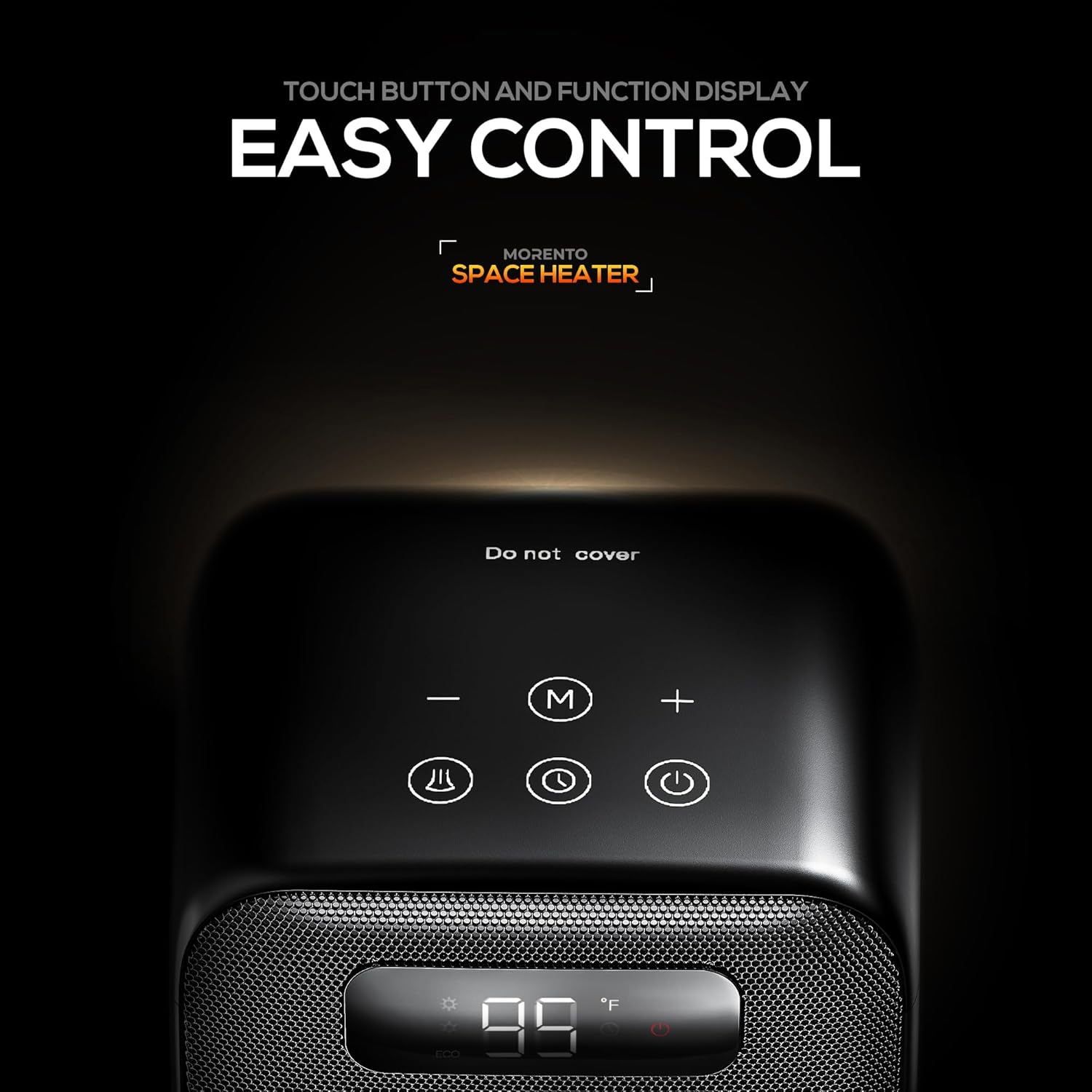
Figure 2: Touch button and function display on the top panel for easy control.
4. Setup
- Unpack: Carefully remove the heater from its packaging. Retain packaging for storage or future shipping.
- Placement: Place the heater on a firm, level, heat-resistant surface. Ensure it is at least 3 feet (0.9 m) away from walls, furniture, and other combustible materials.
- Power Connection: Plug the power cord directly into a 120V AC, 60Hz wall outlet. Do not use extension cords or power strips.
- Initial Power On: The heater is now ready for operation.
5. Operating Instructions
Operate your MORENTO space heater using either the touch controls on the top panel or the included remote control.
5.1 Power On/Off
- Press the Power button (
 ) on the control panel or remote to turn the heater ON or OFF.
 - Upon powering on, the heater will default to the last used setting or fan mode.
5.2 Mode Selection
Press the Mode button ( ) to cycle through the available heating modes:
- Fan Only: Circulates air without heat.
- Low Power Heat (H1): Provides 900W of heating.
- High Power Heat (H2): Provides 1500W of heating.
- ECO Mode: Intelligent energy-saving mode.

Figure 3: Multiple heating modes for customized comfort.
5.3 Temperature Control (ECO Mode)
- In ECO Mode, use the +/- buttons (
 ) to set your desired temperature between 41°F and 95°F.
 - The heater will automatically adjust its heating power to maintain the set temperature, turning on and off as needed.
5.4 Oscillation Function
- Press the Oscillation button (
 ) to activate the 70° wide-angle oscillation, distributing heat evenly across the room. Press again to stop.

Figure 4: 70° oscillation for wide-reaching warmth.
5.5 Timer Function
- Press the Timer button (
 ) to set an auto-off timer from 0 to 12 hours. Each press increases the timer by 1 hour.
 - The heater will automatically shut off once the set time has elapsed.
5.6 Child Lock
- To activate the child lock, press and hold the Oscillation button and the Timer button simultaneously for 3 seconds. The display will show a lock icon.
- In child lock mode, all buttons on the control panel are disabled.
- To deactivate, press and hold the same two buttons for 3 seconds again.
6. Maintenance
Regular maintenance ensures optimal performance and longevity of your heater.
- Cleaning: Always unplug the heater and allow it to cool completely before cleaning. Use a soft, damp cloth to wipe the exterior surfaces. Do not use abrasive cleaners or solvents.
- Storage: When not in use, store the heater in a cool, dry place. It is recommended to store it in its original packaging to protect it from dust and damage.
7. Troubleshooting
If your heater is not operating correctly, please refer to the following common issues and solutions:
- Heater not turning on:
- Ensure the power cord is securely plugged into a working outlet.
- Check if the unit has tipped over; if so, place it upright and manually turn it on.
- Verify that the power switch on the back of the unit is in the 'ON' position.
- Heater stops unexpectedly:
- The tip-over protection may have activated. Place the heater upright and restart it.
- The overheat protection may have activated. Unplug the heater, let it cool down for 30 minutes, then plug it back in and restart. Ensure no obstructions are blocking air intake or exhaust.
- If in ECO mode, the room temperature may have reached the set temperature. The heater will resume heating when the temperature drops.
- No heat, only fan:
- Ensure the heater is not in 'Fan Only' mode. Cycle through modes using the Mode button.
- In ECO mode, if the room temperature is above the set temperature, only the fan will run. Adjust the set temperature or switch to a continuous heating mode.
8. Specifications
| Feature | Detail |
|---|---|
| Brand | MORENTO |
| Model Number | AT-SH26 |
| Color | Black |
| Power Output | 1500W / 900W |
| Special Features | Digital Display, Energy Efficient, Fast Heating, Remote Control, Tip-Over Protection, Overheat Protection, ECO Mode, Oscillation, 0-12H Timer |
| Form Factor | Pedestal |
| Indoor/Outdoor Usage | Indoor |
| Product Dimensions | 7.44"D x 6.93"W x 11.42"H |
| Item Weight | 3.58 pounds (1.57 kg) |
| Max Temperature Setting | 95 Degrees Fahrenheit |
| Fuel Type | Electric |
| Room Type | Bedroom, Dorm Room, Home Office, Living Room, Study Room |
| UPC | 850078408181 |
9. Official Product Videos
MORENTO Space Heater Product Video
This video provides a general overview of the MORENTO Space Heater's features and design.
MORENTO 26 Space Heater Product Video
This video showcases the features and functionality of the MORENTO 26 Space Heater, which shares similar operational aspects with the AT-SH26 model.
MORENTO 26 Space Heater 3D Video
A 3D visualization of the MORENTO 26 Space Heater, highlighting its design and compact form factor.
10. Warranty and Support
The MORENTO AT-SH26 Space Heater comes with a One-Year Limited Warranty from the date of purchase. This warranty covers defects in materials and workmanship under normal use.
For warranty claims, technical support, or any questions regarding your product, please contact MORENTO customer service:
- Email: support@morento.com
- Phone: +1 (888) 550-1319
- Website: www.morento.com
Please have your model number (AT-SH26) and proof of purchase ready when contacting support.

