1. Introduction
The Generic HCT-355 Digital Irrigation Water Timer is designed to automate your garden watering, providing convenience and efficiency. This device allows you to set up to three independent watering programs, features a rain sensor to prevent overwatering, and offers manual control when needed. Its robust design ensures reliable outdoor performance.
2. Package Contents
- HCT-355 Water Timer Unit
- 3/4" Tap Adapter(s)
- Sealing Washer(s)
- Quick Start Instructions (this manual provides detailed instructions)
3. Product Overview and Features

Figure 3.1: Front view of the HCT-355 Digital Irrigation Water Timer, showing its compact design and LCD screen. Dimensions are approximately 16cm (6.30 inches) in height.
- Three Independent Programs (P1/P2/P3): Allows setting distinct start times, run times (1 second to 99 minutes 59 seconds), and frequencies (1 hour to 15 days).
- Rain Sensor Auto Pause: A built-in high-sensitivity sensor detects rainfall, automatically pausing irrigation and resuming the schedule when dry.
- Manual Watering: One-touch manual mode for immediate watering without affecting programmed schedules.
- Outdoor-Ready Design: IPX5 splash-resistant housing and gasketed fittings ensure durability in outdoor conditions.
- Weak-Battery Safety: Automatically closes the valve to prevent unintended water flow when battery power is low.
- Child-Lock: Prevents accidental button presses and tampering.
- Large LCD Display: An 8x4 cm (3.15x1.57 inch) screen clearly shows current time, next start time, run duration, frequency, battery level, rain, and lock icons.
- Universal Fit: Designed for standard 3/4" taps (female connection) with a 3/4" male outlet.
- Wide Pressure Range: Operates effectively from 0.05–0.8 MPa (7–116 psi) water pressure.

Figure 3.2: The HCT-355 timer displaying its key features: super battery life, arbitrary timing mode, rain sensor function, weak current protection, and child lock protection.
LCD Display Overview

Figure 3.3: Detailed view of the LCD display with labels for current time, battery level, child lock, irrigation start prompt, next start time, program indicators (P1, P2, P3), start time, watering time (how long), and frequency (how often).
- NOW: Current time.
- Battery Level Display: Indicates remaining battery power.
- Child Lock Display: Icon indicates if child lock is active.
- Irrigation Start Prompt: Icon indicates active watering.
- NEXT START: Displays time until the next scheduled irrigation.
- P1, P2, P3: Program indicators (ON/OFF).
- START TIME: The set start time for the watering program.
- HOW LONG: The duration of watering for the current program (e.g., 30 minutes 00 seconds).
- HOW OFTEN: The frequency of watering (e.g., 12 hours, 1 day, 3 days).
4. Setup
4.1 Battery Installation
- Ensure the timer is dry before opening the battery compartment.
- Locate the battery compartment on the back of the unit.
- Open the compartment and insert 2x AA 1.5V alkaline batteries (not included), observing the correct polarity (+/-).
- Securely close the battery compartment to maintain water resistance.
4.2 Attaching to Tap
- Ensure the sealing washer is correctly seated in the timer's inlet connector.
- Screw the timer onto a standard 3/4" outdoor tap. Hand-tighten only; no tools are required.
- Ensure a secure, leak-free connection.
4.3 Attaching Hose
- Connect your garden hose to the 3/4" male outlet at the bottom of the timer.
- Hand-tighten to ensure a secure connection.
5. Operating Instructions
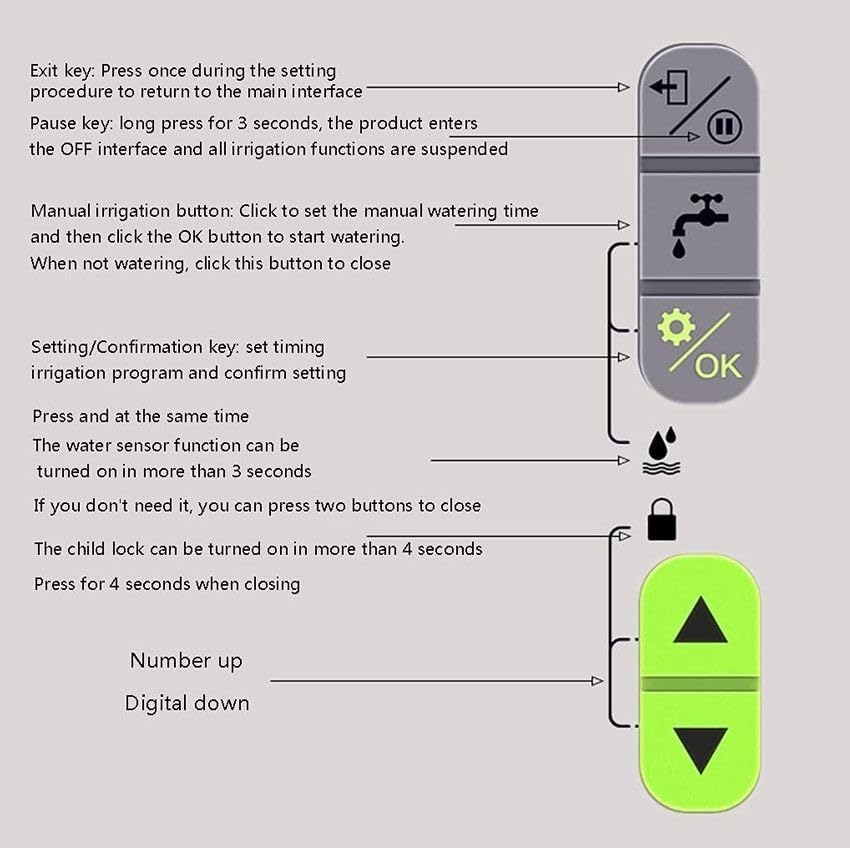
Figure 5.1: Button layout and functions on the HCT-355 Digital Irrigation Water Timer.
Button Functions
- Exit Key (Top Left): Press once during setting to return to the main interface.
- Pause Key (Top Right): Long press for 3 seconds to suspend all irrigation functions and enter OFF mode.
- Manual Irrigation Button (Middle Right, Faucet Icon): Click to set manual watering time, then click OK to start. Click again to close when not watering.
- Setting/Confirmation Key (Middle Right, OK Icon): Used to set irrigation programs and confirm settings.
- Water Sensor Function (Middle Right, Water Droplet Icon): Press and hold for more than 3 seconds to turn on/off the water sensor function. If not needed, press both UP and DOWN buttons simultaneously to close.
- Child Lock (Bottom Right, Lock Icon): Press and hold for more than 4 seconds to activate/deactivate the child lock.
- UP/DOWN Arrows (Bottom Right): Used to adjust numerical values (e.g., time, duration, frequency).
5.1 Setting Current Time
- From the main screen, press the OK button to enter time setting mode. The 'NOW' time will flash.
- Use the UP/DOWN arrows to adjust the hour. Press OK to confirm.
- Use the UP/DOWN arrows to adjust the minute. Press OK to confirm and exit time setting.
5.2 Programming Watering Schedules (P1, P2, P3)
The HCT-355 allows for three independent programs. Each program (P1, P2, P3) can be configured with its own start time, run duration, and frequency.
- From the main screen, press the UP or DOWN arrow to cycle through P1, P2, P3. Select the program you wish to set (e.g., P1).
- Press OK to enter the program settings. The 'ON/OFF' indicator for the selected program will flash. Use UP/DOWN to toggle between ON and OFF. Press OK to confirm.
- Set Start Time: The 'START TIME' will flash. Use UP/DOWN to adjust the hour, then press OK. Adjust the minute, then press OK.
- Set Watering Duration ('HOW LONG'): The 'MIN' (minutes) will flash. Use UP/DOWN to adjust the minutes (0-99), then press OK. The 'SEC' (seconds) will flash. Use UP/DOWN to adjust the seconds (0-59), then press OK.
- Set Watering Frequency ('HOW OFTEN'): The frequency unit (e.g., 'HRS' or 'DAY') will flash. Use UP/DOWN to select between hours (1-23) or days (1-15). Press OK. Then, use UP/DOWN to adjust the numerical value for the selected frequency. Press OK to confirm and save the program.
- Repeat for P2 and P3 as desired.
5.3 Manual Watering
To water immediately without affecting your programmed schedules:
- From the main screen, press the Manual Irrigation Button (faucet icon).
- The 'HOW LONG' duration will flash. Use the UP/DOWN arrows to set the desired manual watering duration (from 1 second to 99 minutes 59 seconds).
- Press OK to start manual watering. The timer will begin watering for the set duration.
- To stop manual watering prematurely, press the Manual Irrigation Button again.
5.4 Rain Sensor Function

Figure 5.2: The HCT-355 timer indicating the rain sensor functionality for automatic watering.
The built-in rain sensor detects rainfall and automatically pauses scheduled watering to prevent overwatering. Watering will resume once the sensor dries.
- To Activate/Deactivate: Press and hold the Water Sensor Function Button (water droplet icon) for more than 3 seconds. The rain sensor icon on the LCD will indicate its status (steady ON for active, flashing for working/detecting rain).
- If you do not wish to use the rain sensor, you can deactivate it. Alternatively, if the sensor is active and you wish to override it, press both UP and DOWN buttons simultaneously to close the function temporarily.
5.5 Child Lock
The child lock feature prevents accidental button presses and tampering.
- To Activate/Deactivate: Press and hold the Child Lock Button (lock icon) for more than 4 seconds. A lock icon will appear on the LCD when activated. Repeat the process to deactivate.
6. Maintenance
6.1 Battery Replacement
When the battery level indicator on the LCD shows low power, replace the batteries promptly. The weak-battery safety feature will close the valve to prevent continuous flow if batteries are critically low.
- Turn off the water supply to the tap.
- Remove the timer from the tap if necessary.
- Open the battery compartment and replace the old batteries with 2 new AA 1.5V alkaline batteries, ensuring correct polarity.
- Close the compartment securely.
6.2 Cleaning
Clean the exterior of the timer with a soft, damp cloth. Do not use abrasive cleaners or solvents. Ensure the rain sensor area is kept clear of debris for optimal performance.
6.3 Winter Storage
During freezing temperatures, remove the timer from the tap, drain any remaining water, and store it indoors in a dry, frost-free location. Freezing water can damage the internal components.
7. Troubleshooting
- No Water Flow:
- Check if the tap is fully open.
- Ensure batteries are installed correctly and have sufficient power. Replace if necessary.
- Verify that a program is active and the start time has been reached.
- Check if the rain sensor is active and detecting rain.
- Ensure water pressure is within the operating range (0.05–0.8 MPa).
- Timer Not Starting/Stopping:
- Confirm the program (P1/P2/P3) is set to 'ON'.
- Check the set start time, duration, and frequency.
- Ensure the child lock is not active.
- If the 'Pause' function was activated, long press the Pause key for 3 seconds to resume.
- Leaking Connections:
- Ensure all connections are hand-tightened securely.
- Check that sealing washers are correctly seated and not damaged. Replace if worn.
- Inaccurate Watering:
- Recalibrate the current time if it has drifted.
- Verify program settings (duration, frequency).
8. Specifications
| Model | HCT-355 |
| Dimensions (L x W x H) | 86 × 56 × 150 mm (3.39 × 2.20 × 5.91 in) |
| Weight | 390 g (13.8 oz) |
| Working Temperature | 1–45 °C (avoid direct high sun/heat) |
| Power Source | 2× AA 1.5 V alkaline batteries (not included) |
| Water Pressure Range | 0.05–0.8 MPa (7–116 psi) |
| Tap Connection | 3/4" Female (internal thread) |
| Outlet Connection | 3/4" Male (external thread) |
| Water Resistance Rating | IPX5 (splash-resistant) |
| Program Capacity | 3 independent programs (P1/P2/P3) |
| Run Time Range | 1 second – 99 minutes 59 seconds |
| Frequency Range | 1 hour – 15 days |
9. Warranty and Support
This product is sold by Generic. For warranty information and customer support, please refer to the retailer or seller from whom you purchased this device. Keep your purchase receipt for any warranty claims.


