
1. Introduction
Welcome to your new xinwld A97 Pro Wireless Earbuds. These earbuds are designed to provide a high-fidelity audio experience with deep bass, advanced Bluetooth 5.4 connectivity, and effective environmental noise cancellation (ENC) for clear calls. This manual will guide you through the setup, operation, and maintenance of your earbuds.
Key Features:
- Bluetooth 5.4: For stable and efficient wireless connection.
- HiFi Stereo Sound with Deep Bass: Delivers rich audio quality.
- Up to 40 Hours Playtime: Extended listening with the charging case.
- 4 ENC Noise Cancelling Microphones: Ensures clear calls by reducing ambient noise.
- IP7 Water Resistance: Protects earbuds from water splashes and sweat (earbuds only).
- Intuitive Touch Controls: Easy management of music and calls.
- LED Digital Display: Shows battery level of the charging case and earbuds.
2. Package Contents
Please check the package for the following items:
- xinwld A97 Pro Wireless Earbuds (Left and Right)
- Charging Case
- USB-C Charging Cable
- User Manual
- (Optional) Various Sizes of Eartips
3. Product Overview
Familiarize yourself with the components of your xinwld A97 Pro Wireless Earbuds.
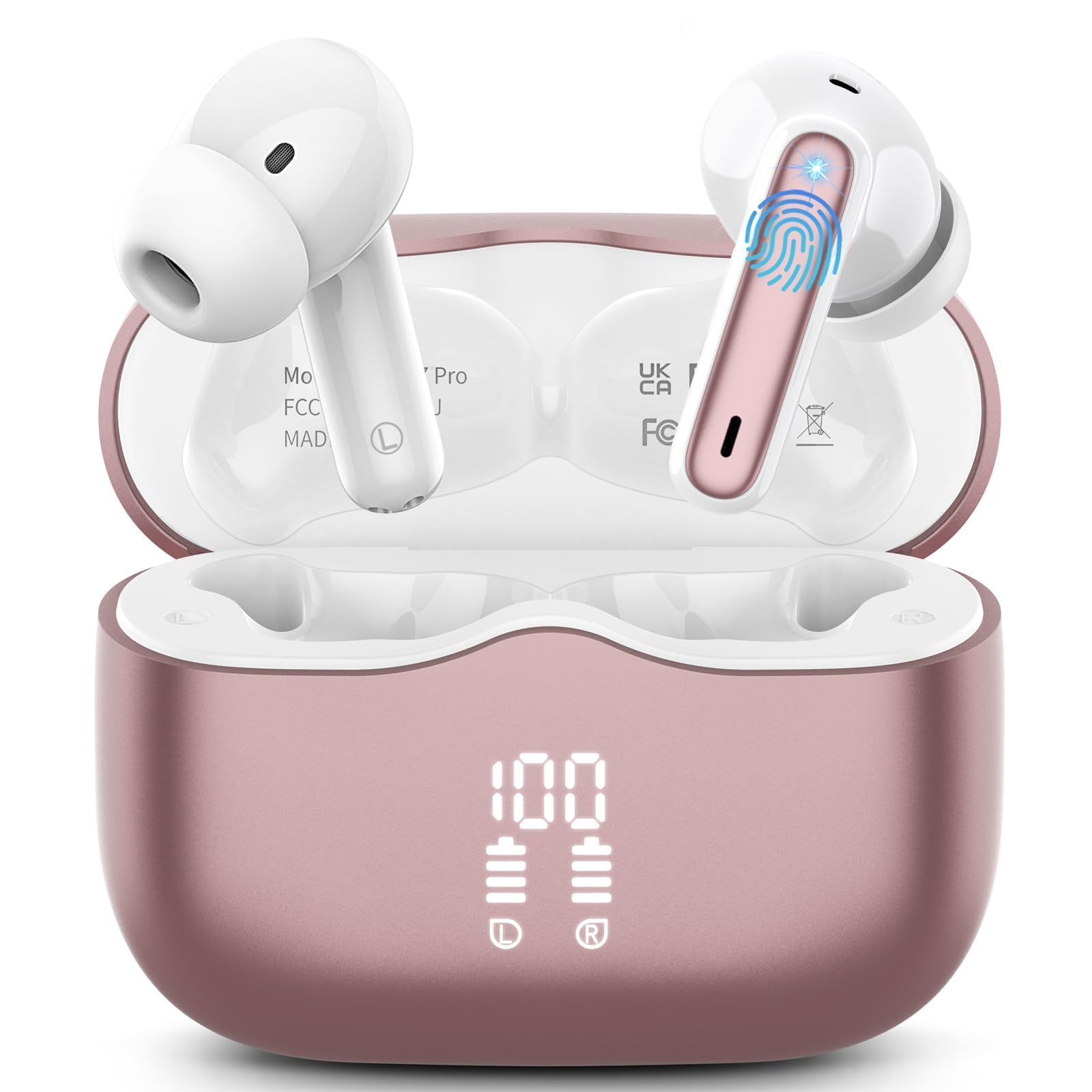
Image 1: xinwld A97 Pro Wireless Earbuds and Charging Case. The image shows the black earbuds placed inside their charging case, which features a digital LED display on the front indicating battery levels.
Earbud Components:
- Touch Control Area: For managing playback, calls, and voice assistant.
- Microphone: For calls and ENC functionality.
- Charging Contacts: Connects with the charging case for power.
- Eartip: Provides comfort and sound isolation; replaceable.
Charging Case Components:
- LED Digital Display: Shows the battery level of the case and charging status of the earbuds.
- USB-C Charging Port: For charging the case.
- Earbud Charging Slots: Holds and charges the earbuds when placed inside.
4. Setup Guide
4.1. Initial Charging
Before first use, fully charge the earbuds and the charging case.
- Place both earbuds into the charging case.
- Connect the USB-C charging cable to the charging port on the case and the other end to a USB power adapter (not included).
- The LED display on the charging case will show the battery percentage. The charging indicators for the earbuds will also be visible.
- Once fully charged, disconnect the charging cable.
4.2. Pairing with Your Device
- Ensure the earbuds are charged.
- Open the charging case. The earbuds will automatically power on and enter pairing mode, indicated by flashing lights.
- On your device (smartphone, tablet, etc.), go to Bluetooth settings and turn on Bluetooth.
- Search for available devices. Select "xinwld A97 Pro" from the list.
- Once connected, you will hear a confirmation sound, and the earbud indicator lights will turn off or flash slowly.
- If pairing fails, place the earbuds back into the case, close the lid, wait a few seconds, and then repeat the steps.
5. Operating Instructions
5.1. Power On/Off
- Power On: Open the charging case, and the earbuds will automatically power on. Alternatively, press and hold the touch control area on both earbuds for 3 seconds.
- Power Off: Place the earbuds back into the charging case and close the lid. They will automatically power off and begin charging. Alternatively, disconnect them from Bluetooth, and they will power off after 5 minutes of inactivity.
5.2. Wearing the Earbuds
Insert the earbuds into your ears and gently rotate them to find a comfortable and secure fit. Ensure the microphones are facing downwards for optimal call quality. Experiment with different eartip sizes (if included) for the best seal and sound.
5.3. Touch Controls
The xinwld A97 Pro earbuds feature intuitive touch controls on each earbud. The functions are generally mirrored on both earbuds unless specified.
| Function | Action |
|---|---|
| Play/Pause Music | Single tap on either earbud |
| Next Track | Double tap on either earbud |
| Previous Track | Triple tap on either earbud |
| Answer/End Call | Single tap on either earbud |
| Reject Call | Press and hold either earbud for 2 seconds |
| Activate Voice Assistant | Press and hold either earbud for 3 seconds |
| Volume Control | Control via your connected device (earbuds do not have direct volume control) |
5.4. Environmental Noise Cancellation (ENC)
The earbuds feature 4 ENC microphones to reduce ambient noise during calls, ensuring clearer conversations for both you and the person you are speaking with. This feature is automatically active during phone calls.
6. Maintenance and Care
6.1. Cleaning
- Regularly clean the earbuds and charging case with a soft, dry, lint-free cloth.
- Do not use harsh chemicals, cleaning solvents, or strong detergents, as these may damage the product.
- Gently clean the charging contacts on both the earbuds and inside the case to ensure proper charging and connectivity.
6.2. Water Resistance (IP7)
The earbuds are rated IP7 water-resistant, meaning they can withstand immersion in water up to 1 meter for 30 minutes. This rating applies to the earbuds only, not the charging case.
- Do not submerge the charging case in water.
- Avoid using the earbuds in saunas, steam rooms, or during water sports.
- If the earbuds get wet, dry them thoroughly with a soft cloth before placing them back in the charging case to prevent damage to the charging contacts.
6.3. Storage
When not in use, store the earbuds in their charging case to protect them from dust, scratches, and accidental damage.
6.4. Battery Care
To prolong battery life, avoid fully discharging the earbuds and charging case frequently. Charge them regularly, even if not in constant use, to maintain optimal battery health.
7. Troubleshooting
If you encounter any issues, please refer to the following common solutions:
7.1. Earbuds not pairing with device:
- Ensure Bluetooth is enabled on your device.
- Make sure the earbuds are charged and out of the charging case.
- Try forgetting "xinwld A97 Pro" from your device's Bluetooth list and re-pairing.
- Restart your device.
- Place earbuds back in the case, close the lid, wait 10 seconds, then open to re-enter pairing mode.
7.2. Only one earbud working:
- Ensure both earbuds are charged.
- Place both earbuds back into the charging case, close the lid, and then open it again.
- Clean the charging contacts on both earbuds and inside the case.
7.3. Earbuds not charging:
- Ensure the charging cable is securely connected to both the case and the power source.
- Check if the charging contacts on the earbuds and inside the case are clean and free of debris.
- Try a different USB-C cable or power adapter.
7.4. Poor sound quality:
- Ensure the earbuds are properly seated in your ears.
- Try different sized eartips for a better seal.
- Clean any earwax or debris from the earbud nozzles.
- Ensure your device's volume is not too low.
- Move closer to your connected device to avoid interference.
8. Specifications
| Feature | Detail |
|---|---|
| Brand | xinwld |
| Model Name | A97 Pro |
| Model Number | A97 |
| Connectivity Technology | Wireless (Bluetooth) |
| Bluetooth Version | 5.4 |
| Ear Placement | In Ear |
| Control Type | Touch Control |
| Water Resistance Rating | IP7 (Earbuds only) |
| Playtime | Up to 40 hours (with charging case) |
| Microphones | 4 ENC Noise Cancelling Mics |
| Material | Plastic |
9. Warranty and Support
9.1. Warranty Information
Your xinwld A97 Pro Wireless Earbuds come with a limited warranty. Please refer to the warranty card included in your package or visit the official xinwld website for detailed warranty terms and conditions. The warranty period is typically 1 year from the date of purchase, covering manufacturing defects.
9.2. Customer Support
For any questions, technical assistance, or warranty claims, please contact xinwld customer support through the following channels:
- Email: Please check your product packaging or the official xinwld website for direct customer support email.
- Website: Visit the xinwld Store on Amazon (for general inquiries or to find official contact information).
When contacting support, please have your product model (A97 Pro) and purchase details ready to expedite assistance.

