
Introduction
This manual provides detailed instructions for the safe and efficient operation of your Goplus 88lb/40kg Price Computing Scale. Please read this manual thoroughly before using the scale and retain it for future reference. This digital commercial food scale is designed for precision weighing tasks in various food environments, offering features like dual LCD displays, multiple weighing modes, and a robust design.
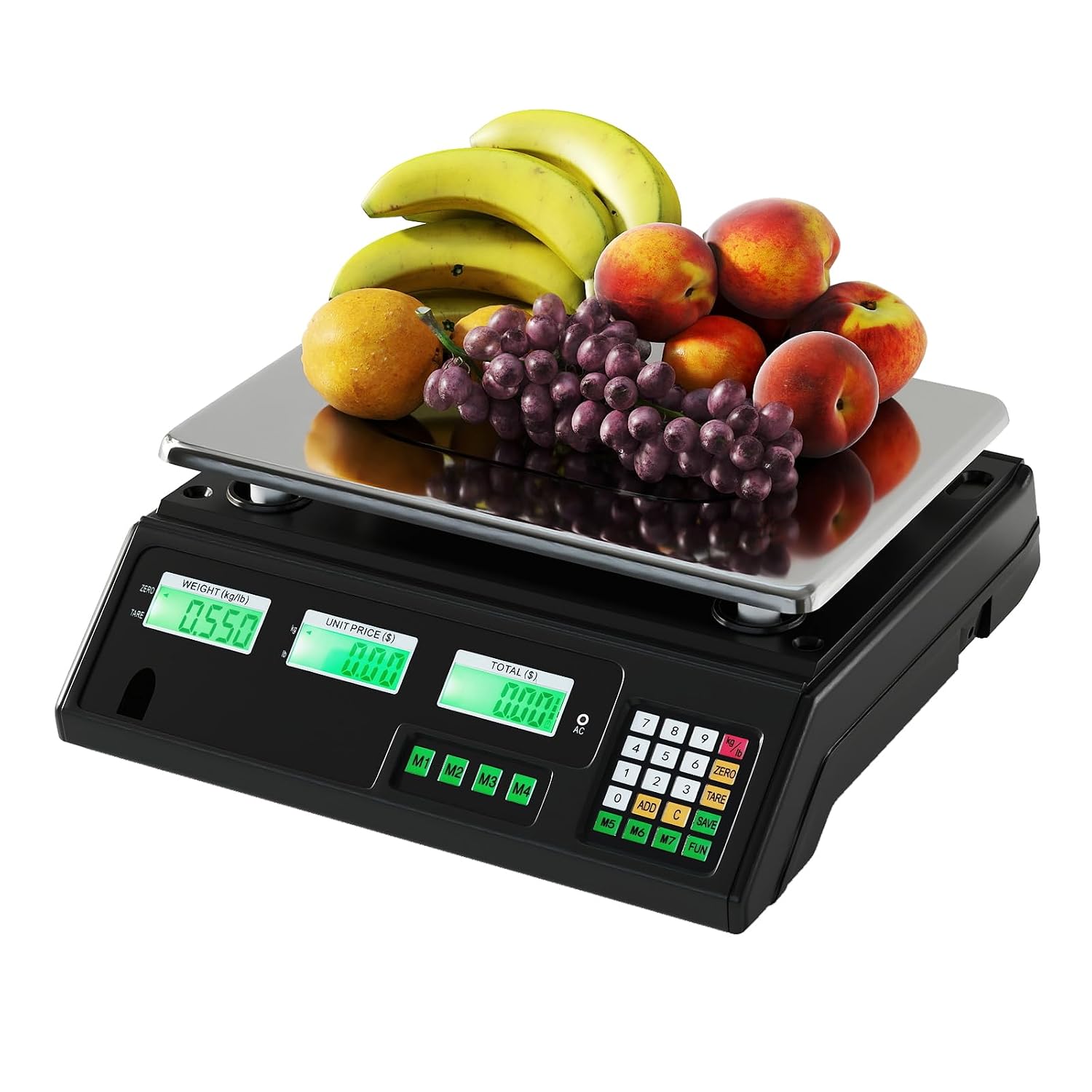
Figure 1: Goplus 88lb/40kg Price Computing Scale.
Important Safety Information
- Ensure the scale is placed on a stable, level surface to guarantee accurate readings.
- Do not overload the scale beyond its maximum capacity of 88 lb (40 kg).
- Keep the scale away from water and excessive moisture to prevent electrical damage.
- Avoid exposing the scale to extreme temperatures or direct sunlight.
- Clean the stainless steel platform regularly with a damp cloth; do not use abrasive cleaners.
- Do not attempt to disassemble or repair the scale yourself. Contact qualified service personnel.
- Use only the provided AC adapter for charging.
Package Contents
Verify that all items are present in the package:
- 1 x Goplus Price Computing Scale
- 1 x AC Adapter
- 1 x Instruction Manual (this document)
Product Components
Familiarize yourself with the main parts of your Goplus Price Computing Scale.

Figure 2: Key components of the scale, including platform holder, charging port, and adjustable foot pads.
- Stainless Steel Platform: Removable for easy cleaning and durable for commercial use.
- Dual LCD Displays: Front and back displays for weight, unit price, and total, visible to both seller and buyer.
- Control Panel: Includes numeric keypad, function buttons (ZERO, TARE, ADD, C, FUN), and shortcut buttons (M1-M7).
- Platform Holders: Ensure stable and precise weighing.
- Charging Port: For connecting the AC adapter.
- Adjustable Foot Pads: For leveling the scale on uneven surfaces.
Setup Instructions
- Unpacking: Carefully remove all components from the packaging.
- Placement: Place the scale on a firm, level, and stable surface. Avoid areas with vibrations, drafts, or rapid temperature changes.
- Leveling: Adjust the four adjustable foot pads at the bottom of the scale until the bubble in the level indicator (if present) is centered.
- Power Connection:
- AC Power: Connect the provided AC adapter to the charging port on the scale and then plug it into a standard electrical outlet.
- Battery Power: The scale has a built-in rechargeable battery. Ensure it is fully charged before initial use for optimal performance. A full charge provides up to 100 hours of continuous operation. An audio alert and icon will indicate low battery power.
- Initial Power On: Press the ON/OFF button to turn on the scale. The display will perform a self-check and then show "0.000".

Figure 3: Power options: AC adapter and built-in rechargeable battery.
Operating Instructions
Basic Weighing
- Ensure the scale displays "0.000" before placing any item. If not, press the ZERO button.
- Place the item to be weighed on the stainless steel platform.
- The weight will be displayed on both the front and back LCD screens.
Unit Switching (lb/kg)
To switch between pounds (lb) and kilograms (kg), press the lb/kg button on the control panel. The display will update to show the weight in the selected unit.

Figure 4: One-button unit switching between kilograms and pounds.
Price Computing Function
- Place the item on the platform.
- Enter the unit price using the numeric keypad.
- The scale will automatically calculate and display the total price on the LCD screens.
Using Shortcut Buttons (M1-M7)
The scale features 7 shortcut buttons (M1-M7) to store frequently used unit prices for quick recall.
- To Save a Price:
- Enter the desired unit price using the numeric keypad.
- Press the SAVE button.
- Press one of the shortcut buttons (M1-M7) to store the price.
- To Recall a Price:
- Place the item on the platform.
- Press the desired shortcut button (M1-M7). The stored unit price will be applied, and the total price calculated.

Figure 5: Saving and recalling unit prices using shortcut buttons M1-M7.
Parts-Counting Mode
This mode helps manage inventory by counting multiple identical items.
- Press the FUN button.
- Place a known quantity of items (e.g., 10 pieces) on the platform.
- Enter the quantity (e.g., "10") using the numeric keypad.
- Press FUN again to confirm. The scale is now calibrated for counting this item.
- Remove the sample. When you place a bulk quantity of the same item, the scale will display the count.
Accumulation Operations (ADD)
The scale supports up to 99 accumulation operations for efficient transaction tracking, allowing you to add items with different prices for a cumulative total.
- Weigh the first item and enter its unit price.
- Press the ADD button. The display will show "ADD" or a similar indicator.
- Remove the first item.
- Weigh the next item and enter its unit price.
- Press ADD again.
- Repeat for all items.
- To view the total accumulated weight and price, press the TOTAL button (if available, or typically the last ADD press shows total).
- To clear the accumulation, press the C (Clear) button.
Backlight Adjustment
The dual LCD displays feature a green backlight with 2 adjustable brightness levels or can be turned off.
Refer to the control panel for a dedicated backlight button or a combination key press (e.g., FUN + a number key) to cycle through backlight settings (Off, Level 1, Level 2).

Figure 6: Dual LCD displays with adjustable backlight settings.
Function Button Summary

Figure 7: Overview of key function buttons.
- ZERO: Resets the display to 0.000 before weighing.
- TARE: Used to subtract the weight of a container. Place the container, press TARE, wait for 0.000, then add goods.
- ADD: Adds items with different prices for a cumulative total.
- C (CLEAR): Exits ADD mode or resets the unit price to zero.
- FUN: Activates the parts-counting mode.
Maintenance
Cleaning
The stainless steel platform is removable for easy cleaning. Wipe the platform and the scale body with a soft, damp cloth. Do not use harsh chemicals, abrasive cleaners, or immerse the scale in water.

Figure 8: Cleaning the removable stainless steel platform.
Battery Care
- Charge the battery fully before first use.
- Recharge the battery when the low battery indicator appears.
- If the scale will not be used for an extended period, charge the battery every 3 months to maintain its lifespan.
Troubleshooting
| Problem | Possible Cause | Solution |
|---|---|---|
| Scale does not turn on. | No power, discharged battery, faulty power adapter. | Ensure AC adapter is properly connected. Charge the battery. Check power outlet. |
| Inaccurate readings. | Uneven surface, overloaded scale, drafts, dirty platform. | Place on a level surface and adjust foot pads. Do not exceed max capacity. Avoid drafts. Clean platform. |
| Display shows "OVERLOAD" or similar error. | Weight exceeds maximum capacity. | Remove excess weight immediately. |
| Display does not show "0.000". | Residual weight on platform, scale not zeroed. | Ensure nothing is on the platform. Press the ZERO button. |
| Battery drains quickly. | Battery not fully charged, aging battery. | Ensure full charge. If issue persists, battery may need replacement (contact support). |
Specifications
| Feature | Detail |
|---|---|
| Model | SU-10555US-SE |
| Max Scale Capacity | 88 lb / 40 kg |
| Min Scale Capacity | 0.22 lb / 100 g |
| Division (Accuracy) | 0.01 lb / 5 g |
| Measurement Units | lb / kg |
| Display Type | Dual LCD with Backlight |
| Power Source | AC Adapter (included) / Built-in Rechargeable Battery |
| Battery Runtime | Up to 100 hours (continuous use) |
| Platform Material | Stainless Steel |
| Housing Material | High-impact ABS |
| Overall Dimensions | 13" x 13.5" x 5" (L x W x H) / 33 x 34 x 12.5 cm |
| Net Weight | 5.5 lbs / 2.5 kg |

Figure 9: Product dimensions.
Warranty and Support
For warranty information or technical support, please refer to the contact details provided with your purchase documentation or visit the official Goplus website. Please have your model number (SU-10555US-SE) and purchase date ready when contacting support.
Manufacturer: Goplus
