
Introduction
Thank you for choosing the HOOBRO C-Shaped End Table with Charging Station. This manual provides detailed instructions for the assembly, operation, and maintenance of your new table. Please read this manual thoroughly before assembly and use to ensure safe and correct operation.
Safety Information
- Ensure all parts are present and undamaged before assembly. Do not use if any parts are missing or damaged.
- Assemble the product on a soft, clean surface to prevent scratches.
- Do not overtighten screws during assembly to avoid damaging the material.
- Keep small parts away from children.
- Do not exceed the maximum weight recommendation of 13.61 kg (30 lbs) for the tabletop.
- Ensure the power cord is not pinched or damaged during use. Only use the charging station indoors.
- Always unplug the charging station from the wall outlet before cleaning or moving the table.
What's in the Box
Please check to ensure all the following components are included in your package:
- 1 x Side Table (components for assembly)
- 1 x Charging Station (pre-installed or separate unit)
- 1 x Accessory Kit (screws, nuts, Allen key)
- 1 x Instructions Manual (this document)
Setup and Assembly
Assembly is required for this product. It is recommended for 1 person to assemble. An Allen Key is included for assembly.
- Unpack Components: Carefully remove all parts from the packaging. Lay them out on a clean, soft surface to prevent scratches. Refer to the included accessory kit and instructions for part identification.
- Assemble Frame: Connect the metal frame components using the provided screws from the accessory kit. Ensure all connections are secure but do not fully tighten screws until the entire frame is assembled.
- Attach Tabletop: Secure the engineered wood tabletop to the assembled metal frame. Align the pre-drilled holes and fasten with screws.
- Install Charging Station: If the charging station is not pre-installed, carefully insert it into the designated slot on the tabletop or frame and secure it according to the specific instructions provided in the accessory kit.
- Tighten All Screws: Once all components are in place, systematically tighten all screws to ensure the table is stable and secure.
- Adjust Feet: Install the adjustable feet at the bottom of the table legs. These can be rotated to level the table on uneven surfaces and protect your floor.
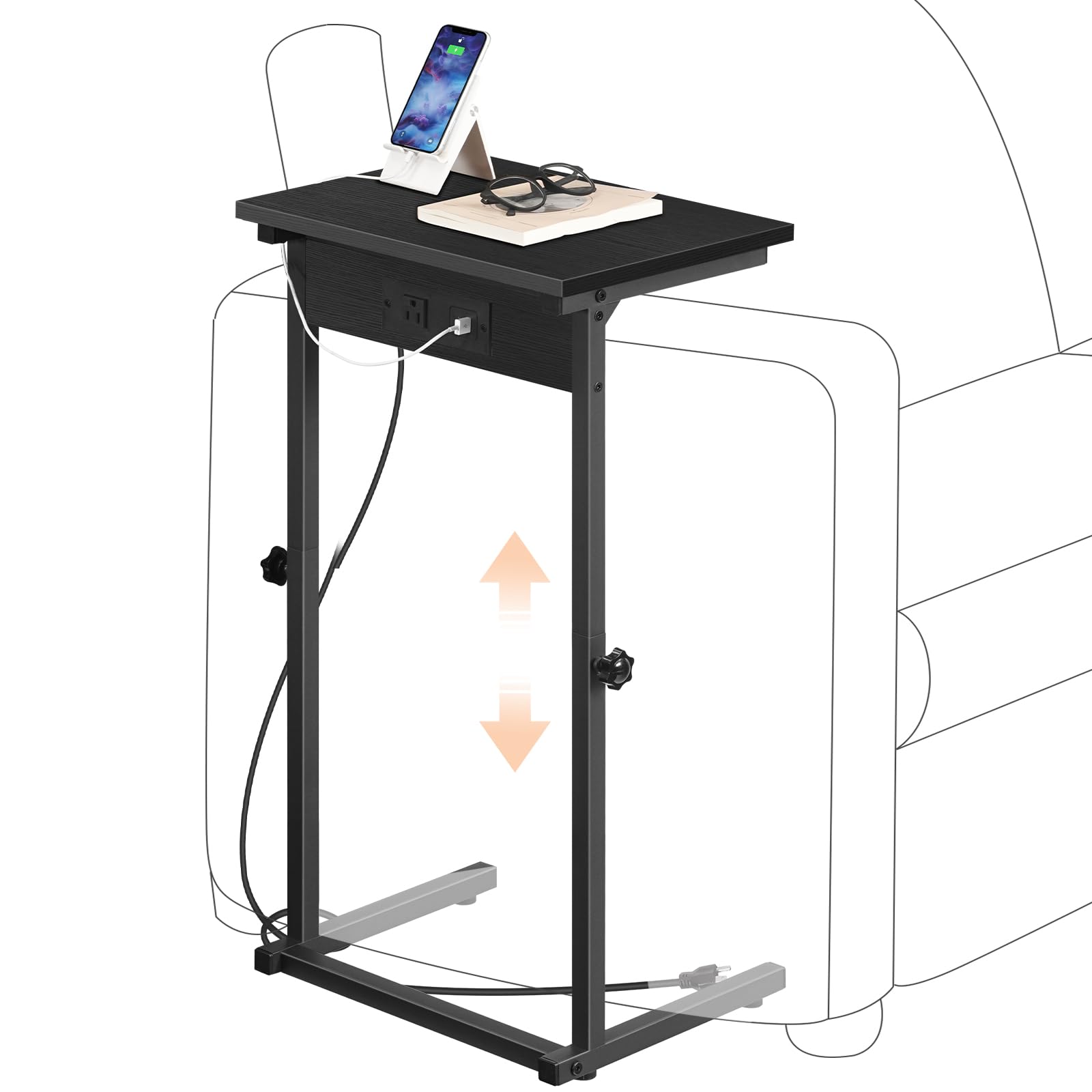

Operating Instructions
Height Adjustment
The HOOBRO C-Shaped End Table features an adjustable height mechanism, allowing it to adapt to various scenarios such as fitting over a sofa arm, under a couch, or beside a bed.
- Unlock Adjustment: Locate the adjustment knobs on the side of the table's vertical support. Loosen these knobs by turning them counter-clockwise.
- Adjust Height: Carefully slide the tabletop section up or down to your desired height. The table can be adjusted between 17.7 inches (45.5 cm) and 30 inches (76 cm).
- Lock Adjustment: Once the desired height is reached, tighten the adjustment knobs by turning them clockwise until secure. Ensure both knobs are equally tightened to maintain stability.


Charging Station Usage
The integrated charging station provides convenient power access for your electronic devices.
- Connect to Power: Plug the 59-inch power cord from the charging station into a standard wall outlet.
- Charge Devices:
- Use the 1 AC outlet (120V/12A) for larger electronics or adapters.
- Use the 1 USB port (5V/2A) for standard USB charging cables.
- Use the 1 Type-C port (5V/2A) for devices compatible with USB-C charging.
- Safety Note: Ensure devices are compatible with the charging station's output specifications. Do not overload the outlets. The charging station is designed for indoor use only.

Maintenance
To maintain the appearance and longevity of your HOOBRO C-Shaped End Table, follow these simple care instructions:
- Cleaning: Wipe the table surfaces with a dry cloth. Avoid using harsh chemicals or abrasive cleaners, which can damage the finish.
- Spills: Immediately wipe up any spills to prevent staining, especially on the engineered wood tabletop.
- Stability Check: Periodically check all screws and connections to ensure they remain tight. Retighten if necessary to maintain stability.
- Adjustable Feet: Ensure the adjustable feet are properly set to prevent wobbling and protect your floor from scratches.

Troubleshooting
If you encounter any issues with your HOOBRO C-Shaped End Table, please refer to the following common solutions:
- Table is Wobbly:
- Check that all assembly screws are securely tightened.
- Adjust the leveling feet at the bottom of the legs to compensate for uneven floors.
- Charging Station Not Working:
- Ensure the power cord is fully plugged into a functional wall outlet.
- Verify that the device you are trying to charge is properly connected to the charging port.
- Check if the wall outlet itself is working by plugging in another appliance.
- Avoid overloading the charging station with too many high-power devices.
- Difficulty Adjusting Height:
- Ensure the adjustment knobs are sufficiently loosened before attempting to change the height.
- Do not force the adjustment mechanism. If it feels stuck, check for any obstructions.
Specifications
| Brand | HOOBRO |
| Model Number | BB71USF01 |
| Product Dimensions (D x W x H) | 38.1 x 27.9 x 76.2 Centimeters (15"L x 11"W x 30"H max) |
| Adjustable Height Range | 17.7 - 30 inches (45.5 - 76 cm) |
| Maximum Weight Recommendation | 13.61 kg (30 lbs) |
| Frame Material | Metal |
| Top Material Type | Engineered Wood (Particleboard) |
| Color | Black |
| Charging Station | 1 AC Outlet (120V/12A), 1 USB Port (5V/2A), 1 Type-C Port (5V/2A) |
| Power Cord Length | 59 inches (150 cm) |
| Assembly Required | Yes (Includes all assembly tools) |
| Recommended Uses | Sofa Side Table, Sofa Arm Table, Under Couch Table, TV Tray Table |
Warranty and Support
For warranty information or technical support, please refer to the contact details provided with your purchase documentation or visit the official HOOBRO website. Please have your model number (BB71USF01) ready when contacting support.