
Introduction
This manual provides detailed instructions for the assembly, operation, and maintenance of your HOOBRO C-Shaped End Table with Charging Station. Please read all instructions carefully before assembly and use to ensure safe and proper functionality.
Safety Information
- Keep all small parts and packaging materials away from children and pets to prevent choking hazards.
- Ensure all screws and fasteners are securely tightened before use. Periodically check and re-tighten as necessary.
- Do not overload the table. The maximum weight recommendation is 30 pounds (13.6 kg).
- Place the table on a flat, stable surface to prevent tipping.
- Do not expose the charging station to moisture or liquids. Use indoors only.
- If any parts are missing or damaged, do not proceed with assembly. Contact customer support for assistance.
Package Contents
Verify that all components are present before beginning assembly. If any items are missing, please contact HOOBRO customer service.
- 1 x Side Table (Tabletop, Frame Components)
- 1 x Accessory Kit (Screws, Allen Key, Adjustable Feet)
- 1 x Assembly Guide
- 1 x Charging Station (pre-installed in tabletop)
Assembly Instructions
Assembly typically requires one person and an Allen Key (included). Follow the numbered steps in the provided assembly guide for best results.
- Unpack Components: Carefully remove all parts from the packaging. Lay them out on a clean, soft surface to prevent scratches. Identify each part using the labels and the assembly guide.
- Attach Frame to Tabletop: Secure the metal frame components to the underside of the tabletop using the designated screws. Ensure the triangular metal supports are correctly positioned to enhance stability.
- Assemble Base: Connect the base frame components. Ensure all connections are firm.
- Attach Adjustable Feet: Screw the four adjustable feet into the bottom of the table's base. These feet help maintain balance on uneven floors and prevent scratches.
- Final Tightening: Once all parts are assembled, gently tighten all screws to ensure the table is stable and secure. Do not overtighten.

Image: Close-up view of the triangular metal support, highlighting its role in enhancing table stability.

Image: Detail of the adjustable feet at the table's base, designed to stabilize on uneven surfaces and protect floors.
Operating Instructions
Adjusting Height
The HOOBRO C-Shaped End Table features an adjustable height mechanism, allowing it to adapt to various furniture heights from 17.7 inches (45.5 cm) to 30 inches (76 cm).
- Locate the adjustment knobs on the side of the table's vertical support.
- Loosen the knobs by turning them counter-clockwise.
- Carefully slide the tabletop up or down to your desired height.
- Once the desired height is reached, tighten the knobs by turning them clockwise until secure. Ensure both knobs are equally tightened for stability.

Image: The C-shaped end table demonstrating its adjustable height feature, adapting to different sofa heights.
Using the Charging Station
The integrated charging station provides convenient power access for your electronic devices.
- Plug the table's 59-inch (150 cm) power cord into a standard wall outlet.
- The charging station includes:
- 1 x AC Outlet (120V/12A)
- 1 x USB Port (5V/2A)
- 1 x Type-C Port (5V/2A)
- Connect your devices to the appropriate port for charging.
- Ensure devices are compatible with the provided voltage and amperage.
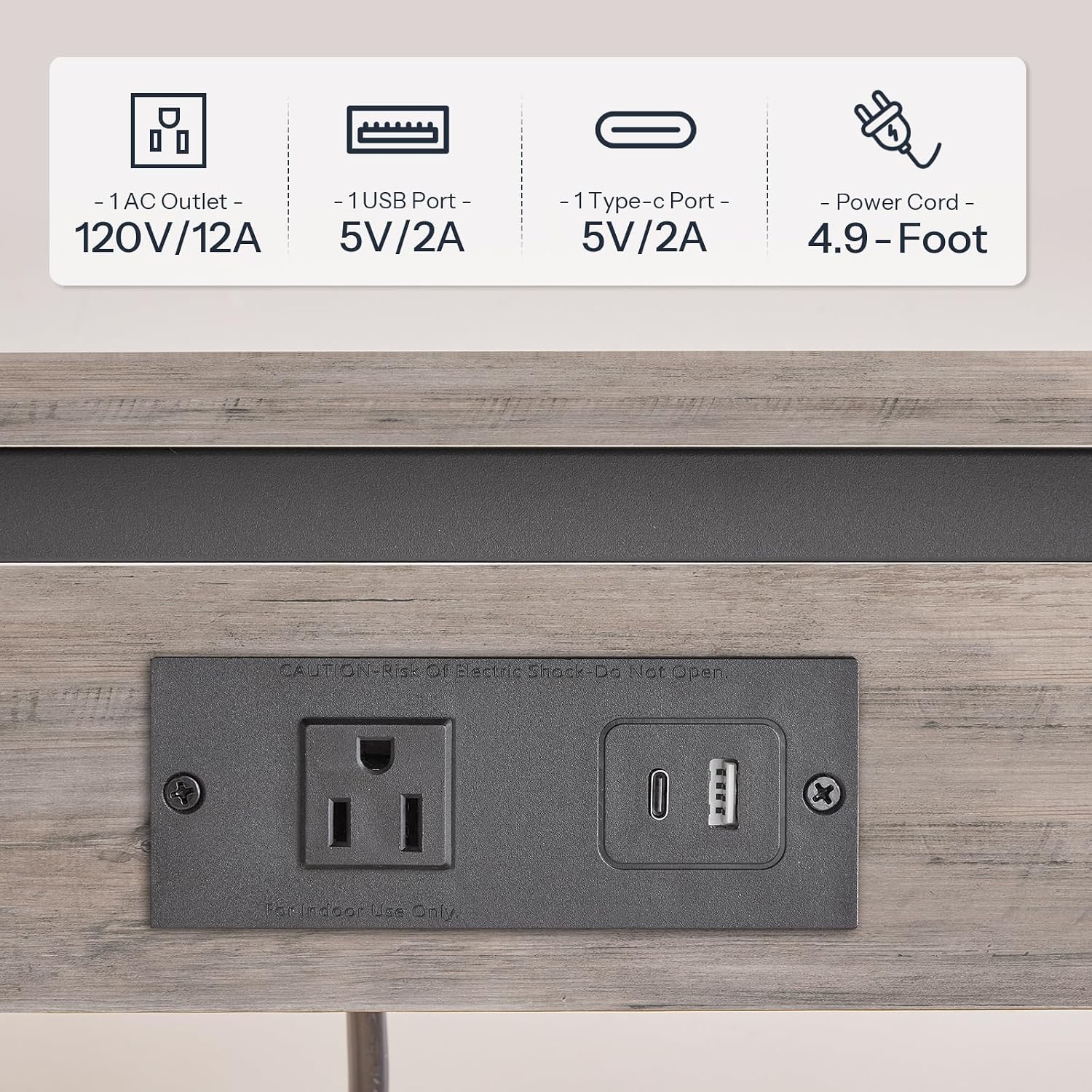
Image: Detailed view of the charging station, showing the AC outlet, USB port, and Type-C port.
Maintenance and Care
- Cleaning: Wipe the table surfaces with a dry, soft cloth. Avoid abrasive cleaners or harsh chemicals that may damage the finish.
- Spills: Immediately wipe up any spills to prevent staining or damage to the particleboard.
- Electrical Components: Keep the charging station dry. Do not attempt to clean the electrical ports with liquids.
- Stability Check: Periodically check all screws and connections to ensure they remain tight. Re-tighten if necessary.
Troubleshooting
- Issue: Table feels unstable or wobbly.
- Solution: Ensure all assembly screws are fully tightened. Adjust the four leveling feet at the base of the table to compensate for uneven floor surfaces.
- Issue: Charging station is not working.
- Solution: Verify that the power cord is securely plugged into a functional wall outlet. Check if the wall outlet itself is receiving power. Ensure devices are properly connected to the charging ports.
- Issue: Difficulty adjusting table height.
- Solution: Loosen the adjustment knobs completely before attempting to slide the tabletop. Ensure no obstructions are preventing movement. If the mechanism is stiff, apply gentle, even pressure.
Specifications
| Feature | Detail |
|---|---|
| Model Number | BG71USF01 |
| Product Dimensions (D x W x H) | 15" x 11" x 17.7"-30" (Adjustable) |
| Materials | Engineered Wood (Particleboard), Metal |
| Maximum Weight Recommendation | 30 lbs (13.6 kg) |
| AC Outlet | 120V/12A |
| USB Port | 5V/2A |
| Type-C Port | 5V/2A |
| Power Cord Length | 59 inches (150 cm) |
| Assembly Required | Yes |
| Tools Included | Allen Key |

Image: Overview of the HOOBRO C-shaped end table, illustrating its dimensions and 30lb weight capacity.
Warranty and Support
For warranty information, missing parts, or any other inquiries, please contact HOOBRO customer service through the retailer where the product was purchased or visit the official HOOBRO website for support contact details.