
1. Product Overview
The DOOMAY Digital Alarm Clock Model 6221 is designed for bedside use, featuring a clear VA LCD display. It includes dual alarm settings, a 9-minute snooze function, and a weekend mode. The clock displays time, date, day of the week, and indoor temperature. It offers adjustable brightness, multiple alarm sounds, and volume levels. Power options include a Type-C adapter and battery backup.

Image: Front view of the DOOMAY Digital Alarm Clock Model 6221, displaying time, date, and temperature.
2. Package Contents
- DOOMAY Digital Alarm Clock Model 6221
- Type-C USB Cable
- Power Adapter (Wall Plug)
- 2 x AAA Batteries (for backup)
- User Manual (this document)
3. Setup
3.1 Powering the Clock
The clock can be powered via the included Type-C adapter for continuous operation or by batteries for backup during power outages. For optimal performance and continuous display, it is recommended to keep the clock plugged in.
- Primary Power (Adapter): Connect the Type-C USB cable to the clock's DC 5V port and the other end to the power adapter. Plug the adapter into a wall outlet.
- Battery Backup: Open the battery compartment on the back of the clock. Insert 2 AAA batteries (included), ensuring correct polarity. These batteries will preserve your settings during power interruptions and allow the alarm to function, but the display will not be continuously lit when running on battery power alone.

Image: Illustration showing the clock powered by a wall adapter for continuous use and the battery compartment for backup power.
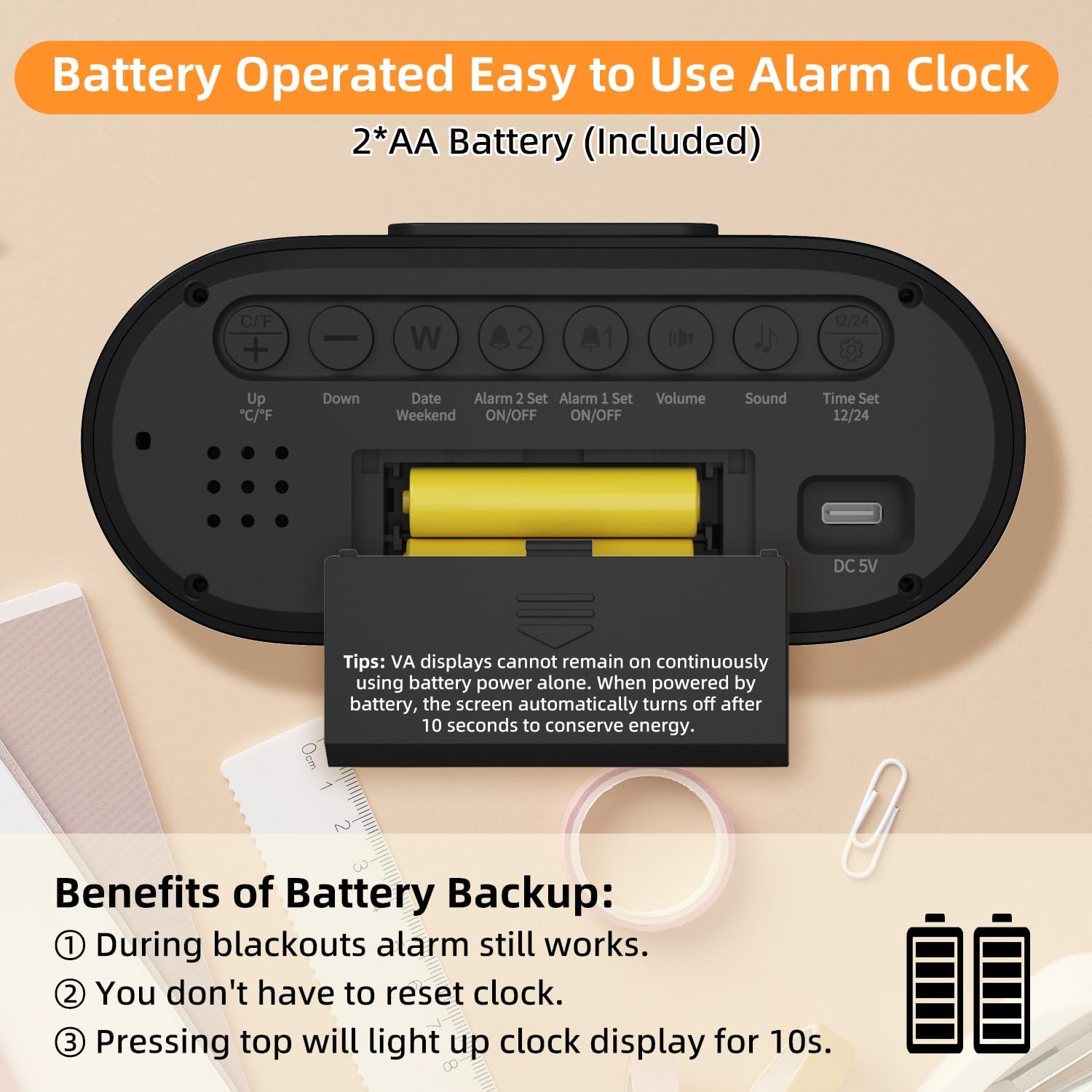
Image: Rear view of the alarm clock, highlighting the battery compartment and labeled control buttons for setup.
4. Operating Instructions
4.1 Time and Date Setting
To set the current time and date:
- Press the "Time Set 12/24" button on the back of the clock to enter time setting mode.
- Use the "Up °C/°F" and "Down" buttons to adjust the hour.
- Press "Time Set 12/24" again to move to minute adjustment, then use "Up" and "Down" buttons.
- Continue pressing "Time Set 12/24" to cycle through year, month, and day settings, adjusting each with the "Up" and "Down" buttons.
- Press "Time Set 12/24" one last time to exit setting mode.
- To switch between 12-hour and 24-hour format, press the "Time Set 12/24" button outside of setting mode.

Image: The clock display showing both 12-hour (AM/PM) and 24-hour time formats.
4.2 Alarm Setting
The clock features two independent alarms (Alarm 1 and Alarm 2).
- Setting an Alarm:
- Press the "Alarm 1 Set ON/OFF" or "Alarm 2 Set ON/OFF" button to select the alarm you wish to set. The alarm icon will flash.
- Use the "Up °C/°F" and "Down" buttons to adjust the hour.
- Press the respective alarm set button again to move to minute adjustment, then use "Up" and "Down" buttons.
- Press the alarm set button one last time to confirm and exit setting mode.
- Activating/Deactivating Alarms: Press the "Alarm 1 Set ON/OFF" or "Alarm 2 Set ON/OFF" button briefly outside of setting mode to toggle the alarm on or off. An alarm icon will appear on the display when active.
- Weekend Mode: Press the "Date Weekend" button to activate or deactivate weekend mode. When active, alarms will only sound from Monday to Friday.
- Snooze Function: When an alarm sounds, press the large "SNOOZE/LIGHT" button on top of the clock to activate a 9-minute snooze. The alarm will sound again after 9 minutes.
- Stopping an Alarm: To stop an alarm completely, press any button on the back of the clock. If no button is pressed, the alarm will sound for 2 minutes, snooze for 9 minutes, and repeat this cycle 3 times before turning off automatically.

Image: The clock displaying two separate alarm times, indicating its dual alarm capability.

Image: A hand pressing the top snooze button on the clock, illustrating the 9-minute snooze feature.

Image: The clock display indicating "WEEKEND" mode is active, meaning alarms are suspended for the weekend.
4.3 Display Settings
Adjust the display to your preference:
- Brightness Adjustment: When the clock is plugged in, press the large "SNOOZE/LIGHT" button on top to cycle through 4 brightness levels (Off, Dim, Medium, Bright). The display will remain continuously lit at the selected brightness. When operating on battery power, pressing this button will illuminate the display for 10 seconds.
- Temperature Unit: Press the "Up °C/°F" button on the back to switch the temperature display between Celsius (°C) and Fahrenheit (°F).

Image: Four panels illustrating the different brightness levels (Off, Dim, Medium, Bright) of the clock display when plugged in.

Image: The clock display showing temperature in both Celsius and Fahrenheit, with an icon indicating the switch function.
4.4 Sound Settings
Customize your alarm experience:
- Volume Adjustment: Press the "Volume" button on the back to cycle through 3 alarm volume levels (Low: 65dB, Medium: 75dB, High: 85dB).
- Ringtone Selection: Press the "Sound" button on the back to choose from 4 available alarm sounds (standard beeps and 3 music ringtones).

Image: The clock display alongside graphics illustrating three volume levels and four distinct alarm sound options.
5. Maintenance
- Cleaning: Wipe the clock with a soft, dry cloth. Do not use abrasive cleaners or solvents.
- Battery Replacement: Replace AAA batteries when the low battery indicator appears on the display or if the clock fails to maintain settings during a power outage.
- Storage: If storing the clock for an extended period, remove the batteries to prevent leakage.
6. Troubleshooting
| Problem | Possible Cause | Solution |
|---|---|---|
| Display is blank or intermittent. | Not plugged in, power outage, low batteries. | Ensure Type-C adapter is securely plugged in. Check power outlet. Replace AAA batteries. Note: Display is not continuously lit on battery power alone. |
| Alarm does not sound. | Alarm not activated, volume too low, weekend mode active. | Verify alarm icon is displayed. Adjust alarm volume. Deactivate weekend mode if necessary. |
| Time/Date is incorrect. | Incorrectly set, battery backup failed. | Follow instructions in Section 4.1 to reset time and date. Ensure backup batteries are fresh. |
| Display is too bright/dim. | Brightness level needs adjustment. | Press the "SNOOZE/LIGHT" button to cycle through brightness levels (when plugged in). |
7. Specifications
- Model: 6221
- Display Type: VA LCD Digital
- Screen Size: 4.55 Inches
- Dimensions: 5.58"W x 2.56"H
- Power Source: Type-C USB (DC 5V) / 2 x AAA Batteries (backup)
- Alarm Features: Dual Alarms, 9-Minute Snooze, Weekend Mode
- Volume Levels: 3 (65dB, 75dB, 85dB)
- Ringtones: 4 types
- Brightness Levels: 4 (Off, Dim, Medium, Bright - when plugged in)
- Additional Features: Time (12H/24H), Date, Day of Week, Indoor Temperature (°C/°F)
- Material: Plastic
8. Warranty and Support
For warranty information or technical support, please refer to the contact details provided on the product packaging or visit the official DOOMAY website. Keep your purchase receipt for warranty claims.