
Introduction
The Aovemt M01 Pro AI Smart Glasses are designed to integrate advanced artificial intelligence with the functionality of eyewear. This device offers hands-free capabilities including high-definition video recording, real-time language translation, and immersive audio. Crafted from durable, lightweight TR90 material, the M01 Pro is compatible with prescription lenses and includes an extra tinted sunglasses lens for versatile use. This manual provides instructions for setup, operation, and maintenance to ensure optimal performance of your smart glasses.
Package Contents
Verify that all items listed below are present in your package.
- Aovemt M01 Pro Smart Glasses
- Magnetic Charging Cable
- Extra Lens (Tinted Sunglasses Lens)
- User Manual
- Cleaning Cloth
- Product Packaging Box
- Glasses Pouch

Image: Contents of the Aovemt M01 Pro Smart Glasses package.
Product Features
- 1080P HD Camera: Capture hands-free 1080P HD video and 8MP photos. Features Electronic Image Stabilization (EIS) and an adaptive low-light sensor for clear footage in various conditions.
- AI Real-Time Translation: Supports two-way translation for over 27 major languages, including English, Spanish, Japanese, French, and Mandarin.
- ChatGPT Voice Assistant: Integrated voice assistant for hands-free queries, object identification, and information retrieval.
- Open-Ear Bluetooth Audio: Directional speakers deliver sound while maintaining environmental awareness. Dual microphones with Environmental Noise Cancellation (ENC) ensure clear call quality.
- Long Battery Life & Fast Charging: Up to 8 hours of music playback or 90 minutes of continuous recording. Recharges in approximately 1 hour via magnetic cable.
- 32GB Built-in Storage: Provides ample space for photos and videos without requiring an external SD card.
- Lightweight & Prescription-Ready Design: Constructed from ultra-lightweight TR90 material (38g). Compatible with prescription lenses and includes an extra tinted lens.

Image: Key features of the Aovemt M01 Pro Smart Glasses.

Image: Everyday applications of the Aovemt M01 Pro Smart Glasses.
Setup
1. Charging the Glasses
Before first use, fully charge your Aovemt M01 Pro Smart Glasses.
- Connect the magnetic charging cable to the charging port on the glasses.
- Connect the other end of the cable to a USB power adapter (not included) or a computer's USB port.
- The charging indicator light will illuminate.
- A full charge takes approximately 1 hour. The indicator light will change or turn off once charging is complete.
2. Powering On/Off
- Power On: Long press the power button (refer to controls diagram) for 2 seconds.
- Shut Down: Long press the power button for 5 seconds.
3. Bluetooth Pairing
To connect your smart glasses to your smartphone or other Bluetooth-enabled device:
- Ensure the glasses are powered on.
- Enable Bluetooth on your smartphone.
- Search for available devices and select "Aovemt M01 Pro" (or similar name) from the list.
- Confirm pairing if prompted. A voice prompt or indicator light will confirm successful connection.
4. App Installation
For full functionality, including AI features and advanced settings, download the dedicated Aovemt app from your smartphone's app store (iOS App Store or Google Play Store). Follow the in-app instructions for setup and customization.
Operating Instructions
The Aovemt M01 Pro Smart Glasses feature both smart touch controls and physical buttons for various functions. Refer to the diagram below for button locations and functions.

Image: Control layout and functions of the Aovemt M01 Pro Smart Glasses.
Music Playback
- Play/Pause: Single tap (touch control).
- Previous Track: Triple-click (touch control).
- Next Track: Long press (touch control).
- Increase Volume: Swipe forward (touch control).
- Decrease Volume: Swipe backward (touch control).
Camera Functions (Photo/Video)
- Take Photo: Single tap (physical button).
- Start Video Recording: Double tap (physical button).
- Save/Pause Video Recording: Single tap during recording (physical button).
Call Management
- Answer/End Call: Single tap (physical button).
- Reject Call: Double tap (physical button).
AI Features
- AI Image Recognition: Double tap (physical button) to activate.
- AI Chat (ChatGPT Assistant): Single tap (physical button) to activate.
- Real-Time Translation: This feature is typically managed via the companion app after activation through the glasses' AI functions. Consult the app for specific language settings and usage.
Maintenance
- Cleaning: Use the provided cleaning cloth to gently wipe the lenses and frame. Avoid abrasive materials or harsh chemicals.
- Storage: When not in use, store the glasses in the provided pouch or case to protect them from scratches and dust.
- Water Resistance: The glasses have an IPX2 waterproof rating, meaning they are protected from dripping water when tilted up to 15 degrees. They are not designed for submersion or heavy water exposure. Avoid wearing them during swimming, showering, or in heavy rain.
- Temperature: Avoid exposing the glasses to extreme temperatures, direct sunlight for prolonged periods, or high humidity.
Troubleshooting
- Glasses not powering on: Ensure the battery is charged. Connect to the magnetic charging cable and allow it to charge for at least 15 minutes before attempting to power on again.
- Bluetooth connectivity issues:
- Ensure Bluetooth is enabled on your smartphone and the glasses are in pairing mode.
- Move the glasses closer to your smartphone.
- Try unpairing and re-pairing the device from your smartphone's Bluetooth settings.
- Restart both the glasses and your smartphone.
- No audio or poor audio quality:
- Check the volume level on both the glasses and your connected device.
- Ensure the glasses are properly connected via Bluetooth.
- Clean the speaker areas gently with a soft, dry cloth.
- Camera not recording:
- Check if there is sufficient storage space (32GB internal).
- Ensure the battery has enough charge.
- Verify correct button presses for photo/video capture as per operating instructions.
- AI features not responding:
- Ensure the glasses are connected to the companion app and have an active internet connection (for translation and ChatGPT).
- Check app settings for AI feature activation.
- Ensure the microphone is not obstructed.
Specifications
| Model Name | Aovemt M01 Pro AI Smart Glasses |
| Model Number | A-M01 Pro |
| Brand | Aovemt |
| Operating System | Proprietary OS (Compatible with iOS/Android via Bluetooth) |
| Memory Storage Capacity | 32 GB |
| Battery Capacity | 220 Milliamp Hours |
| Battery Average Life | 8 Hours (Music Playback) |
| Battery Charge Time | 1 Hour |
| Connectivity Technology | Bluetooth (BT5.4) |
| Camera Resolution | 8MP (Photos), 1080P HD (Video) |
| Material | TR90 Plastic |
| Weight | 45 Grams |
| Waterproof Rating | IPX2 (Protected from dripping water) |
| Human Interface Input | Microphone, Touch Control, Physical Buttons |
| Supported Applications | ChatGPT, DeepSeek AI, Translation, Music, Camera |
| Compatible Devices | Smartphones, Tablets (iOS and Android) |
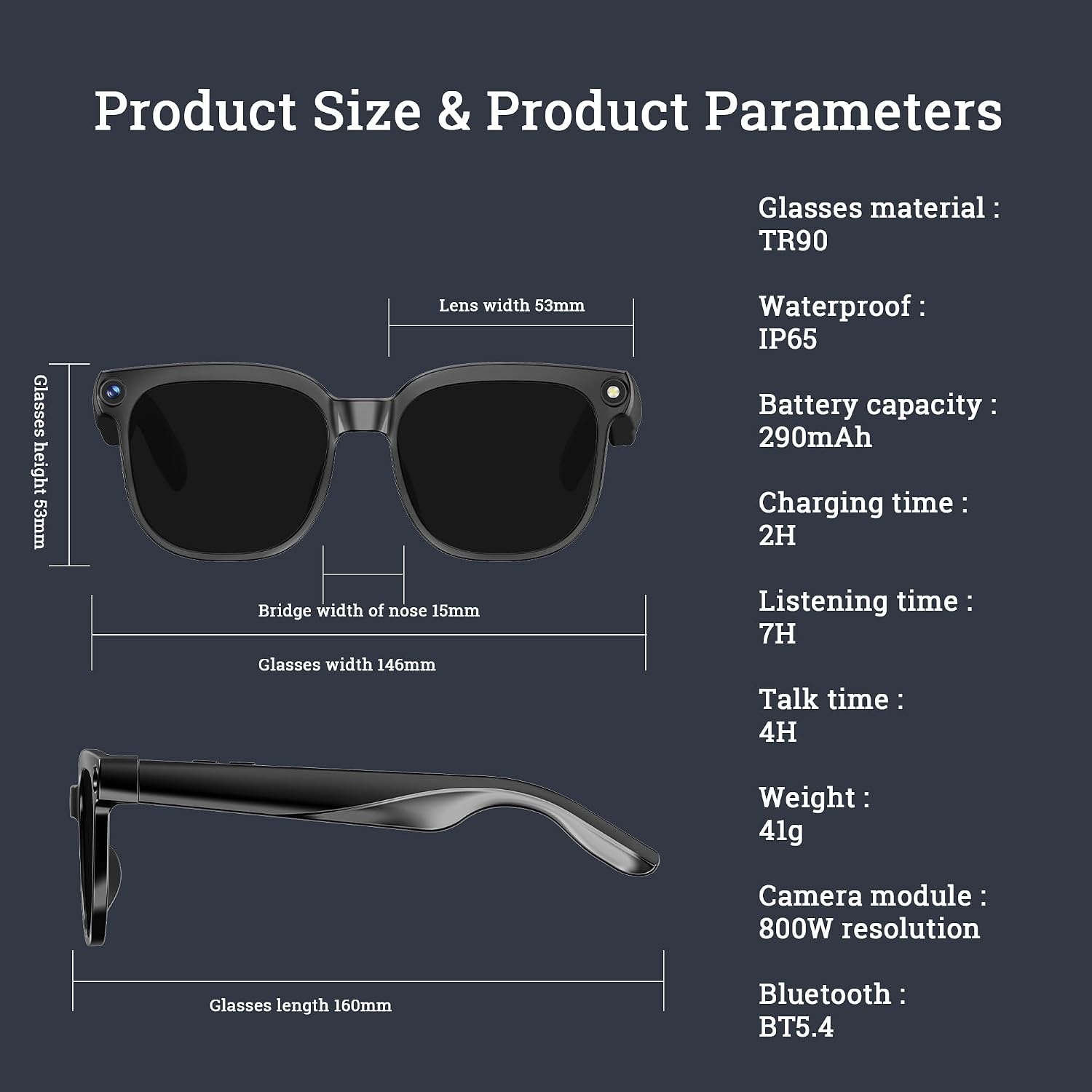
Image: Product dimensions and technical parameters.
Warranty and Support
For detailed warranty information, please refer to the warranty card included in your product packaging or visit the official Aovemt website. If you encounter any issues not covered in this manual, please contact Aovemt customer support for assistance.