
FiveWillowise DA0498BR01A
FiveWillowise DA0498BR01A 58.3" Walnut Buffet Cabinet User Manual
Model: DA0498BR01A | Brand: FiveWillowise
1. Important Safety Information
Please read and understand all safety instructions before assembly, installation, or use of this product. Failure to follow these instructions may result in injury or product damage.
- Always unplug the cabinet before assembly or disassembly.
- Be cautious when handling glass doors to avoid injury.
- Ensure the cabinet is stable and level before use.
- Do not overload the cabinet, as it may tip over.
- Keep the cabinet away from heat sources and moisture to prevent warping or damage.
- Always use appropriate safety gear when assembling the cabinet.
- Consider anchoring the cabinet to a wall, especially if children or pets are present, to prevent tipping.
2. Product Overview
The FiveWillowise DA0498BR01A Buffet Cabinet is a versatile storage unit designed with a mid-century modern aesthetic. It features grille-striped doors, tempered glass doors, and integrated LED lighting. This cabinet is suitable for various rooms including the living room, kitchen, dining room, and entryway.
Key Features:
- Design: Mid-century modern style with distinctive grille-striped panels and tempered glass doors.
- Storage: Spacious interior with adjustable shelves to accommodate items of various heights.
- Durability: Constructed from high-quality MDF material, offering scratch and wear resistance. Features U-shaped legs for stability.
- LED Lighting: Integrated LED light with multiple color temperature options.
- Versatility: Suitable for use as a kitchen buffet, coffee bar storage, or living room display piece.
Product Dimensions:

Image: Detailed diagram illustrating the overall dimensions of the buffet cabinet, including width (58.3"), depth (14.2"), and height (30.3"). Internal shelf dimensions are also shown.
- Overall Dimensions: 58.3" W x 14.2" D x 30.3" H
- Item Weight: 60 Pounds
- Maximum Weight Capacity: 100 Pounds (Countertop: 80 lbs, Storage Shelf: 30 lbs)
3. Setup and Assembly
This cabinet is designed for home assembly. All necessary parts and clear, step-by-step instructions are included to facilitate the process.
- Unpack Components: Carefully unpack all parts and hardware. Verify that all components listed in the instruction manual are present.
- Prepare Workspace: Assemble the cabinet on a clean, flat, and soft surface to prevent scratches.
- Follow Instructions: Adhere strictly to the provided step-by-step manual for assembly. Ensure all connections are secure.
- Door Installation: The doors are designed for easy connection. Ensure they are properly aligned and secured.
- Shelf Adjustment: Install adjustable shelves as needed for your storage requirements.
- LED Light Installation: Connect the LED light strip. Note that the cord has a USB end and may require a power adapter (not included).
- Stability Check: Once assembled, ensure the cabinet is stable and level.
- Wall Anchoring (Recommended): For enhanced safety, especially in households with children or pets, anchor the cabinet to a wall using the provided hardware.
If you encounter any problems during assembly, refer to the troubleshooting section or contact customer support.
4. Operating Instructions
4.1 Adjustable Shelves

Image: Close-up view of the cabinet's interior, highlighting the adjustable shelves and the mechanism for changing their height to accommodate various items.
The cabinet features adjustable shelves within its compartments. To adjust a shelf:
- Empty the shelf of all items.
- Carefully lift the shelf and remove it from its current position.
- Relocate the shelf to the desired height by aligning it with the pre-drilled holes.
- Ensure the shelf is securely seated before placing items on it.
4.2 LED Lighting System
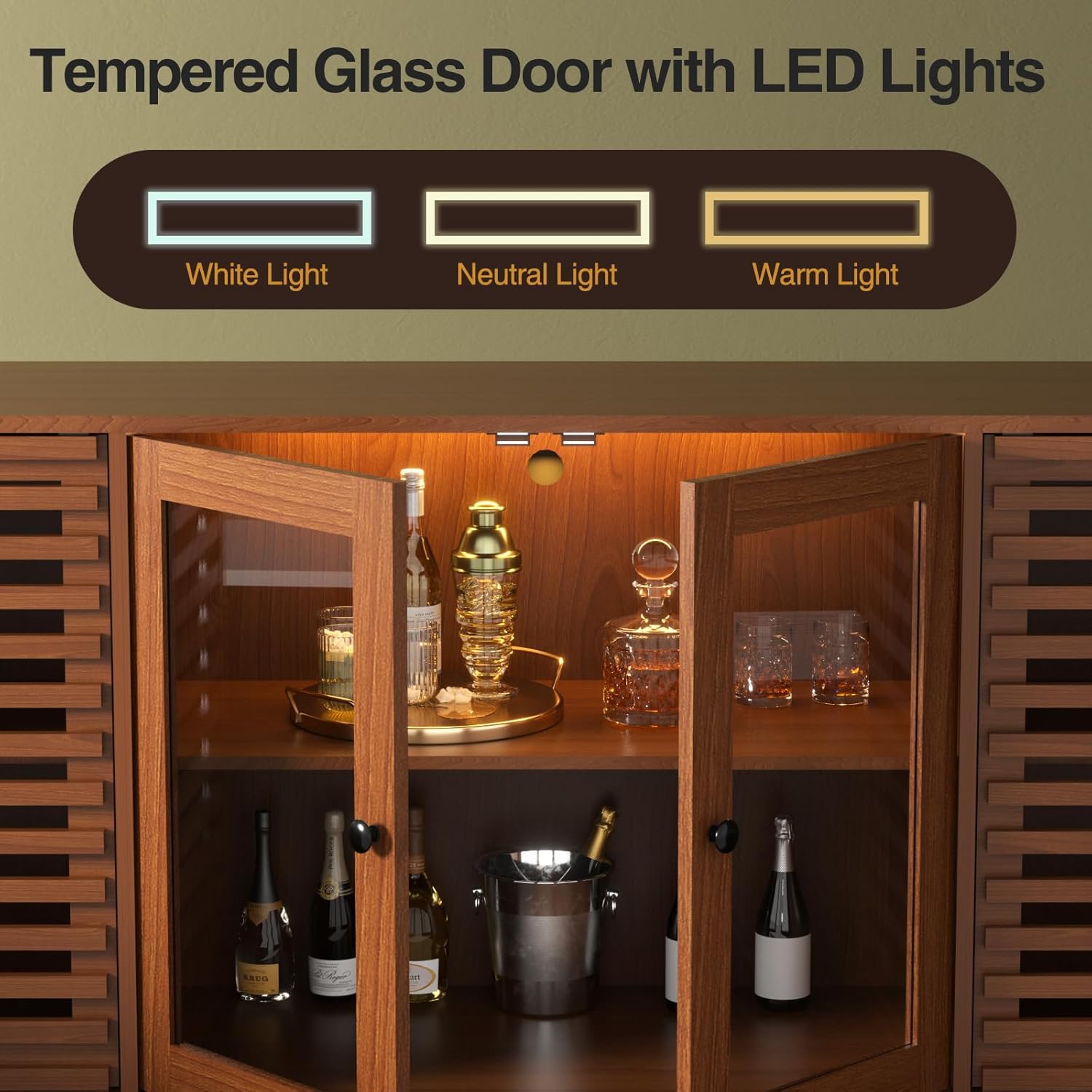
Image: The tempered glass doors of the cabinet are open, revealing the interior with an LED light strip. The image illustrates the three available light color temperatures: white, neutral, and warm.
The cabinet includes an integrated LED lighting system to illuminate the interior. The LED light offers three color temperatures: White Light, Neutral Light, and Warm Light.
- Power On/Off: The LED light is activated via an in-line tap switch. Tap the switch to turn the light on or off.
- Change Color Temperature: Continue tapping the switch to cycle through the three available color temperatures.
- Power Source: The LED light cord has a USB end. Connect it to a suitable USB power adapter (not included) or a USB port.
Note: Some users may find the blue LED indicator light on the tap area to be constantly on. If this is undesirable, the LED light can be unplugged.
4.3 Grille-Striped Doors

Image: A detailed view of the cabinet's grille-striped door, emphasizing its design that promotes air circulation and helps prevent dampness inside the compartments.
The lower compartments feature grille-striped doors. This design promotes air circulation within the cabinet, which can help prevent dampness and maintain the condition of stored items.
5. Maintenance
- Cleaning: The cabinet's surface is scratch and wear-resistant and is easy to clean. Use a soft, damp cloth to wipe down surfaces. Avoid harsh chemicals or abrasive cleaners.
- Dusting: Regularly dust the cabinet to prevent buildup.
- Legs: The U-shaped legs are raised off the ground, allowing for easy navigation and cleaning by robot vacuums.
- Avoid Moisture: Keep the cabinet away from excessive moisture to prevent damage to the engineered wood material.
6. Troubleshooting
| Problem | Possible Cause | Solution |
|---|---|---|
| Cabinet wobbles or is unstable. | Uneven floor; loose connections; cabinet not anchored. | Ensure the cabinet is on a level surface. Tighten all assembly screws. Use the provided wall anchoring hardware. |
| Doors do not close properly or are misaligned. | Incorrect door installation; loose hinges. | Re-check door installation steps in the manual. Ensure hinges are securely fastened and adjusted correctly. |
| LED light not working. | USB power not connected; faulty connection; tap switch issue. | Ensure the USB cable is securely connected to a working power source. Check the tap switch for responsiveness. |
| Missing parts during assembly. | Packaging error. | Contact FiveWillowise customer support immediately with your product model and a list of missing parts. |
7. Specifications
| Feature | Detail |
|---|---|
| Brand | FiveWillowise |
| Model Number | DA0498BR01A |
| Color | Walnut |
| Material | Engineered Wood |
| Product Dimensions (D x W x H) | 14.2" x 58.3" x 30.3" |
| Item Weight | 60 Pounds |
| Weight Capacity (Maximum) | 100 Pounds |
| Recommended Uses | Dining Room, Home Bar, Kitchen, Living Room |
| Additional Features | Adjustable Shelf, LED Light, Tempered Glass Doors |
| Room Type | Dining Room, Entryway, Kitchen, Living Room |
| Included Components | 1 x Instruction Manual, 1 x Mid-century Modern Storage Cabinet |
| Number Of Shelves | 12 (adjustable) |
| Number of Doors | 4 |
| Base Type | Legs (U-shaped metal) |
| Style Name | Mid-Century Modern |
| Door Style | Grille Striped, Tempered Glass |
| Installation Type | Freestanding |
| Required Assembly | Yes |
8. Warranty and Support
FiveWillowise is committed to providing quality products and customer satisfaction.
- Returns: This product is eligible for 30-day easy returns. Please refer to the retailer's return policy for detailed information.
- Customer Support: For any questions, concerns, or issues regarding your FiveWillowise cabinet, our professional service team is available to assist you. We aim to respond to inquiries within 24 hours.
- Contact Information: Please refer to your purchase documentation or the retailer's website for specific contact details for FiveWillowise customer support.
Ask a question about this manual
Ask about setup, troubleshooting, compatibility, parts, safety, or missing instructions. Manuals+ will review the question and use this page’s manual context to help answer it.