
1. Introduction
This manual provides detailed instructions for the setup, operation, and maintenance of your Lefitus Smart Watch IW06. Please read this manual thoroughly before using the device to ensure proper functionality and to maximize your user experience.
2. What's in the Box
Upon opening your Lefitus Smart Watch IW06 package, you should find the following items:
- Watch x 1
- Charging Cable x 1
- User Manual x 1
- Magnetic Steel Strap + White Strap + Pink Strap + Two-Tone Pink-White Strap

Image: Contents of the Lefitus Smart Watch IW06 package, showing the watch, charging cable, user manual, and four different strap options.
3. Setup Guide
3.1. Charging the Device
Before initial use, fully charge your smart watch. Connect the magnetic charging cable to the charging contacts on the back of the watch and plug the USB end into a power adapter (not included) or a computer's USB port. A full charge takes approximately 2.5 hours.
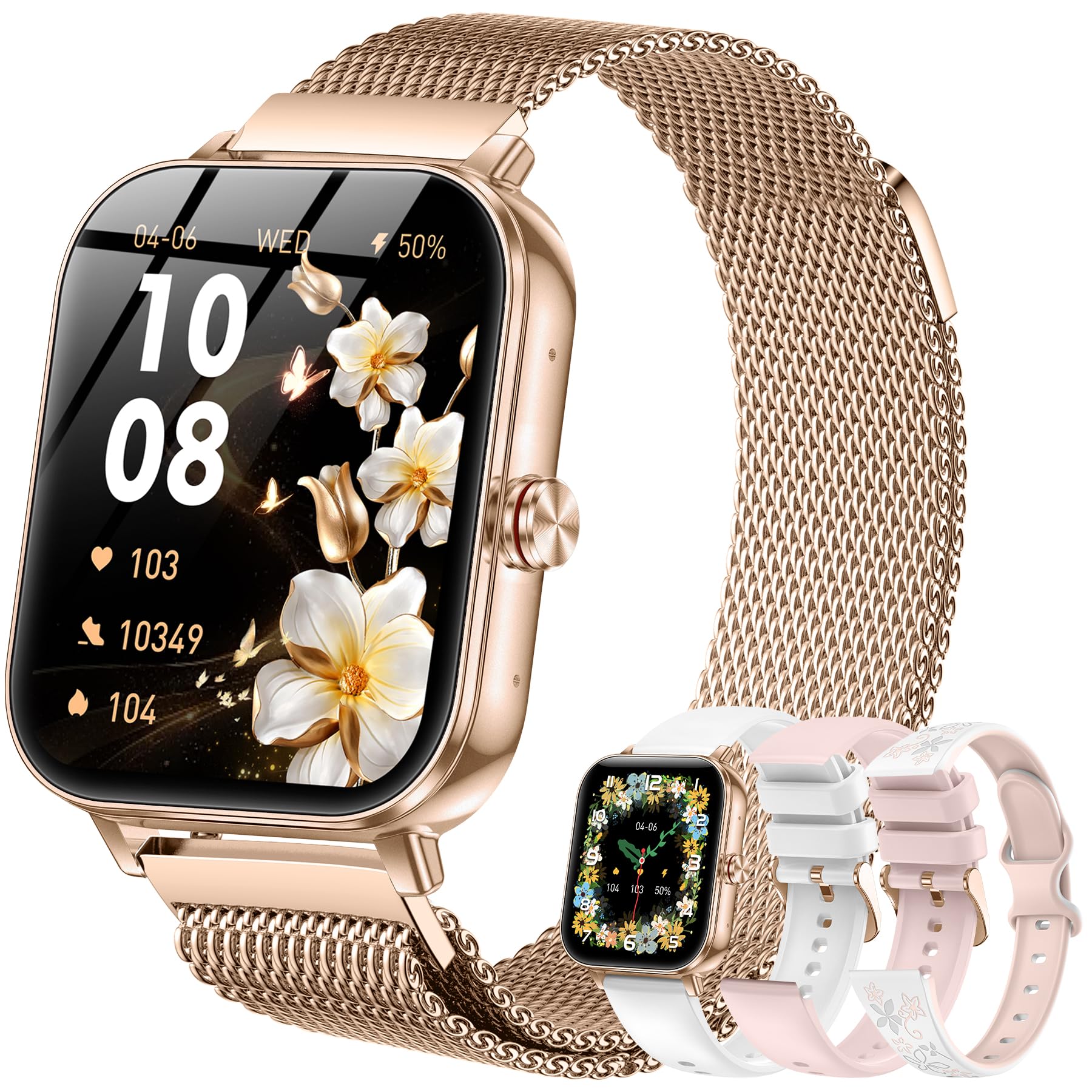
Image: The Lefitus Smart Watch IW06 connected to its magnetic charging cable, displaying a charging indicator on the screen. The image also highlights the 1000mAh battery capacity, 2.5 hours charging time, 20 days normal usage, and 100 days standby time.
The 1000mAh battery provides approximately 20-30 days of continuous operation depending on usage, and up to 100 days of standby time.
3.2. App Installation and Device Pairing
To unlock the full functionality of your smart watch, download and install the "FitCloudPro" app on your smartphone. The app is available on both iOS and Android app stores.
- Download the App: Search for "FitCloudPro" in your phone's app store and install it.
- Enable Bluetooth: Ensure your phone's Bluetooth is turned on.
- Pairing: Open the FitCloudPro app. Navigate to the "Device" section and select "Add Peripheral Now" or "Bind Smartwatch". You can connect in two ways:
- Search for the watch name "IW11" (or similar model identifier) in the app's Bluetooth search results and tap to connect.
- Alternatively, locate the QR code in your watch's settings menu and scan it using the app's QR code scanner.
- Confirm Pairing: Follow the on-screen prompts on both your phone and watch to confirm the pairing request.
Video: A step-by-step guide on how to download the FitCloudPro app, enable Bluetooth, and pair the Lefitus Smart Watch IW06 with your smartphone. It demonstrates searching for the device and confirming the connection.
Once successfully bound, the app will synchronize with your watch, and you can begin configuring its features.
4. Operating Your Smart Watch
4.1. Basic Navigation
- Swipe Up/Down: Access quick settings or notifications.
- Swipe Left/Right: Navigate through widgets like activity data, heart rate, weather, etc.
- Press Side Button: Return to the home screen or access the app menu.
- Tap: Select an item or open an application.
4.2. Bluetooth Calls and Smart Notifications
The Lefitus Smart Watch IW06 allows you to make and answer calls directly from your wrist when connected to your phone via Bluetooth. You will also receive instant alerts for texts, emails, and social media apps.
- Enabling Notifications: In the FitCloudPro app, go to the "Device" section, then "Push Notifications". Toggle on the notifications for calls, SMS, and other desired applications (e.g., WhatsApp, Facebook, Instagram, Twitter).
- Making/Answering Calls: Use the watch's dial pad or access frequent contacts through the app. Incoming calls can be answered or rejected directly from the watch screen.
- Note: Text replies are not supported directly from the watch.

Image: A user wearing the Lefitus Smart Watch IW06, which displays various app notification icons and message previews, illustrating the smart notification feature.
4.3. Health Monitoring
The smart watch continuously tracks various health metrics, providing a comprehensive overview of your well-being. All data is synchronized and displayed within the FitCloudPro app.
- Heart Rate Monitoring: Tracks your heart rate throughout the day.
- Blood Oxygen (SpO2) Monitoring: Measures your blood oxygen levels.
- Blood Pressure Monitoring: Provides blood pressure readings.
- Sleep Tracking: Monitors your sleep stages (deep, light, REM) and awake time.

Image: A person exercising while wearing the Lefitus Smart Watch IW06, with overlaid graphs showing blood oxygen, blood pressure, and heart rate data, indicating 24/7 health tracking.

Image: A person sleeping while wearing the Lefitus Smart Watch IW06, with the watch screen displaying detailed sleep tracking data, including total sleep duration and breakdown of sleep stages.
4.4. Sports Modes and Activity Tracking
The smart watch supports over 130 sports modes to accurately track your workouts. It records steps, distance, and calories burned.
- Activity Tracking: Automatically records daily steps, distance, and calories.
- Sports Modes: Select your activity from the watch's sports menu (e.g., running, swimming, yoga, hiking). GPS tracking is available via your connected smartphone.

Image: A person running outdoors while wearing the Lefitus Smart Watch IW06, with the watch screen showing real-time activity data like calories burned, steps taken, and distance covered. Icons for over 130 sports modes are also displayed.
4.5. Customizing Watch Faces
Personalize your watch with over 200 dynamic watch faces available through the FitCloudPro app. You can also upload your own photos to create custom watch faces.

Image: The Lefitus Smart Watch IW06 showcasing a customizable watch face with a scenic background, alongside a selection of other watch face designs available for personalization.
4.6. Additional Smart Features
- Voice Assistant: Use the integrated voice assistant for hands-free control.
- Music Control: Control music playback on your smartphone.
- Remote Camera: Use your watch as a remote shutter for your phone's camera.
- Weather Forecast: Check current weather conditions and forecasts.
- Menstrual Cycle Tracking: Track and monitor menstrual cycles through the app.
- Sedentary Reminder: Receive gentle reminders to move during long periods of inactivity.
- Drink Water Reminder: Turn on this feature in the app to receive reminders to drink water at set intervals.
5. Maintenance
5.1. Cleaning Your Watch
Regularly clean your watch and strap to prevent skin irritation and maintain device performance. Use a soft, lint-free cloth. If necessary, dampen the cloth with a small amount of water. Avoid harsh chemicals or abrasive materials.
5.2. Water Resistance (IP68)
The Lefitus Smart Watch IW06 features an IP68 waterproof rating, making it suitable for everyday situations such as washing hands, sweating during exercise, and swimming. However, it is not recommended for hot showers, saunas, or diving, as steam and high water pressure can compromise the seal.

Image: A person relaxing in a swimming pool while wearing the Lefitus Smart Watch IW06, demonstrating its IP68 waterproof capability for various daily activities including swimming, rain, and sweat.
5.3. Battery Care
To prolong battery life, avoid extreme temperatures and fully discharging the battery frequently. Charge the device using only the provided charging cable.
6. Troubleshooting
- Watch not turning on: Ensure the watch is fully charged. Connect it to the charger for at least 30 minutes.
- Cannot pair with phone:
- Ensure Bluetooth is enabled on your phone.
- Make sure the watch is within close proximity (0.5 meters) to your phone during pairing.
- Restart both your phone and the watch.
- Check if the FitCloudPro app is updated to the latest version.
- Notifications not appearing:
- Verify that "Push Notifications" are enabled for specific apps in the FitCloudPro app settings.
- Check your phone's notification settings to ensure the FitCloudPro app has permission to send notifications.
- Ensure the watch is connected to your phone via Bluetooth.
- Inaccurate health data:
- Ensure the watch is worn snugly on your wrist, but not too tight.
- Clean the sensor on the back of the watch.
- Avoid excessive movement during measurements.
- Short battery life:
- Reduce screen brightness.
- Limit the number of apps sending frequent notifications.
- Turn off continuous heart rate monitoring if not needed.
- Ensure the watch is not constantly searching for a Bluetooth connection.
7. Specifications
| Feature | Detail |
|---|---|
| Model Number | IW06 |
| Screen Size | 1.85 Inches TFT HD Color Display |
| Battery Capacity | 1000 mAh |
| Battery Type | Lithium Ion |
| Charging Time | Approx. 2.5 hours |
| Normal Usage Battery Life | 20-30 days |
| Standby Time | Up to 100 days |
| Connectivity | Bluetooth |
| Water Resistance | IP68 |
| Operating System | Android Wear 2.9 (compatible with iOS/Android phones) |
| Memory Storage Capacity | 128 GB |
| Health Monitoring | Heart Rate, Blood Oxygen, Blood Pressure, Sleep Tracking, Menstrual Cycle Tracking |
| Sports Modes | 130+ (with GPS via smartphone) |
| Special Features | Activity Tracker, Bluetooth Calls, Smart Notifications, Music Player, Remote Camera, Weather, Voice Control, Customizable Dials, Sedentary Reminder, Drink Water Reminder |
| Item Weight | 8.8 ounces |
| Dimensions (Watch Face) | 44mm (1.72 inch) height, 38mm (1.5 inch) width, 13mm (0.45 inch) thickness |

Image: Detailed product dimensions of the Lefitus Smart Watch IW06, indicating its height, width, and thickness, along with strap length ranges.
8. Warranty and Support
Lefitus provides 24/7 professional technical support to assist you with any questions or issues you may encounter with your Smart Watch IW06.
For additional peace of mind, protection plans are available for purchase:
- 2-Year Protection Plan: $9.99
- 3-Year Protection Plan: $11.99
- Complete Protect: One plan covering all eligible past and future purchases for $16.99/month.
Please refer to the specific terms and conditions of the protection plans for full details.
