
1. Important Safety Information
Please read this manual thoroughly before installation and use. Keep this manual for future reference. If you have any questions, please contact XINLEI customer support.
- Weight Capacity: Do not exceed the maximum weight capacity of 45 kg (99 lbs). Exceeding this limit may result in serious injury or property damage.
- TV Size: This mount is designed for TVs between 26 and 70 inches. Ensure your TV falls within this range.
- VESA Compatibility: Verify your TV's VESA mounting pattern is between 75x75mm and 400x400mm.
- Wall Type: This mount is suitable for installation on wood studs, solid concrete, or brick walls. DO NOT install on drywall alone. Ensure the wall structure can safely support the combined weight of the mount and your TV.
- Professional Installation: If you are unsure about the installation process or the suitability of your wall, seek assistance from a qualified professional.
- Component Check: Before installation, ensure all parts are present and undamaged. Do not use damaged or defective parts.
- Tools: Use appropriate tools for installation.
2. Package Contents
The package includes the XINLEI MAP3L TV wall mount, all necessary mounting hardware, and detailed installation instructions. Please verify all components are present before beginning installation.
3. Specifications
| Model Number | MAP3L |
| Mounting Type | Wall Mount |
| Movement Type | Articulating |
| Material | Alloy Steel |
| Color | Black |
| Compatible Devices | Television |
| Maximum Load Capacity | 45 kg (99 lbs) |
| VESA Compatibility | 75x75mm to 400x400mm |
| TV Size Compatibility | 26 - 70 inches |
| Extension Range | 77mm (retracted) to 1021mm (extended) |
| Tilt Adjustment | +3° / -12° |
| Swivel Adjustment | +/-90° |
| Leveling Adjustment | +/-3° |
Dimensions Overview
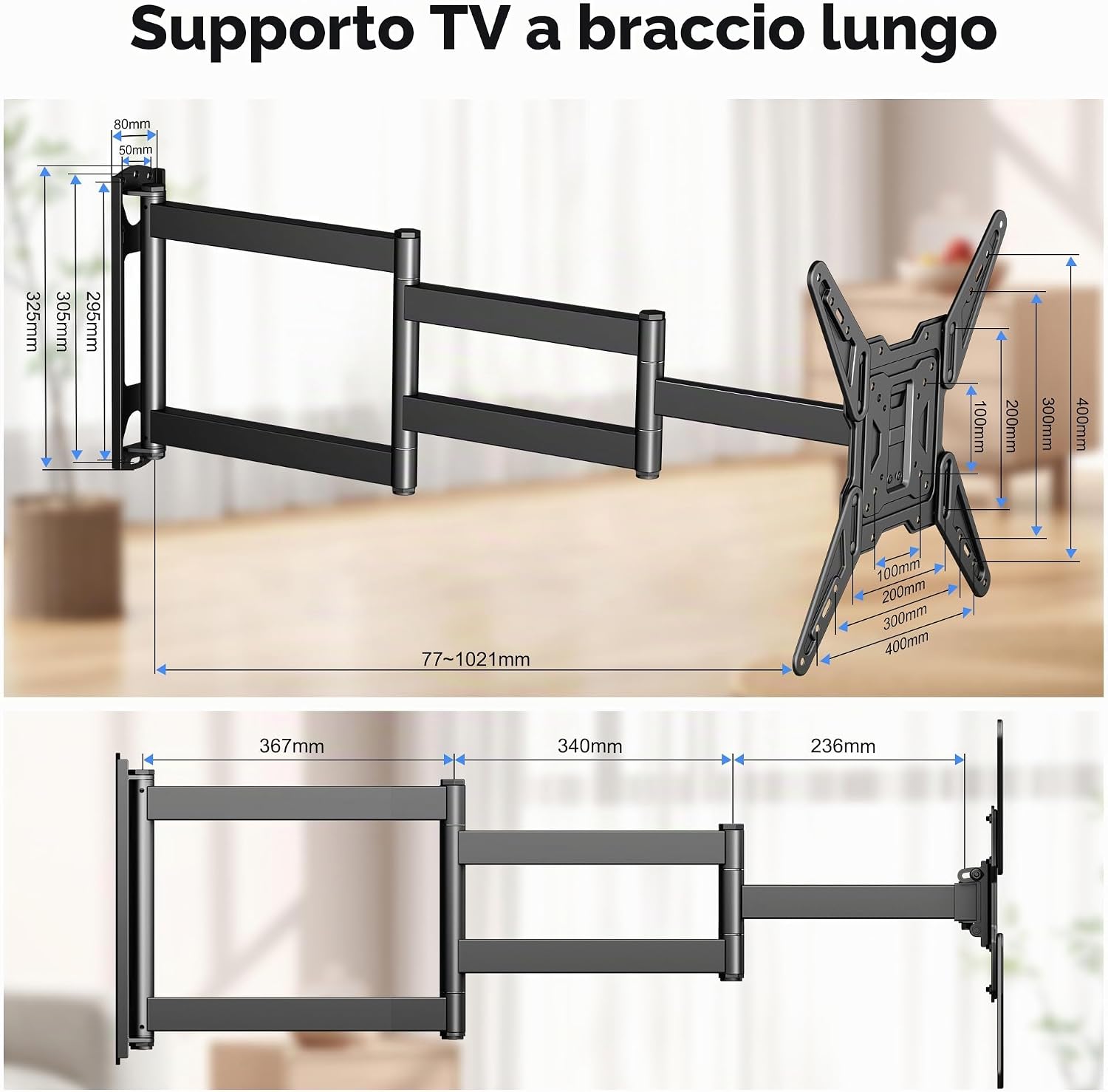
Image: Detailed dimensions of the XINLEI MAP3L TV wall mount, showing wall plate size, arm lengths, and VESA plate dimensions. The mount extends from 77mm to 1021mm from the wall.
4. Compatibility Check
Before proceeding with installation, ensure your TV and wall are compatible with the XINLEI MAP3L mount.
Pre-Purchase Checklist

Image: A checklist illustrating key compatibility factors: VESA pattern (Min 100x100mm, Max 400x400mm), TV cable outlet location, TV weight (Max 45kg) and size (26-70 inches), and compatible wall types (concrete, brick, wood stud).
VESA Mounting Patterns
The mount supports various VESA patterns. Measure the horizontal and vertical distance between the mounting holes on the back of your TV.

Image: Diagrams showing common VESA mounting patterns (e.g., 75x75mm, 100x100mm, 200x200mm, 300x300mm, 400x400mm) and how they relate to the TV bracket.
Compatible Wall Types
Ensure your wall is suitable for mounting. The mount is designed for:
- Wood Stud Walls
- Solid Concrete Walls
- Brick Walls
Important: Do not mount the TV bracket solely on drywall. Always secure it to a structural element.

Image: Illustrations demonstrating proper installation on wood studs, concrete walls, and brick walls, emphasizing that drywall-only installation is not supported.
5. Setup and Installation Instructions
Follow these steps carefully to install your XINLEI MAP3L TV wall mount. It is recommended to have two people for safe installation.
- Locate Mounting Position: Determine the desired height and center position for your TV. Use a stud finder to locate wood studs if applicable. Mark the drilling points on the wall.
- Drill Pilot Holes: Drill pilot holes at the marked locations. The size of the drill bit will depend on your wall type and the anchors/screws provided.
- Attach Wall Plate: Secure the wall plate of the mount to the wall using the appropriate screws and anchors. Ensure it is level before tightening all fasteners.
- Attach TV Brackets to TV: Carefully place your TV face down on a soft, clean surface. Attach the TV brackets to the back of your TV using the correct VESA screws and spacers. Ensure the brackets are centered and securely fastened.
- Mount TV to Wall Plate: With assistance, carefully lift the TV and hook the TV brackets onto the wall plate. Secure the TV to the wall plate using the safety screws or locking mechanisms provided.
- Cable Management: Route your TV cables through the integrated cable management covers on the mount arms for a tidy appearance.
Robust Design for Secure Mounting

Image: Illustrates the robust construction of the mount, highlighting its solid rotation axes and 45 kg load capacity, indicating enhanced durability and safety.
6. Operating Instructions
The XINLEI MAP3L mount offers flexible positioning for optimal viewing.
Adjusting Viewing Angle and Extension

Image: Demonstrates the mount's ability to retract to 77mm and extend up to 1021mm from the wall. It also shows the tilt range of +3° to -12° and leveling adjustment of +/-3°.
- Extension/Retraction: Gently pull or push the TV to extend it up to 1021mm from the wall or retract it to a minimum of 77mm.
- Tilt: Adjust the tilt angle of your TV between +3° (upward) and -12° (downward) to reduce glare and achieve a comfortable viewing angle.
- Swivel: Pivot the TV left or right up to +/-90° to direct the screen towards different seating areas.
- Leveling: Fine-tune the horizontal level of your TV by adjusting +/-3° after installation.
Flexible Viewing Positions

Image: Shows the TV mount extended and swiveled, demonstrating the flexible viewing positions achievable with its three-section articulating arms.
Corner Installation Capability

Image: Illustrates the mount's suitability for corner installations, showcasing its 360° rotation capability at pivot points and +/-90° swivel for optimal screen positioning in a corner.
7. Maintenance
Regular maintenance ensures the longevity and safe operation of your TV wall mount.
- Periodic Checks: Periodically check all screws and connections to ensure they remain tight and secure.
- Cleaning: Clean the mount with a soft, dry cloth. Avoid abrasive cleaners or solvents that could damage the finish.
- Movement: If the arm movement becomes stiff, check for any obstructions. Do not apply excessive force.
8. Troubleshooting
If you encounter issues with your XINLEI MAP3L TV wall mount, refer to the following common problems and solutions.
- TV is not level: Use the +/-3° leveling adjustment feature to correct the horizontal alignment. Ensure the wall plate was installed level.
- Mount feels loose: Re-check all mounting screws on both the wall plate and the TV brackets. Ensure they are securely tightened. Verify the wall type is appropriate and the anchors are correctly installed.
- Limited movement/stiffness: Check for any cables or objects obstructing the arm's movement. Ensure no screws are overtightened at the articulating joints, which might restrict motion.
- TV does not fit: Double-check your TV's VESA pattern and weight against the specifications in Section 3. Ensure your TV size is within the 26-70 inch range.
9. Warranty and Support
XINLEI is committed to providing quality products. For any questions, concerns, or assistance with your MAP3L TV wall mount, please contact XINLEI customer support. We offer immediate assistance to ensure your satisfaction.
Please retain your proof of purchase for any warranty claims.

