
1. Introduction
This manual provides essential information for the safe and efficient operation, setup, and maintenance of your Genmitsu 710W CNC Compact Router. Please read these instructions thoroughly before use and retain this manual for future reference.
2. Product Overview
The Genmitsu 710W CNC Compact Router is a powerful spindle motor designed for CNC milling machines. It features a 65mm diameter, an LCD digital display for real-time speed monitoring, and 6 adjustable speeds for versatile applications.
Key Features:
- Powerful 710W Motor: Provides robust cutting power for various materials including aluminum and hardwood.
- High Compatibility: Designed for 3020 and larger CNC routers, fitting most machines with a 65mm diameter spindle holder. Includes a custom 1/8" ER11 collet and nut, compatible with 1-8mm and 1/4" shank bits (collets or bits not included).
- LCD Speed Display: Digital readout shows real-time speed (6000–30000 RPM) for precise adjustment.
- High Precision: Less than 0.05mm runout ensures smooth cutting performance.
- Durable Construction: Fitted with long-life carbon brushes and includes 4 high-quality spare brushes.
- Flexible Power Cord: Comes with an 11.5ft (3.5m) power cord for extended reach.
Components:
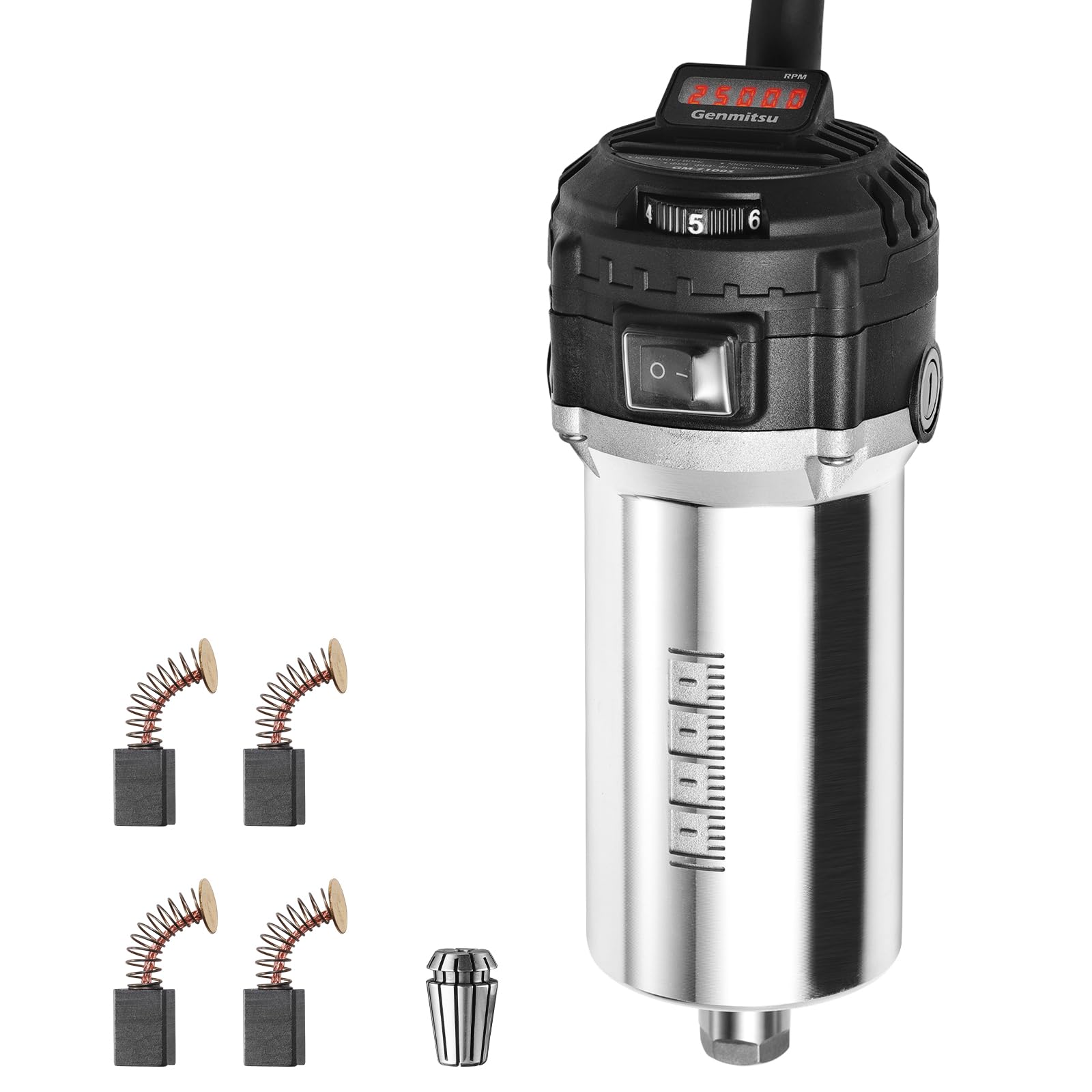
Figure 1: Main components of the Genmitsu 710W CNC Compact Router. Labels indicate the LCD Display, 6-Level Speed Adjusting Dial, Switch ON/OFF, Fast Heat Dissipation, and Carbon Brush Port.

Figure 2: Product dimensions including overall length (7.8"), body diameter (2.6" / 65mm), and power cord length (11.5ft).
Included Accessories:

Figure 3: Accessories include a power cord, 1/8" ER-11 collet, 17mm wrench, 10mm wrench, and long-life carbon brushes (4 spares).
3. Safety Instructions
WARNING: Always follow basic safety precautions to reduce the risk of fire, electric shock, and personal injury.
- Read all instructions before operating the router.
- Wear appropriate personal protective equipment (PPE), including eye protection, hearing protection, and a dust mask.
- Ensure the workpiece is securely clamped before starting any operation.
- Keep hands and loose clothing away from rotating parts.
- Disconnect power before changing bits, performing maintenance, or when the tool is not in use.
- Do not operate the router in damp or wet conditions.
- Use the correct collet size for your bit shank.
- Avoid forcing the tool; let the router's speed and power do the work.
- Ensure adequate ventilation in your workspace to prevent dust accumulation.
4. Setup
Mounting the Router:
- Ensure your CNC machine has a spindle holder compatible with a 65mm diameter router.
- Carefully insert the Genmitsu 710W Compact Router into the spindle holder.
- Secure the router firmly in place using the clamping mechanism of your CNC machine's spindle holder. Ensure there is no movement or wobble.
Installing the Collet and Bit:
- Ensure the router is unplugged from the power source.
- Unscrew the collet nut from the router shaft.
- Insert the 1/8" ER11 collet (or appropriate collet for your bit) into the collet nut.
- Insert the desired router bit into the collet, ensuring it is seated correctly and not inserted too shallowly or too deeply.
- Thread the collet nut back onto the router shaft and tighten it securely using the provided wrenches. Do not overtighten.
5. Operating Instructions
Power Connection:
Connect the router's power cord to a standard 110V power outlet. The flexible power cord allows for greater reach across your workspace.
Adjusting Speed:

Figure 4: The 6-level speed adjusting dial and LCD display for precise RPM control.
- Turn the router ON using the ON/OFF switch.
- Rotate the 6-level speed adjusting dial to select your desired RPM. The LCD digital display will show the real-time speed, ranging from 6000 to 30000 RPM.
- Adjust the speed according to the material being cut and the specific bit being used for optimal performance and to prevent damage to the workpiece or tool.
Operation:

Figure 5: The 710W router actively cutting material on a CNC machine, demonstrating its power.

Figure 6: An example of a precise cut with less than 0.05mm runout, highlighting the router's accuracy.
Once the router is securely mounted and the bit is installed, proceed with your CNC operations according to your machine's software and operational guidelines. Monitor the LCD display for consistent speed during operation.
6. Maintenance
Cleaning:
Regularly clean the router to remove dust and debris. Use a soft brush or compressed air. Ensure the power is disconnected before cleaning.
Carbon Brush Replacement:
The router is equipped with long-life carbon brushes. When the motor performance decreases or the brushes are worn, they should be replaced. The router includes 4 spare carbon brushes.
- Disconnect the router from the power supply.
- Locate the carbon brush ports on the side of the router (refer to Figure 1).
- Unscrew the brush caps and carefully remove the old carbon brushes.
- Insert the new carbon brushes, ensuring they are oriented correctly.
- Replace and tighten the brush caps.
7. Troubleshooting
| Problem | Possible Cause | Solution |
|---|---|---|
| Router does not start | No power supply; ON/OFF switch is off; Worn carbon brushes | Check power connection; Turn ON switch; Replace carbon brushes. |
| Inconsistent speed / Loss of power | Worn carbon brushes; Overload; Loose connections | Replace carbon brushes; Reduce cutting depth/feed rate; Check power cord and internal connections. |
| Excessive vibration / Poor cut quality | Loose bit/collet; Damaged bit; Unbalanced workpiece; Loose router mounting | Ensure bit and collet are tight; Replace damaged bit; Secure workpiece; Re-tighten router in mount. |
| LCD display not working | Electrical fault; Display damage | Contact customer support for assistance. |
8. Specifications
| Specification | Value |
|---|---|
| Brand | Genmitsu |
| Model Number | GM7100S |
| Power Source | Corded Electric |
| Voltage | 110 Volts |
| Power Output | 710W |
| Maximum Rotational Speed | 30000 RPM |
| Minimum Rotational Speed | 6000 RPM |
| Speed Settings | 6 Adjustable Speeds |
| Collet Type | ER11 (1/8" included) |
| Compatible Shank Bits | 1-8mm and 1/4" |
| Diameter | 65mm |
| Item Weight | 2.04 Kilograms |
| Material | Metal |
| Power Cord Length | 11.5 ft (3.5m) |
9. Warranty and Support
Return Policy:
This product is subject to a 30-day return policy for refund or replacement.
Protection Plans:
Extended protection plans are available for purchase to cover your investment:
- 3-Year Protection Plan
- 4-Year Protection Plan
- Complete Protect (monthly billing)
For further assistance, technical support, or warranty claims, please contact Genmitsu customer service through your purchase platform or the official Genmitsu website.


