
1. Product Overview
The VINGLI Farmhouse Fireplace TV Stand (Model BL0SM07) is designed to accommodate televisions up to 70 inches and support a maximum weight of 420 lbs. This entertainment center features a rustic Dark Rustic Oak finish with decorative criss-cross details, blending functional storage with aesthetic appeal. It includes an integrated electric fireplace heater for customizable ambiance and warmth.
Key features include:
- Television Compatibility: Supports TVs up to 70 inches and a weight capacity of 420 lbs.
- Electric Fireplace: Features a realistic flame effect with 7 color options, adjustable heating from 62°F to 82°F, a 0.5–6 hour timer, and remote control operation. Includes CSA-certified overheating protection.
- Storage: Equipped with adjustable shelves to accommodate various media devices, gaming consoles, soundbars, and decorative items.
- Design: Farmhouse style with Dark Rustic Oak finish and criss-cross embellishments.

Image 1.1: The VINGLI Farmhouse Fireplace TV Stand, showcasing its design and integrated electric fireplace.
2. Safety Information
Please read and understand all safety instructions before assembly and use of this product. Failure to follow these instructions may result in electric shock, fire, property damage, or personal injury.
- Electrical Safety: Ensure the electric fireplace is connected to a properly grounded outlet. Do not overload electrical circuits. Keep flammable materials at least 3 feet (0.9 meters) away from the front of the fireplace.
- Overheating Protection: The fireplace is equipped with CSA-certified overheating protection. If the heater overheats, it will automatically shut off. Unplug the unit and allow it to cool before restarting.
- Weight Capacity: Do not exceed the maximum weight capacity of 420 lbs for the TV stand top. Ensure the television size is within the recommended 70-inch limit.
- Stability: Always install the provided anti-tilt device to prevent accidental tipping, especially in households with children or pets. Place the TV stand on a flat, level, and stable surface.
- Ventilation: Do not block the air vents of the electric fireplace. Ensure adequate clearance around the unit for proper air circulation.
- Assembly: Follow all assembly instructions carefully. Do not use power tools for assembly unless specifically instructed, as this may damage components.
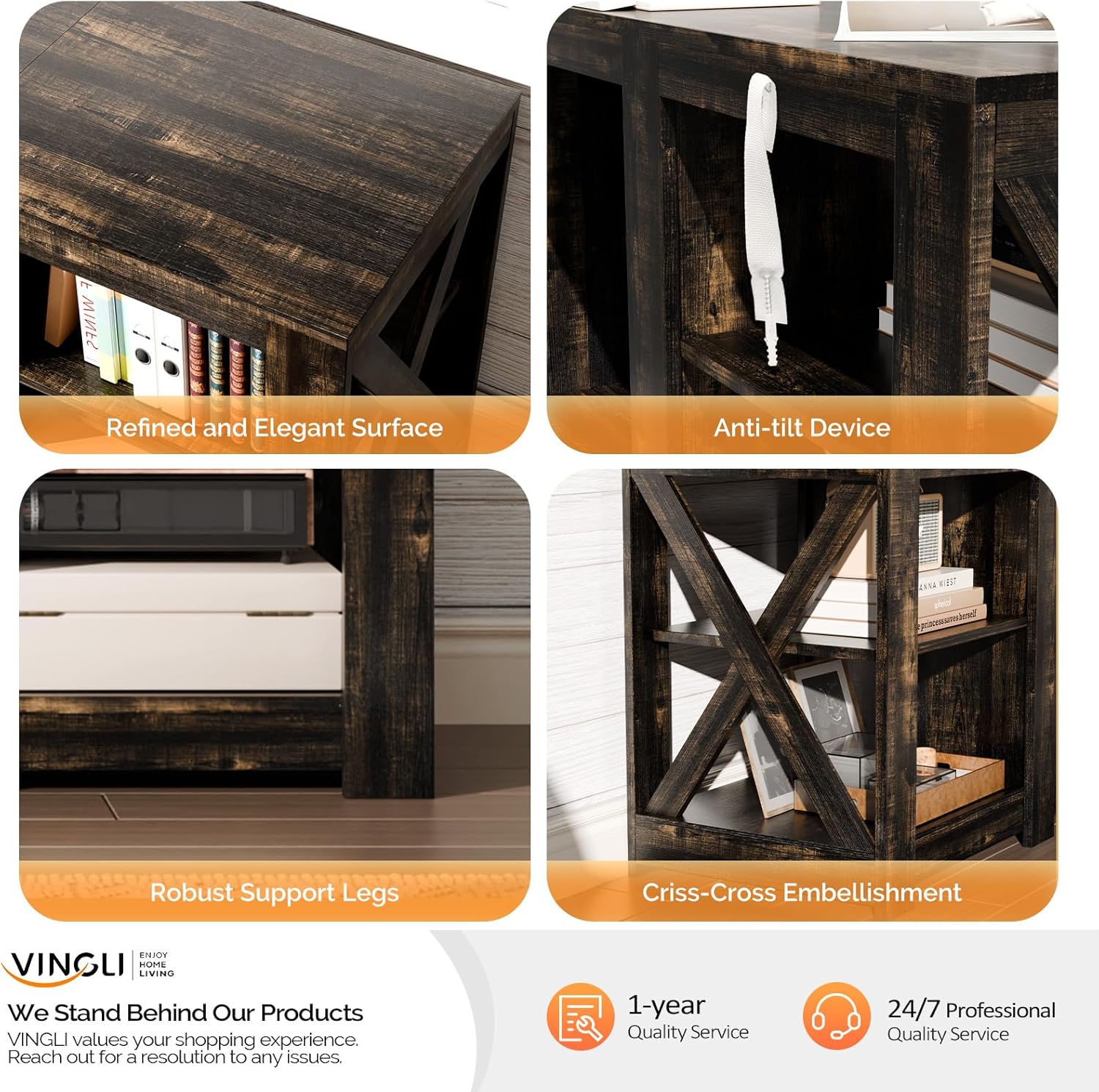
Image 2.1: Details highlighting the robust construction and safety features, including the anti-tilt device.
3. Setup and Assembly
The VINGLI Farmhouse Fireplace TV Stand is designed for straightforward assembly. All necessary tools and clear instructions are included. Please note that the item is delivered in two separate packages, which may arrive at different times.
3.1 Before You Begin
- Unpack: Carefully unpack all components and hardware.
- Verify Contents: Check the parts list against the included hardware to ensure all pieces are present. Contact customer service immediately if any parts are missing or damaged.
- Organize: Lay out all parts on a soft, clean surface (e.g., a blanket or carpet) to prevent scratches. Group similar hardware items together.
- Tools: Ensure you have a Phillips head screwdriver and any other tools specified in the instruction manual.
3.2 Assembly Steps
Follow the step-by-step instructions provided in the physical manual included with your product. Pay close attention to diagrams and ensure all connections are secure before proceeding to the next step. It is recommended to have two people for assembly.
- Assemble the main frame of the TV stand.
- Install the adjustable shelves according to your desired configuration.
- Carefully insert the electric fireplace unit into its designated opening.
- Attach the anti-tilt device to the back of the TV stand and secure it to a wall stud as per instructions.

Image 3.1: Visual guide to personalized storage options and adjustable shelves.
4. Operating Instructions
The electric fireplace provides both aesthetic flame effects and functional heating. It can be operated using the control panel on the unit or the included remote control.
4.1 Electric Fireplace Controls
- Power Button: Turns the fireplace on or off.
- Flame Effect Button: Cycles through 7 different flame color options. The flame effect can be used independently of the heater.
- Heater Button: Activates the heating function. The temperature can be adjusted between 62°F and 82°F.
- Timer Button: Sets the automatic shut-off timer for 0.5 to 6 hours.
4.2 Remote Control
The remote control duplicates the functions of the control panel, allowing convenient operation from a distance. Ensure the remote has working batteries and is pointed towards the fireplace unit.

Image 4.1: The electric fireplace unit and its remote control, detailing operational features.
5. Maintenance
Proper care and maintenance will ensure the longevity and appearance of your VINGLI TV stand.
- Cleaning the Stand: The Dark Rustic Oak surface is waterproof and scratch-resistant. Wipe surfaces with a soft, damp cloth. Avoid harsh chemicals or abrasive cleaners that could damage the finish.
- Cleaning the Fireplace: Ensure the fireplace is turned off and unplugged before cleaning. Use a soft, dry cloth to wipe the exterior. Do not spray liquids directly onto the unit.
- Dusting: Regularly dust all surfaces to prevent buildup.
- Inspections: Periodically check all screws and connections to ensure they remain tight. Re-tighten if necessary.
6. Troubleshooting
If you encounter issues with your TV stand or electric fireplace, refer to the following common troubleshooting steps:
- Fireplace Not Turning On:
- Ensure the power cord is securely plugged into a working electrical outlet.
- Check if the circuit breaker has tripped.
- If the unit recently shut off, it might be due to overheating protection. Unplug, wait 10-15 minutes, and plug back in.
- No Heat Output:
- Verify the heater function is activated on the control panel or remote.
- Check the temperature setting; ensure it is above the current room temperature.
- Ensure air vents are not obstructed.
- Remote Control Not Working:
- Replace the batteries in the remote control.
- Ensure there are no obstructions between the remote and the fireplace sensor.
- Stand Instability:
- Re-check all assembly connections and tighten any loose screws.
- Ensure the anti-tilt device is properly installed and secured to the wall.
For further assistance, please contact VINGLI customer service.
7. Specifications
| Feature | Specification |
|---|---|
| Brand | VINGLI |
| Model Number | BL0SM07 |
| Color | Dark Rustic Oak |
| Material | Engineered Wood |
| Product Dimensions (L x W x H) | 58.66 x 15.75 x 23.62 inches |
| Item Weight | 61.7 pounds |
| Maximum Load Capacity | 420 lbs |
| Recommended TV Size | Up to 70 inches |
| Fireplace Features | Adjustable Flame (7 colors), Adjustable Heating (62°F–82°F), 0.5–6 Hour Timer, Remote Control, Overheating Protection (CSA Certified) |

Image 7.1: Visual representation of TV stand dimensions and TV size compatibility.
8. Warranty and Support
VINGLI stands behind the quality of its products. This TV stand comes with a 1-year Quality Service warranty.
For any questions, concerns, or assistance with assembly, operation, or troubleshooting, VINGLI offers 24/7 Professional Quality Service. Please refer to the contact information provided in your product packaging or visit the official VINGLI website for support.