
WAVEL PocketQuiet X10 Pro
WAVEL Adjustable Noise Cancelling Ear Plugs PocketQuiet X10 Pro
User Manual
Introduction
The WAVEL Adjustable Noise Cancelling Ear Plugs are designed to provide a quiet environment by reducing unwanted noise. Featuring three precise adjustable noise cancellation levels, these ear plugs are suitable for various scenarios, from light noise to high-frequency sounds, helping to protect your hearing and improve concentration.
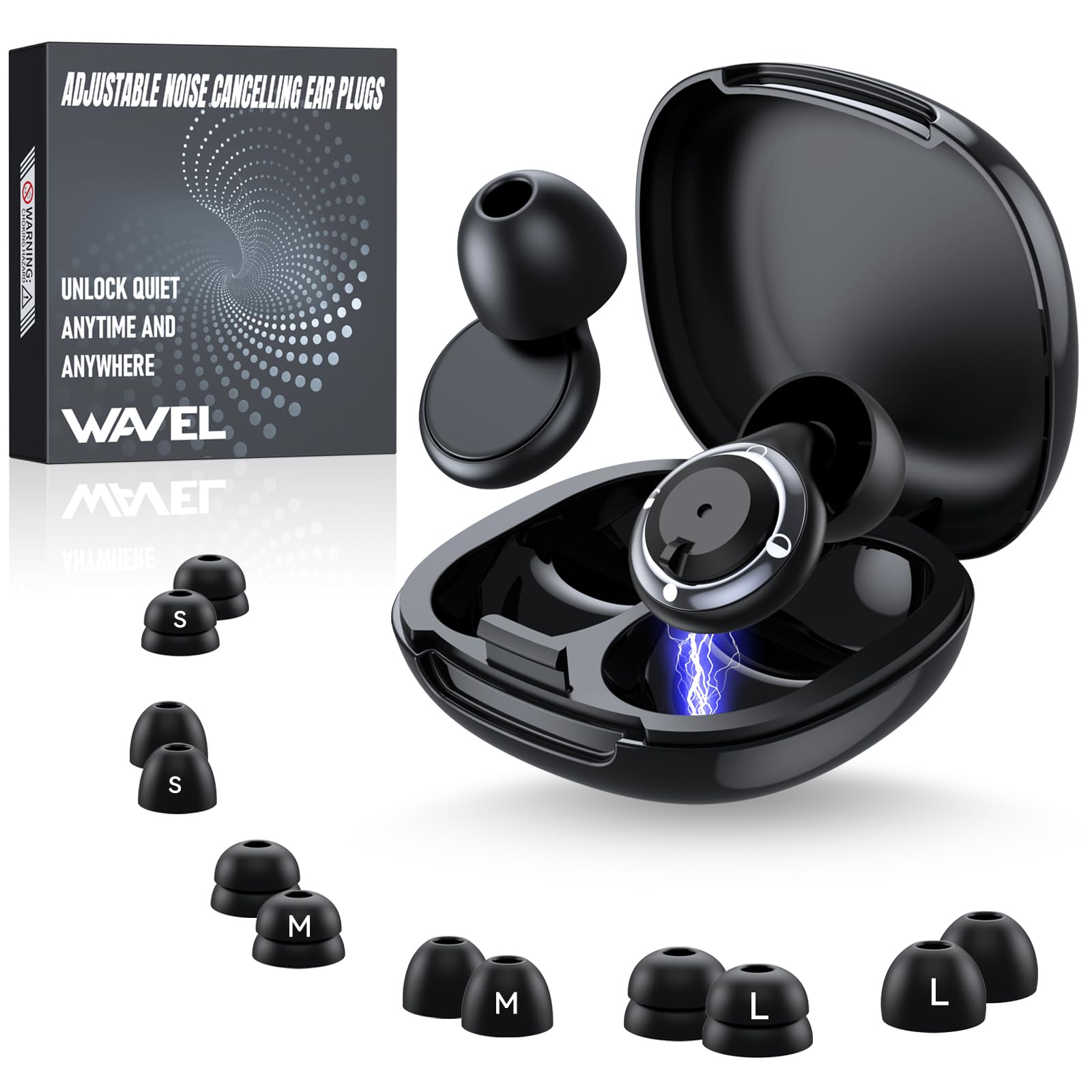
Figure 1: Internal structure and noise reduction capability of WAVEL ear plugs.
Package Contents
Verify that all items listed below are included in your package:

Figure 2: Contents of the WAVEL ear plugs package.
- Earplug Storage Case (x1)
- Noise-Cancelling Earplugs (x2)
- Silicone Ear Caps (x14, 7 pairs)
- Packaging Box (x1)
- User Manual (x1)
Setup
1. Selecting Ear Tips
The WAVEL ear plugs come with 7 pairs of silicone ear tips in various sizes to ensure optimal comfort and noise reduction for different ear canal shapes and noise requirements. Choose the tip that provides the best seal and comfort for your ears.
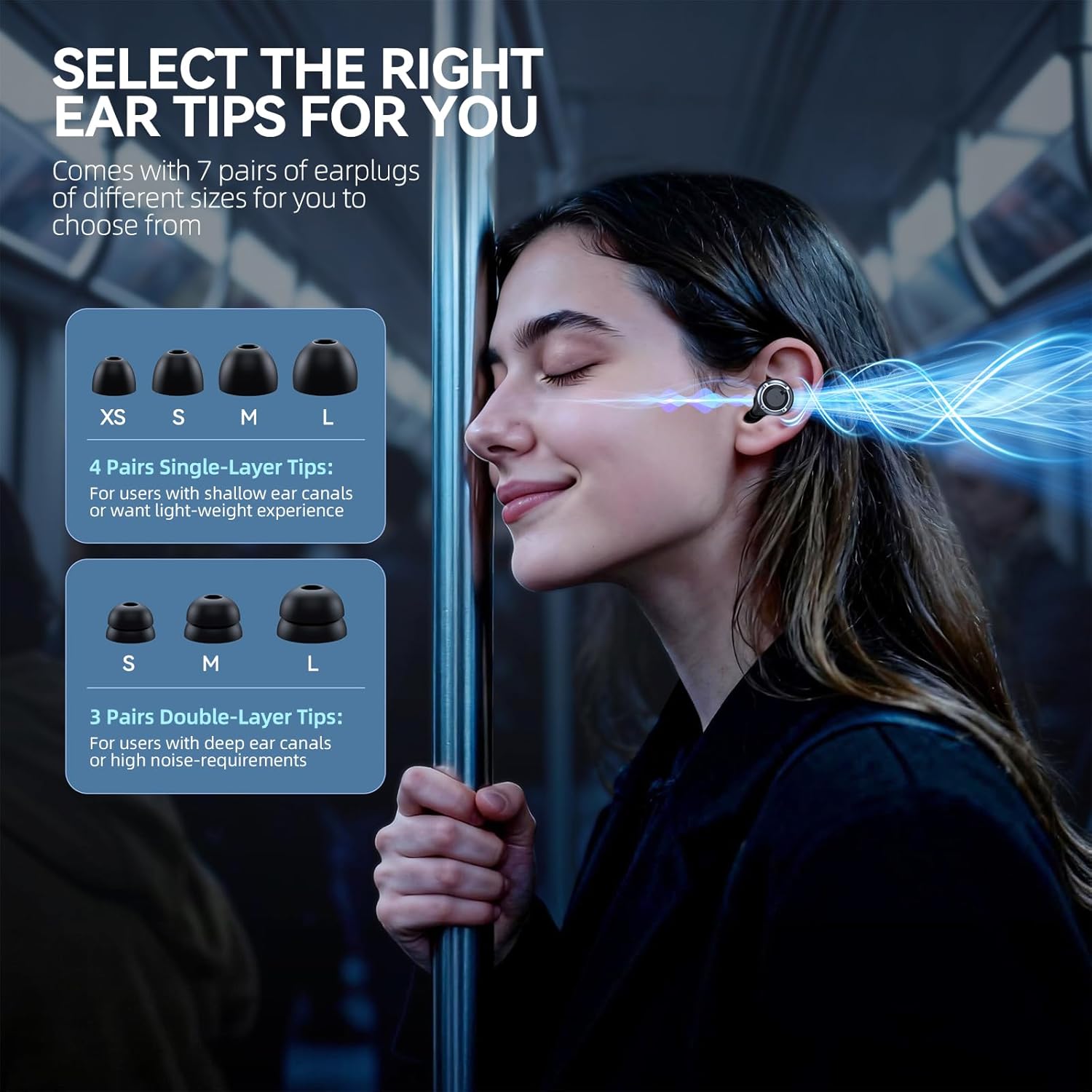
Figure 3: Available ear tip sizes and types.
- Single-layer tips (XS/S/M/L): Suitable for users with shallow ear canals or those preferring a lighter experience.
- Double-layer tips (S/M/L): Recommended for users with deeper ear canals or higher noise reduction requirements.
2. Adjusting Noise Cancellation Modes
The ear plugs feature an adjustable mechanism to select one of three noise cancellation levels. Gently twist the earplug to cycle through the modes:

Figure 4: Three adjustable noise cancellation modes.
- Leisure Mode (17dB): Ideal for light noise scenarios such as daily conversations and cafes, balancing quietness with environmental awareness.
- Entertainment Mode (21dB): Designed for medium to high-frequency noise in concerts or parties, protecting hearing while allowing enjoyment of the atmosphere.
- Focus Mode (35dB): Provides deep noise isolation, perfect for office work, studying, or long-distance travel to enhance concentration.
Operating Instructions
Wearing the Ear Plugs
To ensure effective noise cancellation and comfort, proper insertion of the ear plugs is crucial:
- Select the appropriate silicone ear tip size for your ear canal.
- Gently insert the earplug into your ear canal.
- Adjust the earplug until it feels secure and comfortable, forming a good seal to block external noise.

Figure 5: Proper fit for ergonomic ear canal design.
Recommended Usage Scenarios
WAVEL ear plugs are versatile and can be used in various situations:

Figure 6: Ear plugs in various usage scenarios.
- Sleeping: Block out snoring or environmental noise for undisturbed rest.
- Travel: Reduce engine noise and chatter on planes, trains, or buses.
- Work/Study: Minimize distractions in noisy offices, libraries, or cafes.
- Concerts/Events: Protect hearing from loud music while retaining sound clarity.
- Industrial Settings: Provide hearing protection in environments with moderate noise levels.
Maintenance
Cleaning and Care
To maintain hygiene and performance, regularly clean your WAVEL ear plugs:

Figure 7: Key features including washable design.
- The earplugs and silicone tips are made from durable, waterproof ABS plastic and food-grade soft silicone.
- After daily use, rinse the earplugs and tips with water.
- Allow them to air-dry completely before storing or reusing.
- Proper cleaning ensures hygiene and preserves noise-reduction performance.
Troubleshooting
If you encounter issues with your WAVEL ear plugs, consider the following:
- Earplugs do not stay in / Discomfort: Ensure you have selected the correct ear tip size. Experiment with different single-layer and double-layer tips to find the best fit for your ear canal. Improper fit can lead to discomfort or the earplugs falling out.
- Insufficient Noise Cancellation: Verify that the earplugs are inserted correctly and form a tight seal. Check if the noise cancellation mode is set to the desired level (e.g., Focus Mode for maximum reduction). If using single-layer tips, try double-layer tips for enhanced noise blocking.
- Sound is completely blocked / Muffled: If you need to hear some environmental sounds, ensure the earplugs are not set to Focus Mode (35dB). Adjust to Leisure Mode (17dB) or Entertainment Mode (21dB) for a balance between noise reduction and sound perception.
Specifications
| Feature | Detail |
|---|---|
| Brand Name | WAVEL |
| Model | PocketQuiet X10 Pro |
| Noise Attenuation | 17dB - 35dB (Adjustable) |
| Number of Items | 1 (Pair of earplugs) |
| Number of Pieces | 14 (Earplugs + 7 pairs of tips) |
| Item Form | Pair |
| Reusability | Reusable |
| Material | ABS Plastic, Food-Grade Soft Silicone |
| Color | Black |
| Package Dimensions | 3.46 x 3.43 x 0.75 inches |
| Item Weight | 1.76 ounces |
| Manufacturer | WAVEL |
| Date First Available | October 25, 2025 |
Warranty and Support
For warranty information, technical support, or any product-related inquiries, please contact WAVEL customer service through the retailer's platform or the official WAVEL website. Please retain your proof of purchase for warranty claims.
Statements regarding dietary supplements have not been evaluated by the FDA and are not intended to diagnose, treat, cure, or prevent any disease or health condition.
Ask a question about this manual
Ask about setup, troubleshooting, compatibility, parts, safety, or missing instructions. Manuals+ will review the question and use this page’s manual context to help answer it.