
1. Introduction
This manual provides comprehensive instructions for the LAXASFIT H6 Smart Watch. It covers setup, operation, maintenance, and troubleshooting to ensure optimal use of your device. The H6 Smart Watch features a 2.01-inch TFT display, Bluetooth 5.0 connectivity, and various health and fitness tracking capabilities.
2. Package Contents
Before proceeding, please verify that all items are present in your package:
- LAXASFIT H6 Smart Watch
- Watch Band (pre-attached or separate)
- Charging Cable
- User Manual (this document)

Image: The LAXASFIT H6 Smart Watch, its charging cable, and the product packaging.
3. Setup
3.1. Charging the Smart Watch
Before first use, fully charge your LAXASFIT H6 Smart Watch.
- Connect the charging cable to the charging port on the back of the watch.
- Plug the USB end of the charging cable into a standard USB power adapter (not included) or a computer's USB port.
- The watch display will indicate charging status. A full charge typically takes approximately 2 hours.
A fully charged battery provides an average life of 1 day, depending on usage.
3.2. Installing the Companion App
To unlock the full functionality of your H6 Smart Watch, you need to install the companion application on your smartphone.
- Scan the QR code provided in the quick start guide (if available) or search for "Laxasfit" in your smartphone's app store.
- Download and install the "Laxasfit" app.

Image: Screenshot of the Laxasfit application available on the Google Play Store.

Image: Screenshot of the Laxasfit application available on the Apple App Store.
3.3. Pairing with Your Smartphone
Ensure your smartphone's Bluetooth is enabled.
- Open the Laxasfit app on your smartphone.
- Follow the in-app instructions to search for and connect to your H6 Smart Watch.
- Confirm the pairing request on both your watch and smartphone.
4. Operating the Smart Watch
4.1. Basic Navigation
The H6 Smart Watch features a touchscreen interface for navigation.
- Swipe Up/Down: Scroll through menus and notifications.
- Swipe Left/Right: Access quick functions or different screens.
- Tap: Select an item or confirm an action.
- Side Button: Typically used to return to the home screen or power on/off the device.
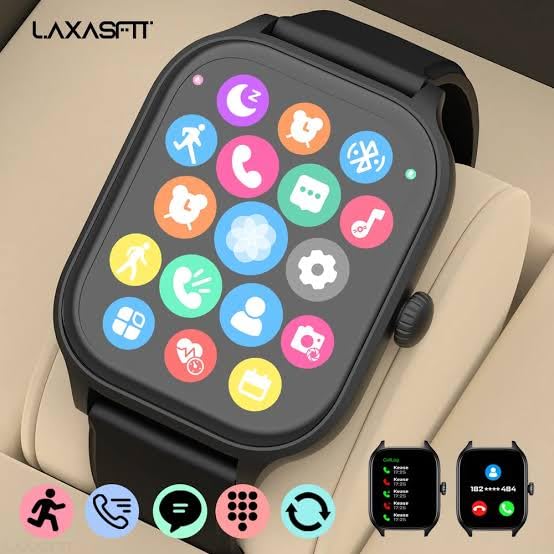
Image: The smartwatch display showing a grid of application icons for various functions.
4.2. Call and Message Management
Once paired, your H6 Smart Watch can display incoming calls and messages.
- Incoming Calls: The watch will display caller ID. You can accept or reject calls directly from the watch.
- Messages: View message previews and notifications from various applications.

Image: The smartwatch screen showing an incoming call notification with options to accept or decline.

Image: The smartwatch screen displaying a message notification from a contact.
4.3. Health Monitoring
The H6 Smart Watch includes sensors for monitoring various health metrics.
- Heart Rate Monitor: Tracks your heart rate throughout the day.
- Blood Oxygen Monitor: Measures your blood oxygen saturation levels.
- Sleep Monitoring: Analyzes your sleep patterns.
4.4. Sports Modes and GPS
The watch supports over 100 sports modes to track your physical activities. It also features GPS for accurate outdoor activity tracking.

Image: A person running outdoors, wearing the LAXASFIT H6 Smart Watch on their wrist, displaying activity data.
4.5. Other Functions
The H6 Smart Watch offers a range of additional features:
- Dial-up Call & Call Record: Initiate calls and view call history.
- Directory: Access your phone contacts.
- Notifications: Receive alerts from various apps.
- Find a Cell Phone: Locate your paired smartphone.
- Luminance: Adjust screen brightness.
- Game: Access simple games.
- Remote Control Camera: Control your phone's camera remotely.
- Alarm: Set alarms.
- Wireless Music: Control music playback on your phone.
- Calculators: Basic calculator function.
- Weather: View current weather information.
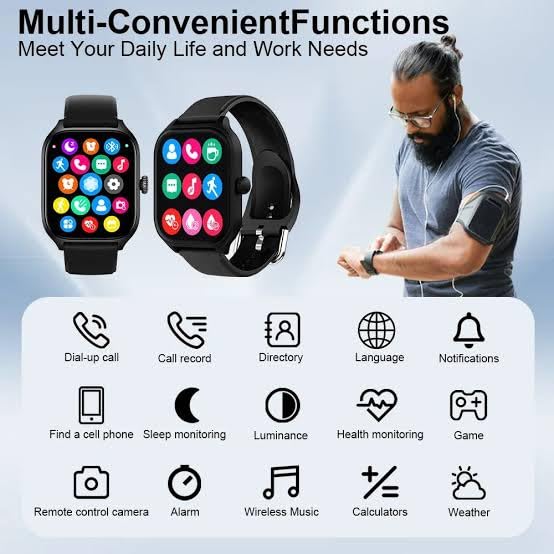
Image: An infographic illustrating multiple convenient functions of the smartwatch, including call, message, health monitoring, and music control.
5. Maintenance
5.1. Cleaning
Regularly clean your watch to maintain its appearance and functionality.
- Wipe the screen and strap with a soft, damp cloth.
- Avoid using harsh chemicals or abrasive materials.
- Ensure the charging contacts are clean and dry before charging.
5.2. Water Resistance
The LAXASFIT H6 Smart Watch is IP67 waterproof. This means it is protected against dust ingress and can withstand immersion in water up to 1 meter for up to 30 minutes. It is suitable for daily use and light water exposure like hand washing or rain. However, it is not recommended for swimming, showering with hot water, or diving.
5.3. Battery Care
- Avoid fully discharging the battery frequently.
- Store the watch in a cool, dry place if not used for extended periods.
- Use only the provided charging cable.
6. Troubleshooting
If you encounter issues with your LAXASFIT H6 Smart Watch, refer to the following common solutions:
- Watch not turning on: Ensure the watch is fully charged. Connect it to the charger for at least 30 minutes.
- Cannot pair with phone: Make sure Bluetooth is enabled on your phone and the watch is within range. Restart both the watch and your phone, then try pairing again through the Laxasfit app.
- Inaccurate health data: Ensure the watch is worn snugly on your wrist, not too tight or too loose. Clean the sensor on the back of the watch.
- Notifications not appearing: Check app notification settings on your phone and within the Laxasfit app to ensure they are enabled for the watch.
- Screen unresponsive: Try restarting the watch by pressing and holding the side button.
7. Specifications
| Feature | Specification |
|---|---|
| Brand | LAXASFIT |
| Model | H6 Smart Watch |
| Display Type | AMOLED |
| Screen Size | 1.9 Inches (2.01" TFT Display mentioned in title) |
| Connectivity | Bluetooth 5.0 |
| Operating System | WatchOS |
| Memory Storage Capacity | 500 MB |
| RAM Memory Installed Size | 0.13 MB |
| Special Features | GPS, Heart Rate Monitor, Blood Oxygen Monitor, 100+ Sports Modes |
| Water Resistance | IP67 |
| Battery Capacity | 100 Amp Hours |
| Average Battery Life | 1 Day |
| Charging Time | 2 Hours |
| Compatible Devices | Android & iOS (Iphone listed in specs) |
| Material | Silicone (Strap) |
| Item Weight | 200 g |
8. Warranty and Support
For warranty information and customer support, please refer to the official LAXASFIT website or contact your retailer. Keep your purchase receipt as proof of purchase.

Image: The LAXASFIT brand logo.
