
Introduction
This manual provides essential information for the safe and efficient installation, operation, and maintenance of the ANKROYU JLS B 4T 4.0GB 5.5PB Variable Frequency Drive (VFD). This device is designed to control the speed and torque of AC induction motors by varying the frequency and voltage of the power supplied to the motor. It is suitable for applications such as CNC routers, milling machines, and other industrial equipment requiring precise motor control.
Safety Information
WARNING: Risk of electric shock.
- Always disconnect power before installation or maintenance.
- Wait at least 10 minutes after disconnecting power for DC bus capacitors to discharge. Verify with a voltmeter before touching terminals.
- Installation and wiring must be performed by qualified personnel only.
- Ensure proper grounding techniques are used.
- Do not connect power to the output terminals (U, V, W).
- Do not operate the VFD with damaged cables or if the enclosure is open.
Setup and Installation
1. Environmental Requirements
- Operating Temperature: -10°C to +40°C. For ambient temperatures between 40°C to 50°C, reduce the rating for use.
- Humidity: 5% to 95% RH, non-condensing.
- Environment: Indoor use only. Avoid direct sunlight, corrosive gases, flammable gases, oil mist, dust, and metal particles.
- Altitude: Derate by 10% for every 1000 meters above 1000 meters.
- Protection Grade: IP20.
2. Mounting
Mount the VFD vertically on a stable, non-flammable surface. Ensure adequate clearance around the unit for proper ventilation and heat dissipation. The cooling method is air-cooled with fan control.
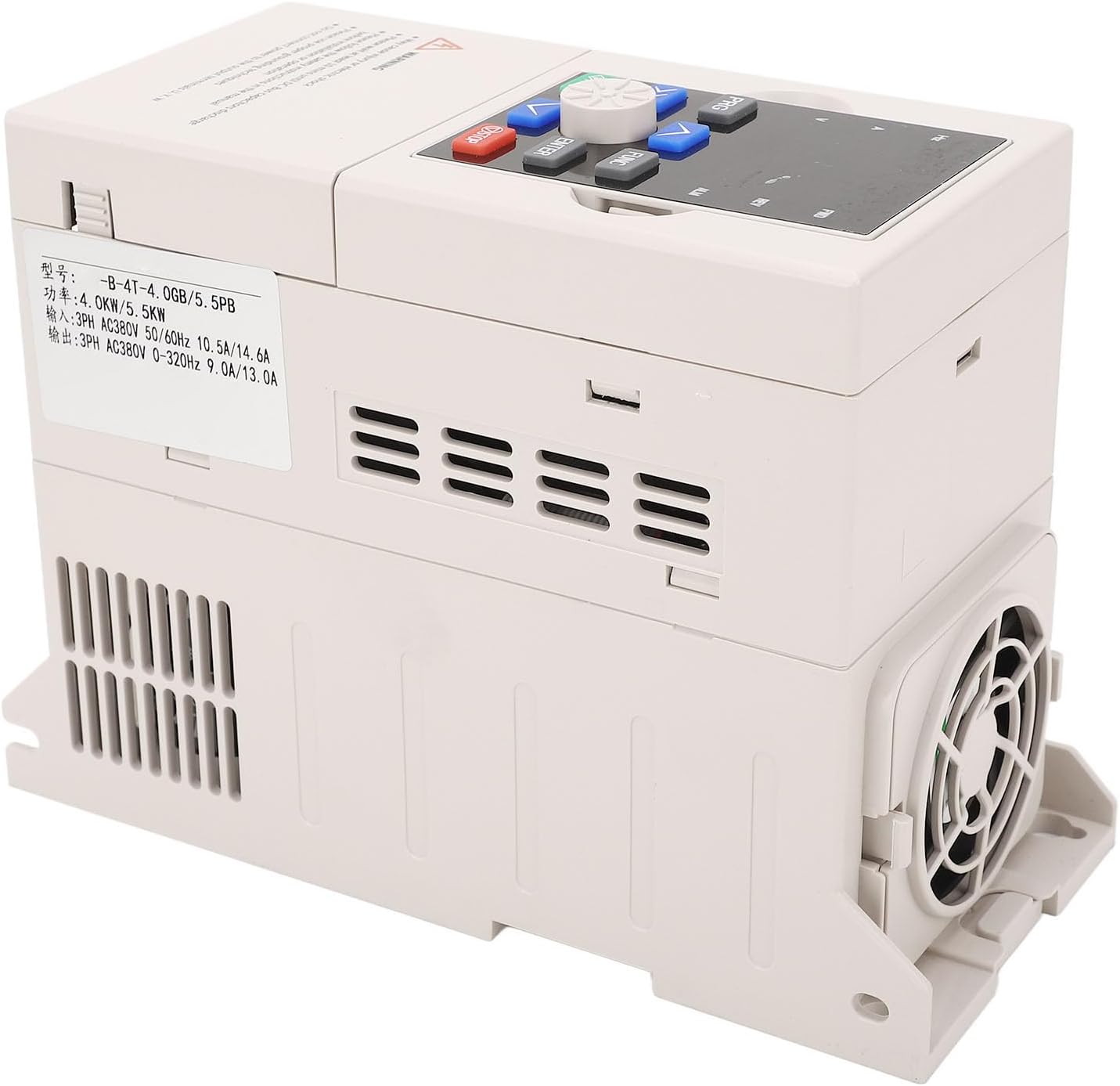
Figure 1: Side view of the VFD, illustrating the ventilation grilles and cooling fan for optimal airflow.
3. Wiring Connections
Refer to the wiring diagram below for proper connection of input power, motor output, and control signals. All connections must be secure and comply with local electrical codes.

Figure 2: Top view of the VFD, displaying the input terminals (R, S, T) and output terminals (U, V, W) for motor connection.
- Input Power (R, S, T): Connect 3-phase AC380V, 50/60Hz power supply.
- Motor Output (U, V, W): Connect to the 3-phase AC motor.
- Grounding: Ensure the VFD chassis is properly grounded to prevent electrical hazards.
- Control Terminals: For RS485 communication and other control signals (refer to detailed wiring diagram in the full manual for specific pinouts).
Operating Instructions
1. Control Panel Overview
The VFD features a digital display and a user-friendly control panel for monitoring and parameter adjustments.

Figure 3: Close-up of the VFD control panel, showing the digital display, rotary encoder, and control buttons (PRG, FUNC, RUN, STOP, arrow keys, ENTER).
- Digital Display: Shows frequency, current, voltage, and other operational parameters.
- PRG (Program): Enters/exits parameter setting mode.
- FUNC (Function): Cycles through different display parameters or menu options.
- RUN: Starts the motor.
- STOP: Stops the motor.
- Arrow Keys (Up/Down): Adjusts frequency or navigates menu options.
- ENTER: Confirms selections or parameter changes.
- Rotary Encoder: For fine adjustment of frequency or parameter values.
2. Basic Operation
- Power On: Ensure all wiring is correct and secure. Apply input power. The display will illuminate.
- Start Motor: Press the RUN button. The motor will start accelerating to the set frequency.
- Adjust Frequency: Use the Up/Down arrow keys or the rotary encoder to adjust the output frequency, thereby controlling motor speed.
- Stop Motor: Press the STOP button. The motor will decelerate and stop.
3. Advanced Functions and Parameter Settings
The VFD supports various programmable functions for customized motor control:
- Multi-Speed Control: 16 programmable multi-speed settings are available. Refer to the detailed parameter manual for configuration.
- Swing Frequency Operation: Preset frequency, adjustable center frequency, with state memory and recovery after power outage.
- PID Control: Built-in PID controller for closed-loop process control (with preset frequency).
- RS485 Communication: Standard RS485 communication function with multiple communication protocols optional, enabling linkage synchronization control.
To access and modify parameters, press the PRG button. Navigate through menus using arrow keys and confirm with ENTER. Consult the comprehensive parameter list in the full user manual for detailed descriptions and adjustment ranges.
Maintenance
Regular maintenance ensures optimal performance and extends the lifespan of your VFD.
- Cleaning: Periodically clean the VFD's exterior and ventilation grilles to prevent dust accumulation. Use a soft, dry cloth. Do not use liquid cleaners.
- Fan Inspection: Check the cooling fan for obstructions or excessive noise. Ensure it operates freely.
- Terminal Check: Annually inspect all wiring terminals for tightness and signs of corrosion. Retighten if necessary.
- Environmental Monitoring: Ensure the operating environment continues to meet the specified conditions (temperature, humidity, dust).

Figure 4: Bottom view of the VFD, highlighting the cooling fan for heat dissipation.
Troubleshooting
This section provides solutions for common issues. For complex problems, contact technical support.
| Problem | Possible Cause | Solution |
|---|---|---|
| VFD does not power on | No input power; Blown fuse; Loose wiring. | Check power supply; Inspect fuses; Verify all input power connections. |
| Motor does not run | Incorrect wiring; Parameter settings incorrect; Overload. | Verify motor wiring (U, V, W); Check frequency and control parameters; Reduce motor load. |
| Overheat alarm | Insufficient ventilation; Ambient temperature too high; Fan malfunction. | Ensure proper airflow; Reduce ambient temperature or derate VFD; Check cooling fan operation. |
| Motor speed unstable | Poor grounding; Interference; Incorrect PID settings. | Verify grounding; Shield control cables; Adjust PID parameters. |
Specifications
| Parameter | Value |
|---|---|
| Model | JLS B 4T 4.0GB 5.5PB |
| Input Voltage | 3PH AC380V 50/60Hz |
| Output Voltage | 3PH AC380V 0-320Hz |
| Input Current (4.0KW) | 10.5A |
| Input Current (5.5KW) | 14.6A |
| Output Current (4.0KW) | 9.0A |
| Output Current (5.5KW) | 13.0A |
| Adaptive Motor Power | 4.0KW / 5.5KW |
| Operating Temperature | -10°C to +40°C |
| Humidity | 5% to 95% RH (non-condensing) |
| Protection Grade | IP20 |
| Cooling Method | Air cooled, with fan control |
| Item Weight | 3.34 pounds |
| Package Dimensions | 10.24 x 8.27 x 5.91 inches |
Warranty and Support
Warranty information and technical support details are typically provided with your purchase documentation or available on the manufacturer's official website. Please refer to those resources for specific terms and contact information.