1. Introduction
The Black Shark Wireless Gaming Headset Goblin X8 offers a versatile audio experience for gamers across multiple platforms. Featuring tri-mode connectivity (2.4GHz wireless, Bluetooth 6.0, and wired 3.5mm audio), 7.1 virtual surround sound, and a noise-canceling microphone, this headset is designed for immersive gameplay and clear communication. Its ergonomic design ensures comfort during extended use, complemented by a long-lasting battery.
2. What's in the Box
- Black Shark BS-X8 Gaming Headset
- Wireless Dongle (USB & USB-C)
- 3.5mm Audio Cable
- USB-C Charging Cable
- User Manual

3. Product Features
3.1 Tri-Mode Connectivity & Ultra-Low Latency
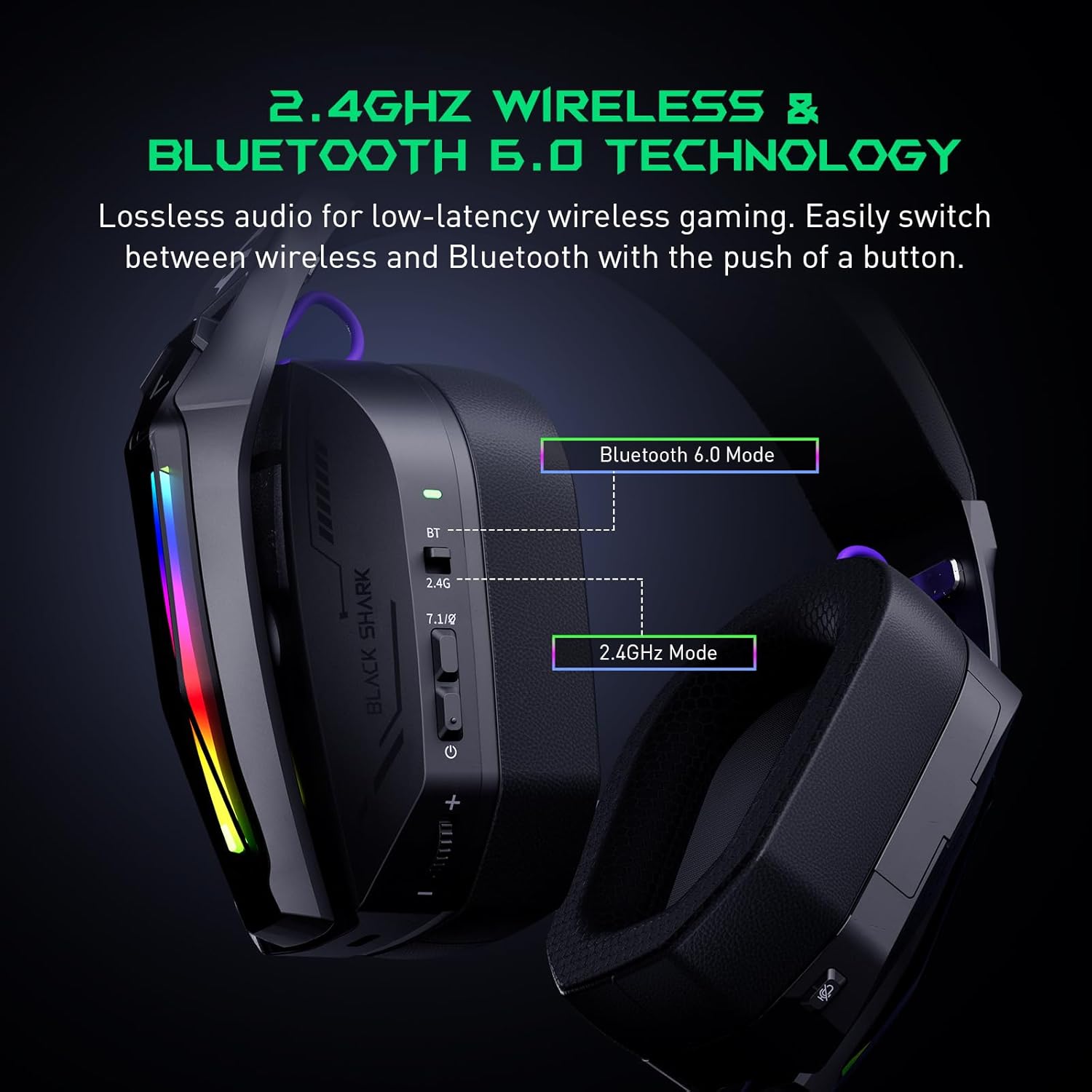
The Goblin X8 offers three connection methods: 2.4GHz wireless (via USB/Type-C dongle), Bluetooth 6.0, and a wired 3.5mm audio connection. The 2.4GHz mode provides ultra-low latency (under 20ms), ideal for competitive gaming. Bluetooth 6.0 ensures stable connectivity with under 30ms delay.


3.2 7.1 Virtual Surround Sound
Equipped with 40mm magnetic neodymium drivers and 2.4GHz lossless wireless technology, the headset delivers virtual 7.1 surround sound. This expands the audio dynamic range, providing exceptional scene reproduction and an immersive 3D sound experience in games.

3.3 Noise Cancelling Microphone
The 120° adjustable, high-sensitivity microphone features omnidirectional noise cancellation technology. This effectively suppresses background noise, ensuring clear voice capture for communication during games or chats. It includes a one-touch mic mute switch for convenience.

3.4 Wide Compatibility
This headset is compatible with a broad range of gaming devices, including PC, PS4, PS5, Switch, Xbox, laptops, tablets, TVs, iPads, and mobile phones, thanks to its triple-mode connectivity.

3.5 Ergonomic Design & Comfort
Designed for all-day comfort, the headset features an adjustable, ergonomic headband and breathable protein leather ear cups. This design reduces pressure and heat, preventing fatigue during long gaming sessions.
3.6 Long Battery Life
The gaming headphones offer up to 40 hours of battery life for continuous use without RGB lights. With RGB lights on, the battery lasts for 20 hours. A low battery alert is provided when voltage drops below 3.2V.

4. Controls and Indicators
The headset features intuitive controls for easy management of audio and settings:
- Status Indicator: Displays connection and battery status.
- 2.4G & Bluetooth Switching: Toggle between wireless modes.
- Virtual 7.1 Surround Sound On/Off: Activate or deactivate surround sound.
- Power Button: Turns the headset on/off.
- Volume Wheel: Adjusts audio volume.
- USB-C Charging Port: For charging the headset.
- Mic Mute Button: Mutes or unmutes the microphone.
- Hidden 2.4G USB Dongle: Stores the wireless dongle securely.

5. Setup
5.1 2.4GHz Wireless Connection
- Locate the hidden 2.4G USB dongle on the headset.
- Plug the USB-A or USB-C end of the dongle into your PC, PS4, PS5, or Switch.
- Slide the connectivity switch on the headset to the '2.4G' position.
- The headset will automatically connect to the dongle.
5.2 Bluetooth 6.0 Connection
- Slide the connectivity switch on the headset to the 'BT' (Bluetooth) position.
- On your device (smartphone, tablet, laptop), go to Bluetooth settings and search for 'Black Shark Goblin X8'.
- Select the headset to pair and connect.
5.3 Wired 3.5mm Audio Connection
- Connect one end of the included 3.5mm audio cable to the headset's 3.5mm jack.
- Connect the other end to the 3.5mm audio port on your device (PC, PS4, PS5, Xbox controller, Switch, etc.).
- The headset will operate in wired mode.
6. Operating Instructions
6.1 Power On/Off
- To power on, press and hold the Power Button until the status indicator lights up.
- To power off, press and hold the Power Button until the status indicator turns off.
6.2 Volume Adjustment
- Rotate the Volume Wheel up to increase volume.
- Rotate the Volume Wheel down to decrease volume.
6.3 Microphone Usage
- To use the microphone, gently pull it down from its hidden position on the earcup.
- To mute the microphone, press the Mic Mute Button. Press again to unmute.
- To store the microphone, push it back into its hidden slot.
6.4 7.1 Virtual Surround Sound
- Press the Virtual 7.1 Surround Sound On/Off button to toggle the surround sound feature.
6.5 RGB Lighting Effects
- Double-press the Virtual 7.1 Surround Sound On/Off button to turn the RGB lights on or off.
7. Maintenance
- Keep the headset clean by wiping it with a soft, dry cloth.
- Avoid exposing the headset to extreme temperatures, humidity, or direct sunlight.
- Do not attempt to disassemble or repair the headset yourself. Contact customer support for assistance.
- Store the headset in a safe place to prevent damage when not in use.
8. Troubleshooting
8.1 No Sound/Poor Sound Quality
- Ensure the headset is powered on and properly connected (2.4GHz dongle, Bluetooth, or 3.5mm cable).
- Check the volume levels on both the headset and your connected device.
- If using 2.4GHz wireless, ensure the dongle is securely plugged in and the headset is in 2.4G mode.
- If using Bluetooth, ensure the headset is paired and connected in your device's Bluetooth settings.
- Test with a different audio source or device to rule out device-specific issues.
8.2 Microphone Not Working
- Ensure the microphone is pulled down and not muted (check the Mic Mute Button).
- Verify microphone input settings on your connected device.
- Some devices (e.g., Nintendo Switch in 2.4GHz mode) may have limitations on microphone usage. Refer to the device's manual.
8.3 Connectivity Issues
- For 2.4GHz, ensure the dongle is within range and there are no major obstructions.
- For Bluetooth, ensure the headset is in pairing mode and your device's Bluetooth is enabled. Try unpairing and re-pairing.
- Ensure the headset is fully charged.
9. Specifications
| Feature | Specification |
|---|---|
| Model Name | Goblin X8 (BS-X8) |
| Connectivity Technology | Wired, Wireless (2.4GHz, Bluetooth 6.0) |
| Audio Driver Type | Dynamic Driver |
| Audio Driver Size | 40 Millimeters |
| Audio Latency | 20 Milliseconds (2.4GHz) |
| Bluetooth Version | 6.0 |
| Bluetooth Range | 10 Meters |
| Battery Life | 40 Hours (lights off), 20 Hours (lights on) |
| Charging Time | 3 Hours |
| Microphone | Noise Cancelling, 120° Adjustable |
| Special Features | Surround Sound, Volume Control, Rechargeable Battery |
| Compatible Devices | PC, PS4, PS5, Switch, Xbox, Laptops, Tablets, TVs, iPads, Mobile Phones |
| Item Weight | 325 Grams (11.5 ounces) |
10. Warranty and Support
For warranty information, technical support, or service inquiries, please refer to the official Black Shark website or contact their customer service directly. Keep your purchase receipt for warranty claims.


