
Digital Weight Scale-B22
User Manual for Generic Digital Personal Weighing Scale
Model: Digital Weight Scale-B22
Introduction
This manual provides instructions for the safe and effective use of your Generic Digital Personal Weighing Scale, Model Digital Weight Scale-B22. Please read this manual thoroughly before operating the device and retain it for future reference.
Safety Information
- Do not use this scale on slippery surfaces. Ensure the scale is placed on a firm, flat surface.
- Avoid jumping on the scale. Step on and off gently.
- Do not immerse the scale in water or other liquids. Clean with a damp cloth.
- Keep the scale away from extreme temperatures and direct sunlight.
- This scale is for personal use only and not intended for commercial or medical purposes.
- If the scale malfunctions, do not attempt to repair it yourself. Contact customer support.
Package Contents
The package should contain the following items:
- 1 x Generic Digital Personal Weighing Scale (Model: Digital Weight Scale-B22)
- 1 x User Manual (this document)
- Note: Batteries may or may not be included depending on the specific package. Please check the packaging.
Product Features
- High Accuracy & Precision: Equipped with advanced digital sensors for instant and accurate weight readings.
- Durable Tempered Glass Platform: Strong, scratch-resistant glass with an anti-slip design for safety and longevity.
- Clear LCD/LED Display: Easy-to-read digital screen with bright backlight for visibility in various lighting conditions.
- Auto ON/OFF Function: Step-on activation and automatic shutdown to conserve battery power.
- Sleek & Stylish Design: Ultra-slim, lightweight body suitable for various home environments.
Setup
- Unpack the Scale: Carefully remove the scale from its packaging.
- Install Batteries: Open the battery compartment on the underside of the scale. Insert the required batteries (typically AAA or CR2032, check compartment for type) ensuring correct polarity (+/-). Close the compartment securely.
- Placement: Place the scale on a hard, flat, and stable surface. Avoid carpets or uneven flooring, as this can affect accuracy.
- Initial Calibration (First Use): For the first use or after moving the scale, step on the scale briefly until the display shows "0.0" or a similar indication, then step off. This calibrates the scale.
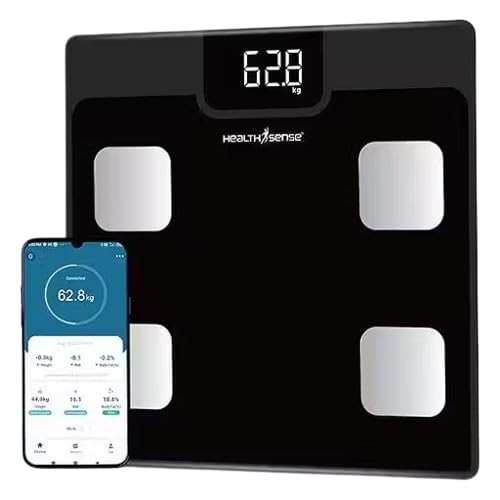
Image: The Generic Digital Personal Weighing Scale, showing its digital display and a smartphone connected via an app, illustrating its smart features and weight tracking capabilities. The scale itself is black with four silver sensor pads.
Operating Instructions
- Step On: Gently step onto the center of the scale with bare feet for best results. The scale will automatically turn on.
- Wait for Reading: Stand still on the scale. The display will show your weight. It may flash a few times before settling on a final reading.
- Step Off: Once the reading is stable, step off the scale. The display will hold the reading for a few seconds and then automatically turn off to save battery.
- Unit Conversion (if applicable): If your scale supports multiple units (e.g., kg, lb, st), there is usually a button on the underside of the scale to switch between them. Press this button while the scale is off or displaying "0.0" to change the unit.
Maintenance
- Cleaning: Wipe the scale surface with a soft, damp cloth. Do not use abrasive cleaners or immerse the scale in water.
- Battery Replacement: When the battery indicator appears on the display (if applicable) or the display becomes dim, replace the batteries with new ones of the correct type.
- Storage: Store the scale in a cool, dry place. Avoid placing heavy objects on it when not in use.
Troubleshooting
| Problem | Possible Cause | Solution |
|---|---|---|
| Scale does not turn on. | Dead or incorrectly installed batteries. | Check battery polarity. Replace batteries if necessary. |
| Inaccurate readings. | Scale on uneven surface; not calibrated; moved recently. | Place on a hard, flat surface. Perform initial calibration (step on, step off). |
| "Lo" or "Err" displayed. | Low battery; overload; internal error. | Replace batteries. Ensure weight is within scale's capacity. Recalibrate. |
Specifications
| Model Number | Digital Weight Scale-B22 |
| Brand | Generic |
| Material | Tempered Glass |
| Display Type | LCD/LED (Digital) |
| Power Source | Battery (type not specified, typically AAA or CR2032) |
| Features | Auto ON/OFF, High Precision Sensors, Anti-slip Design |
Warranty and Support
For warranty information or technical support, please refer to the contact details provided on your product packaging or purchase receipt. As this is a Generic branded product, specific warranty terms may vary by retailer.
Please keep your proof of purchase for any warranty claims.
Ask a question about this manual
Ask about setup, troubleshooting, compatibility, parts, safety, or missing instructions. Manuals+ will review the question and use this page’s manual context to help answer it.