
Introduction
The Edillas 1.57 Inch Kid Digital Watch is designed for children aged 5-16, offering a large, easy-to-read display and multiple functions. This manual provides detailed instructions for setting up and operating your watch, ensuring you can utilize all its features effectively.
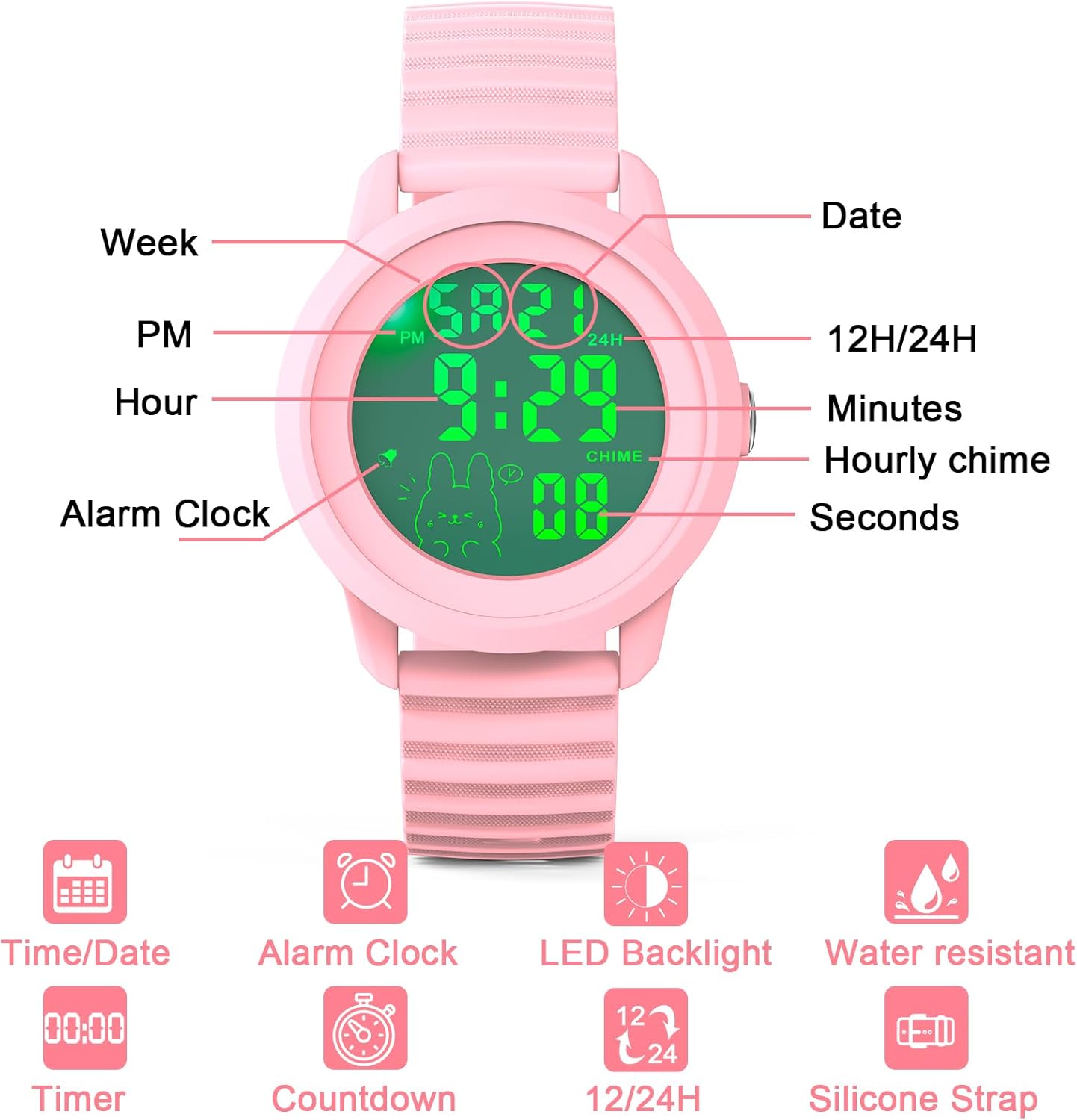
- 1.57-Inch Large Digital Display: Features oversized numerals for effortless time-telling.
- Multi-Function Digital Watch: Includes date display, 12/24-hour format, alarm, stopwatch, and countdown timer.
- LED Backlight: Allows for easy viewing in low-light conditions.
- 30m Water Resistance: Suitable for daily use like hand washing and splashes, but not for swimming or diving.
- Comfortable Adjustable Strap: Made with soft silicone for a customizable and comfortable fit.
- Durable Construction: Features a scratch-resistant reinforced resin glass lens and sturdy build.
Watch Overview
Familiarize yourself with the watch display and its various indicators.

Setup Instructions
Setting Time, Date, and Day of Week
Follow these steps to accurately set the time, date, and day of the week on your Edillas Digital Watch.
Video 1: How to set the time, date, and day of the week. This video demonstrates the process of adjusting the watch's time, date, and day settings.
12H/24H Time Format
The watch supports both 12-hour and 24-hour time formats. This setting is typically adjusted within the time setting mode. Refer to Video 1 for detailed instructions on how to switch between these formats.

Operating Instructions
Backlight Function
To activate the backlight, press and hold the 'MODE' button for 2 seconds. The backlight will illuminate the display for 3 seconds, making it visible in the dark.

Video 2: How to activate the backlight. This video demonstrates how to turn on the watch's backlight feature.
Alarm Function
The alarm feature helps set reminders. You can set a specific alarm time and choose to activate or deactivate the hourly chime.

Video 3: How to set the alarm time. This video guides you through setting a specific alarm time.
Video 4: How to turn the alarm and hourly chime on and off. This video shows how to manage the alarm and hourly chime settings.
Countdown Timer
The countdown timer is useful for various activities, from homework sessions to playtime limits.

Video 5: How to use and set the countdown function. This video demonstrates how to set and use the countdown timer.
Stopwatch Function
Use the stopwatch to measure elapsed time for sports, games, or other activities.

Video 6: How to use the stopwatch function. This video demonstrates how to operate the stopwatch.
Maintenance
Water Resistance
The Edillas Digital Watch features 30m water resistance, making it suitable for everyday activities such as hand washing, splashes, and light rain. However, it is not suitable for swimming, diving, or prolonged submersion in water. Avoid operating the buttons underwater to prevent water ingress.

Battery Life
The watch uses an imported battery designed for longevity, offering up to 5 years of use under normal conditions.

Durability
Constructed with a scratch-resistant reinforced resin glass lens and sturdy materials, the watch is built to withstand everyday bumps and minor impacts. It has passed a 2-meter drop test, ensuring functionality even after accidental drops. Please note that drop resistance data is for reference only; intentional tests are not recommended.

Troubleshooting
Turning Off Hourly Chime
If the hourly chime is active and you wish to turn it off:
- Ensure the watch is in Time Display Mode.
- Press and hold the 'MODE' button and the 'R' button simultaneously.
- Repeat the action to toggle the hourly chime on or off.
For further assistance, please refer to the alarm setting video (Video 4) or contact customer support.
Specifications
| Feature | Detail |
|---|---|
| Model Number | Edi 918 |
| Display Type | Digital |
| Screen Size | 1.57 inches |
| Water Resistance | 30m (Not for swimming/diving) |
| Strap Material | Soft Silicone |
| Clasp Type | Buckle |
| Battery | 1 Nonstandard Battery (included) |
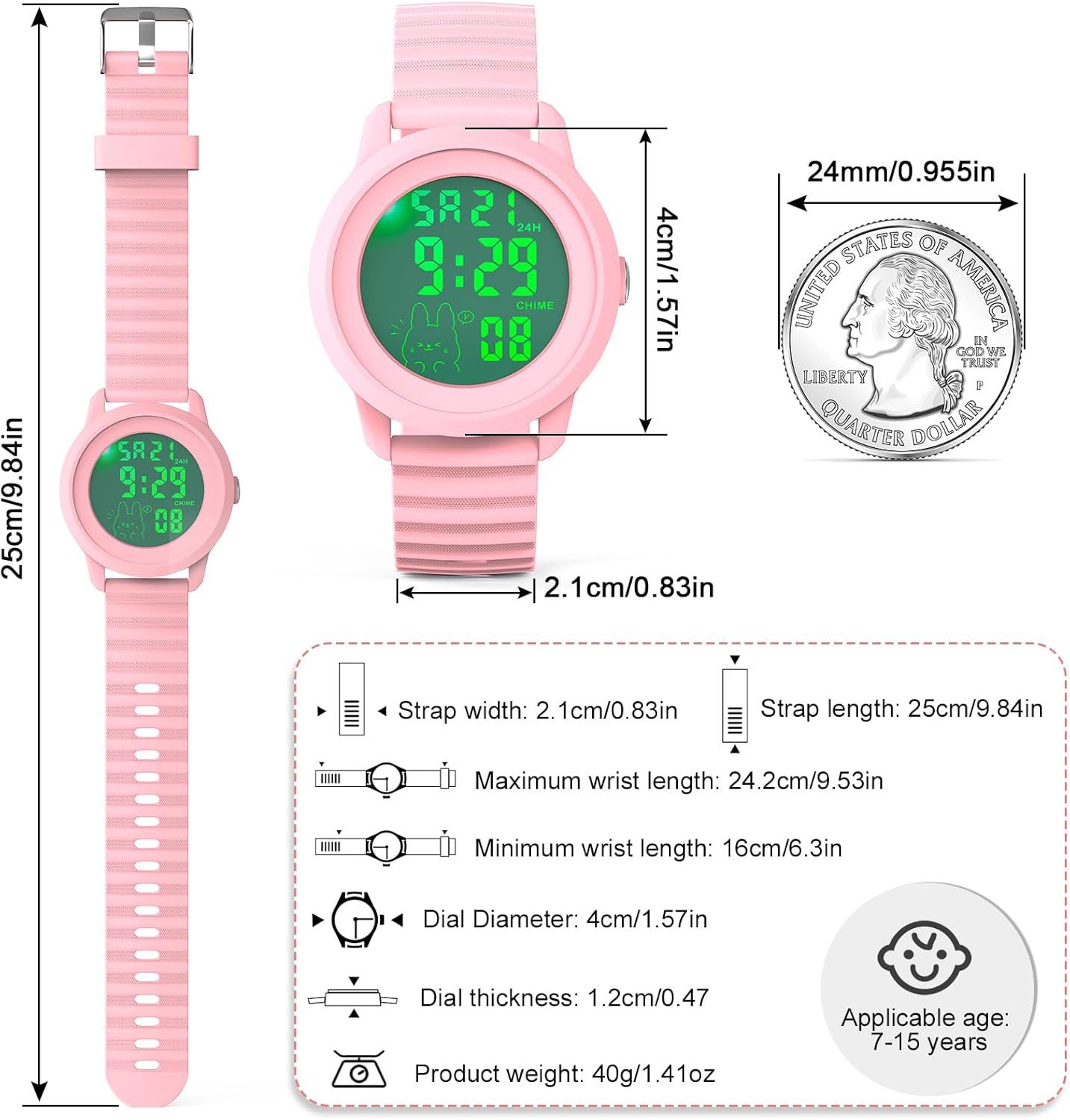
| Product Weight | 1.41 ounces (40g) |
| Dial Diameter | 1.57 inches (4cm) |
| Dial Thickness | 0.47 inches (1.2cm) |
| Strap Length | 9.84 inches (25cm) |
| Strap Width | 0.83 inches (2.1cm) |
| Applicable Age | 5-16 years |
Warranty and Support
Edillas is committed to providing reliable products and satisfactory service. Your purchase includes:
- 2-Year After-Sales Service: For any product-related issues.
- 30-Days No Reason Return: Hassle-free returns within 30 days of purchase.
- 12-Hour Online Customer Service: Dedicated support available to assist you.
If you have any questions, concerns, or require assistance, please do not hesitate to contact us.
Contact Email: yadelaiiaftersale@163.com
