
1. Introduction and Overview
The Cubitt VIVA Pro 2 Smartwatch is designed to enhance your daily life and fitness journey. It features a vibrant 1.85” AMOLED HD display, built-in GPS, and comprehensive health monitoring capabilities. This manual provides essential information for setting up, operating, and maintaining your device.
- Advanced Navigation: Built-in GPS, offline maps, barometer, and compass. Supports 5 GNSS systems (GPS, BDS, GLONASS, GALILEO, QZSS).
- 1.85” AMOLED HD Display: Ultra-bright with auto-brightness and 24-bit true color (~16.7M colors).
- Smart Health Features: 24/7 tracking of heart rate (HR), blood oxygen (SpO₂), VO₂ Max, body temperature, stress, sleep, and menstrual cycle. Includes Sleep Score and Health Snap (HR, HRV, SpO₂, stress in 90 seconds).
- Performance & Training: AI Coach, Readiness Score, and over 100 sports modes, including precise swim tracking.
- Powerful & Connected: Up to 10 days of battery life, 5ATM water resistance, Bluetooth calling, offline music with TWS support, smart notifications, and quick replies (Android only).
2. Setup Guide
2.1 Unboxing and Initial Charge
Carefully remove the smartwatch and its accessories from the packaging. Before first use, fully charge the device using the provided charging cable. Connect the magnetic end of the cable to the charging contacts on the back of the watch and the USB end to a power adapter (not included) or computer USB port.
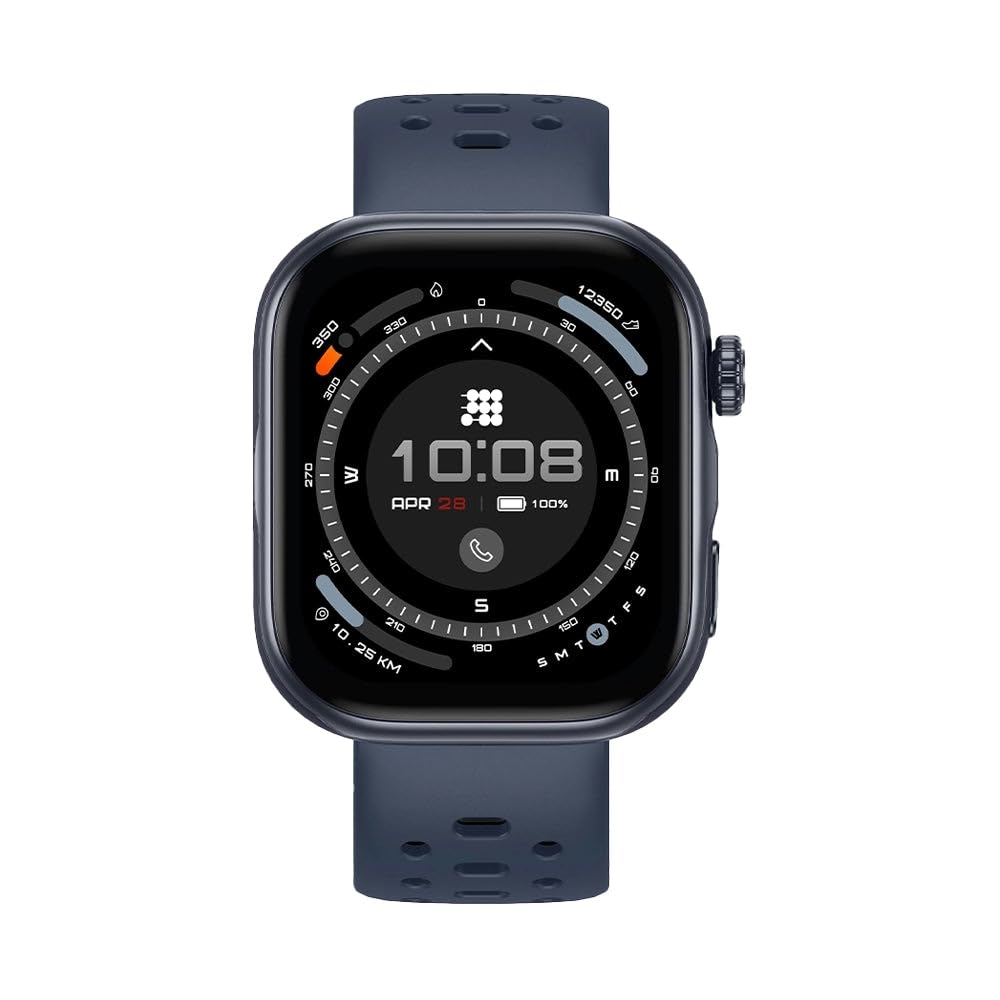
Image: The Cubitt VIVA Pro 2 Smartwatch, showcasing its sleek design and display.
2.2 App Download and Pairing
- Download the official Cubitt companion app from your smartphone's app store (iOS or Android).
- Open the app and create an account or log in.
- Ensure Bluetooth is enabled on your smartphone.
- Follow the in-app instructions to search for and pair your Cubitt VIVA Pro 2 Smartwatch. The watch will display a pairing code for verification.
- Once paired, complete your profile information within the app for accurate health and fitness tracking.
3. Operating Instructions
3.1 Basic Navigation
- Touchscreen: Swipe up, down, left, or right to navigate through menus and notifications. Tap to select.
- Side Button (Crown): Press to return to the watch face or access the app list. Rotate to scroll through menus.
- Action Button: Customizable button for quick access to your favorite sports mode or function.

Image: The Cubitt VIVA Pro 2 Smartwatch highlighting the new action button for quick access to sports modes.
3.2 Bluetooth Calling
Once paired with your smartphone, the VIVA Pro 2 supports Bluetooth calling. You can answer calls directly from your wrist, view call logs, and access your contacts. Ensure your watch is within Bluetooth range of your phone for this feature to function.
3.3 Offline Music
The smartwatch allows you to store music directly on the device for offline playback. Transfer music files from your smartphone to the watch via the companion app. You can then connect TWS (True Wireless Stereo) earbuds directly to the watch to listen to music without needing your phone.

Image: The Cubitt VIVA Pro 2 Smartwatch showing offline music controls, indicating music can be played without a phone.
4. Health Monitoring
The VIVA Pro 2 offers comprehensive health tracking features to help you monitor your well-being.
- Heart Rate (HR): Continuous 24/7 heart rate monitoring. View real-time data on your watch and detailed trends in the app.
- Blood Oxygen (SpO₂): Measure your blood oxygen saturation levels.
- Sleep Tracking: Monitors sleep stages (light, deep, REM), duration, and quality. Provides a Sleep Score to help you understand and improve your rest.
- Stress Monitoring: Tracks stress levels throughout the day.
- Body Temperature: Provides body temperature readings.
- Health Snap: A quick 90-second measurement of HR, HRV, SpO₂, and stress.
- Menstrual Cycle Tracking: For female users, track and predict menstrual cycles.

Image: The Cubitt VIVA Pro 2 Smartwatch showing a Sleep Score of 86, indicating good sleep quality and duration.
5. Sports Modes and AI Coach
The VIVA Pro 2 supports over 100 sports modes, providing detailed metrics for various activities. The built-in GPS accurately tracks your routes and distances.
- Built-in GPS: Tracks outdoor activities like running, cycling, and hiking with precision. Supports 5 GNSS systems for enhanced accuracy.
- AI Coach: Provides personalized guidance and insights to optimize your training and recovery.
- Readiness Score: Assesses your body's recovery and readiness for physical activity.
- Swim Tracking: Specifically designed for precise tracking during swimming activities, with 5ATM water resistance.

Image: The Cubitt VIVA Pro 2 Smartwatch showing an integrated dual-band GPS tracking a route over a mountainous landscape.
Video: An overview of the Cubitt VIVA Pro Smartwatch features, including its AMOLED HD screen, Bluetooth calling, built-in GPS, sports modes, and health monitoring capabilities.
6. Display and Durability
The VIVA Pro 2 features a 1.85” AMOLED HD display that is designed for clarity and durability.
- Ultra-Bright Display: Ensures readability even in direct sunlight.
- Enhanced Durability: The display is 40% more durable than previous models.
- Always-On Screen: Keep essential information visible without needing to raise your wrist.

Image: The Cubitt VIVA Pro 2 Smartwatch display, emphasizing its brightness and vibrant colors.
7. Battery Life
The Cubitt VIVA Pro 2 Smartwatch is equipped with a long-lasting battery, providing up to 10 days of use on a single charge, depending on usage patterns and enabled features.

Image: The Cubitt VIVA Pro 2 Smartwatch showing a battery icon, indicating up to 10 days of battery life.
8. Specifications
| Feature | Description |
|---|---|
| Display | 1.85” AMOLED HD, 24-bit true color |
| Navigation | Built-in GPS, Offline Maps, Barometer, Compass, 5 GNSS systems (GPS, BDS, GLONASS, GALILEO, QZSS) |
| Health Tracking | HR, SpO₂, VO₂ Max, Body Temperature, Stress, Sleep, Menstrual Cycle, Health Snap |
| Sports Modes | 100+ (including precise swim tracking) |
| Water Resistance | 5ATM |
| Battery Life | Up to 10 days |
| Connectivity | Bluetooth Calling, Offline Music with TWS support, Smart Notifications, Quick Replies (Android) |
| Item Type Name | Smartwatch |
| Item Width | 3 inches |
9. Maintenance
9.1 Cleaning Your Smartwatch
Regularly clean your smartwatch to ensure optimal performance and hygiene. Use a soft, lint-free cloth to wipe the screen and watch body. For stubborn dirt, slightly dampen the cloth with water. Avoid using harsh chemicals, abrasive materials, or compressed air.
9.2 Band Care
Clean the watch band regularly, especially after workouts or exposure to sweat. For silicone bands, use mild soap and water, then rinse thoroughly and dry completely before wearing. Avoid prolonged exposure to direct sunlight or extreme temperatures, which can damage the band material.
9.3 Water Resistance
The Cubitt VIVA Pro 2 is 5ATM water resistant, meaning it can withstand pressures equivalent to a depth of 50 meters. It is suitable for showering, swimming in shallow water, and other surface water activities. It is not suitable for scuba diving, high-speed water sports, or prolonged submersion. After exposure to saltwater, rinse the watch with fresh water and dry it thoroughly.
10. Troubleshooting
10.1 Device Not Turning On
- Ensure the watch is fully charged. Connect it to the charger for at least 30 minutes.
- Press and hold the side button for 10-15 seconds to perform a forced restart.
10.2 Pairing Issues
- Make sure Bluetooth is enabled on your smartphone and the watch is within range.
- Restart both your smartphone and the smartwatch.
- Ensure the Cubitt app is updated to the latest version.
- If previously paired, try unpairing the device from your phone's Bluetooth settings and then re-pairing through the app.
10.3 Inaccurate Health Data
- Ensure the watch is worn snugly on your wrist, about one finger's width above your wrist bone.
- Keep the sensor area on the back of the watch clean and free from debris.
- Environmental factors and individual physiology can affect sensor accuracy.
10.4 GPS Not Connecting
- Ensure you are in an open outdoor area with a clear view of the sky.
- Wait a few minutes for the watch to acquire a GPS signal.
- Check for any available firmware updates for your smartwatch via the companion app.
11. Warranty and Support
For warranty information, technical support, or service inquiries, please refer to the warranty card included with your product or visit the official Cubitt Tracking Technologies website. You can also contact customer support through the Cubitt companion app.

