
Introduction
This manual provides essential information for the safe and effective operation of your Radioddity FS-T8 FRS Two-Way Radio. Please read this manual thoroughly before using the device and retain it for future reference. The Radioddity FS-T8 is a Family Radio Service (FRS) device designed for clear, long-range communication, suitable for various outdoor activities and family use.
Package Contents
Upon unpacking, please ensure all items listed below are present and in good condition. If any items are missing or damaged, please contact Radioddity customer support.
- 4 x Radioddity FS-T8 Two-Way Radios
- 4 x Rechargeable Batteries (2000mAh)
- 4 x USB-C Charging Cables
- 4 x Belt Clips
- 4 x Lanyards
- 4 x Compasses
- 4 x Badges
- Sticker Sheets
- User Manual
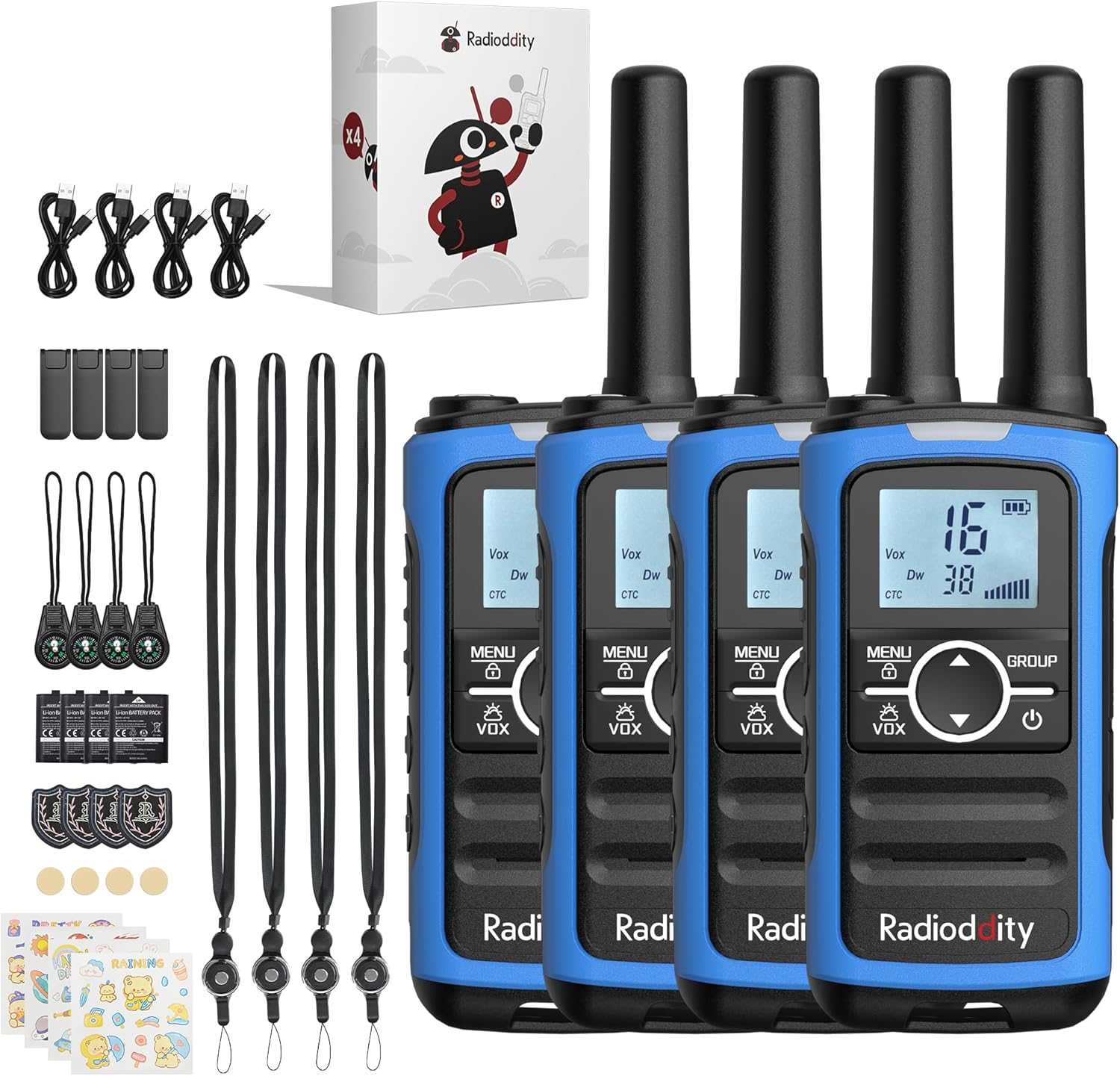
Image: A complete set of Radioddity FS-T8 walkie talkies and their accessories, laid out on a surface.
Product Overview
The Radioddity FS-T8 features a compact design with an easy-to-read backlit digital display. It includes essential functions for reliable communication and safety.

Image: A close-up of the Radioddity FS-T8 walkie talkie, highlighting its digital display and main control buttons.
Setup
Battery Installation and Charging
The FS-T8 radios come with 2000mAh rechargeable batteries. They are also compatible with 3xAA batteries (not included) for backup power.
- To install the rechargeable battery, remove the battery compartment cover on the back of the radio.
- Insert the 2000mAh rechargeable battery pack, ensuring correct polarity.
- Replace the battery compartment cover.
- To charge, connect the USB-C charging cable to the radio's USB-C port and a compatible 5V USB power adapter (not included). A full charge takes approximately 2 hours and provides up to 48 hours of continuous talk time.
- For AA battery use, open the compartment and insert 3xAA batteries, observing polarity.

Image: An illustration showing the USB-C charging port on the Radioddity FS-T8 and the option for both rechargeable and AA batteries.
Attaching Accessories
Each radio includes a belt clip and a lanyard for convenient carrying. The lanyard can be attached to either the top or bottom loop on the radio.
- Belt Clip: Slide the belt clip into the slot on the back of the radio until it clicks into place.
- Lanyard: Thread the lanyard loop through the desired attachment point (top or bottom) on the radio and secure it.
- Compass: The included compass can be attached to the lanyard. Avoid attaching the compass directly to the radio's magnetic areas, as this may affect its accuracy.
Operating Instructions
Power On/Off
To power on or off the radio, press and hold the Power button (usually marked with a power symbol) until the display lights up or turns off.
Channel Selection
The FS-T8 features 22 FRS channels. To select a channel:
- Press the MENU button once. The channel number will flash.
- Use the Up or Down arrow buttons to select your desired channel.
- Press the MENU button again to confirm your selection, or wait a few seconds for it to auto-confirm.
Group Call Function
The One-Key Group Call feature allows instant communication with all other FS-T8 radios within range, regardless of their current channel setting. This is ideal for ensuring everyone hears important messages.
- To initiate a group call, press and hold the GROUP button.
- Speak clearly into the microphone.
- Release the GROUP button to listen.

Image: A visual representation of the group call feature, demonstrating its ease of use in an outdoor family setting.
VOX (Voice Operated Transmission)
The VOX function allows for hands-free communication. When activated, the radio will transmit automatically when it detects your voice.
- To activate/deactivate VOX, press the MENU button multiple times until the VOX icon flashes.
- Use the Up or Down arrow buttons to select a VOX sensitivity level (1-3, with 3 being most sensitive) or 'OFF'.
- Press MENU to confirm.
Keypad Lock
To prevent accidental changes to settings, you can lock the keypad.
- To lock the keypad, press and hold the MENU button until the lock icon appears on the display.
- To unlock, press and hold the MENU button again until the lock icon disappears.
NOAA Weather Channels
Stay informed about hazardous weather conditions with the integrated NOAA weather channels.
- To access NOAA weather channels, press the MENU button until the NOAA icon appears.
- Use the Up or Down arrow buttons to scan through the 11 available NOAA channels. The radio will automatically select the strongest signal.
- Press MENU to exit NOAA mode.

Image: The Radioddity FS-T8 showing its NOAA weather channel feature, providing critical weather alerts.
Flashlight and SOS Alert
The FS-T8 includes a built-in flashlight and an SOS alert function for emergencies.
- To turn on/off the flashlight, press the dedicated Flashlight button on the side of the radio.
- To activate the SOS alert, press and hold the SOS button (often combined with the flashlight button or a separate dedicated button). The flashlight will flash in an SOS pattern, and an audible alert may sound.
Range Performance
The effective communication range varies based on terrain and obstructions:
- Up to 3 miles in open areas with minimal obstructions.
- Approximately 1 mile in semi-obstructed zones (e.g., light foliage, scattered buildings).
- Up to 547 yards in heavily obstructed urban environments.

Image: A graphic illustrating the varying communication ranges of the FS-T8 in different types of terrain.
Maintenance
Cleaning
To maintain your radio's performance and appearance:
- Wipe the radio with a soft, damp cloth.
- Do not use harsh chemicals or abrasive cleaners.
- Ensure all ports are dry before charging.
Battery Care
- Charge batteries fully before first use.
- Avoid overcharging or completely draining the rechargeable batteries.
- If using AA batteries, remove them if the radio will not be used for an extended period to prevent leakage.
Troubleshooting
| Problem | Possible Cause | Solution |
|---|---|---|
| No power | Battery low or not installed correctly. | Charge the rechargeable battery or replace AA batteries. Ensure batteries are installed with correct polarity. |
| Cannot communicate with other radios | Different channels or privacy codes. Out of range. | Ensure all radios are on the same channel and privacy code. Use the Group Call function. Move closer to other radios. |
| Poor audio quality | Weak signal. Obstructions. | Move to an area with fewer obstructions. Check battery level. |
| Keypad unresponsive | Keypad is locked. | Unlock the keypad by pressing and holding the MENU button. |
Specifications
| Feature | Detail |
|---|---|
| Brand | Radioddity |
| Model Number | FS-T8 (QYWRFTB01) |
| Frequency Range | FRS |
| Number of Channels | 22 |
| Talking Range Maximum | 3 Miles (unobstructed) |
| Battery Type | 2000mAh Rechargeable (included), 3xAA (not included) |
| Battery Average Life | Up to 48 Hours |
| Charging | USB-C (5V only) |
| Special Features | Integrated Flashlight, NOAA Weather Channels, One-Key Group Call, SOS Alarm, VOX (Voice Operated Transmission), Keypad Lock, 131 Privacy Codes |
| Water Resistance Level | Not Water Resistant |
| Product Dimensions | 1.18"D x 1.9"W x 5.9"H |
| Item Weight | 0.3 Pounds |
| FCC ID | 2AN62-T8 |
Warranty
The Radioddity FS-T8 FRS Two-Way Radio comes with a 19-month warranty from the date of purchase. This warranty covers manufacturing defects and malfunctions under normal use. Please retain your proof of purchase for warranty claims. For detailed warranty terms and conditions, please visit the official Radioddity website or contact customer support.
Support
For further assistance, technical support, or to inquire about replacement parts, please contact Radioddity customer service through the following channels:
- Online: Visit the official Radioddity website for FAQs, support articles, and contact forms.
- Email: Refer to your product packaging or the official website for the customer support email address.
Please have your model number (FS-T8) and purchase information ready when contacting support.


