Introduction
Thank you for choosing the Gizoon 53-Inch L-Shaped Gaming Desk. This manual provides essential information for the safe assembly, operation, and maintenance of your new desk. Please read these instructions thoroughly before beginning assembly and retain them for future reference.
Safety Information
- Always follow assembly instructions carefully.
- Ensure all connections are secure before use.
- Do not exceed the maximum weight capacity of 200 lbs for the desktop.
- Keep all electrical connections (power outlets) away from moisture and liquids to prevent electric shock.
- For safety and ease, two people are recommended for assembly.
- Adjust anti-slip foot pads to ensure stability on uneven floors.
Package Contents
Verify that all components listed below are present before beginning assembly. If any parts are missing or damaged, please contact customer support.
- All Main Desk Panels (Engineered Wood)
- Heavy-Duty Steel Frame Components
- Built-in Power Strip with 3 AC Outlets and 2 USB Charging Ports (Type-C included)
- 3 Fabric Drawers
- CPU Stand
- 2 Removable Iron Hooks
- Complete Hardware Kit (screws, bolts, etc.)
- Assembly Tools (screwdriver, Allen wrench)
- Instruction Manual
Assembly Instructions
Estimated assembly time: 30-45 minutes. Two people are recommended for the safest and most efficient assembly.
- Unpack and Identify Parts: Carefully unpack all components and lay them out. Refer to the parts list in your manual to identify each piece. All hardware is pre-packaged and labeled.
- Assemble the Steel Frame: Connect the steel frame components using the provided screws and tools. Ensure all connections are finger-tight initially.
- Attach Desktop Panels: Secure the engineered wood desktop panels to the assembled steel frame. Ensure proper alignment.
- Install Storage Shelves: The 3-shelf unit is reversible. Decide whether you want the shelves on the left or right side of the L-shape before securing them.
- Insert Fabric Drawers: Assemble the fabric drawers as per the diagram (fold and insert base). Slide them into their designated slots under the desktop.
- Mount Power Outlet: Integrate the built-in power strip into the designated slot on the desktop. Ensure the power cord is routed safely.
- Attach Hooks: Install the removable iron hooks to the side of the desk as desired.
- Final Tightening and Leveling: Once all components are in place, tighten all screws securely. Adjust the anti-slip foot pads to level the desk on uneven surfaces.

Image: Detailed product dimensions and weight capacities for the Gizoon L-Shaped Desk.

Image: Key features including removable iron hook, thicker steel tubes, waterproof desktop, and included assembly tools.

Image: Step-by-step visual guide for assembling the fabric drawers.
Video: An overview of the Gizoon 53-inch L-Shaped Desk, highlighting its features and design. This video is provided by Gizoon Direct.
Operating Instructions
Using the Built-in Power Outlets
The desk features a built-in power strip with 3 AC ports and 2 USB ports (including Type-C). To use, simply plug the desk's main power cord (6.2-foot) into a wall outlet. You can then connect your laptop, monitor, phone, and other devices directly to the desk's integrated ports.
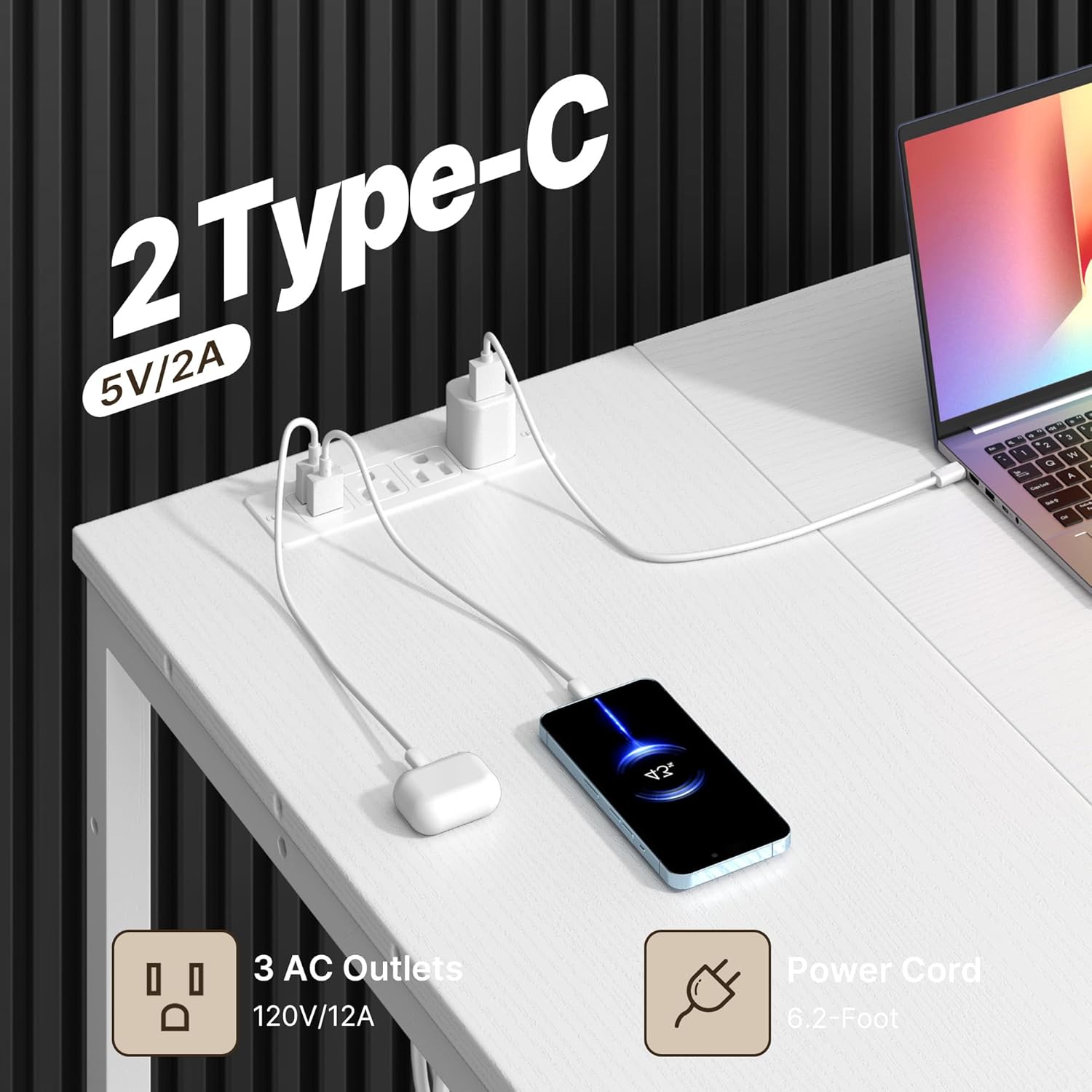
Image: Detail of the integrated power strip with AC and USB (including Type-C) charging ports.
Utilizing Storage and Reversible Design
The desk includes three fabric drawers for documents and supplies, and three storage shelves. The L-shaped design is reversible, allowing you to configure the shelf unit on either the left or right side to best fit your room layout. The shelves are suitable for storing CPUs, printers, books, or decorative items.

Image: The reversible design of the L-shaped desk, demonstrating how the shelf unit can be positioned on either side.

Image: Example of items organized on the three storage shelves, including a printer and CPU.
Maintenance
Daily Dusting & Cleaning
For routine cleaning, use a soft, dry microfiber cloth to wipe away dust and loose particles from all surfaces. For spills, immediately wipe with a slightly damp cloth and then dry thoroughly. Avoid abrasive cleaners or harsh chemicals, as these can damage the finish.
Care for Fabric Drawers
The fabric drawers can be spot cleaned with a mild detergent and a damp cloth. Allow to air dry completely before reinserting into the desk.
Troubleshooting
- Desk Wobbles: Check that all screws are securely tightened. Adjust the anti-slip foot pads on the bottom of each leg to compensate for uneven flooring.
- Power Outlets Not Working: Ensure the desk's main power cord is fully plugged into a functional wall outlet. Check if the wall outlet itself is receiving power. Avoid overloading the power strip with too many high-power devices.
- Difficulty Assembling: Review the step-by-step instructions and diagrams. Ensure you are using the correct hardware for each step. If a part seems misaligned, re-check its orientation. Contact customer support if you encounter persistent issues or believe a part is defective.
Specifications
| Brand | Gizoon |
| Model Number | DA11 |
| Product Dimensions | 39.4"D x 53.1"W x 30.7"H |
| Item Weight | 48.5 Pounds |
| Maximum Weight Recommendation | 200 Pounds |
| Material Type | Desktop & Shelves: Engineered Wood; Frame: Steel |
| Color | White |
| Number of Drawers | 3 (Fabric) |
| Number of Shelves | 3 |
| Power Outlets | 3 AC Ports, 2 USB Ports (including Type-C) |
| Special Features | Reversible Design, CPU Stand, Removable Hooks, Waterproof Desktop |
Warranty and Support
Warranty Information
The Gizoon L-Shaped Desk is backed by a 1-Year Limited Warranty against manufacturing defects in materials and workmanship under normal use. This warranty covers defects that arise from proper use of the product and does not cover damage caused by misuse, accidents, unauthorized modifications, or normal wear and tear.
Customer Support
Should you have any questions, require assistance with assembly, or encounter a missing/damaged part, please contact our dedicated customer service team. Our team is ready to assist you promptly.
For support, please visit the Gizoon Store on Amazon or refer to the contact information provided in your product packaging.


