
Introduction
The Wildgame Innovations Insite-V Cellular Trail Camera is designed to provide real-time wildlife monitoring and property surveillance. This advanced camera captures high-resolution 32 MP images and utilizes invisible infrared illumination for discreet night vision. With nationwide cellular coverage and integration with the HuntSmart app, users can receive instant updates and analyze data efficiently. This manual will guide you through the setup, operation, and maintenance of your Insite-V camera to ensure optimal performance.
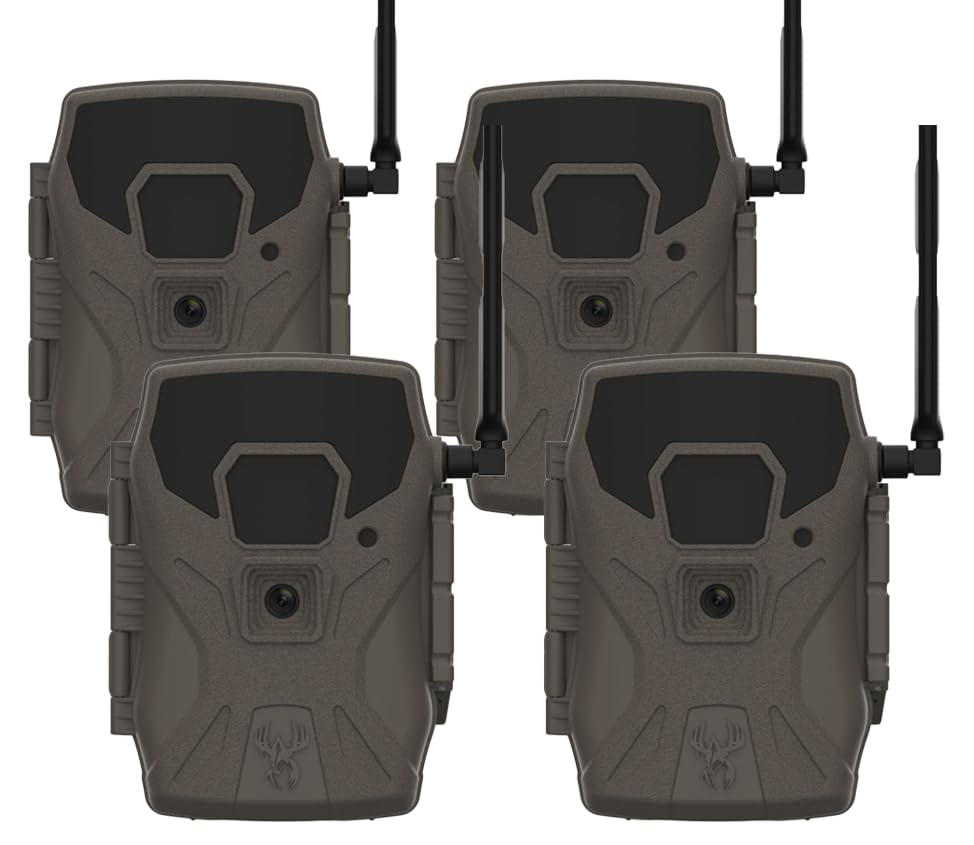
Front view of the Wildgame Innovations Insite-V Cellular Trail Camera.
Product Features
- Real-Time Wildlife Monitoring: Automatically sends high-resolution 32MP photos to your phone or desktop, providing instant scouting insights anywhere nationwide.
- Invisible Infrared Illumination: Equipped with 42 invisible black IR LEDs for discreet night shots, ensuring game remains undisturbed while delivering clear images.
- App-Integrated Smart Analysis: Compatible with the HuntSmart app, allowing for data-driven game management by filtering images by species, time, weather, and moon phase.
- Lightning-Fast Trigger Speed: Captures moments with sub-0.7-second trigger performance and up to 80 ft detection range.
- Rugged & Weather-Resistant Build: Designed with an IP54 rating to withstand moisture, dust, and temperature fluctuations, featuring a silent, noise-reduced design.
Setup Guide
1. Battery Installation
The Insite-V camera requires batteries for operation. Open the battery compartment located on the side or bottom of the camera. Insert the required number of AA batteries, ensuring correct polarity (+/-). Close the compartment securely to maintain weather resistance.
2. SD Card Insertion
Locate the SD card slot. Insert a compatible SD card (up to 32GB, Class 10 recommended) with the label facing up until it clicks into place. Ensure the card is formatted before first use via the camera's menu or the HuntSmart app.
3. Antenna Attachment
Screw the provided cellular antenna firmly into the antenna port on the top of the camera. Ensure it is tightened to prevent signal loss and maintain weather sealing.
4. Mounting the Camera
Use the included tree strap to securely mount the camera to a tree or post. Position the camera at an appropriate height and angle to capture the desired area. Ensure the camera is stable and not prone to movement from wind or animals.

A hunter adjusting the Wildgame Innovations trail camera in an outdoor setting.
5. HuntSmart App & Cellular Activation
Download the HuntSmart app from your smartphone's app store. Follow the in-app instructions to create an account, register your camera, and activate its cellular plan. This process will link your camera to your account for remote monitoring and settings management.
Operating Instructions
Powering On/Off
To power on the camera, slide the power switch to the "ON" position. The camera will perform a self-check. To power off, slide the switch to "OFF".
Basic Settings Configuration
Access the camera's menu using the control buttons. Configure settings such as:
- Mode: Select Photo, Video, or Photo+Video.
- Resolution: Set image resolution (e.g., 32MP) and video resolution.
- Trigger Delay: Adjust the time interval between detections before the camera triggers again.
- Sensitivity: Adjust PIR sensor sensitivity based on environmental conditions.
- Time & Date: Ensure accurate time and date for proper data logging.
Using the HuntSmart App
The HuntSmart app provides remote access to your camera. Through the app, you can:
- View captured images and videos.
- Change camera settings remotely.
- Monitor battery life and SD card capacity.
- Receive real-time notifications of activity.
- Utilize smart analysis features to filter and organize data.
Image and Video Capture Examples

Daytime capture of a deer in its natural habitat.

Nighttime capture of a deer using invisible infrared illumination.
Maintenance
Cleaning
Regularly clean the camera lens and PIR sensor window with a soft, lint-free cloth. Avoid abrasive materials or harsh chemicals. Wipe down the camera housing with a damp cloth to remove dirt and debris.
Battery Management
Check battery levels periodically via the HuntSmart app or the camera's display. Replace all batteries with new ones simultaneously to ensure consistent power. Do not mix old and new batteries or different battery types.
SD Card Care
Format the SD card regularly to prevent data corruption and ensure optimal performance. Back up important images and videos before formatting. Replace the SD card if you notice slow performance or errors.
Environmental Protection
While the camera is weather-resistant (IP54), avoid submerging it in water. Ensure all ports and compartments are securely closed to prevent moisture ingress. In extreme cold, battery performance may be reduced.
Troubleshooting
| Problem | Possible Cause | Solution |
|---|---|---|
| Camera not powering on | Incorrect battery installation; depleted batteries. | Check battery polarity; replace all batteries with fresh ones. |
| Camera not taking pictures/videos | SD card full or corrupted; incorrect settings; PIR sensor blocked. | Format or replace SD card; verify camera mode and trigger settings; ensure clear view for PIR sensor. |
| No cellular signal or data transmission | Poor network coverage; antenna not properly attached; cellular plan inactive. | Relocate camera to an area with better signal; ensure antenna is secure; check cellular plan status via HuntSmart app. |
| Poor image quality (blurry, dark) | Dirty lens; low light conditions; incorrect resolution settings. | Clean the lens; ensure adequate lighting or proper night mode activation; adjust resolution settings. |
| HuntSmart app not connecting to camera | Camera not powered on; cellular connectivity issues; app not updated. | Ensure camera is on and has signal; check app for updates; re-register camera if necessary. |
Specifications
| Feature | Detail |
|---|---|
| Brand | Wildgame Innovations |
| Model Name | Insite-V |
| Model Number | WGI-INSV-4PK |
| Image Resolution | 32 MP |
| Detection Range | 80 ft |
| Trigger Speed | Sub-0.7 seconds |
| Connectivity Technology | Wireless, Cellular |
| Special Feature | HD Resolution, Invisible IR LEDs |
| Indoor/Outdoor Usage | Outdoor |
| Compatible Devices | Smartphone (via HuntSmart app) |
| Mount Type | Tree Mount |
| Color | Gray |
| Power Source | Battery Powered (Batteries Required: Yes) |
| Item Dimensions | 3 x 1.5 x 8 inches |
| Item Weight | 4.9 Pounds |
| Built-In Media | Camera, Tree Strap |
| Manufacturer | GSM Outdoors |
| UPC | 888151099285 |
Warranty Information
Wildgame Innovations products are typically covered by a limited warranty against defects in materials and workmanship. For specific warranty terms, duration, and claim procedures, please refer to the warranty card included with your product or visit the official Wildgame Innovations website. Keep your purchase receipt as proof of purchase.
Customer Support
Should you encounter any issues or have questions not covered in this manual, please visit the official Wildgame Innovations website for frequently asked questions, troubleshooting guides, and contact information for customer service.
Website: www.wildgameinnovations.com