
1. Introduction
This manual provides essential information for the safe and effective installation, operation, and maintenance of the Walfront NLQ1H-63/4P Dual Power Automatic Transfer Switch (ATS). Please read this manual thoroughly before attempting to install or operate the device. Keep this manual for future reference.
The Walfront NLQ1H-63/4P ATS is designed to automatically switch between two power sources, ensuring a continuous and uninterrupted power supply for critical loads. It features both automatic and manual operation modes and is suitable for various applications including households, machinery production, and high-rise buildings.
2. Safety Information
WARNING: Electrical shock hazard. Installation and servicing should only be performed by qualified personnel.
- Always disconnect all power sources before installing or servicing the ATS.
- Ensure proper grounding of the device.
- Verify all wiring connections are secure and correct according to the wiring diagram.
- Do not operate the ATS if it appears damaged.
- Wear appropriate personal protective equipment (PPE) when working with electrical systems.
- The device housing is made of PC fire retardant material to prevent fire spread.
3. Product Overview
The Walfront NLQ1H-63/4P is a robust dual power automatic transfer switch designed for reliable power management.
Key Features:
- Automatic Power Transfer: Ensures seamless power switching between supplies for uninterrupted operation.
- Remote Operation: Equipped with a fire power interface for noiseless, energy-saving operation.
- Fireproof Housing: Constructed from PC fire retardant material to prevent fire spread and damage, ensuring safety.
- Versatile Operation: Features both automatic and manual modes for easy use and reliable performance.
- Multiple Applications: Suitable for various settings including households, machinery production, and high-rise buildings.
Components and Dimensions:
The following images illustrate the Walfront NLQ1H-63/4P ATS, highlighting its overall design and key dimensions.
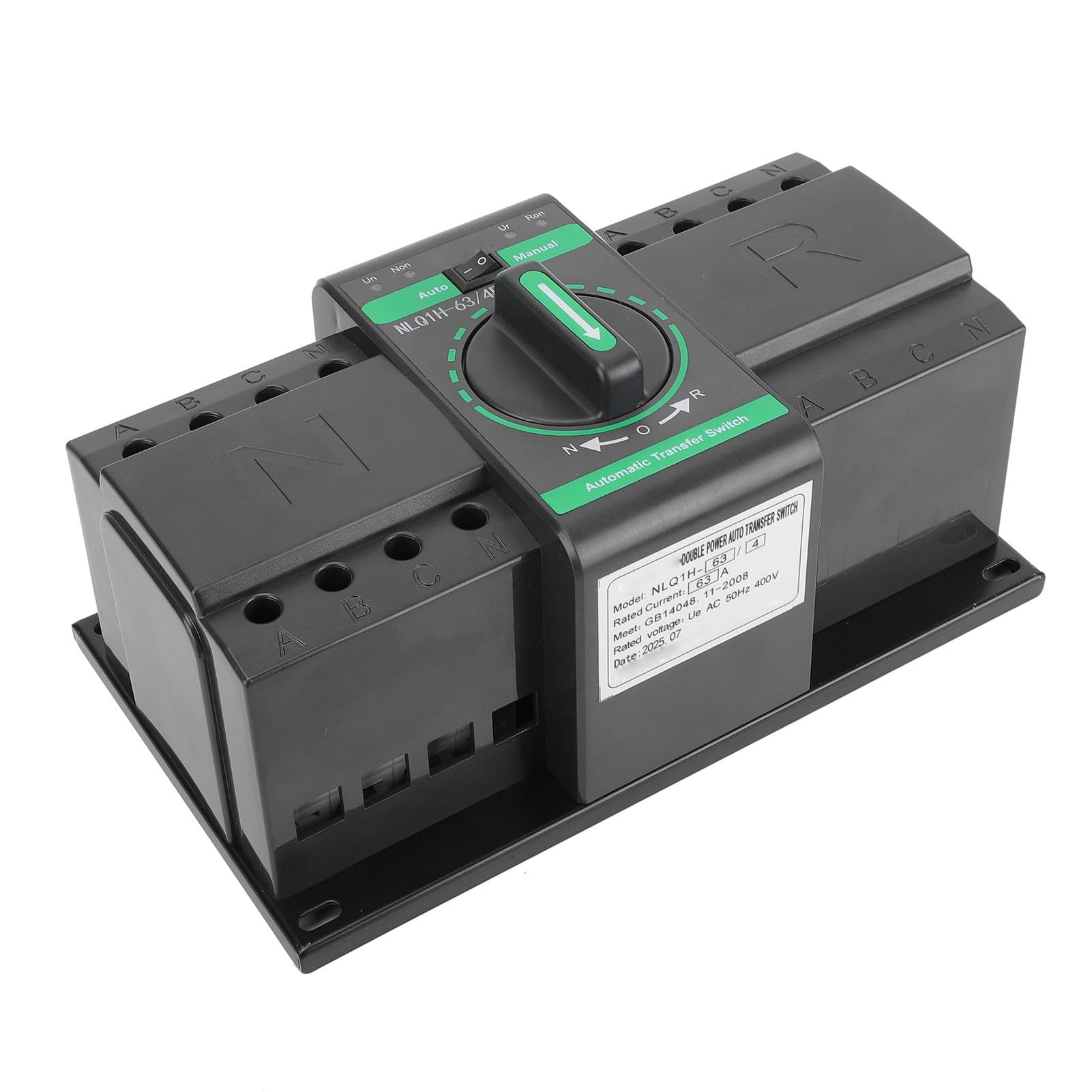
Figure 1: Front view of the Walfront NLQ1H-63/4P Automatic Transfer Switch.

Figure 2: Dimensions of the Walfront NLQ1H-63/4P Automatic Transfer Switch. The device measures approximately 235mm (9.25in) in length, 138mm (5.43in) in width, and 110mm (4.33in) in height.
For detailed component identification and wiring terminals, refer to the setup section.
4. Specifications
| Specification | Value |
|---|---|
| Model | NLQ1H-63/4P |
| Rated Voltage | AC 400V |
| Rated Current | 63A |
| Rated Frequency | 50Hz |
| Rated Short Circuit Current | 3kA |
| Mechanical Life (Automatic) | 3000 Times |
| Mechanical Life (Manual) | 1500 Times |
| Material | PC Fire Retardant, Silver |
| Item Dimensions (L x W x H) | 9.44 x 5.9 x 4.72 inches (235 x 138 x 110 mm) |
| Mounting Type | Wall Mount |
| International Protection Rating | IP20 |
| Specification Met | ISO 9001 |
5. Setup and Installation
Proper installation is crucial for the safe and reliable operation of the ATS. This device is designed for wall mounting.
Wiring Diagram and Terminal Identification:
The ATS requires connection to two separate power sources (e.g., utility grid and generator) and the load. Carefully follow the wiring diagram provided on the device and illustrated below.

Figure 3: Detailed view of the Walfront NLQ1H-63/4P ATS showing common incoming wiring terminals (N, A, B, C), backup incoming wiring terminals (N, A, B, C), common closing power indicator (Un), backup outgoing power indicator (Ur), manually switching handle, and fixed installation holes.
- Mounting: Securely mount the ATS to a wall using appropriate fasteners through the fixed installation holes. Ensure the mounting surface is stable and can support the weight of the device.
- Power Source 1 (Common Incoming): Connect the main power source (e.g., utility grid) to the terminals labeled 'N', 'A', 'B', 'C' on the left side of the switch (Common Incoming Wiring Terminal).
- Power Source 2 (Backup Incoming): Connect the backup power source (e.g., generator) to the terminals labeled 'N', 'A', 'B', 'C' on the right side of the switch (Backup Incoming Wiring Terminal).
- Load Connection: Connect the electrical load to the output terminals of the ATS.
- Control Wiring: Connect any necessary control wiring, such as for the fire power interface, to the designated terminals.
- Verification: After all connections are made, double-check all wiring for correctness and tightness. Ensure no loose wires are present.
IMPORTANT: Always consult a qualified electrician for installation to ensure compliance with local electrical codes and safety standards.
6. Operating Instructions
The Walfront NLQ1H-63/4P ATS offers both automatic and manual operation modes.
Operating Modes:
- Automatic Mode (Auto): In this mode, the ATS will automatically detect the availability of power from both sources and switch to the preferred source. If the primary source fails, it will automatically transfer to the backup source. When the primary source is restored, it will switch back. To select automatic mode, turn the central rotary handle to the 'Auto' position. The 'Un' indicator (Common closing power indicator) and 'Ur' indicator (Backup outgoing power indicator) will illuminate to show the active power source.
- Manual Mode (Manual): This mode allows for manual switching between power sources. To select manual mode, turn the central rotary handle to the 'Manual' position. You can then manually switch between the 'N' (Normal/Common) and 'R' (Reserve/Backup) positions using the handle. This mode is useful for maintenance or specific operational requirements.
The central rotary handle on the front of the device (see Figure 3) is used to select between 'Auto' and 'Manual' modes, and for manual switching between 'N' and 'R' positions when in manual mode.
7. Maintenance
Regular maintenance helps ensure the longevity and reliable operation of your ATS.
- Visual Inspection: Periodically inspect the ATS for any signs of physical damage, loose connections, or overheating.
- Cleaning: Keep the device clean and free from dust and debris. Use a dry, soft cloth for cleaning. Do not use liquid cleaners.
- Terminal Tightness: Annually, or as needed, check the tightness of all terminal connections to prevent arcing and overheating.
- Functional Test: Periodically test the automatic transfer function by simulating a primary power failure (if safe to do so) to ensure it switches correctly to the backup source.
CAUTION: Always disconnect power before performing any maintenance or cleaning.
8. Troubleshooting
If you encounter issues with your Walfront NLQ1H-63/4P ATS, refer to the following common troubleshooting steps:
| Problem | Possible Cause | Solution |
|---|---|---|
| ATS does not transfer power automatically. | ATS is in manual mode. No power detected from primary or backup source. Faulty control wiring. | Switch to 'Auto' mode. Check power supply to both sources. Inspect control wiring for damage or incorrect connections. |
| No power to load. | Both power sources are off. Loose load connections. Internal fault. | Verify both power sources are active. Check and tighten load wiring connections. Contact qualified service personnel. |
| Indicators not illuminating. | No power to the ATS. Faulty indicator light. | Check power supply to the ATS. If power is present, the indicator may need replacement (contact support). |
If the problem persists after attempting these solutions, contact Walfront customer support or a qualified electrician.
9. Warranty and Support
For warranty information, technical support, or service inquiries regarding your Walfront NLQ1H-63/4P Dual Power Automatic Transfer Switch, please contact Walfront customer service through their official channels. Refer to your purchase documentation or the Walfront website for specific warranty terms and contact details.
Walfront Customer Support:
- Visit the Walfront Store on Amazon for more information.
- Refer to your product packaging for direct contact information.