
Introduction
This manual provides detailed instructions for the safe and effective use of your ALSTU N-W5113 Rechargeable Spotlight Flashlight. Please read this manual thoroughly before operating the device and retain it for future reference.

Image: The ALSTU N-W5113 spotlight demonstrating its powerful beam across a wide outdoor landscape at night.
What's in the Box
Verify that all items are present in the package:
- 1x ALSTU N-W5113 Spotlight Flashlight
- 1x Built-in Rechargeable Battery
- 1x USB Charging Cable
- 1x Lanyard
- 1x User Manual (this document)
- 3x Colored Lenses (Blue, Red, Yellow)
- 1x Lens Holder
- 1x Shoulder Strap
Product Features
- High Brightness: Equipped with a P90.9 chip, providing up to 2,000,000 lumens and a beam distance of 2,000 meters (6,000 ft).
- Dual Charging Options: Features both USB and solar panel charging for versatility.
- Multiple Lighting Modes: Includes 3 main spotlight modes (High, Medium, Strobe) and 3 COB side light modes (High, Medium, Red & Blue Strobe).
- Color Filters: Comes with red, yellow, and blue filters for specialized lighting needs.
- Hands-Free Design: Includes an adjustable tripod and shoulder strap.
- Durable Construction: IPX5 waterproof rating and constructed from aluminum alloy and ABS for ruggedness.
- Power Bank Function: Can be used to charge other devices via its USB output port.

Image: Detailed diagram of the ALSTU N-W5113 spotlight, highlighting components such as the main light, USB ports, solar panel, side light, power display, P90 LED chip, button switch, and anti-slip handle.
Setup
Initial Charge
Before first use, fully charge the spotlight using the provided USB cable. Connect the USB cable to the charging port on the device and to a standard USB power adapter (not included). The power display indicators will show charging progress.
Attaching the Shoulder Strap
Attach the included shoulder strap to the designated loops on the spotlight for easier carrying and hands-free operation.
Using Color Filters
To use a color filter, place the desired colored lens into the lens holder and attach it securely over the main light. These filters are useful for signaling, fishing, or enhancing night vision.
Operating Instructions
Power Button Operation
The spotlight features a single button switch for controlling all lighting modes. Press the button repeatedly to cycle through the available modes.
- Main Spotlight Modes: High Beam → Medium Beam → Strobe.
- COB Side Light Modes: High → Medium → Red & Blue Strobe (Safety Warning Mode).
To turn off the flashlight, continue pressing the button until all modes have cycled and the light turns off. Alternatively, some models may allow a long press to turn off directly from any mode.

Image: Visual representation of the six lighting modes: High, Medium, and Strobe for the main beam, and High, Medium, and Red & Blue Strobe for the side COB light.
Using Color Filters
Once a color filter is attached, activate the main spotlight. The light will project through the chosen filter, providing red, yellow, or blue illumination as needed. These are particularly useful for specific tasks such as night fishing (red/blue), signaling (red), or reducing glare.

Image: The ALSTU N-W5113 spotlight demonstrating its main light with white, red, blue, and yellow color filters, alongside its integrated solar panel.
Hands-Free Operation
Utilize the adjustable tripod for stable, stationary lighting. The shoulder strap allows for comfortable carrying and hands-free use during activities like hiking or patrolling.
Charging Instructions
USB Charging
Connect the provided USB cable to the spotlight's USB charging port and to a 5V USB power source. A full charge typically takes 4-5 hours. The power indicator lights will show the battery level.
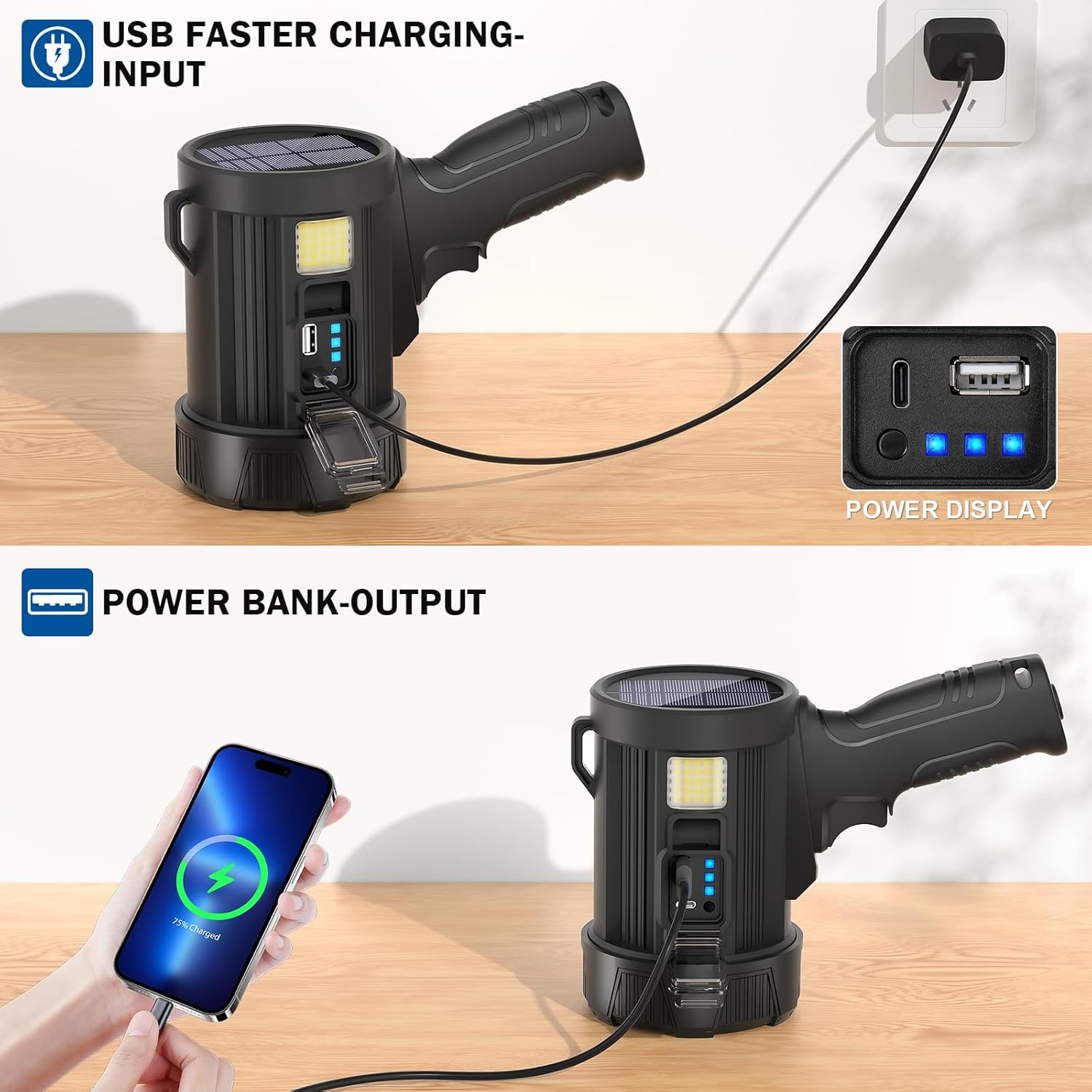
Image: The ALSTU N-W5113 spotlight illustrating its USB charging input and its capability to function as a power bank for charging other devices.
Solar Charging
For outdoor use, the integrated solar panel can provide continuous charging when exposed to direct sunlight. This is ideal for extending battery life during prolonged outdoor activities or emergencies. Solar charging efficiency depends on sunlight intensity.

Image: The ALSTU N-W5113 spotlight showcasing its solar panel charging capability while outdoors in sunlight.
Power Bank Function
The spotlight can also serve as a power bank. Connect your mobile device or other USB-powered gadgets to the USB output port on the spotlight to charge them.
Maintenance
- Cleaning: Wipe the spotlight with a soft, damp cloth. Do not use abrasive cleaners or solvents.
- Storage: Store the device in a cool, dry place away from direct sunlight when not in use for extended periods.
- Battery Care: To prolong battery life, avoid fully discharging the battery frequently. Recharge the battery at least once every three months if stored.
- Water Resistance: The spotlight has an IPX5 waterproof rating, meaning it is protected against low-pressure water jets from any direction. It is not designed for submersion. Ensure all port covers are securely closed to maintain water resistance.

Image: The ALSTU N-W5113 spotlight operating in rainy conditions, highlighting its IPX5 waterproof design.
Troubleshooting
| Problem | Possible Cause | Solution |
|---|---|---|
| Flashlight does not turn on. | Battery is depleted. | Charge the spotlight using the USB cable or solar panel. |
| Flashlight does not charge. | USB cable is faulty or not properly connected. Power source is not active. Solar panel is not exposed to sufficient sunlight. | Ensure USB cable is securely connected and functional. Try a different USB power source. Place the spotlight in direct sunlight for solar charging. |
| Light output is dim. | Battery is low. Lens is dirty. | Recharge the battery. Clean the lens with a soft cloth. |
| Cannot cycle through all modes. | Button malfunction or temporary software glitch. | Try pressing the button firmly. If the issue persists, contact customer support. |
Specifications
| Feature | Detail |
|---|---|
| Model Number | N-W5113 |
| Light Source | P90.9 LED Chip (Main Light), COB (Side Light) |
| Brightness | Up to 2,000,000 Lumens (Main Light) |
| Beam Distance | 2,000 meters (6,000 ft) |
| Battery Capacity | 9,600mAh (Built-in) |
| Charging Time (USB) | 4-5 hours |
| Charging Methods | USB, Solar Panel |
| Water Resistance | IPX5 |
| Material | Aluminum Alloy + ABS |
| Weight | 0.62 Kilograms |
| Included Accessories | USB Cable, Lanyard, 3 Color Filters, Lens Holder, Shoulder Strap |
Warranty and Support
Warranty Information
This ALSTU N-W5113 Spotlight Flashlight comes with a Three-YEAR Warranty from the date of purchase. This warranty covers manufacturing defects and malfunctions under normal use.
Customer Support
For any issues, including malfunctions, lost accessories, or damaged packaging, please contact ALSTU customer service directly through Amazon. Our team of engineers is available 24/7 to provide professional assistance.
For further assistance, please visit the ALSTU Store on Amazon.
Product Videos
ALSTU Spotlight Demonstration
Video: A brief demonstration of the ALSTU spotlight's brightness and beam in an outdoor setting. This video is a 5-second preview from the seller.