
1. Introduction
Thank you for choosing the Feelfunn 27QT Portable 12V Refrigerator/Freezer. This appliance is designed to provide reliable cooling and freezing for various applications, including vehicles, camping, and home use. Please read this manual thoroughly before operating the unit to ensure proper use, optimal performance, and safety.
2. Safety Information
Observe the following safety precautions to prevent injury and damage to the appliance:
- Ensure the power supply voltage matches the specifications of the refrigerator.
- Do not operate the unit if the power cord is damaged. Contact customer support for replacement.
- Keep the ventilation openings clear of obstructions to ensure proper airflow.
- Do not use electrical appliances inside the storage compartments unless they are of the type recommended by the manufacturer.
- Avoid placing the unit in direct sunlight or near heat sources.
- Do not immerse the refrigerator in water or expose it to heavy rain.
- Disconnect the power supply before cleaning or performing maintenance.
- This appliance is not intended for use by persons (including children) with reduced physical, sensory or mental capabilities, or lack of experience and knowledge, unless they have been given supervision or instruction concerning use of the appliance by a person responsible for their safety.
3. Package Contents
Verify that all items are present in the package:
- 1 x 27 Quart Portable Refrigerator
- 1 x DC Power Cord (12V/24V)
- 1 x AC Adapter (110-240V)
- 1 x User Manual
- 1 x Ice Pack

Image: Included components in the package.
4. Product Features
The Feelfunn 27QT Portable Refrigerator/Freezer offers several key features for convenience and performance:
- Fast Cooling & Deep Freeze: Achieves 32°F (0°C) in 15 minutes and -4°F (-20°C) in 45 minutes from 77°F (25°C) ambient temperature.
- Smart APP Control: Adjust temperature, switch modes, and monitor battery level remotely via a smartphone application (iOS/Android).
- Extended Freshness: Maintains cold temperatures for up to 50 hours during power outages with the included ice pack and superior insulation.
- Energy Efficiency: Operates at only 28W in ECO mode, consuming less than 1 kWh per day.
- Quiet Operation: Runs at a low noise level of 45dB, ensuring minimal disturbance.
- All-Terrain Stability: Equipped with four anti-shake anchor points for secure placement and consistent cooling on slopes up to 40° or rough roads.
- 3-Level Battery Protection: Prevents vehicle battery drain with adjustable voltage cut-off settings.
- Reversible Doors: Allows for flexible access and configuration.
- Sturdy Handles & Cup Holders: Designed for portability and convenience.

Image: Overview of the Feelfunn 27QT Portable Refrigerator/Freezer.

Image: The refrigerator's ability to maintain temperature for up to 50 hours with the built-in ice pack during a power outage.

Image: Capacity and dimensions of the 27QT model.

Image: Fast cooling capabilities and low noise operation.

Image: The refrigerator's anti-shake design for stable operation on uneven surfaces.

Image: Detailed view of sturdy handles, thick insulation, cup holders, and reversible doors.
5. Setup
- Unpacking: Carefully remove the refrigerator from its packaging. Inspect for any shipping damage. Retain packaging for future transport or storage.
- Initial Placement: Place the unit on a flat, stable surface. Ensure adequate ventilation around the unit, especially around the air inlets and outlets.
- Power Connection:
- DC Power (12V/24V): Connect the DC power cord to the refrigerator's DC input port and then to your vehicle's 12V/24V cigarette lighter socket or a portable power station.
- AC Power (110-240V): Connect the AC adapter to the refrigerator's AC input port, then plug the AC adapter into a standard wall outlet.
- First Use: For optimal performance, it is recommended to run the refrigerator empty for a few hours to allow it to reach the desired temperature before loading it with contents.

Image: Various power connection methods for the refrigerator.
6. Operating Instructions
The refrigerator features an intuitive control panel and can also be managed via a smartphone app.
6.1 Control Panel Overview
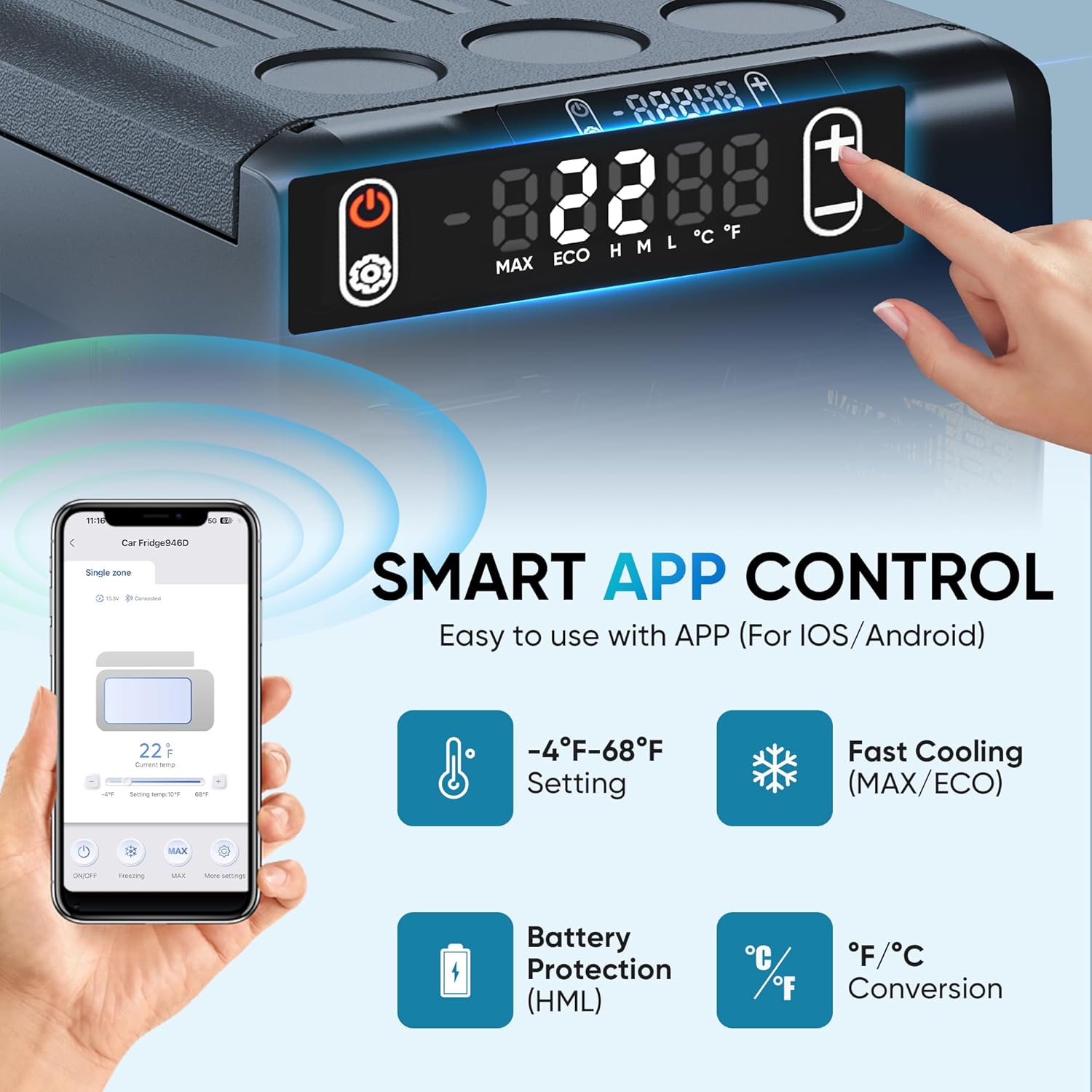
Image: Control panel and smartphone app interface.
The control panel typically includes:
- Power Button: Turns the unit ON/OFF.
- SET Button: Enters temperature setting mode or cycles through other settings.
- +/- Buttons: Adjusts the temperature or setting values.
- Display: Shows current temperature, mode (ECO/MAX), and battery protection level (H/M/L).
6.2 Temperature Setting
- Press the SET button once. The temperature display will flash.
- Use the +/- buttons to set the desired temperature.
- Wait a few seconds for the display to stop flashing, and the new temperature will be set.
6.3 ECO and MAX Modes
The refrigerator offers two operating modes:
- ECO Mode (Energy Saving): Operates at 28W for reduced power consumption, ideal for maintaining temperature over longer periods.
- MAX Mode (Fast Cooling): Operates at 40W for rapid cooling or freezing, suitable when quick temperature changes are needed.
To switch between modes, press the SET button multiple times until the desired mode (ECO or MAX) is highlighted on the display, or use the smartphone app.

Image: ECO and MAX cooling modes and their recommended uses.
6.4 Celsius/Fahrenheit Conversion
To switch between Celsius (°C) and Fahrenheit (°F):
- With the unit ON, press and hold the SET button for approximately 3-5 seconds.
- The display will show "E1" or a similar code. Continue pressing SET until you see "F1" or "F2".
- Use the +/- buttons to select "C" for Celsius or "F" for Fahrenheit.
- Wait for the display to return to the temperature reading.
6.5 Battery Protection Settings
The unit features a 3-level battery protection system to prevent your vehicle's battery from draining. You can select High (H), Medium (M), or Low (L) protection levels.
- High (H): Highest cut-off voltage, ideal for protecting the vehicle battery.
- Medium (M): Standard protection.
- Low (L): Lowest cut-off voltage, allows for longer operation but with higher risk of battery drain.
To adjust the battery protection level:
- With the unit ON, press and hold the SET button for approximately 3-5 seconds.
- The display will show "E1" or a similar code. Continue pressing SET until you see "H", "M", or "L".
- Use the +/- buttons to select the desired protection level.
- Wait for the display to return to the temperature reading.

Image: Battery protection voltage levels.
7. Smart APP Control
The Feelfunn refrigerator can be controlled via a dedicated smartphone application. This allows for remote temperature adjustment, mode switching, and battery monitoring.
- Download the App: Search for the "Feelfunn" app in your device's app store (iOS/Android) and install it.
- Pairing: Follow the in-app instructions to pair your smartphone with the refrigerator via Bluetooth. Ensure Bluetooth is enabled on your phone.
- Remote Control: Once paired, you can use the app to:
- Adjust the target temperature.
- Switch between ECO and MAX cooling modes.
- Monitor the current temperature inside the unit.
- Check the battery protection level.
Video: Demonstration of the Feelfunn portable refrigerator's smart app control features, showing how to adjust settings remotely.
8. Maintenance
Regular maintenance ensures the longevity and efficiency of your portable refrigerator.
8.1 Cleaning
- Disconnect the power supply before cleaning.
- Wipe the interior and exterior surfaces with a damp cloth and a mild detergent. Avoid abrasive cleaners or solvents.
- Ensure the unit is completely dry before reconnecting power.
- Clean the ventilation openings regularly to prevent dust buildup, which can affect cooling performance. Use a soft brush or vacuum cleaner.
8.2 Defrosting
Frost may accumulate on the interior cooling surfaces, especially in humid conditions or when operating as a freezer. Defrost the unit when the frost layer becomes thick (approximately 0.2 inches or 5mm).
- Turn off the refrigerator and disconnect it from the power supply.
- Remove all contents and leave the lid open.
- Allow the frost to melt naturally. Do not use sharp objects or heating devices to speed up defrosting, as this can damage the unit.
- Wipe away melted water with a clean cloth.
- Ensure the interior is completely dry before restarting the unit.
9. Troubleshooting
If you encounter issues with your refrigerator, refer to the table below for common problems and solutions.
| Problem | Possible Cause | Solution |
|---|---|---|
| Unit does not turn on | No power supply; Damaged power cord; Blown fuse in vehicle; Battery protection activated. | Check power connections; Inspect power cord; Check vehicle fuse; Adjust battery protection level (L). |
| Insufficient cooling | Lid not closed properly; Overloaded with warm items; Poor ventilation; ECO mode selected; Ambient temperature too high. | Ensure lid is sealed; Allow warm items to cool before loading; Clear ventilation; Switch to MAX mode; Move unit to cooler environment. |
| Display shows error code | Internal fault. | Note the error code and contact customer support. |
| Excessive noise | Unit not level; Fan obstruction. | Place on a flat surface; Check for obstructions around the fan. |
| App not connecting | Bluetooth off; App not installed; Unit not powered on; Interference. | Ensure Bluetooth is on; Reinstall app; Power on unit; Move closer to unit. |
10. Specifications
| Feature | Specification |
|---|---|
| Brand | Feelfunn |
| Model Number | CF027-25 |
| Capacity | 27 Quarts (25 Liters) |
| Product Dimensions | 13.1"D x 24.3"W x 14.3"H (33.3 x 61.7 x 36.3 cm) |
| Item Weight | 23.4 Pounds (10.6 kg) |
| Voltage | 12 Volts (DC), 110-240 Volts (AC) |
| Cooling Range | -4°F to 68°F (-20°C to 20°C) |
| Noise Level | <45 dB |
| Energy Consumption (ECO Mode) | 28W (<1 kWh/day) |
| Special Features | 50 Hours Still Keep Cool, Anti-Shake, App Control, Energy Efficient, Low Noise |
| Certification | ETL |
11. Warranty and Support
This Feelfunn portable refrigerator comes with a 1-year warranty from the date of purchase, covering manufacturing defects. Please retain your proof of purchase for warranty claims.
For technical assistance, troubleshooting not covered in this manual, or warranty inquiries, please contact our customer support team. Our support team is available to help with any questions or concerns you may have.
Contact information can typically be found on the product packaging or the official Feelfunn website.


