
1. Introduction
This manual provides detailed instructions for the safe and efficient use of your Qubo X232 phone. Please read this manual thoroughly before operating the device and retain it for future reference.
2. Product Overview
The Qubo X232 is a 4G mobile phone designed for ease of use, featuring a large 2.3-inch screen, loud audio, and a dedicated SOS emergency button. Its robust 1700mAh battery ensures extended usage, and the unlocked status provides compatibility with various Mexican carriers.
2.1. Package Contents
- Qubo X232 Phone
- 1700mAh Battery
- USB Type-C Charging Cable
- USB OTG Adapter
- User Manual
3. Key Features
- Clear Display & Simple Operation: Features a 2.3-inch color screen for enhanced readability, large illuminated buttons with voice prompts, and a simplified user interface for straightforward navigation. Includes side buttons for keypad lock/unlock and volume control.
- SOS Emergency Function: A dedicated SOS button allows for automatic dialing to up to 5 pre-set emergency contacts and simultaneous alert message sending.
- Loud Audio & Clear Calls: Equipped with a high-volume speaker for improved audibility in various environments. Supports 3.5mm headphones and Bluetooth accessories.
- Efficient 1700mAh Battery: Offers extended battery life, providing up to 14 days of standby time depending on usage. Features a reversible USB Type-C port for convenient charging.
- Unlocked & Wide Compatibility: Compatible with major Mexican carriers including Telcel, AT&T, Movistar, BAIT, CFE, and Altan. Supports 4G, 3G, and 2G networks, and accepts 5G SIM cards operating on 4G.
- Integrated Tools: Includes FM radio (usable without headphones), camera, multimedia player, alarm, calendar, calculator, call recorder, SMS, and photo contacts.
- Compact & Ergonomic Design: Dimensions of 132.1 x 58.2 x 14.1 mm and a weight of approximately 110 grams ensure comfortable handling and portability.
4. Setup
4.1. Installing the SIM Card and Battery
- Carefully remove the back cover of the phone.
- Insert your Nano SIM card(s) into the designated slot(s). Ensure the gold contacts face downwards and the card is correctly oriented.
- If desired, insert a MicroSD card (up to 64GB) into its dedicated slot for expanded storage.
- Place the 1700mAh battery into the battery compartment, aligning the contacts.
- Replace the back cover until it clicks securely into place.
4.2. Initial Charging
Before first use, fully charge the phone battery. Connect the USB Type-C cable to the phone's charging port and the other end to a compatible USB power adapter. The charging indicator will show the battery status. A full charge typically takes a few hours.

The Qubo X232 features a 1700mAh battery for extended use, with convenient Type-C charging.
4.3. Powering On/Off
- To Power On: Press and hold the Power/End Call button (usually red) until the screen lights up.
- To Power Off: Press and hold the Power/End Call button until the power-off options appear, then select 'Power Off'.
5. Operating Instructions
5.1. Basic Navigation
Use the directional keys (up, down, left, right) to navigate through menus. The 'OK' button (center) confirms selections, and the 'Back' button (often the right soft key) returns to the previous screen.

The Qubo X232 features a user-friendly, multi-language menu with voice prompts for keys, enhancing ease of use.
5.2. Making and Receiving Calls
- To Dial: Enter the phone number using the keypad and press the Green Call button.
- To Answer: When the phone rings, press the Green Call button.
- To End Call: Press the Red End Call button.
- Speed Dial: Assign frequently called numbers to specific keys for quick dialing. Refer to the 'Phone Settings' menu for setup.
- Photo Contacts: Store contacts with associated photos for easy visual identification.
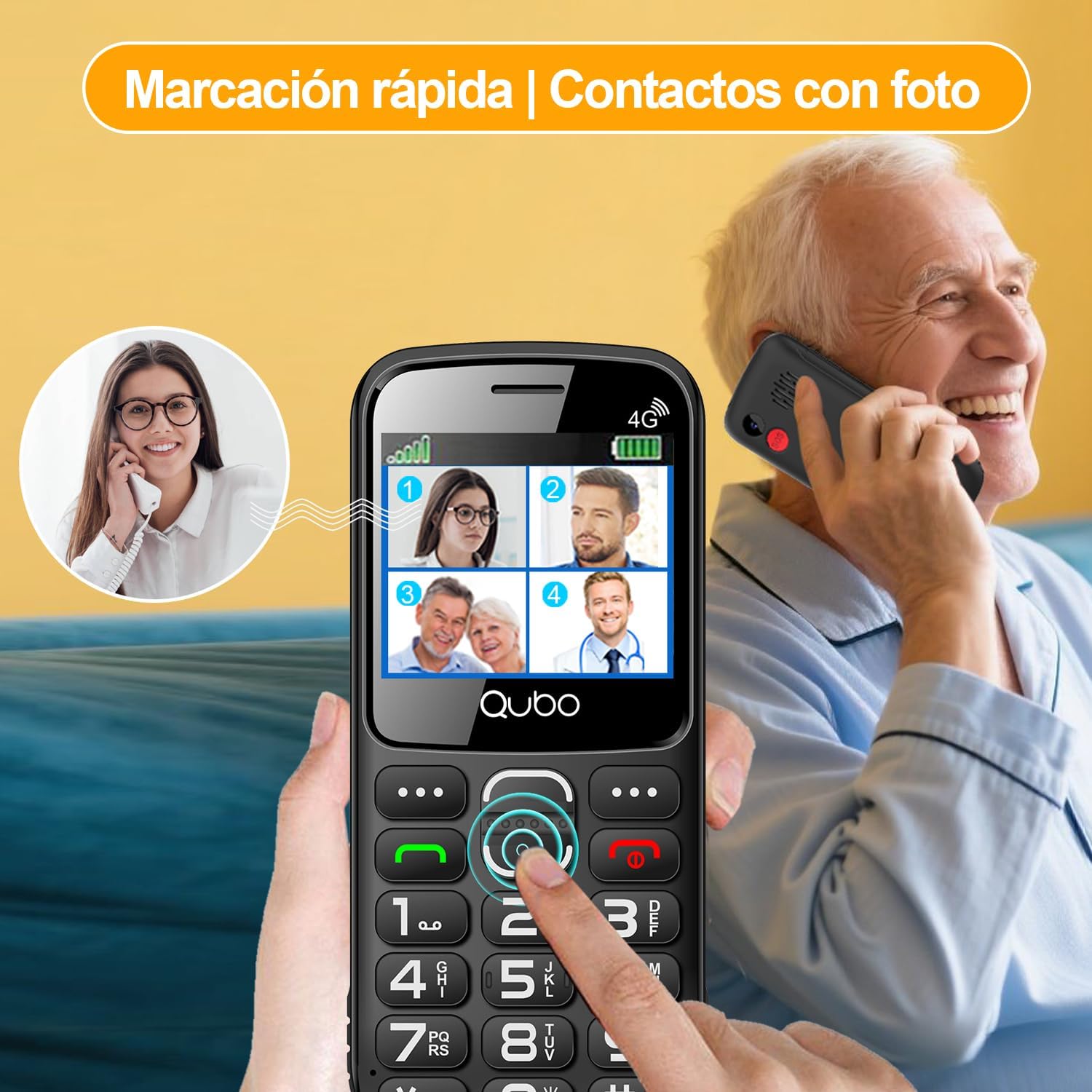
Quick dial and photo contacts on the Qubo X232 simplify calling for users, allowing them to recognize contacts visually.
5.3. SOS Emergency Button
The SOS button is located on the back of the phone. In an emergency:
- Press and hold the SOS button for a few seconds.
- The phone will automatically dial up to 5 pre-set emergency contacts in sequence until one answers.
- Simultaneously, an alert message will be sent to these contacts.
To set up SOS contacts: Navigate to Menu > SOS Settings and add/edit emergency numbers.
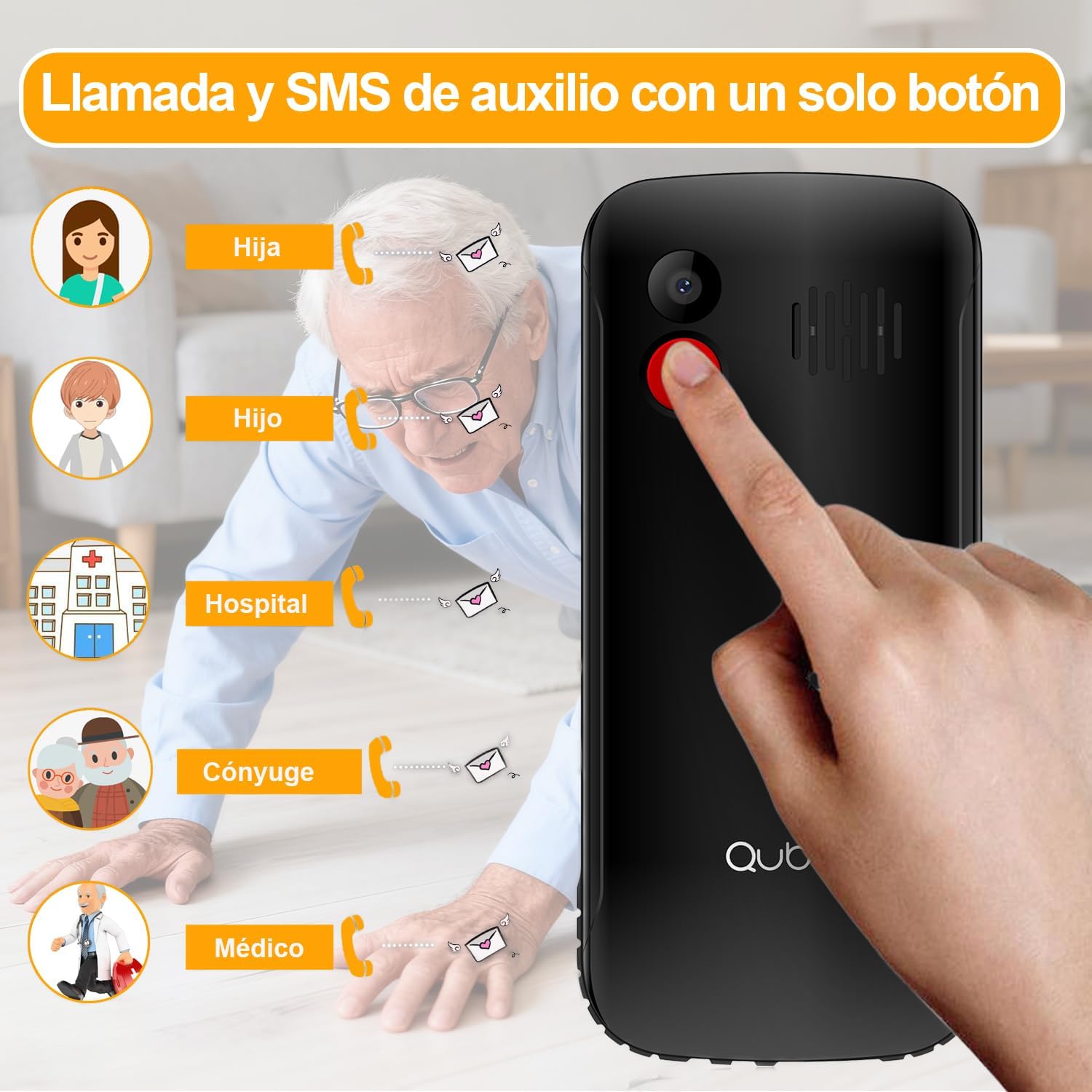
The dedicated SOS button on the Qubo X232 allows for quick emergency calls to up to five pre-selected contacts.
5.4. Messaging (SMS)
To send or read text messages, navigate to Menu > Messages. The large screen and clear font facilitate easy reading and composing.
5.5. Flashlight
The Qubo X232 includes a built-in LED flashlight. To activate/deactivate, use the dedicated side button or access it via the menu.

The Qubo X232 includes a bright built-in flashlight, easily accessible for use in low-light conditions.
5.6. FM Radio
Access the FM Radio via the Menu. The Qubo X232 allows listening to FM radio without requiring headphones.

Enjoy FM radio on the Qubo X232, which can be used without the need for headphones.
5.7. Other Applications
The phone includes various useful applications:
- Camera: For taking basic photos.
- Multimedia Player: For playing audio and video files stored on the device or MicroSD card.
- Alarm: Set multiple alarms.
- Calendar: Keep track of dates and events.
- Calculator: Perform basic arithmetic.
- Call Recorder: Record phone conversations (check local laws regarding consent).
- Browser: Basic internet access.

The Qubo X232 offers essential applications such as messaging, FM radio, a camera, and a calculator, along with Bluetooth connectivity.
5.8. Language Settings
The phone supports multiple languages including Spanish, English, and Portuguese. To change the language, navigate to Menu > Settings > Phone Settings > Languages.
6. Maintenance
- Cleaning: Use a soft, dry cloth to clean the phone. Avoid liquid cleaners.
- Battery Care: To prolong battery life, avoid extreme temperatures and do not leave the phone fully discharged for extended periods.
- Storage: Store the phone in a cool, dry place when not in use.
7. Troubleshooting
| Problem | Possible Cause | Solution |
|---|---|---|
| Phone does not turn on | Battery is discharged or not properly installed. | Charge the battery for at least 30 minutes. Ensure the battery is correctly inserted. |
| No network signal | Out of network coverage, SIM card not inserted correctly, or network settings issue. | Move to an area with better coverage. Reinsert the SIM card. Check network settings in the menu. |
| Cannot make/receive calls | No network signal, insufficient balance (prepaid), or call barring activated. | Check network signal. Ensure sufficient balance. Deactivate call barring if active. |
| SOS button not working | Emergency contacts not set up or incorrect numbers. | Verify SOS settings and ensure emergency contacts are correctly saved. |
| Battery drains quickly | Heavy usage, poor network signal, or background applications. | Reduce usage. Turn off features like Bluetooth when not needed. Charge regularly. |
8. Specifications
| Feature | Detail |
|---|---|
| Brand | Qubo |
| Model | X232 |
| Operating System | Nucleus OS |
| RAM | 48 MB |
| Internal Storage | 1 GB |
| Expandable Storage | MicroSD up to 64 GB |
| Screen Size | 2.31 Inches |
| Resolution | 320 x 240 pixels |
| Screen Type | AMOLED |
| Mobile Technology | 4G (compatible with 5G SIM on 4G network) |
| SIM Card Slots | Dual SIM |
| SIM Card Size | Nano |
| Battery Capacity | 1700 mAh |
| Talk Time | Up to 6 Hours |
| Standby Time | Up to 14 Days |
| Charging Port | USB Type-C |
| Audio Jack | 3.5 mm |
| Dimensions (L x W x H) | 132.1 x 58.2 x 14.1 mm |
| Weight | Approx. 110 grams |
| Origin | China |
9. Official Product Videos
9.1. HXEIR 4G Phone Features Overview
Video demonstrating the features of a 4G phone for seniors, including large buttons, SOS function, flashlight, and a simplified user interface.
9.2. artfone 4G Basic Mobile Phone for Seniors
Overview video of a basic 4G mobile phone for seniors, showcasing features like large buttons, SOS emergency call, charging dock, and built-in flashlight.
9.3. artfone C1+ 4G Mobile Phone for Seniors
Demonstration of the artfone C1+ 4G mobile phone for seniors, highlighting its large buttons, SOS function, charging cradle, and voice dialing capabilities.
10. Warranty and Support
10.1. Warranty Information
Your Qubo X232 phone comes with a 30-day product warranty from the date of purchase. This warranty covers manufacturing defects. Please retain your proof of purchase for warranty claims.
10.2. Customer Support
For technical assistance, troubleshooting, or warranty inquiries, please contact your retailer or the Qubo customer support line. Refer to the packaging or official Qubo website for contact details.