
1. Introduction
The Sinocare Safe AQ Pro I Blood Glucose Meter is designed for self-testing blood glucose levels. It provides rapid and accurate results to assist in the management of blood sugar. This device features advanced silver-carbon electrode technology for enhanced conductivity and reliability, meal markers for tracking glucose levels before and after meals, and a ketone reminder function.
Please read this manual thoroughly before using the device to ensure proper operation and accurate results. Keep this manual for future reference.
2. Package Contents
The Sinocare Safe AQ Pro I kit typically includes the following components:
- 1 x Sinocare Safe AQ Pro I Blood Glucose Meter
- 100 x Test Strips
- 100 x Lancets
- 1 x Lancing Device
- 1 x Carrying Bag
- 1 x User Manual (multilingual)
- 2 x AAA Alkaline Batteries (often included, check packaging)
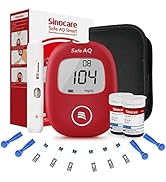
Image: Contents of the Sinocare Safe AQ Pro I kit.
3. Product Overview
Familiarize yourself with the main parts of the Sinocare Safe AQ Pro I Blood Glucose Meter:
- Large LCD Screen: Displays glucose readings, time, date, and other indicators.
- Test Strip Port: Where the test strip is inserted.
- Eject Button: Used to safely remove used test strips.
- Battery Cover: Located on the back, for battery insertion.
- Control Buttons: For navigation and setting adjustments.

Image: Key components of the Sinocare Safe AQ Pro I Blood Glucose Meter.
Key Features:
- Professional Accuracy: Silver-carbon electrode strips provide high conductivity and reliable results, conforming to ISO 15197:2013.
- Ketone Reminder: Displays a reminder for ketone bodies when blood glucose is elevated (≥ 250 mg/dL or 13.9 mmol/L). Note: The device does not measure ketone bodies directly.
- Meal Markers: Allows marking measurements as before-meal (PRE-MEAL) or after-meal (POST-MEAL) for better tracking. A casual mode is also available.
- Rapid Test: Provides results in approximately 5 seconds using only 1 μL of blood.
- Memory Storage: Stores up to 500 results and calculates 7, 14, 30, and 90-day averages.
- No Coding Required: Simplifies the testing process.

Image: Overview of the glucometer's features and display.

Image: Illustrating the no-coding feature of the test strips.
4. Setup
4.1. Inserting Batteries
- Open the battery cover on the back of the meter.
- Insert two AAA alkaline batteries, ensuring correct polarity (+/-).
- Close the battery cover securely.
4.2. Setting Date and Time
Upon first use or after battery replacement, you may need to set the date and time. Refer to the detailed instructions in the multilingual manual for specific steps on navigating the menu using the control buttons.
4.3. Preparing the Lancing Device
- Unscrew the cap of the lancing device.
- Insert a new sterile lancet firmly into the lancet holder.
- Twist off the protective cap from the lancet.
- Replace the lancing device cap.
- Adjust the penetration depth by rotating the cap. Start with a lower setting (e.g., 2-3) and adjust as needed for a sufficient blood sample.
- Pull back the cocking control until it clicks, indicating it's ready for use.

Image: Preparing the lancing device and selecting penetration depth.
5. Operating the Meter (Performing a Test)
- Wash and Dry Hands: Thoroughly wash your hands with soap and warm water, then dry them completely.
- Insert Test Strip: Insert a new test strip into the test strip port of the meter. The meter will turn on automatically and display a blood drop symbol.
- Select Meal Marker (Optional): If desired, use the control buttons to select the appropriate meal marker (PRE-MEAL, POST-MEAL, or CASUAL).
- Obtain Blood Sample: Press the lancing device firmly against the side of your fingertip and press the release button. A small drop of blood will form.
- Apply Blood Sample: Touch the tip of the test strip to the blood drop. The blood will be drawn into the strip automatically. Do not smear the blood.
- Read Results: The meter will count down (approx. 5 seconds) and then display your blood glucose result.
- Ketone Reminder: If your blood glucose reading is ≥ 250 mg/dL (13.9 mmol/L), the meter will display a ketone reminder. This is an alert, not a measurement. Consult your doctor for ketone testing recommendations.
- Eject Test Strip: Press the eject button to safely dispose of the used test strip. Dispose of lancets and test strips in a sharps container.

Image: Selecting meal markers on the glucometer.
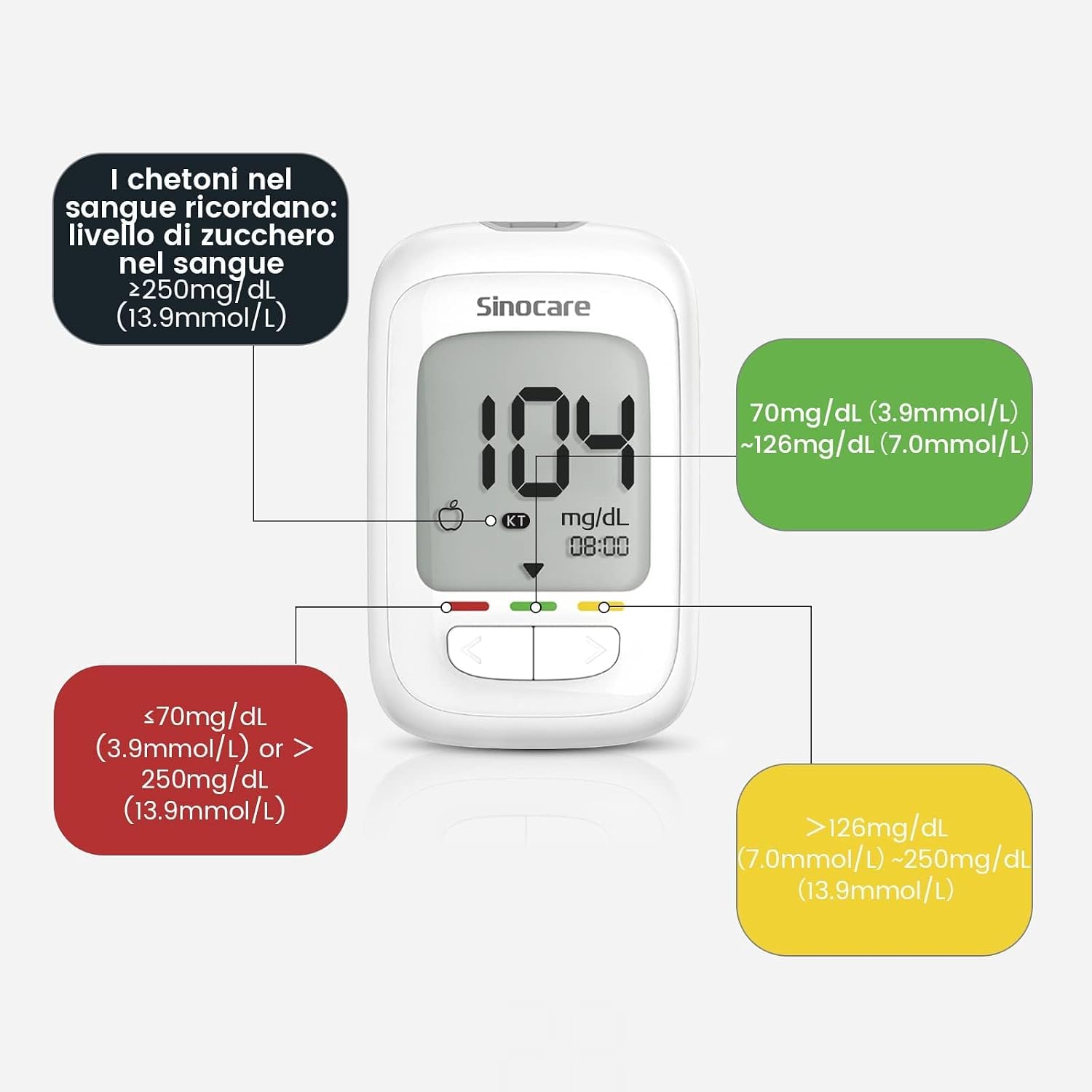
Image: Glucometer display showing a blood glucose reading, ketone reminder, and color-coded range indicator.
6. Memory Functions
The Safe AQ Pro I meter stores up to 500 blood glucose results with date and time. It also calculates average results for 7, 14, 30, and 90 days.
- To review past results, turn on the meter and use the navigation buttons to scroll through the memory.
- The meter will automatically display average readings for different periods.

Image: Visual representation of the 500-result memory and average tracking feature.
7. Maintenance
7.1. Cleaning the Meter
- Wipe the meter's exterior with a soft, damp cloth.
- Do not immerse the meter in water or use harsh cleaning agents.
- Ensure no liquid enters the test strip port.
7.2. Storage
- Store the meter and test strips in a cool, dry place, away from direct sunlight and extreme temperatures.
- Keep test strips in their original vial and close the cap immediately after removing a strip.
- Do not store test strips in the refrigerator.
8. Troubleshooting
| Problem | Possible Cause | Solution |
|---|---|---|
| Meter does not turn on. | Dead or incorrectly inserted batteries. | Check battery polarity or replace batteries. |
| Error message displayed. | Improper test strip insertion, insufficient blood sample, or expired test strip. | Ensure strip is inserted correctly. Re-test with a new strip and sufficient blood. Check strip expiry date. |
| Inaccurate results. | Improper testing technique, expired strips, or meter malfunction. | Review operating instructions. Use fresh, unexpired strips. Perform a control solution test if available. Contact customer support if issues persist. |
| Lancing device not pricking. | Not cocked, incorrect depth setting, or dull lancet. | Ensure device is cocked. Adjust depth. Use a new sterile lancet. |
9. Specifications
| Feature | Detail |
|---|---|
| Model Name | Safe AQ Pro I |
| Measurement Time | Approximately 5 seconds |
| Blood Sample Volume | 1 μL |
| Memory Capacity | 500 test results |
| Battery Type | AAA Alkaline Batteries |
| Special Features | 10x more accurate rapid tests, Ketone Reminder, Meal Markers (Pre/Post-meal, Casual) |
| Country of Origin | China |
10. Safety Information
- This device is for in vitro diagnostic use only. Do not use for diagnosis of diabetes or for screening purposes.
- Always consult your healthcare professional for interpretation of results and treatment decisions.
- Keep out of reach of children.
- Dispose of used lancets and test strips properly in a sharps container to prevent injury and infection.
- Do not use expired test strips.
- Do not share lancing devices or lancets with others.


