
1. Safety Information
Read this manual thoroughly before operating the Windhorse C2 Cargo Electric Scooter. Failure to follow instructions can result in serious injury or property damage.
General Safety Guidelines:
- Always wear a helmet and appropriate safety gear when riding.
- Ensure all components are securely fastened before each ride.
- Do not exceed the maximum load capacity of 265 lbs (120 kg).
- Observe local traffic laws and regulations.
- Avoid riding in adverse weather conditions, such as heavy rain or snow.
- Do not allow children under the age of 16 to operate the scooter.
- Maintain a safe distance from other vehicles and pedestrians.
- Regularly inspect tires, brakes, and lights for proper function.
Battery Safety:
- Use only the charger provided by Windhorse.
- Do not attempt to open or modify the battery pack.
- Keep the battery away from water and extreme temperatures.
- If the battery shows signs of damage, discontinue use immediately and contact support.
2. Package Contents
Verify that all items are present in the package:
- Windhorse C2 Cargo Electric Scooter (main unit)
- Adjustable Seat
- Front Pet Basket
- Rear Cargo Basket
- Charger
- Assembly Tools (Allen wrenches, screwdriver)
- User Manual
3. Setup and Assembly
The Windhorse C2 Cargo Electric Scooter requires minimal assembly. Follow these steps:
3.1 Unfolding the Scooter
- Place the scooter on a flat, stable surface.
- Carefully lift the handlebar stem until it locks into place.
- Secure the folding mechanism latch.
3.2 Attaching the Baskets
The scooter comes with a detachable front pet basket and a rear cargo basket.
Front Pet Basket:
- Align the mounting points of the front basket with the corresponding holes on the scooter frame.
- Use the provided screws and tools to securely fasten the basket. Ensure it is stable and does not wobble.
Rear Cargo Basket:
- Align the mounting points of the rear basket with the corresponding holes on the rear fender/frame.
- Use the provided screws and tools to securely fasten the basket.
Image: Detachable basket dimensions and placement.

Image: Scooter with detachable basket, showing uses for commuting, dog walking, and groceries.

Image: Scooter with large capacity rear basket, showing items like vegetables, books, and shopping bags.

3.3 Adjusting the Seat
- Loosen the quick-release lever on the seat post.
- Adjust the seat height to a comfortable position for riding.
- Securely tighten the quick-release lever.
3.4 Assembly Tutorial Video
For a visual guide on assembly, please watch the official tutorial video:
Video: Assembly tutorial for the Windhorse C2 Cargo Electric Scooter, demonstrating how to unfold the scooter and attach the baskets and seat.
4. Components Overview
Familiarize yourself with the main components of your Windhorse C2 Cargo Electric Scooter:
- 650W Peak / 450W Brushless Motor: Provides power for speeds up to 15.5 MPH and climbing 15° slopes.
- 36V 8.0AH / 288Wh Lithium Battery: Offers an extended range of up to 20 miles.
- 12.5" Tires: Designed for various terrains.
- Dual Disc Brakes: Front and rear disc brakes for reliable stopping power.
- Bright Headlight: Enhances visibility for safe night riding.
- Comfort Seat: Soft, breathable, and adjustable saddle for extended comfort.
- Foldable Footrest: Provides additional support and can be folded when not in use.
- Anti-Slip Deck: Widened deck for enhanced comfort and foot support.
- Dual Baskets: Front pet basket (30-lb capacity) and rear cargo rack (20-lb capacity).
Image: Windhorse C2 Cargo Electric Scooter with a rider in a snowy environment, highlighting the 650W peak motor, 15.5 MPH max speed, 15° max slope capability, and 12.5" tires.
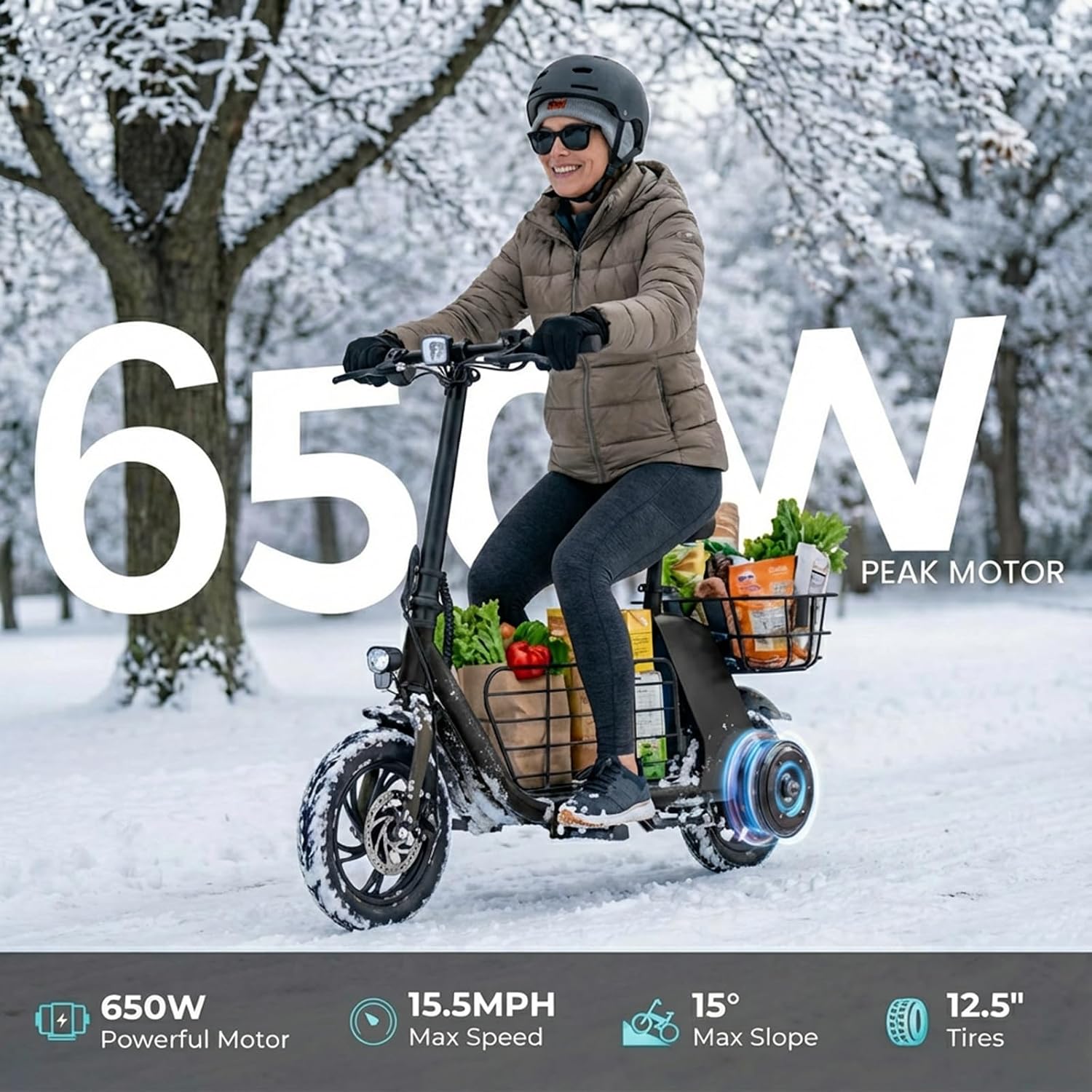
Image: Close-up of the scooter's battery compartment, detailing the 36V 8.0AH battery capacity, 20 miles max range, 5-6 hours charging time, and IPX5 waterproof rating.

Image: Detailed view of the scooter's dual disc brakes, bright headlight, comfort seat, and foldable footrest.

5. Operating Instructions
5.1 Powering On/Off
Insert the key into the ignition and turn it to the 'ON' position to power on the scooter. Turn the key to 'OFF' to power off.
5.2 Riding
Once powered on, gently push off with your foot and use the throttle to accelerate. Use the handlebars for steering. The scooter can be ridden while seated or standing.
5.3 Braking
Engage the brake levers on the handlebars to slow down or stop. The dual disc brakes provide effective stopping power.
5.4 Folding the Scooter
To fold the scooter for storage or transport:
- Ensure the scooter is powered off.
- Locate the folding latch mechanism on the handlebar stem.
- Follow the instructions to release the latch and fold the stem down.
Image: Visual guide on how to fold the e-scooter, showing steps to push up the latch, pull out the latch, and fold the stem fully.

5.5 Pet Basket Usage
The front basket is designed to safely carry small pets. Ensure your pet is comfortable and secure before riding. Always supervise your pet while in the basket.
Video: Demonstration of a pet being placed into the front basket of the Windhorse C2 Cargo Electric Scooter.
Video: Short demonstration of a pet being placed into the front basket of the Windhorse C2 Cargo Electric Scooter.
Image: Safety comparison showing a secure pet basket versus a pet without a basket, highlighting the risk of falling off.

5.6 General Operation Video
View the scooter in action and its features:
Video: General overview of the Windhorse C2 Cargo Electric Scooter, showcasing its design and functionality.
Video: Short demonstration of the dual-basket feature on the Windhorse C2 Cargo Electric Scooter.
6. Charging the Battery
Before first use, fully charge the scooter. The charging process typically takes 5-6 hours.
- Locate the charging port on the scooter.
- Connect the charger to the scooter, then plug it into a power outlet.
- A red light on the charger indicates that the battery is charging.
- A green light indicates a full charge or a connection issue. If the light is green and the battery is not fully charged, check the charging port and connections.
Image: Close-up of the scooter's high-capacity built-in battery, showing 20 miles range, 36V 8AH, and 4-5 hours charging time.

7. Maintenance
Regular maintenance ensures the longevity and safe operation of your scooter.
- Cleaning: Wipe the scooter with a damp cloth. Avoid using high-pressure water or harsh chemicals.
- Tires: Check tire pressure regularly and inflate to the recommended PSI. Inspect for wear and tear.
- Brakes: Periodically check brake pads and cables for wear. Adjust as needed to ensure responsive braking.
- Fasteners: Ensure all screws and bolts are tight.
- Storage: Store the scooter in a dry, cool place away from direct sunlight and extreme temperatures. If storing for an extended period, charge the battery to about 50-70% and recharge every few months.
8. Troubleshooting
If you encounter issues with your Windhorse C2 Cargo Electric Scooter, refer to the following common problems and solutions:
- Scooter not turning on: Check if the battery is charged and properly connected. Ensure the key is fully inserted and turned to the 'ON' position.
- Reduced range or power: The battery may need a full charge. Battery performance can also be affected by temperature, terrain, and rider weight.
- Brakes not responsive: Inspect brake cables for tension and brake pads for wear. Adjust or replace as necessary.
- Unusual noises: Stop riding immediately and inspect the scooter for loose parts or damage.
For issues not listed here, please contact customer support.
9. Specifications
| Feature | Detail |
|---|---|
| Brand | WINDHORSE |
| Model Name | C2 cargo |
| Motor | 650W Peak / 450W Brushless |
| Max Speed | Up to 15.5 MPH |
| Max Range | Up to 20 Miles |
| Battery | 36V 8.0AH (288Wh) Lithium |
| Charging Time | 5-6 Hours |
| Tire Size | 12.5 inches |
| Max Load | 265 lbs (120 kg) |
| Product Dimensions (LxWxH) | 47.24" x 19.29" x 35.43" |
| Scooter Weight | 55.1 lbs |
| Brakes | Dual Disc Brakes |
| Material | Carbon Alloy |
| Special Features | Foldable, Rechargeable, Adjustable Seat, Dual Baskets |
| Age Range | Adult |
Image: Scooter dimensions for adult and teens, including max user height, scooter weight, and maximum load.

10. Warranty and Support
Windhorse provides professional after-sales service to assist with any issues. Please retain your original packaging for potential returns or warranty claims.
For support, please refer to the contact information provided with your purchase or visit the official Windhorse website.


