
1. Introduction
The TFA.me ID-06 Wireless Weather Station provides comprehensive professional weather forecasts via the wetter.com online weather service. This device offers detailed weather conditions, including temperature, humidity, and various forecast symbols, accessible via Wi-Fi. It also integrates with the TFA.me system for expanded functionalities.
2. Setup
2.1 Unpacking and Components
Carefully unpack all components. Ensure you have the main base station, the thermo-hygro transmitter (TFA 30.3900.02), and the power adapter.

Figure 1: Main unit, external sensor, and digital interface overview.
2.2 Powering the Main Unit
- Connect the provided AC adapter to the main base station.
- Plug the adapter into a suitable power outlet. The display will illuminate.
2.3 Installing Batteries in the External Sensor
- Open the battery compartment of the thermo-hygro transmitter.
- Insert 2 x 1.5 V AA batteries, ensuring correct polarity.
- Close the battery compartment.
2.4 Initial Synchronization
The main unit will automatically attempt to connect to the external sensor and the Wi-Fi network upon initial power-up. Ensure both devices are within range.
2.5 Wi-Fi Connection
The device connects to the wetter.com online weather service via Wi-Fi. Follow the on-screen prompts or refer to the detailed manual for specific Wi-Fi setup instructions. This connection enables professional 4-day weather forecasts.
2.6 Placement Guidelines
- Main Unit: Place the main unit indoors on a flat surface or mount it on a wall. Ensure it is in a location with good Wi-Fi reception.
- External Sensor: Position the external thermo-hygro transmitter outdoors in a shaded, well-ventilated area, protected from direct sunlight and precipitation. The maximum operating range is 100 meters from the main unit.

Figure 2: Main unit and external sensor for indoor and outdoor measurements.
Video 1: Demonstrates the setup and basic operation of a TFA weather station, including sensor placement and display functions.
3. Operating the Weather Station
3.1 Display Overview
The LCD display provides a clear overview of current and forecast weather conditions. It features a backlight with four dimmer levels for optimal readability in various lighting conditions.

Figure 3: Detailed display showing time, indoor/outdoor data, and weather forecast.
3.2 Weather Forecast
The station provides professional 4-day weather forecasts from wetter.com, displayed using up to 40 different weather symbols. Forecasts include daily maximum and minimum temperatures, rain probability, expected rain quantity, hours of sunshine, UV index, wind speed, and wind direction.

Figure 4: Weather forecast display with snow conditions.

Figure 5: Weather forecast display with rain conditions.
3.3 Warning Function
An integrated warning function alerts users to distinctive or potentially dangerous weather conditions, such as storms, extreme rainfall, high heat, critical UV index values, and lightning. This feature helps ensure timely reactions to hazardous weather.
3.4 Temperature and Humidity Display
The station measures and displays indoor temperature and humidity. It also wirelessly transmits and displays outdoor temperature and humidity from up to five external transmitters (one included, additional sold separately).
3.5 Time and Date
The time can be displayed with the date or day of the week, advertised in six different languages for international use.
3.6 TFA.me System Integration
The weather station acts as a gateway for the TFA.me system. Through the free online TFA.me portal, you can access data from up to 50 additional stations and various types of sensors (sold separately) from anywhere in the world.
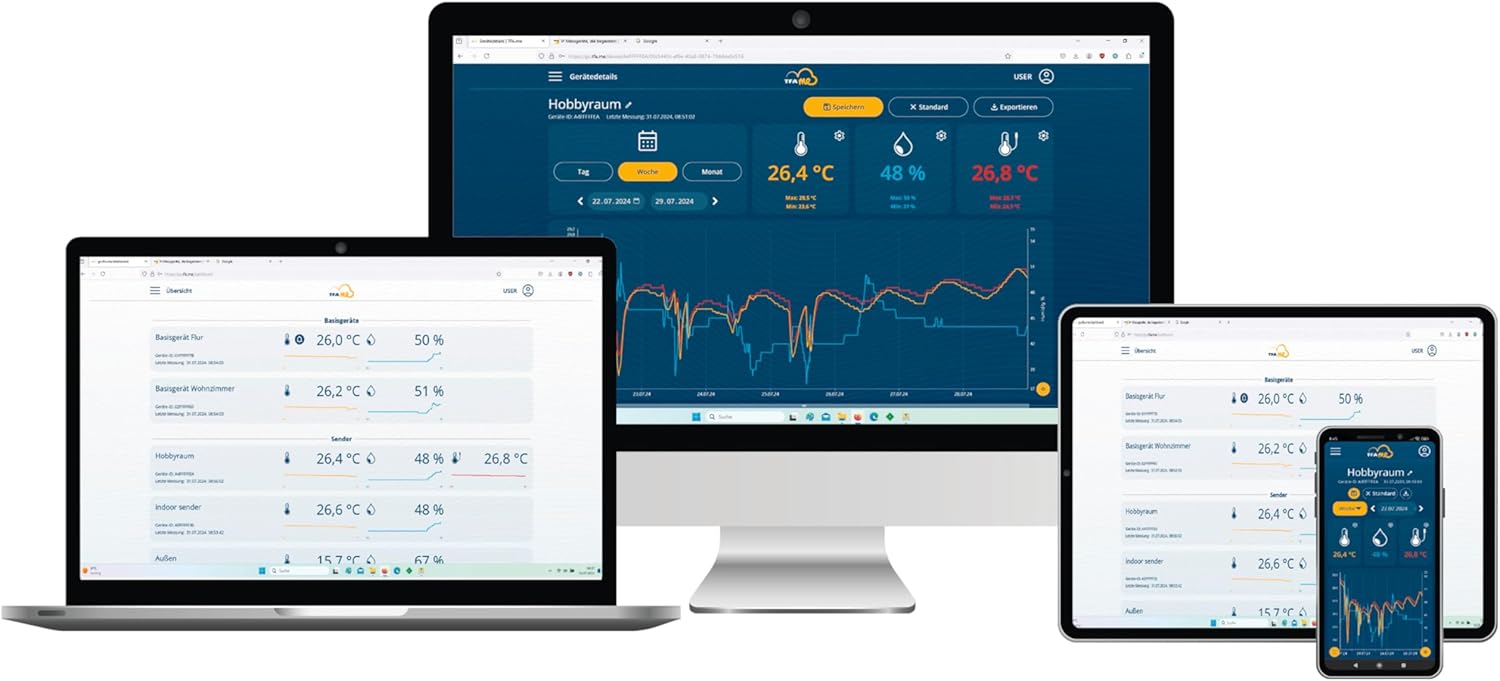
Figure 6: TFA.me online portal for remote data access.
4. Maintenance
4.1 Battery Replacement
Replace batteries in the external sensor when the low battery indicator appears on the main unit's display. For the main unit, use the AC adapter or replace the 3 x 1.5 V AA batteries if operating on battery power.
4.2 Cleaning
Clean the device and sensor with a soft, damp cloth. Do not use abrasive cleaners or solvents, as these may damage the surfaces.
5. Troubleshooting
- No Outdoor Data: Ensure the external sensor batteries are correctly installed and charged. Verify the sensor is within the 100m range of the main unit and free from obstructions. Press the 'CH' button on the main unit to manually search for the sensor signal.
- No Wi-Fi Connection: Check your router and Wi-Fi settings. Ensure the weather station is within range of your Wi-Fi network. Re-enter Wi-Fi credentials if necessary.
- Incorrect Forecast: Ensure the Wi-Fi connection is stable and the device is receiving data from wetter.com.
- Display Issues: Check power supply. Adjust backlight dimmer settings if the display is too dim or bright.
6. Specifications
| Feature | Detail |
|---|---|
| Dimensions | 228 (227) x 87 x 28 (77) mm |
| Outdoor Temperature Range | -40...+60°C |
| Indoor Temperature Range | 0...+50°C |
| Humidity Range | 10...99% rH |
| Temperature Accuracy | ± 1°C (0...+50°C), otherwise ± 1.5°C |
| Humidity Accuracy | ± 5% (at 25°C, 30...80%rH) |
| Wireless Frequency | 868 MHz |
| Max Operating Range | 100 m |
| Material | Plastic |
| Power Supply | 3 x 1.5 V AA batteries (optional), AC adapter (EU plug) |
| Max Transmitters | 5 (on base station), 50 (via TFA.me online portal) |
| WLAN Frequency | 2.4 GHz (802.11 b/g/n) |
| Max WLAN Transmission Power | <25 mW |
7. Warranty and Support
7.1 Warranty Information
For detailed warranty information, please refer to the terms and conditions provided at the point of purchase or visit the official TFA website.
7.2 Customer Support
For further assistance or technical support, please visit the TFA Brand Store or the official TFA.me online portal. The TFA.me portal allows worldwide retrieval of measured values and offers additional functionalities.


