1. Product Overview
The Zeppelin 8680MB-3 100 Years Series Men's Watch is a precision timepiece featuring a Swiss quartz movement, chronograph, and alarm functions. This manual provides detailed instructions for its proper use and care.
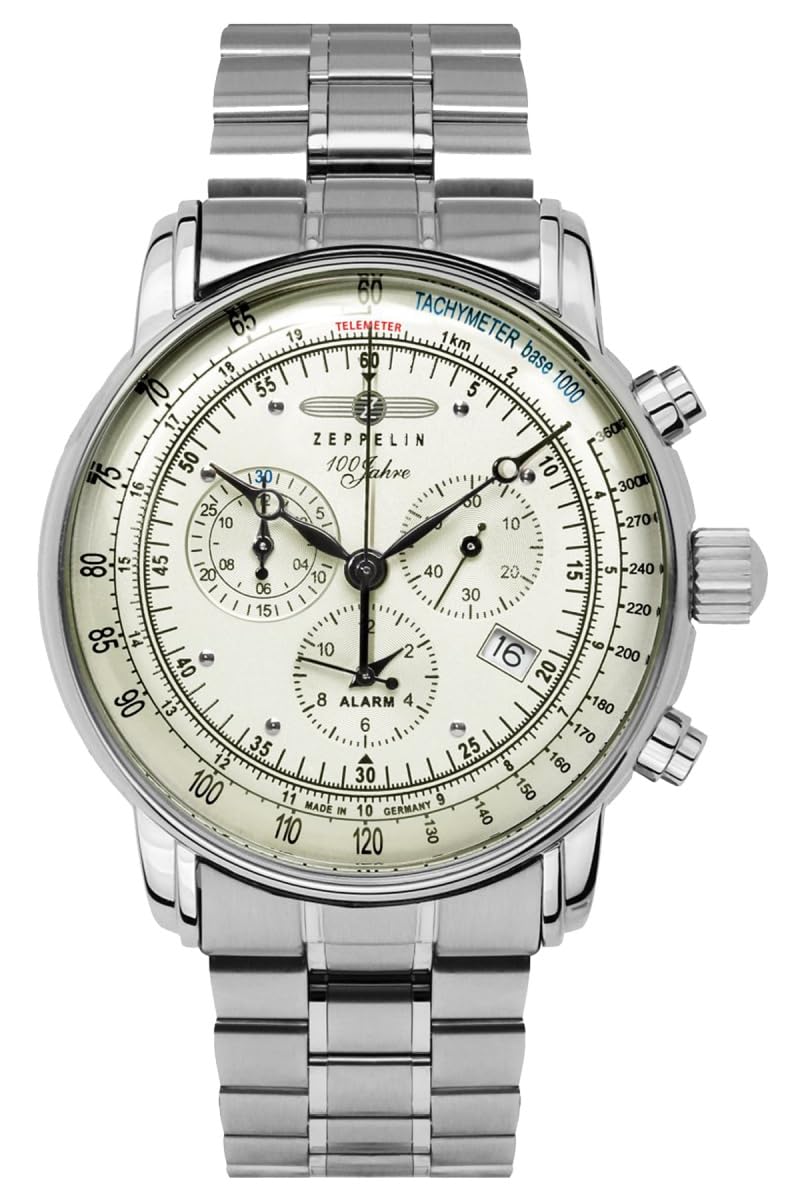
Figure 1: Zeppelin 8680MB-3 Watch. This image shows the overall design of the watch, including its silver stainless steel case and bracelet, and the detailed cream-colored dial with multiple sub-dials and pushers.
2. Components and Controls
Familiarize yourself with the watch's components before operation.

Figure 2: Watch Dial and Controls. This close-up view highlights the main crown, two pushers, the cream dial, Arabic numerals, and the three sub-dials for chronograph minutes, small seconds, and alarm settings, along with the date window.
- Crown (A): Used for setting time and date.
- Pusher (B - top right): Controls the chronograph start/stop functions.
- Pusher (C - bottom right): Controls the chronograph reset and alarm functions.
- Main Dial: Displays hours, minutes, and central chronograph seconds.
- Sub-dial at 2:30: Small seconds indicator.
- Sub-dial at 9:30: Chronograph minutes counter.
- Sub-dial at 6:00: Alarm setting and indicator.
- Date Window at 4:00: Displays the current date.
3. Setup and Initial Operation
3.1. Setting the Time
- Pull the crown (A) out to position 2 (farthest position). The small seconds hand (sub-dial at 2:30) will stop.
- Turn the crown (A) clockwise or counter-clockwise to set the hour and minute hands to the desired time.
- Push the crown (A) back into position 0 (normal operating position). The small seconds hand will resume movement.
3.2. Setting the Date
- Pull the crown (A) out to position 1 (middle position).
- Turn the crown (A) clockwise to adjust the date. Do not set the date between 9 PM and 3 AM, as this may damage the movement. If the time is within this range, first adjust the time outside this range, then set the date, and finally reset the time.
- Push the crown (A) back into position 0.
3.3. Setting the Alarm
- Pull the crown (A) out to position 1 (middle position).
- Press pusher (C) to move the alarm hand (on the sub-dial at 6:00) to the desired alarm time. Each press advances the alarm hand.
- Push the crown (A) back into position 0.
To activate the alarm, ensure the alarm hand is set. The alarm will sound at the set time. To deactivate, press pusher (C) once.
4. Operating the Chronograph
The chronograph function allows for precise measurement of elapsed time.
- Starting the Chronograph: Press pusher (B) once to start the central chronograph seconds hand and the chronograph minutes sub-dial (at 9:30).
- Stopping the Chronograph: Press pusher (B) again to stop the chronograph. The elapsed time can be read from the central seconds hand and the chronograph minutes sub-dial.
- Resetting the Chronograph: After stopping, press pusher (C) to reset both the central chronograph seconds hand and the chronograph minutes sub-dial to zero. The hands will instantly return to their 12 o'clock positions.
Note: The central seconds hand is dedicated to the chronograph function and does not indicate regular time seconds. Regular seconds are displayed on the small seconds sub-dial at 2:30.
5. Maintenance and Care
- Cleaning: Wipe the watch regularly with a soft, dry cloth to remove dust and dirt. For the stainless steel bracelet, a slightly damp cloth can be used, followed by a dry one.
- Water Resistance (5 ATM): This watch is resistant to splashes, rain, and brief immersion in water (e.g., washing hands). It is not suitable for swimming, showering, or diving. Ensure the crown is fully pushed in before any contact with water.
- Temperature and Magnetic Fields: Avoid exposing the watch to extreme temperatures (hot or cold) or strong magnetic fields, as these can affect its accuracy.
- Battery Replacement: The watch is powered by a standard watch battery. When the battery is depleted, have it replaced by a qualified watchmaker or authorized service center to ensure proper sealing and function.
- Storage: When not in use for extended periods, store the watch in a cool, dry place, away from direct sunlight.

Figure 3: Luminous Dial. This image demonstrates the watch's luminous hands and markers, providing readability in low-light conditions.
6. Troubleshooting
| Problem | Possible Cause | Solution |
|---|---|---|
| Watch not running or running intermittently. | Depleted battery. Crown not fully pushed in. | Have the battery replaced by a professional. Ensure crown is in position 0. |
| Time or date is incorrect. | Incorrectly set. | Refer to sections 3.1 and 3.2 for time and date setting instructions. |
| Chronograph hands do not reset to zero. | Requires calibration. | Consult a professional watchmaker for calibration. |
| Alarm not sounding. | Alarm not activated or incorrectly set. | Refer to section 3.3 for alarm setting and activation. |
If problems persist after attempting these solutions, please contact an authorized service center.
7. Specifications
- Model Number: 8680MB-3
- Movement: Swiss Quartz
- Case Material: Silver Stainless Steel
- Case Diameter: 42 mm
- Case Height: 11 mm
- Crystal: Slightly domed Mineral Glass
- Dial Color: Cream, luminous Arabic numerals and hands
- Strap Material: Silver Stainless Steel
- Strap Width: 22 mm
- Clasp: Folding clasp
- Water Resistance: 5 ATM (50 meters / 165 feet)
- Functions: Time (hours, minutes, small seconds), Date, Chronograph (central seconds, 30-minute counter), Alarm, Tachymeter, Telemeter.
- Weight: Approximately 158 grams
- Battery: 1 non-standard battery (included)
8. Warranty and Support
This product comes with a manufacturer's warranty. For specific warranty terms and conditions, please refer to the documentation provided with your purchase or contact the retailer.
In addition to any manufacturer's warranty, you may have a 30-day return right for many products. For exceptions and conditions, please consult the retailer's return policy.
For technical support, service, or inquiries regarding your Zeppelin 8680MB-3 watch, please contact your authorized Zeppelin dealer or the official Zeppelin service center.


