
Carrera 20030048
Carrera 30048 Digital 132 Race of The Champions Slot Car Race Track Set Instruction Manual
Model: 20030048
Introduction
This manual provides essential information for the setup, operation, and maintenance of your Carrera 30048 Digital 132 Race of The Champions Slot Car Race Track Set. Please read these instructions carefully before assembly and use to ensure safe and optimal performance.

Image: The complete Carrera Digital 132 Race of The Champions set, featuring the track layout, two Red Bull Racing cars, and the product packaging.
Safety Information
Always supervise children during play. Ensure all connections are secure and the power supply is disconnected when not in use or during assembly/disassembly.
What's in the Box
Your Carrera Digital 132 Race of The Champions set includes the following components:
- Carrera Digital 132 Slot Car Racing Set
- Red Bull Racing RB20 "M. Verstappen, No.1" Slot Car
- Red Bull Racing RB20 "S. Perez, No.11" Slot Car
- Track sections for a 23.95-foot layout, including straightaways, curves, and crossover sections.
- 2.4 GHz Wireless+ Speed Controllers for precise throttle control.
- Control Unit for managing the race.
- Track supports and barriers.
- Power supply.
- 2 AAA batteries (included for controllers).

Image: Detailed view of all components included in the Carrera Digital 132 Race of The Champions set, laid out for inspection.
Setup
- Track Assembly:
Carefully connect all track sections on a flat, stable surface. Ensure each piece clicks securely into place. Refer to the included layout diagram for suggested configurations or create your own. The track features exciting straightaways, sweeping curves, and crossover sections.

Image: An overhead view of the assembled track, highlighting its 23.95-foot length and various sections.
- Control Unit Connection:
Connect the control unit to the designated track section and then to the power supply. Plug the power supply into a suitable electrical outlet.
- Controller Setup:
Insert the included AAA batteries into the wireless controllers. Pair the controllers with the control unit according to the instructions provided in the quick start guide (usually by pressing a pairing button on both the controller and control unit).

Image: The two wireless controllers and their receiver, ready for connection and use.
- Car Placement:
Place the Red Bull Racing RB20 slot cars onto the track. Ensure the guide keel of each car is properly seated in the track slot.

Image: M. Verstappen's Red Bull Racing RB20 car, detailed and ready for racing.
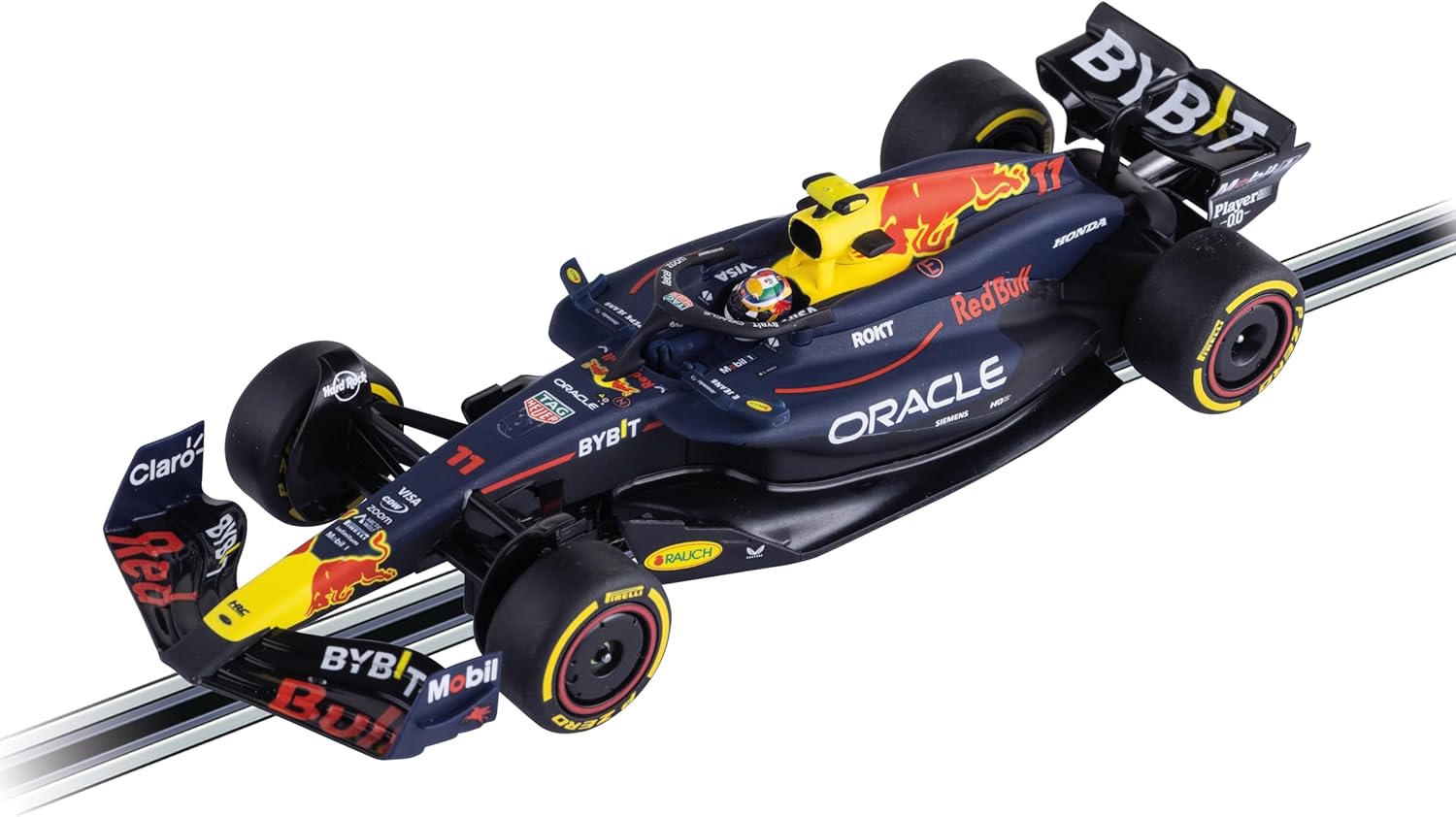
Image: S. Perez's Red Bull Racing RB20 car, showcasing its intricate design.
Operating Instructions
The Carrera Digital 132 system allows for advanced racing features:
- Starting the Race: Once all cars are on the track and controllers are paired, activate the control unit to begin the race.
- Speed Control: Use the wireless controllers to adjust the speed of your car. The 2.4 GHz Wireless+ technology ensures precise and responsive control.
- Lane Changing: Utilize the lane change sections on the track to overtake opponents or switch lanes strategically. This is a key feature of the Digital 132 system.
- Overtaking and Braking: The digital system allows for realistic overtaking and braking maneuvers, adding to the excitement of the race. Up to 6 cars can race simultaneously on the track.
Video: A product overview demonstrating the features and dynamic racing action of a Carrera Digital 132 slot car track system, including lane changes and multiple cars.
Maintenance
- Track Cleaning: Regularly clean the track rails with a lint-free cloth to ensure good electrical contact and smooth car operation. Avoid using abrasive cleaners.
- Car Maintenance: Check the car's guide keel and braids periodically for wear. Replace worn parts to maintain optimal performance. Keep the car's wheels and axles free from dust and debris.
- Storage: When not in use, store the track and cars in a dry, dust-free environment. Disassemble the track carefully if storing for extended periods.
Troubleshooting
- Car Not Moving:
- Ensure the power supply is connected and switched on.
- Check that the car's guide keel is correctly seated in the track slot.
- Verify that the track rails are clean and free of obstructions.
- Confirm the controller batteries are charged and the controller is paired.
- Intermittent Power:
- Inspect all track connections for secure fit.
- Clean track rails to ensure consistent electrical contact.
- Car Derailed Frequently:
- Reduce speed, especially in curves.
- Check car tires for wear or damage.
- Ensure track sections are perfectly flat and joined without gaps.
Specifications
| Feature | Detail |
|---|---|
| Product Dimensions | 31 x 23 x 8 inches |
| Item Weight | 26.1 pounds |
| Item Model Number | 20030048 |
| Manufacturer Recommended Age | 8 years and up |
| Batteries | 2 AAA batteries required (included) |
| Track Length | 23.95 feet |
| Scale | 1:32 |
Warranty and Support
For warranty information and customer support, please refer to the official Carrera website or contact your retailer. You can also visit the Carrera Store for additional resources and product information.
Related documents20030048


Ask a question about this manual
Ask about setup, troubleshooting, compatibility, parts, safety, or missing instructions. Manuals+ will review the question and use this page’s manual context to help answer it.