
1. Introduction
This manual provides essential information for using your new vivo T4X 5G smartphone. Please read it carefully to ensure proper operation and to maximize your device's potential. The vivo T4X 5G is designed for performance and durability, featuring a large 6500 mAh battery, a MediaTek Dimensity 7300 5G processor, and a 50 MP AI camera.
2. Device Setup
2.1 Unboxing and Package Contents
Carefully unpack your vivo T4X 5G. The standard package includes:
- vivo T4X 5G Handset
- Quick Start Guide
- USB Cable
- Charger
- Eject Tool
- Phone Case
- Protective Film (Pre-applied)
- Warranty Card
2.2 SIM Card Installation
- Locate the SIM card tray on the side of your device.
- Insert the eject tool into the small hole next to the tray and press gently until the tray pops out.
- Place your Nano-SIM card(s) into the designated slots on the tray. Ensure the gold contacts face downwards. This device supports Dual SIM functionality.
- Carefully reinsert the tray into the phone.
2.3 Initial Power On and Charging
To power on your device, press and hold the Power button until the vivo logo appears. For first-time use, it is recommended to fully charge the device using the provided 44W FlashCharge charger and USB Type-C cable. The 6500 mAh battery provides extended usage.

Image: The vivo T4X 5G features a 6500mAh battery with 44W FlashCharge technology for rapid charging and extended use.
3. Operating Instructions
3.1 Basic Navigation
The vivo T4X 5G features a 17.07 cm (6.72 inch) Full HD+ 120Hz display. Navigate the interface using touch gestures:
- Tap: Select an item or open an app.
- Swipe: Scroll through screens or lists.
- Pinch: Zoom in or out on photos and web pages.
- Long Press: Access contextual menus or move icons.
3.2 Making Calls and Sending Messages
To make a call, open the Phone app, enter the number, and tap the call icon. To send a message, open the Messages app, tap to start a new conversation, enter the recipient and your message, then send.
3.3 Connecting to Networks
Access Wi-Fi settings via Settings > Network & internet > Wi-Fi. For mobile data, ensure your SIM card is active and navigate to Settings > Network & internet > Mobile network.
3.4 Fingerprint Recognition
The device includes fingerprint recognition for secure unlocking. Set up your fingerprint by going to Settings > Security > Fingerprint and following the on-screen instructions.
4. Camera Features
The vivo T4X 5G is equipped with a 50MP AI Rear Camera and an 8MP Front Camera, designed to capture clear and precise images.

Image: The vivo T4X 5G features a 50 MP AI Camera for clarity in every shot, supporting Super Night Mode and 4K Video Recording.
4.1 AI Erase
The AI Erase feature allows you to remove unwanted elements from your photos. Simply open an image in the gallery, select the AI Erase tool, and highlight the objects or bystanders you wish to remove. The AI will process the image to seamlessly integrate the background.
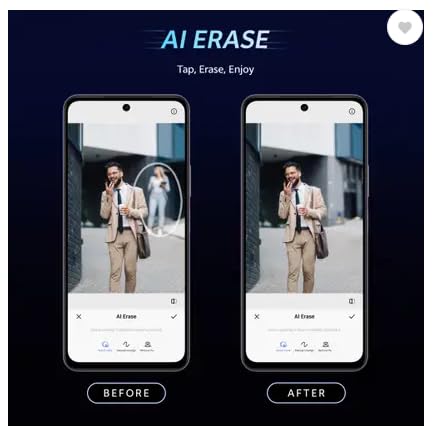
Image: Demonstration of the AI Erase feature, showing a 'Before' image with a person in the background and an 'After' image with the person removed.
4.2 AI Photo Enhance
This advanced AI technology automatically optimizes and enhances your photos. It improves facial clarity, restores details, and enhances color performance, transforming ordinary or unclear images into high-quality ones.
5. Gaming Features
Experience immersive gaming with the vivo T4X 5G's dedicated features.

Image: The vivo T4X 5G offers an Ultra Gaming Experience with New Ultra Game Mode, 400% Volume Dual Stereo Speakers, and 4D Game Vibration.
5.1 Ultra Game Mode
Activate Ultra Game Mode for an optimized gaming environment. This mode minimizes distractions and enhances performance, allowing for efficient switching between social apps and gaming.
5.2 4D Game Vibration and Dual Stereo Speakers
Enjoy a more thrilling gaming experience with 4D Game Vibration, which provides haptic feedback during gameplay, and 400% Volume with Dual Stereo Speakers for powerful audio.
6. Software Features (Funtouch OS 15)
The vivo T4X 5G runs on Funtouch OS 15, offering a range of smart functionalities.

Image: The vivo T4X 5G features a high brightness display (1050 nits), 8GB + 8GB Extended RAM, and runs on Funtouch OS 15 with 2 years of Android updates and 3 years of security updates.
6.1 Circle to Search
Search any image, video, or text on your screen by circling, highlighting, scribbling, or tapping. This feature allows you to quickly find information without needing to take screenshots or switch apps.
6.2 AI Screen Translation
Translate any webpage or text into your preferred language in real-time. With Google Lens support, this feature makes global content more accessible.
7. Maintenance
7.1 Cleaning Your Device
Use a soft, lint-free cloth to clean the screen and body of your phone. Avoid using harsh chemicals or abrasive materials. The device is not water resistant, so avoid exposure to liquids.
7.2 Software Updates
Regularly check for and install software updates to ensure optimal performance and security. Go to Settings > System > System update to check for available updates. Your device is eligible for 2 years of Android updates and 3 years of security updates.
7.3 Battery Care
To prolong battery life, avoid extreme temperatures. Charge your phone using only the original charger and cable. The 6500 mAh battery is designed for long-lasting performance.
8. Troubleshooting
8.1 Common Issues and Solutions
- Device not turning on: Ensure the battery is charged. Connect to the charger for at least 15 minutes, then try powering on.
- Apps crashing or freezing: Close the app and reopen it. If the issue persists, restart your phone.
- Poor network signal: Check your SIM card installation. Move to an area with better network coverage.
- Battery draining quickly: Reduce screen brightness, close unused apps, or disable background data for certain apps.
8.2 Factory Reset
If you encounter persistent software issues, you may need to perform a factory reset. Warning: This will erase all data on your phone. Back up important data before proceeding. Go to Settings > System > Reset options > Erase all data (factory reset).
9. Specifications
Below are the key technical specifications for the vivo T4X 5G smartphone:
| Feature | Specification |
|---|---|
| Brand | vivo |
| Model | T4X 5G |
| Operating System | Android 15 |
| Processor | MediaTek Dimensity 7300 5G Octa-Core (up to 2.5 GHz) |
| RAM | 8 GB |
| Internal Storage | 128 GB |
| Display | 17.07 cm (6.72 inch) Full HD+ (1080 x 2400) 120Hz Display, 1050 nits brightness |
| Rear Camera | 50 MP + 2 MP |
| Front Camera | 8 MP |
| Battery Capacity | 6500 mAh |
| Charging | 44W FlashCharge |
| SIM Card Slot | Dual SIM (Nano) |
| Connectivity | 5G, USB Type-C |
| Biometric Security | Fingerprint Recognition |
| Dimensions | 15 x 10 x 6 Centimeters |
| Weight | 230 Grams |
10. Warranty and Support
10.1 Warranty Information
Your vivo T4X 5G comes with a 1 Year Warranty for the Device and a 6 Months Warranty for Accessories from the date of purchase. Please refer to the included Warranty Card for detailed terms and conditions.
10.2 Customer Support
For technical assistance, service, or further inquiries, please contact vivo customer support. You can find contact details on the official vivo website or through the support information provided in your Quick Start Guide.


