
1. Introduction
Welcome to the user manual for your new vivo T4x 5G smartphone. This guide provides essential information on setting up, operating, maintaining, and troubleshooting your device. Please read this manual thoroughly to ensure optimal performance and longevity of your smartphone.
The vivo T4x 5G is designed to offer a powerful and efficient mobile experience, featuring a large battery, advanced camera capabilities, and robust performance.
2. What's in the Box
Upon unboxing your vivo T4x 5G, please verify that all the following items are included:
- Handset (vivo T4x 5G)
- Quick Start Guide
- USB Cable
- Charger (44W FlashCharge compatible)
- Eject Tool (for SIM/SD card tray)
- Phone Case
- Protective Film (Pre-applied on screen)
- Warranty Card
3. Initial Setup
3.1. Charging the Device
Before first use, fully charge your vivo T4x 5G. Use the provided 44W FlashCharge compatible charger and USB cable for optimal charging speed.

The image displays the vivo T4x 5G smartphone being charged, highlighting its 6500mAh battery capacity and 44W FlashCharge technology. It also mentions features like Overnight Charging Protection and Super Battery Saver Mode.
The device features a 6500 mAh battery, providing extended usage. The 44W FlashCharge technology allows for quick recharges.
3.2. Installing SIM Cards
The vivo T4x 5G supports Dual Nano SIM cards.
- Locate the SIM card tray on the side of your phone.
- Insert the eject tool into the small hole next to the tray and press gently until the tray pops out.
- Place your Nano SIM card(s) into the designated slots on the tray. Ensure the gold contacts face downwards.
- Carefully push the tray back into the phone until it clicks into place.
3.3. Powering On/Off
- To Power On: Press and hold the Power button until the vivo logo appears.
- To Power Off: Press and hold the Power button, then select 'Power off' from the options on the screen.
- To Restart: Press and hold the Power button, then select 'Restart' from the options.
4. Operating Your Device
4.1. Performance and Processing
The vivo T4x 5G is powered by the MediaTek Dimensity 7300 Octa-Core 5G Processor, built on a 4nm power-efficient process technology. It features a peak clock speed of up to 2.5 GHz, ensuring smooth performance for multitasking and demanding applications.

This image illustrates the MediaTek Dimensity 7300 processor, highlighting its 4nm process technology and 2.5 GHz peak clock speed, indicating the phone's fast performance capabilities.
4.2. Camera Features
The device is equipped with a 50 MP AI Camera on the rear and an 8 MP front camera. Advanced AI features enhance your photography experience.

The image focuses on the rear camera setup of the vivo T4x 5G, emphasizing its 50 MP AI Camera, Super Night Mode, and 4K Video Recording capabilities.
AI Erase: This feature allows you to remove unwanted elements or bystanders from your photos. Simply circle the object you wish to remove, and the AI will process the image.
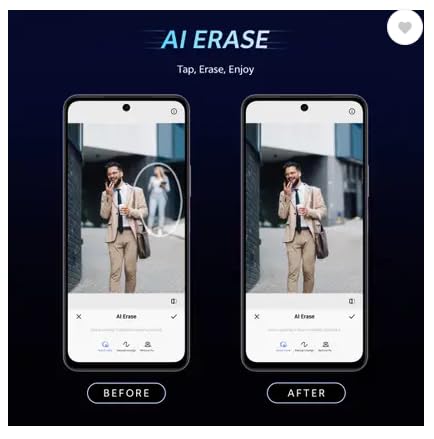
This image demonstrates the 'AI Erase' function, showing a 'Before' photo with an unwanted object and an 'After' photo where the object has been seamlessly removed, illustrating the feature's effectiveness.
AI Photo Enhance: Automatically optimizes and enhances photos by improving facial clarity, restoring details, and enhancing color performance.
4.3. Display
The vivo T4x 5G features a Full HD+ display with a 120 Hz refresh rate, providing smooth visuals and responsiveness. With 1050 nits of high brightness, the screen remains clear even in bright sunlight.
4.4. Gaming Experience
Enhance your mobile gaming with features like Ultra Game Mode, 4D Game Vibration, and 400% Volume with Dual Stereo Speakers for an immersive audio experience.

The image highlights the 'ULTRA GAMING EXPERIENCE' on the vivo T4x 5G, detailing features such as New Ultra Game Mode, 400% Volume with Dual Stereo Speakers, and 4D Game Vibration.
4.5. Storage
The device comes with 128 GB of internal storage, utilizing UFS 3.1 technology for faster data access and multitasking.

This image represents the phone's storage capabilities, showing a chip with '256GB' and 'UFS 3.1'. Please note that the vivo T4x 5G model described in this manual features 128GB of internal storage.
4.6. Operating System (Funtouch OS 15)
Running on Android 15 with Funtouch OS 15, the phone offers features like:
- Circle to Search: Search any image, video, or text on your screen by circling, highlighting, scribbling, or tapping.
- AI Screen Translation: Translate any webpage or text into your language in real-time with Google Lens support.

This image highlights several key features: a 1050 nits High Brightness Display, 8GB + 8GB Extended RAM, Funtouch OS 15 with 2 years of Android updates and 3 years of security updates, and Dynamic Light.
5. Maintenance and Care
5.1. Device Durability
The vivo T4x 5G features Military-grade Certified Durability, incorporating a comprehensive cushioning structure, sturdy frame, and shock-absorbing design. It has undergone rigorous testing for shock resistance and usage in various temperature environments.
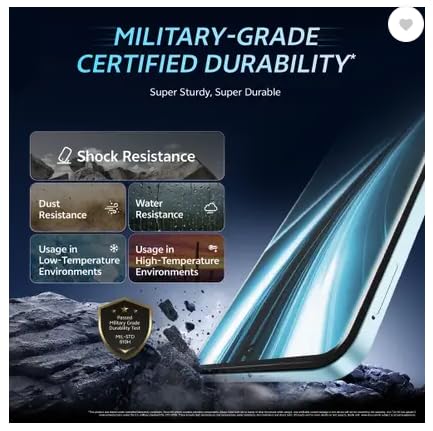
The image showcases the 'MILITARY-GRADE CERTIFIED DURABILITY' of the phone, highlighting its resistance to shock, dust, and water, as well as its ability to function in low and high-temperature environments. Please note that the device is specified as 'Not Water Resistant' in the detailed specifications.
Note: While the device is designed for durability, it is specified as 'Not Water Resistant'. Avoid exposing it to water or excessive moisture.
5.2. General Care
- Keep your phone dry. Liquids can damage the device.
- Use only authorized accessories.
- Avoid extreme temperatures.
- Clean the screen and body with a soft, dry cloth. Avoid harsh chemicals.
- Protect the screen with the pre-applied protective film or a screen protector.
5.3. Battery Care
- Do not expose the battery to extreme heat or cold.
- Avoid fully discharging the battery frequently.
- If the phone becomes excessively hot during charging or use, discontinue use and contact support if the issue persists.
6. Troubleshooting
This section addresses common issues you might encounter with your vivo T4x 5G.
6.1. Device Not Powering On
- Ensure the battery is charged. Connect the charger and wait a few minutes before attempting to power on.
- Press and hold the Power button for at least 10-15 seconds to force a restart.
6.2. Charging Issues
- Verify that the charger and USB cable are securely connected to both the phone and the power outlet.
- Use only the original vivo charger and cable.
- Check for any debris in the charging port.
6.3. Network Connectivity Problems
- Check if your SIM card is properly inserted.
- Ensure mobile data is enabled in your phone settings.
- Restart your phone.
- If issues persist, contact your network provider.
6.4. Apps Crashing or Freezing
- Close the problematic app and reopen it.
- Clear the app's cache and data in Settings > Apps.
- Ensure your apps and operating system are updated to the latest versions.
7. Specifications
| Feature | Specification |
|---|---|
| Brand | vivo |
| Model | T4x 5G |
| Operating System | ANDROID 15 (Funtouch OS 15) |
| RAM Memory | 6 GB |
| Internal Storage | 128 GB (UFS 3.1) |
| CPU Model | MediaTek Dimensity 7300 Octa-Core 5G Processor |
| CPU Speed | 2.5 GHz |
| Colour | Glacial Teal |
| SIM Card Slot Count | Dual SIM |
| SIM Card Size | Nano |
| Connector Type | USB Type C |
| Biometric Security | Fingerprint Recognition |
| Water Resistance Level | Not Water Resistant |
| Headphones Jack | NO HEADPHONE JACK |
| Front Camera Resolution | 8 MP |
| Rear Camera Resolution | 50 MP (Dual Camera Setup) |
| Battery Capacity | 6500 Milliamp Hours |
| Charging | 44W FlashCharge |
| Item Weight | 230 Grams |
| Item Dimensions | 15 x 10 x 6 Centimeters |
| Video Capture Resolution | 1080p |
| Frame Rate | 120 fps |
| Screen Size | 17.07 Centimetres |
| Display Resolution | 1920 x 1080 (Full HD+) |
| Refresh Rate | 120 Hz |
| Display Type | Full HD+ 120Hz Display |
| Cellular Technology | 5G |
| Wireless Provider | Unlocked for All Carriers |
| GPS Geotagging | True |
8. Warranty and Support
8.1. Warranty Information
Your vivo T4x 5G comes with a standard warranty:
- Device Warranty: 1 Year from the date of purchase.
- Accessories Warranty: 6 Months for included accessories (USB cable, charger, etc.) from the date of purchase.
Please retain your proof of purchase for warranty claims. The warranty covers manufacturing defects and does not cover damage caused by misuse, accidents, unauthorized repairs, or normal wear and tear.
8.2. Manufacturer Contact Information
For technical support, service, or warranty inquiries, please contact:
Manufacturer: Vivo Mobile India Private Limited
Address: PLOT NO 8, SECTOR 24, YAMUNA EXPRESSWAY AREA, GAUTAM BUDDHA NAGAR, UP INDIA-201310
For the most up-to-date support information, please visit the official vivo website or refer to the Quick Start Guide included in your product box.


