
realme RMX3943
realme P3 Lite 5G Smartphone User Manual
Model: RMX3943
1. Introduction
This manual provides essential information for the proper use and maintenance of your realme P3 Lite 5G smartphone. Please read this manual thoroughly before using your device to ensure optimal performance and longevity.
The realme P3 Lite 5G (Model RMX3943) is a smartphone featuring a 6.67-inch display, a 6000 mAh battery with 45W fast charging, a Dimensity 6300 processor, and a 32MP rear camera. It operates on Android 15.

Image 1.1: Front and rear view of the realme P3 Lite 5G smartphone, showcasing its design and primary features.
2. What's in the Box
Upon unboxing your realme P3 Lite 5G, verify that all standard components are present:
- realme P3 Lite 5G Smartphone (Lily White)
- Power Adapter
- USB Cable (typically included with power adapter)
- SIM Ejector Tool (typically included)
- Quick Start Guide / Safety Information (typically included)
Note: The exact contents may vary slightly by region.
3. Setup
3.1. Inserting the SIM Card
- Locate the SIM card tray on the side of your device.
- Insert the SIM ejector tool into the small hole next to the tray and press gently until the tray pops out.
- Place your Nano-SIM card(s) and/or microSD card (if applicable) into the tray with the gold contacts facing down.
- Carefully reinsert the tray into the device.
3.2. Initial Power On and Setup
- Press and hold the Power button until the realme logo appears.
- Follow the on-screen instructions to select your language, connect to Wi-Fi, and set up your Google account.
- You will be guided through setting up security features such as a PIN, pattern, or fingerprint.
4. Operating Your Device
4.1. Display and User Interface
Your realme P3 Lite 5G features a 6.67-inch display with a 120Hz refresh rate for smooth visuals and responsiveness. The punch-hole design maximizes screen space.

Image 4.1: The device display highlighting the 120Hz refresh rate and punch-hole camera.
The device also supports a 300% Ultra Volume Mode for enhanced audio output.
4.2. Camera Features
The realme P3 Lite 5G is equipped with a 32MP rear camera and an 8MP front camera. It includes AI-assisted photography features to enhance image quality.

Image 4.2: Demonstration of AI Clear Face technology, Google Gemini integration, and AI Smart Loop.
AI Clear Face technology helps improve facial clarity in photos. The device also integrates with Google Gemini and features AI Smart Loop for intelligent content suggestions.
4.3. Battery and Charging
The device is powered by a 6000 mAh battery, designed for extended usage. It supports 45W fast charging, allowing for quick replenishment of battery life.
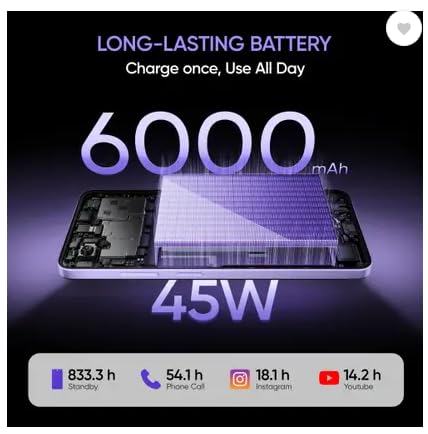
Image 4.3: Battery specifications and estimated usage duration for various activities.
To charge, connect the provided Power Adapter and USB Cable to your device and a power outlet.
4.4. Performance
The realme P3 Lite 5G is equipped with a MediaTek Dimensity 6300 processor, 6GB of RAM (expandable up to 18GB dynamic RAM), and 128GB of internal storage (expandable up to 2TB). This configuration supports smooth multitasking and efficient application performance.
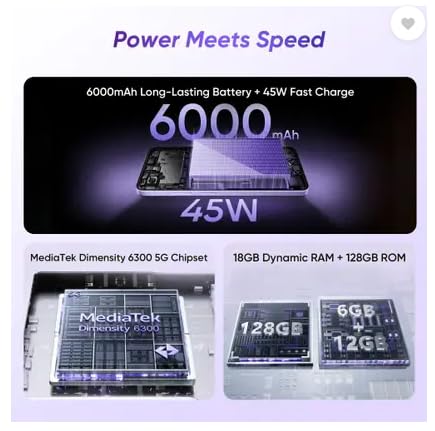
Image 4.4: Overview of the device's processor, RAM, and storage capabilities.
4.5. Connectivity
The device supports 5G network connectivity for high-speed internet access and Bluetooth for connecting to wireless accessories.
5. Maintenance
5.1. Cleaning Your Device
- Use a soft, lint-free cloth to wipe the screen and body.
- Avoid using harsh chemicals, abrasive cleaners, or compressed air.
- Ensure the device is powered off and unplugged before cleaning.
5.2. Software Updates
Regularly check for and install software updates to ensure your device has the latest features, security patches, and performance improvements. You can usually find this option in your device's Settings menu under "System" or "About Phone."
5.3. Durability and Protection
The realme P3 Lite 5G features an ultra-slim and light design, measuring 7.94mm thin and weighing 197g. It also boasts Military-Grade Shock Resistance and IP64 Dust & Water Resistance, providing protection against daily splashes and dust.
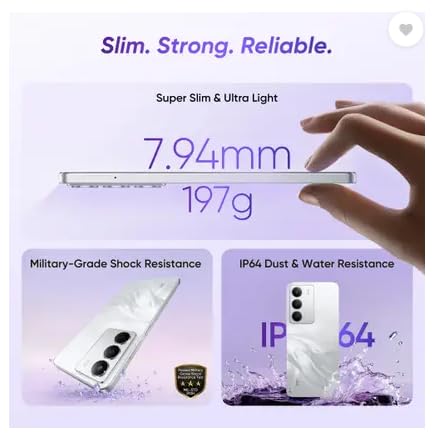
Image 5.1: Device design and durability features, including IP64 rating.

Image 5.2: Visual representation of the IP64 dust and water resistance.
6. Troubleshooting
If you encounter issues with your device, refer to the following common troubleshooting steps:
- Device not turning on: Ensure the battery is charged. Connect the charger and wait a few minutes before attempting to power on again.
- Apps crashing or freezing: Close and restart the app. If the issue persists, clear the app's cache and data in Settings, or uninstall and reinstall the app.
- Connectivity issues (Wi-Fi/Bluetooth): Toggle Wi-Fi or Bluetooth off and on. Restart your device. For Wi-Fi, try restarting your router.
- Slow performance: Close unnecessary background apps. Clear cache regularly. Consider freeing up storage space.
- Battery draining quickly: Check battery usage in Settings to identify power-hungry apps. Reduce screen brightness, disable unnecessary features like GPS or Bluetooth when not in use.
For more complex issues, consult the official realme support website or contact customer service.
7. Specifications
| Feature | Specification |
|---|---|
| Model Number | RMX3943 |
| Operating System | Android 15 |
| Display | 16.94 cm (6.67 inch) Display, 2340 x 1080 Resolution, 120Hz Refresh Rate |
| Processor | Dimensity 6300 Processor (CPU Speed: 2 GHz) |
| RAM | 6 GB (Expandable up to 18 GB Dynamic RAM) |
| Internal Storage | 128 GB (Expandable Upto 2 TB) |
| Rear Camera | 32MP |
| Front Camera | 8MP |
| Battery Capacity | 6000 mAh (Lithium Ion) |
| Charging | 45W Fast Charge |
| Connectivity | 5G, Bluetooth |
| Dimensions (LxWxH) | 16.57 x 7.62 x 0.79 cm |
| Weight | 196 g |
| Color | Lily White |
| Durability | IP64 Dust & Water Resistance, Military-Grade Shock Resistance |
8. Warranty and Support
Your realme P3 Lite 5G smartphone comes with a standard manufacturer's warranty. For detailed information regarding warranty terms, conditions, and duration, please refer to the warranty card included in your product packaging or visit the official realme support website.
For technical assistance, service requests, or further inquiries, please contact realme customer support through their official channels.
Additional protection plans may be available for purchase from authorized retailers.