
Introduction
This manual provides detailed instructions for the assembly, operation, maintenance, and troubleshooting of your ODK 66-Inch Reversible L-Shaped Computer Desk. Please read this manual thoroughly before assembly and use to ensure proper function and safety.
Safety Information
- Two-Person Assembly: For ease and safety, it is recommended that two people assemble this desk.
- Check All Parts: Before assembly, ensure all parts are included and in good condition. Refer to the parts list provided in the packaging.
- Proper Tools: Use only the tools provided or recommended for assembly.
- Stable Surface: Assemble the desk on a clean, flat, and stable surface to prevent damage or injury.
- Weight Limits: Do not exceed the recommended weight limits for the desktop, shelves, or drawers.
- Electrical Safety: When using the built-in power outlet and USB ports, ensure all devices are compatible and do not overload the circuit. Disconnect power before cleaning or if any electrical issues arise.
- Cable Management: Utilize the cable management features to prevent tripping hazards and keep your workspace tidy.
Package Contents
Please verify that all components listed below are present and undamaged before beginning assembly.

Figure 1: Overview of all desk components and their dimensions.
- Desktop Panels (Main, Corner, Side)
- Metal Frame Components (Legs, Support Bars, Brackets)
- File Drawers (2 units)
- Printer Cabinet Shelf
- 2-Tier Under Bookshelf
- Computer Tower Stand
- Built-in Power Outlet with 3 AC outlets and 2 USB ports
- LED Strip with remote control
- Assembly Hardware (Screws, Allen wrench, etc.)
- Adjustable Foot Pads
Setup and Assembly
Follow the steps below for proper assembly. It is recommended to have a second person assist with this process.
Assembly Video Guides
Video 1: ODK L Shaped Gaming Desk Video Tutorial. This video provides a comprehensive guide to assembling your ODK L-shaped desk.
Video 2: SEDETA L Shaped Desk Installation Video. This video demonstrates the installation process for an L-shaped desk, which shares similar assembly principles with your ODK desk.
General Assembly Steps (Refer to videos for visual guidance)
- Unpack and Identify Parts: Lay out all components on a soft, clean surface. Identify each part using the provided parts list and diagrams.
- Assemble Metal Frames: Connect the main metal frame components using the provided screws and Allen wrench. Ensure all connections are secure but do not fully tighten until all parts are aligned.
- Install Storage Units: Assemble the file drawers, printer cabinet, and 2-tier bookshelf according to the instructions. Attach them to the main frame as specified.
- Attach Desktop Panels: Carefully place the desktop panels onto the assembled frame. Ensure proper alignment before tightening all screws.
- Install Monitor Stand: Secure the long monitor stand to the desktop.
- Install Power Outlet: Integrate the built-in power outlet and USB ports into the designated slot on the desktop.
- Apply LED Strip: Attach the LED strip to the underside of the monitor stand or desired location using its adhesive backing. Secure the wiring with provided clips.
- Final Tightening: Once all components are in place and aligned, fully tighten all screws.
- Adjust Foot Pads: Adjust the foot pads to ensure the desk is level and stable on your floor.

Figure 2: The ODK L-shaped desk fully assembled, showcasing its design and features.

Figure 3: An assembled ODK L-shaped desk in a home office environment, demonstrating its spacious layout.
Operating Instructions
Using the Built-in Power Outlet and USB Ports
The desk is equipped with a convenient power strip featuring 3 standard AC outlets and 2 USB ports for charging your devices.
- Connect to Wall Outlet: Plug the desk's main power cord into a grounded wall outlet.
- Power On/Off: Use the red switch on the power strip to turn the outlets and USB ports on or off.
- Charging Devices: Connect your laptop, phone, gaming devices, or other electronics to the AC outlets or USB ports as needed.
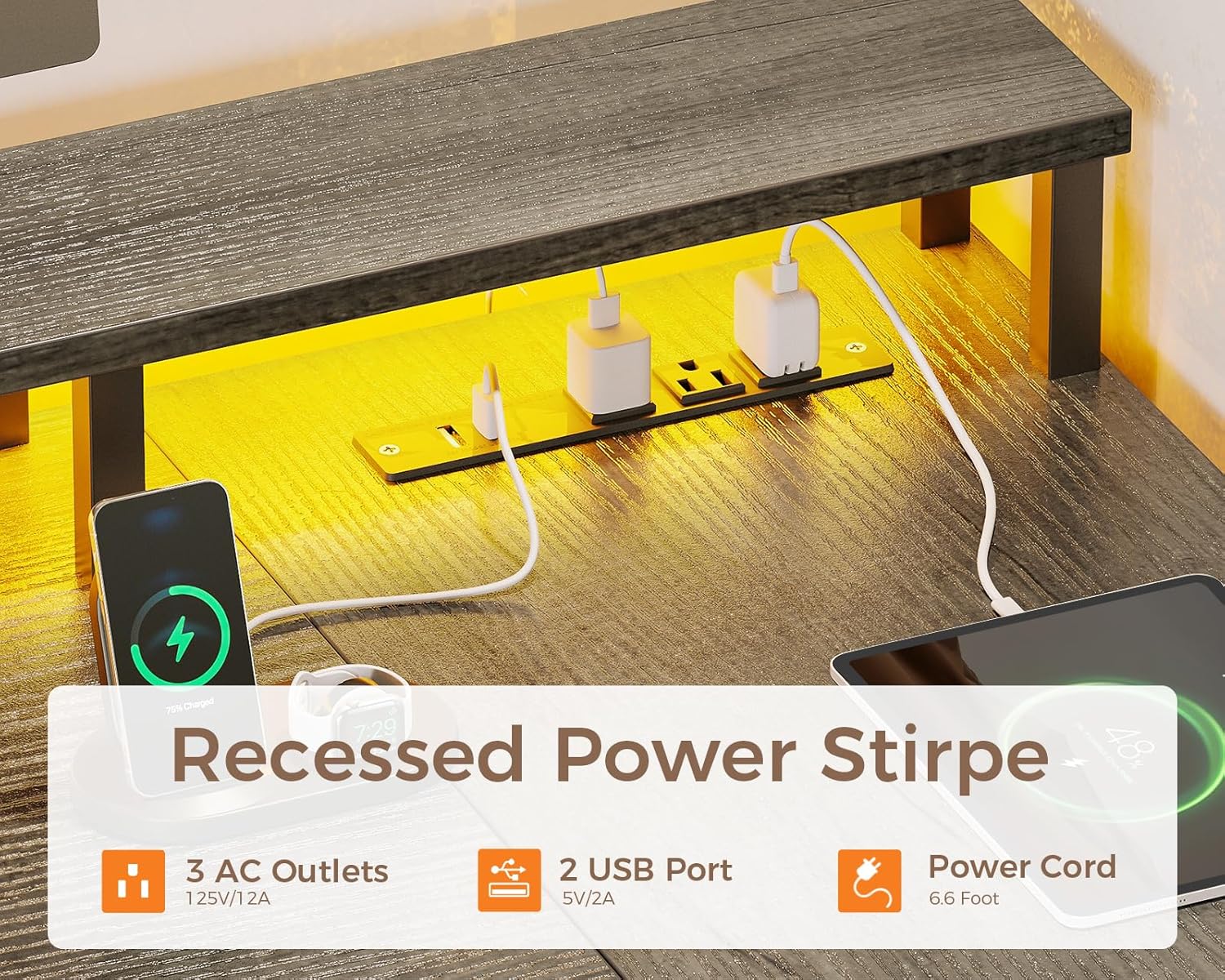
Figure 4: Detail of the recessed power strip, showing 3 AC outlets and 2 USB ports for convenient charging.
LED Lighting Operation
The integrated LED strip offers customizable lighting options to enhance your workspace or gaming setup.
- Power On/Off: Use the remote control (if provided) or the inline controller to turn the LED lights on or off.
- Color Selection: Choose from 7 available colors to match your preference.
- Mode Selection: Select from 13 different lighting modes.
- Brightness Adjustment: Adjust the brightness level (8 options) to suit your environment.
- Flicker Frequency: Choose from 9 flicker frequencies for dynamic lighting effects.
- Memory Function: The LED strip features a memory function that recalls the last used mode when powered on.

Figure 5: The ODK L-shaped desk illuminated with RGB LED lights in a gaming environment.
Reversible Configuration
The L-shaped design is reversible, allowing you to configure the longer side of the desk to either the left or right, adapting to your room layout.
Figure 6: The reversible design of the L-shaped desk, allowing for left or right corner setup.
Maintenance
- Cleaning: Wipe the desk surfaces with a soft, damp cloth. Avoid harsh chemicals or abrasive cleaners that could damage the engineered wood finish.
- Dusting: Regularly dust the desk and shelves to prevent buildup.
- Hardware Check: Periodically check all screws and connections to ensure they remain tight. Retighten as necessary.
- Avoid Excessive Moisture: Protect the desk from prolonged exposure to moisture or direct sunlight.
- Drawer Care: The file drawers are made of fabric. Clean them with a lint roller or a soft brush. Avoid storing excessively heavy items that could deform the fabric.
Troubleshooting
Desk Stability Issues
- Wobbling: Ensure all screws are fully tightened. Adjust the foot pads on the bottom of the desk legs to compensate for uneven flooring.
- Uneven Surface: Verify the desk is placed on a flat surface. Use the adjustable foot pads to level the desk.
LED Light Malfunctions
- Lights Not Turning On: Check if the power strip is plugged in and turned on. Ensure the LED strip's inline controller is connected and functioning.
- Remote Not Working: Replace the battery in the remote control. Ensure there are no obstructions between the remote and the LED strip's receiver.
- Inconsistent Lighting: Check all connections of the LED strip and ensure it is securely attached.
Power Outlet/USB Port Issues
- No Power: Confirm the desk's power cord is securely plugged into a working wall outlet and the power strip switch is on. Check your home's circuit breaker.
- Device Not Charging: Ensure your device's charging cable is functional and properly connected. Try a different device or port to isolate the issue.
Specifications
| Feature | Detail |
|---|---|
| Brand | ODK |
| Model | 66-Inch L-Shaped Desk (B0FV8MVH7R) |
| Product Dimensions | 100D x 172.3W x 88.7H Centimetres |
| Item Weight | 25.7 Kilograms |
| Color | Grey |
| Material | Engineered Wood (Top & Base) |
| Desk Design | L-Shape Computer Desk |
| Special Features | Built-In USB Outlet, Reversible Configuration, LED Strip, Monitor Stand, File Drawers, Storage Shelves |
| Number of Drawers | 2 |
| Number of Shelves | 2 (under bookshelf) |
| Assembly Required | Yes |
| Batteries Required | No (for desk, remote for LED may require) |
Warranty and Support
For warranty information, missing parts, or technical support, please contact ODK customer service. Refer to your purchase documentation for specific contact details or visit the official ODK website.
- Return Policy: This product is returnable until 31 Jan 2026. Please refer to your retailer's return policy for details.
- Customer Support: For any inquiries or assistance, please reach out to Casaottima Store, the seller of this product.


