
1. Introduction
This manual provides essential information for the proper installation, operation, and maintenance of your compatible LCD Display Module. This module is designed to be compatible with S-11540A, S-11540C, and S-11540B systems, serving as a visual output component. Please read this manual thoroughly before installation and use to ensure optimal performance and longevity of the product.
2. Setup and Installation
Careful handling is required during the installation process to prevent damage to the display module or the host system. Ensure all power is disconnected before proceeding with any installation steps.
2.1 Safety Precautions
- Always disconnect power from the host device before installing or removing the LCD module.
- Avoid touching the display surface directly to prevent fingerprints or scratches.
- Handle the module by its edges or frame.
- Ensure proper grounding to prevent electrostatic discharge (ESD) damage.
2.2 Installation Steps
- Power off the host system and disconnect it from any power sources.
- Carefully remove the existing display module, if applicable, following the host system's service manual.
- Align the compatible LCD display module with the designated slot or mounting points in the host system.
- Connect the necessary data and power cables from the host system to the corresponding ports on the LCD module. Ensure all connections are secure and correctly oriented.
- Secure the LCD module using appropriate fasteners (screws, clips) as required by the host system's design. Do not overtighten.
- Once installed, reconnect power to the host system and power it on to test the display functionality.
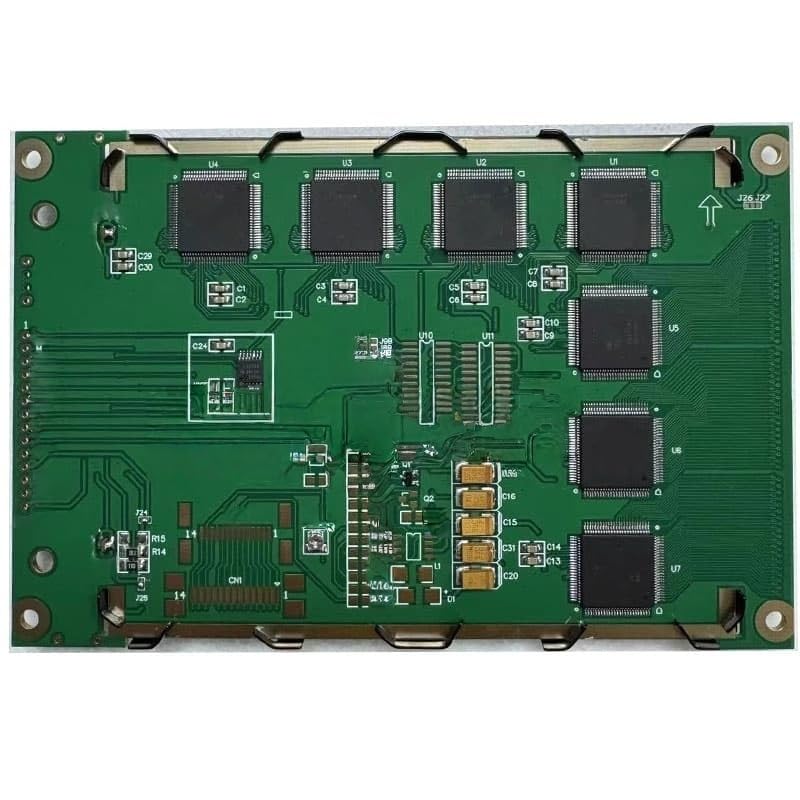
Image showing the compatible LCD display module, highlighting its form factor and connection points. This module is designed for integration into compatible S-11540 series systems.
3. Operating Instructions
The LCD display module functions as a visual output device for your compatible system. Once properly installed and powered, it will display information as generated by the host system's graphics controller.
- The display will automatically activate upon system power-up, provided all connections are correct.
- Brightness, contrast, and other display settings are typically controlled by the host system's software or hardware interface, not directly on the module itself. Refer to your host system's manual for display adjustment procedures.
- Ensure the host system's display drivers are correctly installed and updated for optimal performance.
4. Maintenance
Proper maintenance ensures the longevity and clear display quality of your LCD module.
4.1 Cleaning the Display Surface
- Gently wipe the screen with a soft, lint-free cloth.
- For stubborn smudges, lightly dampen the cloth with water or a specialized LCD cleaning solution. Do not spray liquid directly onto the screen.
- Avoid using harsh chemicals, abrasive cleaners, or alcohol-based solutions, as these can damage the display coating.
4.2 General Care
- Avoid exposing the module to extreme temperatures, high humidity, or direct sunlight for extended periods.
- Do not apply excessive pressure to the display surface.
- Keep the module free from dust and debris.
5. Troubleshooting
If you encounter issues with your LCD display module, refer to the following common troubleshooting steps:
- No Display: Ensure the host system is powered on. Check all cable connections between the module and the host system for proper seating. Verify the host system's display output settings.
- Flickering or Distorted Image: Check cable connections for looseness or damage. Ensure the host system's display drivers are correctly installed and up to date. Test with a different display cable if possible.
- Incorrect Colors: Verify the host system's color settings. Ensure the display cable is fully inserted and not damaged.
- Partial Display: Recheck all cable connections. Ensure the module is correctly seated in its slot.
If the problem persists after performing these checks, consult the host system's service manual or contact technical support.
6. Specifications
| Feature | Detail |
|---|---|
| Product Type | Compatible LCD Display Module |
| Compatible Models | S-11540A, S-11540C, S-11540B |
| Manufacturer | generic |
| ASIN | B0FV8DQC9B |
| Date First Available | October 8, 2025 |
7. Warranty and Support
Specific warranty information for this compatible LCD display module is not provided within this manual. Please refer to the seller's product page or contact the seller directly for details regarding warranty coverage and technical support. For issues related to the host system, consult its respective manufacturer's documentation.