
1. Introduction
This manual provides essential information for the safe and efficient operation of your Thomson 43FT2S15 FHD LED Smart TV. Please read this manual thoroughly before using the television and retain it for future reference.
2. Safety Information
Always follow basic safety precautions when using this product to reduce the risk of fire, electric shock, and injury.
- Do not expose the TV to rain or moisture.
- Do not block ventilation openings.
- Ensure proper grounding for the power cord.
- Do not place the TV on an unstable cart, stand, tripod, bracket, or table.
- Unplug the TV during lightning storms or when unused for long periods.
- Refer all servicing to qualified service personnel.
3. Package Contents
Verify that all items listed below are included in your package:
- Thomson 43FT2S15 FHD LED Smart TV
- Power Adapter
- Remote Control
- User Manual (this document)
- Warranty Card

Image: Front view of the Thomson 43FT2S15 Smart TV.
4. Setup
4.1 Physical Installation
The Thomson 43FT2S15 TV is designed for table mounting. Ensure the TV is placed on a stable, flat surface.

Image: Diagram showing the dimensions of the Thomson 43FT2S15 Smart TV. The screen size is 109 cm (43 inches) diagonally, with a width of 95 cm and height of 60 cm (including stand). The depth is 6 cm.
Dimensions (W x H x D): 95 cm x 60 cm x 6 cm (without stand, depth is 6 cm). The screen diagonal is 109 cm (43 inches).
4.2 Connecting Devices
Connect your external devices to the appropriate ports on the TV. Refer to the diagram below for port locations.
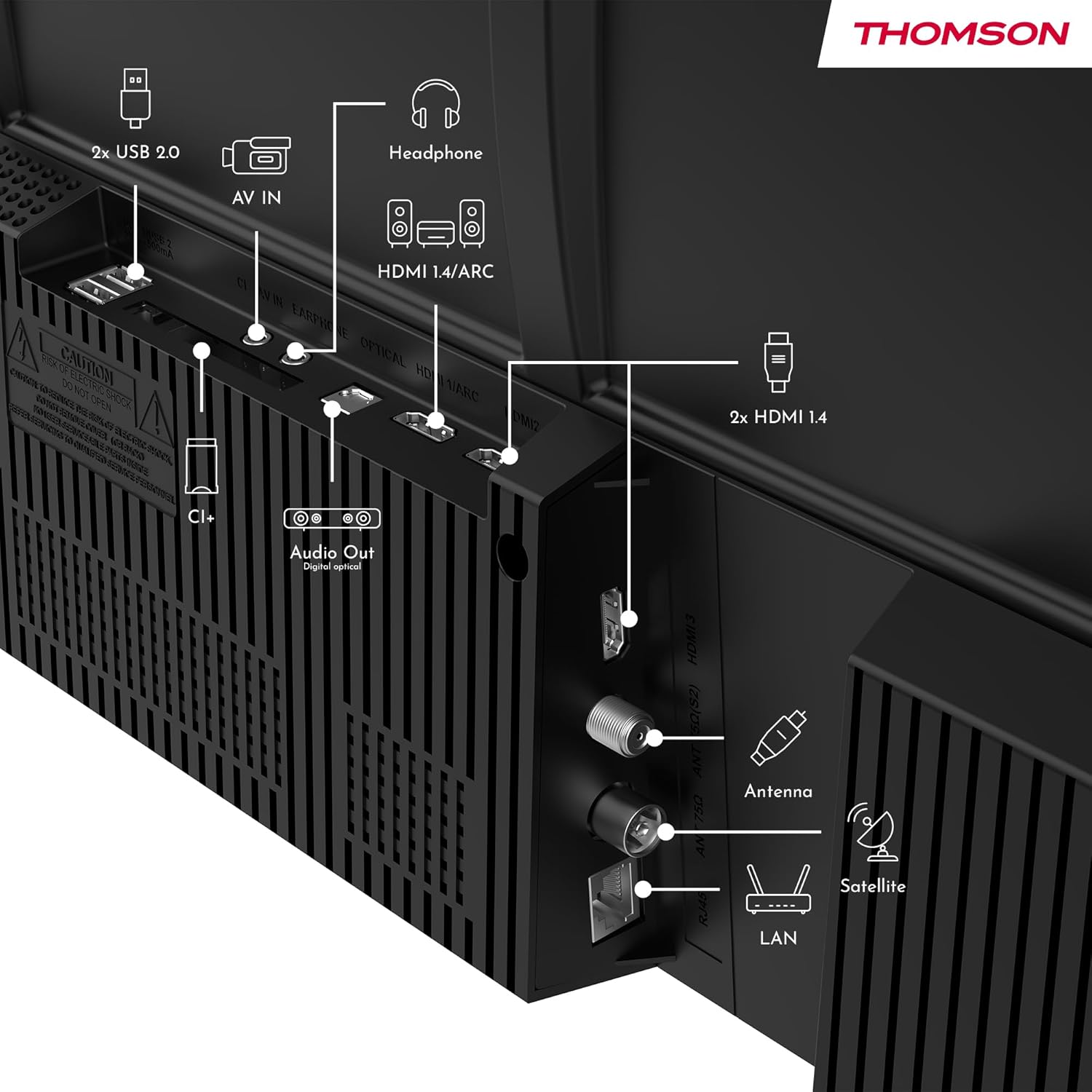
Image: Rear view of the Thomson 43FT2S15 Smart TV showing various connection ports. These include 2x USB 2.0, AV IN, Headphone out, HDMI 1.4/ARC, Optical Audio Out, CI+, Antenna (DVB-T2/C), Satellite (DVB-S2), and LAN (Ethernet).
- HDMI: Connect external devices like Blu-ray players, game consoles, or set-top boxes. The TV has 2 HDMI 1.4 ports, one with ARC support.
- USB: For connecting USB storage devices. The TV has 2 USB 2.0 ports.
- Antenna/Satellite: Connect your terrestrial or satellite antenna for live TV.
- LAN (Ethernet): For a wired internet connection.
- Wi-Fi: For wireless internet connection.
- Bluetooth: For connecting compatible wireless accessories.
- Audio Out (Optical): For connecting to an external sound system.
- Headphone: For connecting headphones.
- CI+ Slot: For inserting a Conditional Access Module (CAM) for encrypted channels.
5. Operating Instructions
5.1 Power On/Off
Connect the power adapter to the TV and a power outlet. Press the power button on the remote control to turn the TV on or off.
5.2 TiVo OS and Smart Features
Your Thomson Smart TV is powered by TiVo OS, which integrates live TV, streaming applications, and on-demand services into a single, intuitive interface. Personalized recommendations help you discover new content.

Image: The Thomson Smart TV displaying the TiVo OS interface with various streaming apps like Netflix, Canal+, Prime Video, YouTube, and Disney+.
5.3 Voice Control
Use the TiVo Voice Control feature to navigate channels, open applications, or search for content across different platforms using voice commands. The remote control includes a microphone for this function.

Image: The Thomson Smart TV remote control highlighting the voice control microphone, backlit buttons, and direct access buttons for streaming services.
5.4 Wireless Display
Mirror content from your smartphone, tablet, or laptop to the TV screen using the Wireless Display function. This allows for easy sharing of videos, photos, and applications.
5.5 Audio and Video Enhancements
- Dolby Audio: Experience enhanced sound quality with Dolby Audio, providing clear dialogue and immersive, multi-dimensional effects.

Image: A Thomson Smart TV displaying content with visual representations of sound waves, indicating the Dolby Audio feature.
- HDR10: Enjoy sharper contrast and lifelike colors with HDR10 technology, revealing details in both bright highlights and deep shadows.

Image: A split-screen comparison showing the difference between SDR (Standard Dynamic Range) and HDR10 (High Dynamic Range) image quality on a Thomson Smart TV, demonstrating improved contrast and color.
5.6 Remote Control
The ergonomic remote control features backlit buttons for easy navigation in low light conditions. It also includes direct access buttons for popular streaming services such as Netflix, YouTube, Prime Video, Disney+, and Canal+.
6. Maintenance
To ensure the longevity and optimal performance of your TV, follow these maintenance guidelines:
- Cleaning the Screen: Gently wipe the screen with a soft, lint-free cloth. For stubborn marks, use a screen cleaner specifically designed for TVs, applied to the cloth, not directly to the screen.
- Cleaning the Cabinet: Use a soft, dry cloth to wipe the TV cabinet. Do not use abrasive cleaners or solvents.
- Ventilation: Ensure the ventilation openings on the back of the TV are not blocked to prevent overheating.
- Power Cord: Regularly check the power cord for any damage. If damaged, contact qualified service personnel for replacement.
7. Troubleshooting
If you encounter issues with your TV, refer to the following common troubleshooting steps:
- No Power:
- Check if the power cord is securely connected to the TV and the power outlet.
- Ensure the power outlet is functioning by plugging in another device.
- Try pressing the power button on the TV itself, not just the remote.
- No Picture/Sound:
- Verify that the correct input source is selected (e.g., HDMI 1, Antenna).
- Check all cable connections between the TV and external devices.
- Adjust the volume and ensure the TV is not muted.
- Remote Control Not Working:
- Replace the batteries in the remote control.
- Ensure there are no obstructions between the remote and the TV's IR sensor.
- Smart TV Features Not Working (Wi-Fi/Apps):
- Check your internet connection. Restart your router if necessary.
- Go to the TV's network settings to ensure it's connected to Wi-Fi or Ethernet.
- Try restarting the TV.
For more complex issues, please contact customer support or refer to the manufacturer's website.
8. Specifications
Key technical specifications for the Thomson 43FT2S15 FHD LED Smart TV:
| Feature | Specification |
|---|---|
| Brand | Thomson |
| Model | 43FT2S15 |
| Screen Size | 43 Inches (109 cm) |
| Display Technology | LED |
| Resolution | 1920 x 1080 (FHD) |
| Refresh Rate | 60 Hz |
| Aspect Ratio | 16:9 |
| Operating System | TiVo OS |
| Audio Technology | Dolby Audio (Dolby Atmos encoding) |
| HDR Support | HDR10 |
| Connectivity | Wi-Fi, Ethernet, Bluetooth, 2x HDMI 1.4 (1x ARC), 2x USB 2.0, Optical Audio Out, AV In, Headphone, CI+ |
| Tuners | DVB-T2/C/S2 (Triple Tuner) |
| Supported Internet Services | Netflix, YouTube, Prime Video, Disney+, Canal+, Browser |
| Dimensions (Product) | 6 x 95 x 60 cm; 6.5 kg |
| Energy Efficiency Class | E |

Image: Energy efficiency label for the Thomson 43FT2S15 Smart TV, showing an energy class of E and energy consumption of 42 kWh/1000h (SDR) and 46 kWh/1000h (HDR).
For detailed product information, refer to the EPREL database: https://eprel.ec.europa.eu/qr/1969521
9. Warranty and Support
Your Thomson 43FT2S15 TV comes with a warranty. Please refer to the included Warranty Card for specific terms and conditions.
For technical support or service inquiries, please contact the manufacturer:
- Manufacturer: Streamview GmbH
- Website: www.streamview.com
- Email: contact@streamview.com
- Phone: +4318900066
Please have your model number (43FT2S15) and purchase information ready when contacting support.


