
1. Introduction
Thank you for choosing the Black+Decker BXRA2501E Electronic Oil Radiator. This appliance is designed to provide efficient and comfortable heating for your indoor spaces. Featuring 2500W of power, 11 heating elements, a digital display, adjustable thermostat, and a 24-hour timer, this radiator offers precise control and quiet operation. Please read this manual thoroughly before use to ensure safe and optimal performance.
2. Safety Instructions
Always follow basic safety precautions when using electrical appliances to reduce the risk of fire, electric shock, and injury.
- Read all instructions before using this radiator.
- Do not use this radiator in the immediate surroundings of a bath, a shower, or a swimming pool.
- Do not cover the radiator. Covering the radiator can lead to overheating and fire.
- Keep flammable materials such as furniture, curtains, and other combustible items at least 1 meter (3 feet) from the front and sides of the radiator.
- Ensure the radiator is placed on a stable, level surface to prevent tipping. This model includes anti-tip protection.
- Do not operate any radiator with a damaged cord or plug, or after the radiator malfunctions or has been dropped or damaged in any manner.
- This appliance is not intended for use by persons (including children) with reduced physical, sensory or mental capabilities, or lack of experience and knowledge, unless they have been given supervision or instruction concerning use of the appliance by a person responsible for their safety.
- Children should be supervised to ensure that they do not play with the appliance.
- Do not insert or allow foreign objects to enter any ventilation or exhaust opening as this may cause an electric shock or fire, or damage the radiator.
- To prevent a possible fire, do not block air intakes or exhaust openings in any manner. Do not use on soft surfaces, like a bed, where openings may become blocked.
- The radiator has hot parts inside. Do not use it in areas where gasoline, paint, or flammable liquids are used or stored.
- Unplug the radiator when not in use.
3. Product Components
The Black+Decker BXRA2501E Electronic Oil Radiator comes with the following components:
- Main Radiator Unit with 11 Heating Elements
- Digital Control Panel with Touch Controls
- Remote Control
- Pre-assembled Wheels for Portability
- Power Cord with Cable Housing

Image: The Black+Decker BXRA2501E oil radiator shown with its remote control. The radiator features a black finish, 11 heating elements, and a digital display on the side panel.
4. Setup
Your Black+Decker BXRA2501E radiator is designed for easy setup. Follow these steps to prepare your unit for use:
- Unpack the Radiator: Carefully remove the radiator from its packaging. Retain packaging for future storage or transport.
- Position the Radiator: Place the radiator on a firm, level surface. Ensure there is at least 1 meter (3 feet) of clear space around the radiator from walls, furniture, and other objects to allow for proper heat circulation and prevent fire hazards.
- Connect to Power: Unwind the power cord from the integrated cable housing. Plug the power cord into a suitable electrical outlet. Ensure the outlet voltage matches the radiator's requirements (220-240V, 50Hz).

Image: A person demonstrating the integrated cable housing on the side of the Black+Decker oil radiator, used for neat storage of the power cord.
5. Operating Instructions
The BXRA2501E radiator features a digital display with touch controls and a remote control for convenient operation.
5.1 Power On/Off
- Using the Control Panel: Press the Power button (symbol: circle with vertical line) on the digital display to turn the radiator on or off.
- Using the Remote Control: Press the Power button on the remote control to turn the radiator on or off.
5.2 Adjusting Heat Settings
The radiator offers 3 heat intensity levels.
- Press the Mode button (symbol: three wavy lines) on the control panel or remote control to cycle through the available heat settings (Low, Medium, High). The selected setting will be indicated on the digital display.
5.3 Setting the Temperature
The adjustable thermostat allows you to set your desired room temperature.
- Use the Up and Down arrows on the control panel or remote control to increase or decrease the target temperature. The digital display will show the set temperature.
- The radiator will automatically turn on or off to maintain the set temperature, ensuring energy efficiency.

Image: A close-up view of the LED touch screen on the Black+Decker oil radiator, displaying the temperature setting and control icons.
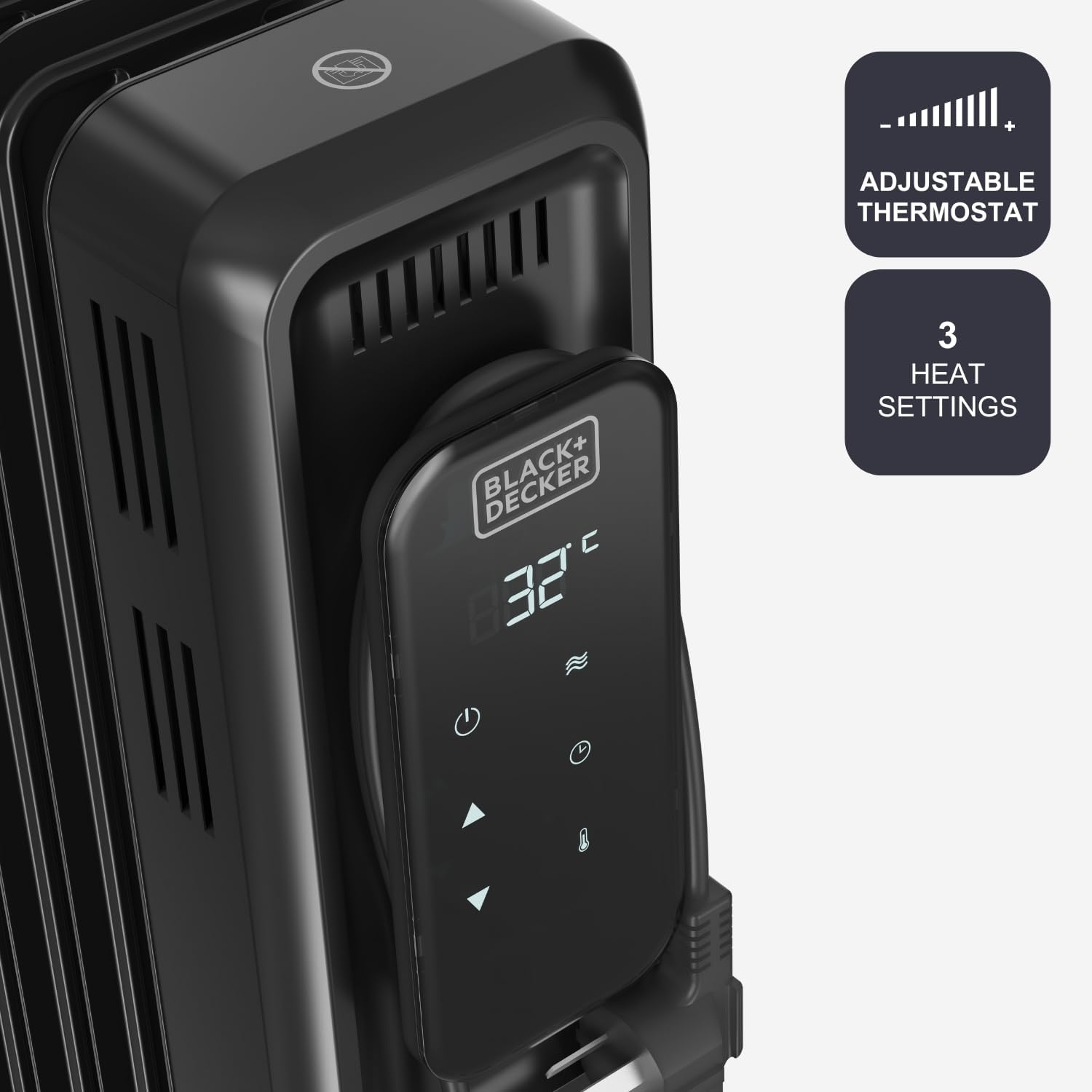
Image: A detailed view of the radiator's control panel, highlighting the adjustable thermostat feature and the three distinct heat settings.
5.4 Using the 24-Hour Timer
The integrated 24-hour timer allows you to program the radiator to turn on or off at specific times.
- Press the Timer button (symbol: clock) on the control panel or remote control.
- Use the Up and Down arrows to set the desired number of hours for the timer (up to 24 hours).
- The timer can be set to delay the start or stop of the radiator. Refer to the digital display for timer status.

Image: A hand holding the remote control for the Black+Decker oil radiator, with the 24-hour timer function prominently featured.
5.5 Remote Control Operation
The remote control provides convenient access to all radiator functions from a distance.
- Ensure the remote control has working batteries.
- Point the remote control towards the radiator's digital display for optimal signal reception.
- All functions available on the control panel (Power, Mode, Temperature Adjustment, Timer) can be operated via the remote control.
6. Maintenance
Regular maintenance ensures the longevity and efficient operation of your radiator.
- Cleaning: Always unplug the radiator and allow it to cool completely before cleaning. Wipe the exterior surfaces with a soft, damp cloth. Do not use abrasive cleaners or solvents. Do not immerse the radiator in water.
- Storage: When not in use, store the radiator in a cool, dry place. You can use the integrated cable housing to neatly store the power cord.
- No Internal Maintenance: The oil in this radiator is permanently sealed and never needs refilling. Do not attempt to open the radiator.
7. Troubleshooting
If you encounter issues with your radiator, refer to the following table for common problems and solutions.
| Problem | Possible Cause | Solution |
|---|---|---|
| Radiator does not turn on. | No power supply. Power button not pressed. Overheat protection activated. | Check if the plug is securely in the outlet. Press the Power button. Unplug, let cool for 30 minutes, then plug back in. |
| Radiator is not heating effectively. | Low heat setting selected. Thermostat set too low. Room too large for radiator. | Increase heat setting. Increase target temperature. Ensure radiator is appropriate for room size. |
| Radiator makes unusual noises. | Normal expansion/contraction of metal. Radiator not on a level surface. | This is usually normal. Ensure radiator is on a flat, stable surface. |
| Remote control not working. | Dead batteries. Obstruction between remote and radiator. | Replace batteries. Ensure clear line of sight to the digital display. |
If the problem persists after attempting these solutions, please contact customer support.
8. Specifications
Detailed technical specifications for the Black+Decker BXRA2501E Electronic Oil Radiator:
| Feature | Specification |
|---|---|
| Model | BXRA2501E |
| Brand | BLACK+DECKER |
| Power Output | 2500W |
| Heating Elements | 11 |
| Heat Settings | 3 |
| Control Type | Digital Display with Touch Controls, Remote Control |
| Thermostat | Adjustable |
| Timer | 24-hour programmable |
| Safety Features | Anti-tip protection, Anti-freeze function, Thermal safety protection |
| Color | Black |
| Dimensions (L x W x H) | 57 x 26 x 63 cm (approximately) |
| Weight | 11.47 kg (approximately) |

Image: A visual representation of the Black+Decker BXRA2501E oil radiator with its key dimensions labeled: 63 cm in height, 57 cm in length, and 26 cm in width.
9. Warranty and Support
Your Black+Decker BXRA2501E Electronic Oil Radiator is covered by a manufacturer's warranty. Please refer to the warranty card included with your purchase for specific terms and conditions, including the warranty period and coverage details.
For technical assistance, troubleshooting beyond this manual, or to inquire about warranty service, please contact Black+Decker customer support. Contact information can typically be found on the product packaging, the official Black+Decker website, or your purchase receipt.
When contacting support, please have your model number (BXRA2501E) and proof of purchase readily available.
