
Introduction
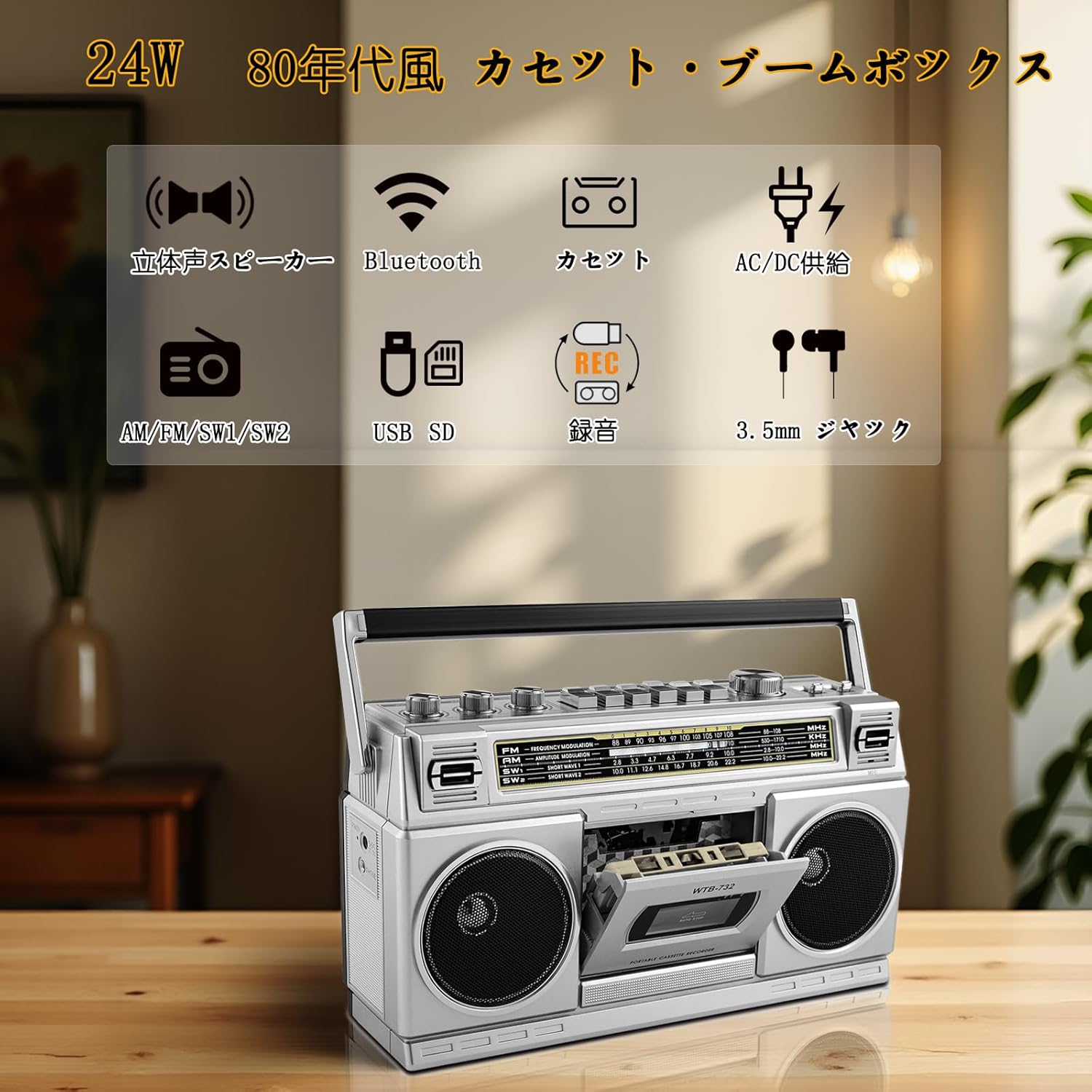
Thank you for purchasing the WISCENT WTB-732 Retro Cassette Player and Radio. This device combines classic 1980s design with modern audio functionalities, including Bluetooth, USB, and SD card playback, alongside traditional AM/FM/SW radio and cassette playback/recording. This manual provides detailed instructions for setup, operation, maintenance, and troubleshooting to ensure optimal performance and longevity of your unit.
Safety Information
- Read all instructions carefully before use and retain for future reference.
- Do not expose the unit to rain, moisture, or extreme temperatures.
- Avoid placing the unit near heat sources such as radiators, heat registers, stoves, or other apparatus (including amplifiers) that produce heat.
- Clean only with a dry cloth.
- Do not block any ventilation openings.
- Use only attachments/accessories specified by the manufacturer.
- Unplug this apparatus during lightning storms or when unused for long periods.
Product Overview
The WISCENT WTB-732 is a versatile audio system featuring a retro design with modern capabilities. It includes stereo speakers, a cassette player/recorder, multi-band radio, Bluetooth receiver, and USB/SD card playback/recording functions.

Front view of the WISCENT WTB-732 Retro Cassette Player and Radio, showcasing its classic design and controls.
Key Features:
- Retro 80s Design: Classic boombox aesthetic.
- Multi-Source Playback: Cassette, AM/FM/SW radio, Bluetooth, USB, SD card.
- Recording Functionality: Record from radio or Bluetooth to cassette or USB.
- High-Quality Audio: 24W (12W+12W RMS) dual full-range stereo speakers with adjustable Bass and Treble.
- Headphone Jack: For private listening.
- Portable: AC/DC power options for home or on-the-go use.
Setup
Powering the Unit:
The WTB-732 can be powered by AC mains or DC batteries.

Rear panel of the WISCENT WTB-732 showing AC power input and battery compartment.
- AC Power: Connect the provided AC power cable to the AC port on the rear of the unit and then to a standard wall outlet.
- DC Battery Power: Open the battery compartment on the rear of the unit. Insert four (4) D-size batteries (not included), ensuring correct polarity. Close the compartment securely.
Antenna:
Extend the telescopic antenna for optimal radio reception, especially for FM and SW bands. For AM reception, rotate the unit for the best signal.
Operating Instructions
General Controls:

Top panel controls of the WISCENT WTB-732, including volume, tone, tuning, and function selectors.
- Power On/Off: Use the dedicated power switch or function selector to turn the unit on or off.
- Volume Control: Adjust the rotary volume knob to increase or decrease the sound level.
- Tone Controls: Use the Bass and Treble knobs to adjust the audio equalization to your preference.
- Function Selector: Switch between Tape, Radio, Bluetooth, USB, and SD modes.
Cassette Player/Recorder:

The cassette compartment of the WISCENT WTB-732 with a tape inserted.
- Loading a Cassette: Press the 'Stop/Eject' button to open the cassette door. Insert a cassette tape with the open edge facing upwards. Close the door.
- Playback: Select 'Tape' mode. Press the 'Play' button to start playback.
- Controls: Use 'Fast Forward' (FF), 'Rewind' (REW), 'Pause', and 'Stop/Eject' buttons for tape control.
- Recording:
- From Radio: Select 'Radio' mode and tune to your desired station. Insert a blank cassette. Press the 'Record' button (usually simultaneously with 'Play') to begin recording.
- From Bluetooth: Pair your Bluetooth device (see Bluetooth section). Insert a blank cassette. Start playing audio on your Bluetooth device. Press the 'Record' button to begin recording.
- Note: Recording quality may vary and some degradation from the original source is inherent in analog recording.
Radio (AM/FM/SW):
The WISCENT WTB-732 with its antenna extended, indicating radio operation.
- Select Radio Mode: Set the function selector to 'Radio'.
- Select Band: Use the band selector switch to choose between AM, FM, SW1, or SW2.
- Tune to a Station: Rotate the 'Tuning' knob to find your desired radio station. Extend the telescopic antenna for better reception.
- Note: Radio playback is monaural.
Bluetooth Mode:

The WISCENT WTB-732 receiving audio via Bluetooth from a smartphone.
- Enable Bluetooth: Set the function selector to 'Bluetooth'. The unit will enter pairing mode, indicated by an audible prompt or flashing indicator.
- Pairing: On your smartphone or other Bluetooth device, search for available devices and select 'WTB-732'. Once connected, you will hear a confirmation sound.
- Playback: Start playing audio on your paired device. The sound will be output through the WTB-732 speakers.
- Note: This unit functions as a Bluetooth receiver only. It does not support Bluetooth transmission or connection to Bluetooth headsets.
USB/SD Playback:

The WISCENT WTB-732 with a USB drive inserted into its port.
- Insert Media: Insert a USB flash drive or an SD/Micro SD (TF) card (up to 64GB, FAT32 format) into the respective slot.
- Select Mode: Set the function selector to 'USB' or 'SD'. The unit will automatically detect and begin playing MP3 files from the inserted media.
- Controls: Use the playback control buttons (Play/Pause, Next, Previous) to navigate your audio files.
Cassette to MP3 Conversion (USB):

Visual representation of converting audio from cassette to MP3 on a USB drive.
- Insert a cassette tape into the unit and a USB flash drive into the USB port.
- Select 'Tape' mode.
- Press the 'Record' button (often labeled 'REC' or similar) while the cassette is playing. The unit will convert the cassette audio to MP3 format and save it to the USB drive.
- Press 'Stop' on the cassette player to end the recording.
Headphone Use:

The WISCENT WTB-732 featuring a headphone jack for private listening.
Connect standard 3.5mm wired headphones (not included) to the headphone jack located on the side of the unit for private listening. The internal speakers will be muted automatically.
Maintenance
- Cleaning: Wipe the exterior of the unit with a soft, dry cloth. Do not use abrasive cleaners or solvents.
- Cassette Head Cleaning: Periodically clean the cassette player's heads, pinch roller, and capstan with a cotton swab lightly dampened with isopropyl alcohol to ensure optimal sound quality and prevent tape damage.
- Storage: When not in use for extended periods, remove batteries and store the unit in a cool, dry place away from direct sunlight.
Troubleshooting
| Problem | Possible Cause | Solution |
|---|---|---|
| No power | Unit not plugged in; batteries depleted or incorrectly inserted. | Check AC power connection; replace batteries or ensure correct polarity. |
| No sound | Volume too low; wrong function selected; headphones connected. | Increase volume; select correct source (Tape, Radio, BT, USB/SD); disconnect headphones. |
| Poor radio reception | Antenna not extended; weak signal; interference. | Extend and adjust antenna; reposition unit; try a different location. |
| Cassette not playing/recording | Tape incorrectly inserted; tape damaged; dirty heads. | Reinsert tape correctly; try another tape; clean cassette heads. |
| Bluetooth not pairing | Unit not in pairing mode; device too far; 'WTB-732' not selected. | Ensure unit is in Bluetooth mode; bring devices closer; select 'WTB-732' from your device's Bluetooth list. |
| USB/SD not playing | Incorrect file format; unsupported card size/format; media not inserted correctly. | Ensure files are MP3; use FAT32 formatted media up to 64GB; reinsert media. |
Specifications
| Feature | Detail |
|---|---|
| Brand | WISCENT |
| Model Number | WTB-732 |
| Power Output | 24W (12W + 12W RMS) |
| Power Source | AC Power Cord / DC 6V (4 x D-size batteries, not included) |
| Radio Frequencies | AM: 530-1710kHz FM: 76-108MHz SW1: 2.8-10.1MHz SW2: 9.9-22.1MHz |
| Bluetooth | Receiver only (no transmission) |
| USB/SD Support | MP3 playback, up to 64GB (FAT32 format) |
| Headphone Jack | 3.5mm Stereo Mini Jack |
| Dimensions (L×W×H) | 12.9 × 4.1 × 7.1 inches (328 × 105 × 180 mm) |
| Origin | China |
Warranty and Support
This WISCENT WTB-732 unit comes with a 1-year warranty from the date of purchase. This warranty covers manufacturing defects and workmanship under normal use. It does not cover damage caused by misuse, accidents, unauthorized modifications, or normal wear and tear.
For warranty claims or technical support, please contact your retailer or the WISCENT customer service department with your purchase receipt and model number.