
1. Introduction
This manual provides comprehensive instructions for the installation, operation, and maintenance of your Hanchen MX-1109 Solar Sliding Gate Opener. Please read this manual thoroughly before installation and use to ensure proper function and safety. This gate opener is designed for sliding gates up to 1300 lbs in weight and 40 ft in length, suitable for various gate types including steel, wood, vinyl, tube, panel, or chain-link designs in residential, commercial, courtyard, farm, and ranch settings.
2. Safety Information
WARNING: Improper installation or use can lead to serious injury or property damage. Always follow safety guidelines.
- Ensure all electrical connections are made by a qualified professional if connecting to AC power.
- Keep the gate area clear of obstructions, children, and pets during operation.
- Do not allow children to operate the gate opener or play near the gate.
- Regularly inspect the gate and opener for any signs of wear, damage, or misalignment.
- Utilize the provided safety features, such as the IR sensor, to prevent accidents.
- In case of power failure, use the emergency release keys to manually operate the gate.
The system includes an infrared (IR) sensor to detect objects in the gateway, causing the gate to stop and reverse. The 's motion. The 'Resistance' function activates if obstructions are met during gate movement. The 'Auto-closing' function ensures the gate secures the property after a set time. 'Soft start and soft stop' features protect the gate and extend the opener's lifespan.

Image: Protective Safety Sensors ensure the gate stops and reverses if an object is detected in its path.
3. Package Contents
Verify that all components listed below are included in your package:
- Gate Opener Unit
- Solar Panel (280W)
- 20ft Chain
- Magnetic Limit Switches (2 pcs)
- Remote Controls (2 pcs, batteries included)
- Infrared Photocell (1 pair)
- Wireless Keypad (1 pc)
- Emergency Keys (2 pcs)
- Warning Sign
- Mounting Accessories
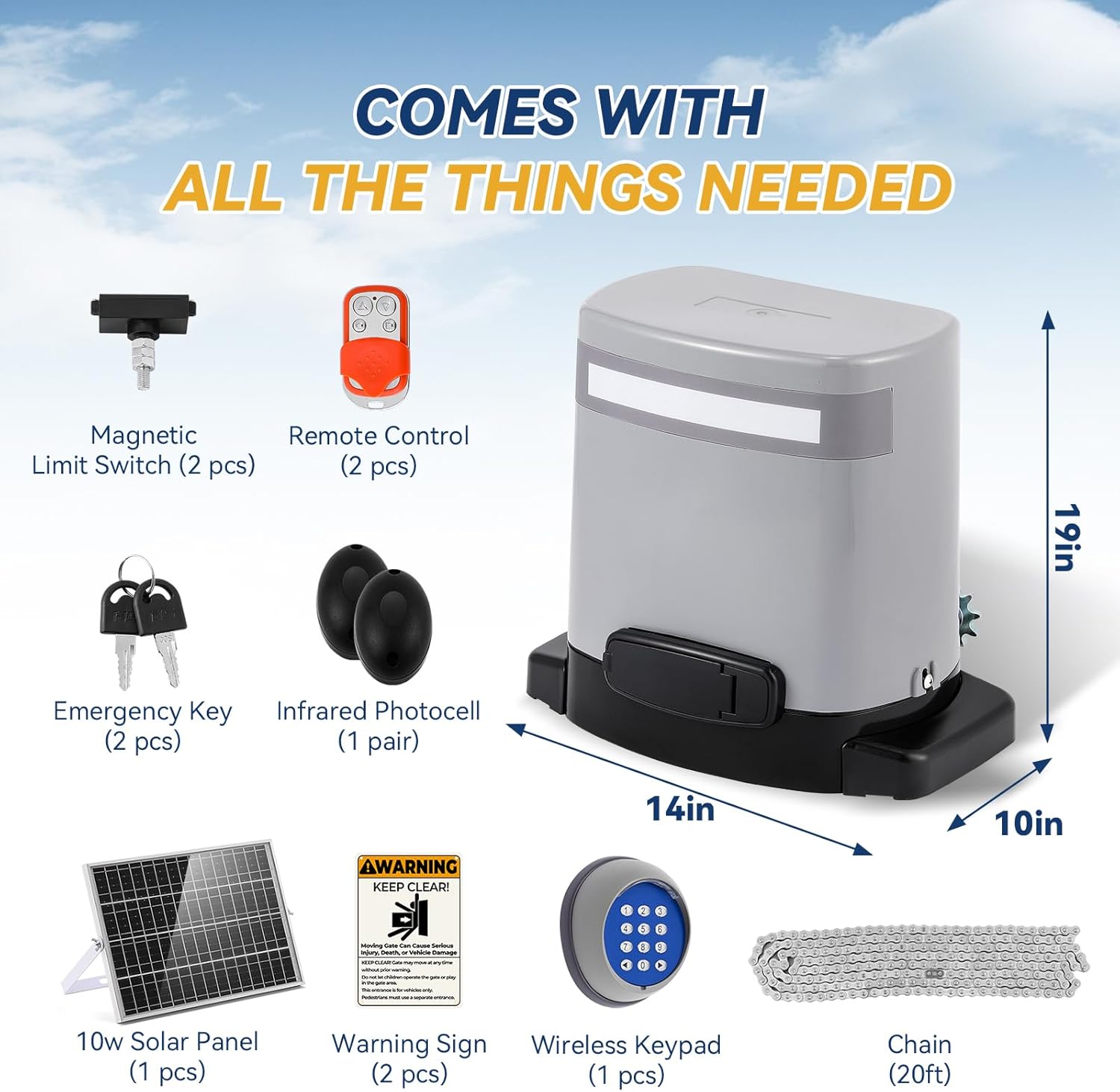
Image: Overview of all included components for the gate opener system.
4. Setup and Installation
The Hanchen MX-1109 is designed for straightforward installation. For detailed steps, refer to the separate installation guide provided with your product. Key features simplifying installation include:
- Plug-and-Play Solar Power: Simply connect the solar panel to the motor. No additional wiring or external solar charge controller is required.
- Built-in Battery: The integrated battery offers enhanced waterproofing and eliminates the need for external battery preparation.
Ensure the gate opener is securely mounted and the chain is properly aligned and tensioned for smooth operation. The magnetic limit switches define the open and closed positions of your gate.

Image: Simplified wiring for solar power with built-in battery compared to older versions requiring external components.
5. Operating Instructions
5.1. Control Options
- WiFi Remote Control: Pair the gate opener with your smartphone to control it from anywhere via a dedicated app. This allows you to open and close your gate remotely.
- Physical Remote Controls: Two remotes are provided, offering a reliable 165ft control range for convenient operation.
- Wireless Keypad: Use the wireless keypad for temporary access or for guests.
5.2. LED Indicator
The integrated LED indicator on the gate opener provides clear visual feedback on the gate's status:
- Green Light: Indicates the gate is open.
- Red Light: Indicates the gate is closed.
This feature enhances visibility, especially in adverse weather conditions.

Image: User-friendly LED indicator showing gate status (green for open, red for closed).
5.3. Official Product Video
Video: This video demonstrates the Hanchen Gate Opener in operation, highlighting its features including the keypad and IR sensor functionality.
6. Power Modes
The Hanchen MX-1109 offers flexible power options:
- 32V Solar Panel with Built-in Battery: Provides an eco-friendly and off-grid power solution. The built-in battery ensures continuous operation even without direct sunlight.
- AC110-120V 60Hz: Can also be powered directly by standard AC electricity.

Image: Illustration of the dual power supply options for the gate opener.
7. Maintenance
Regular maintenance ensures the longevity and reliable operation of your gate opener:
- Clean the Solar Panel: Periodically clean the solar panel surface to ensure maximum efficiency.
- Inspect the Chain: Check the chain for proper tension and lubrication. Adjust if necessary.
- Check Safety Sensors: Ensure the IR sensors are clean and properly aligned. Test their functionality regularly.
- Lubricate Moving Parts: Apply appropriate lubricant to moving mechanical parts as recommended in the full installation guide.
- Battery Health: Monitor the performance of the built-in battery, especially in prolonged periods of low sunlight.
- Keep Area Clear: Ensure the gate's path is free from debris, vegetation, or other obstructions.

Image: The gate opener is designed to be waterproof for outdoor use, but regular checks are still important.
8. Troubleshooting
If you encounter issues with your Hanchen MX-1109 Solar Sliding Gate Opener, refer to the following common problems and solutions:
| Problem | Possible Cause | Solution |
|---|---|---|
| Gate does not move | No power, remote battery dead, safety sensor obstructed, limit switch issue. | Check power connection/solar panel charge. Replace remote batteries. Clear sensor path. Verify limit switch settings. |
| Gate stops unexpectedly | Obstruction detected by IR sensor or resistance function, power fluctuation. | Clear any obstructions. Check power supply stability. |
| Remote control not working | Dead battery, out of range, remote not paired. | Replace remote battery. Move closer to the gate opener. Re-pair the remote control according to pairing instructions. |
| Gate opens/closes partially | Limit switches incorrectly set, mechanical obstruction. | Adjust magnetic limit switches. Inspect gate path for physical obstructions. |
For more complex issues or if troubleshooting steps do not resolve the problem, please contact Hanchen customer support.
9. Specifications
| Feature | Specification |
|---|---|
| Model Number | MX-1109 |
| Max Gate Weight | 1300 lbs |
| Max Gate Length | 40 ft |
| Motor Power | 3/8HP 280W DC Motor |
| Power Supply Options | AC110-120V 60Hz or 32V Solar Panel |
| Control Range (Remote) | 165 ft |
| Item Weight | 48.8 pounds |
| Product Dimensions | 12 x 4 x 16 inches |
| Batteries Included | Yes (for remotes, built-in for unit) |
| Battery Cell Type | Alkaline (for remotes) |
| Included Components | Gate Opener, Solar Panel, Accessories, Remote Control |
10. Warranty and Support
Hanchen provides comprehensive customer support for your gate opener:
- 1 Year Free Replacement: Enjoy a one-year free replacement policy from the date of purchase.
- Lifetime Technical Support: Hanchen offers lifetime technical support to assist with any questions or issues you may encounter.
If you have any questions or require assistance, please contact Hanchen customer service. Our specialists are available to provide professional and timely solutions.