
Introduction
Welcome to the Fotopro E-7H Gimbal Head instruction manual. This guide provides detailed information on the setup, operation, and maintenance of your new gimbal head. Designed for stability and precision, the E-7H is ideal for wildlife, birding, sports, and panoramic photography with heavy camera and lens setups.

Image: Fotopro E-7H Gimbal Head showing its design, 1.09kg weight, 10kg max load, and 68mm base diameter.
Package Contents
Please verify that all items are present in your package:
- Fotopro E-7H Gimbal Head
- Long Quick Release Plate
- Adjustable Panning Handle
Key Features
- Heavy Duty Load Capacity: Built from magnesium aluminum alloy, the Fotopro E-7H gimbal head supports cameras and lenses up to 10kg (22 lbs) while weighing only 1.09kg (2.4 lbs). Its durable construction provides stability for wildlife, birding, sports, and panoramic photography.
- 360° Panoramic & ±90° Tilt: Features full 360° rotation for smooth panoramic shooting and vertical tilt up to ±90°. This tripod head swings up or down in 45° increments with click-stops, and enables shooting straight up or down, allowing precise tracking of fast-moving subjects. Engraved degree markings and bubble level ensure accurate composition for professional video and photography.
- Long Arca-Type Quick Release Plate: The included long quick release plate helps accommodate the size and weight of the camera and give a better balance. Its 1/4"-20 screw fits most DSLR and mirrorless cameras. Compatible with Arca-Swiss standard, it offers secure mounting and fast transitions between tripods, gimbals, and monopods.
- Safety Locker System: The patented locking design for the camera plate prevents accidental camera slips. When loosening the knob, the clamp stops partially open, allowing balance adjustments while keeping your lens secure. Press the lock switch to fully release only when needed, ensuring safe use with heavy telephoto lenses.
- Wide Tripod Compatibility: With a 68mm base diameter, the E-7H gimbal head perfectly fits most professional tripods, including Fotopro E-7 carbon fiber tripod stand and other Pantour series camera tripods. The detachable and adjustable handle provides flexible control for video shooting, bird photography, panoramic landscapes, and astronomy use.
Setup Guide
1. Attaching to a Tripod
- Locate the 3/8" mounting screw on your tripod.
- Align the base of the Fotopro E-7H gimbal head (68mm diameter) with the tripod screw.
- Rotate the gimbal head clockwise until securely fastened. Ensure it is tight to prevent movement during use.
2. Attaching Your Camera
- Identify the long Arca-Type Quick Release Plate.
- Attach the quick release plate to the bottom of your camera or lens collar using the 1/4"-20 screw. Ensure it is firmly tightened.
- With the safety locker system engaged (partially open), slide the camera with the attached quick release plate into the clamp on the gimbal head.
- Adjust the position of the camera on the plate for optimal balance.
- Tighten the knob on the clamp to secure the camera.
- To fully release the camera, press the lock switch. Always ensure the camera is supported when releasing.

Image: Close-up view of the Fotopro E-7H Gimbal Head demonstrating the patented safety locker system for secure camera mounting.
Operation
Adjusting Tilt and Pan
The E-7H gimbal head offers full 360° panoramic rotation and ±90° vertical tilt.
- To adjust the horizontal pan, loosen the knob at the base of the gimbal head. Rotate to the desired position and tighten the knob. Engraved degree markings assist with precise adjustments.
- For vertical tilt, loosen the main tilt knob. The head swings up or down in 45° increments with click-stops, allowing for precise positioning. Tighten the knob once the desired angle is achieved.

Image: Illustration of the semi-automatic positioning feature, allowing the floating arm to be locked at 45°, 90°, or 180° for vertical framing.

Image: Visual representation of the 360° panoramic shooting capability and examples of its use in bird photography, wildlife photography, and astrophotography.
Using the Adjustable Panning Handle
The detachable handle provides additional control for smooth video shooting and tracking. Attach it to the designated port on the gimbal head and tighten. Use it to guide movements for bird photography, panoramic landscapes, and astronomy.
Maintenance
- Keep the gimbal head clean and free from dust and debris. Use a soft, dry cloth for cleaning.
- Avoid exposing the unit to extreme temperatures or moisture.
- Periodically check all screws and knobs to ensure they are securely tightened. Do not overtighten.
- Lubrication is generally not required. If movement becomes stiff, contact customer support.
Troubleshooting
Camera not stable on the head:
- Ensure the quick release plate is securely attached to your camera/lens.
- Verify the clamp knob on the gimbal head is fully tightened after positioning the camera.
- Check that the safety locker system is properly engaged.
Stiff movement or difficulty rotating:
- Ensure no locking knobs are overtightened. Loosen them slightly and re-test.
- Clean any visible debris from the moving parts.
- If the issue persists, contact Fotopro customer support.
Technical Specifications
| Feature | Detail |
|---|---|
| Model | E-7H |
| Load Capacity | 10kg (22 lbs) |
| Weight | 1.09kg (2.4 lbs) |
| Base Diameter | 68mm |
| Material | Magnesium Aluminum Alloy |
| Panoramic Rotation | 360° |
| Tilt Angle | ±90° (45° increments) |
| Quick Release Plate | Arca-Type, 1/4"-20 screw |
| Compatible Devices | Camcorder, Camera, Tripod & Monopod, heavy Telephoto Lenses up to 600mm |
| Included Accessories | Adjustable Panning Handle, Long Quick Release Plate |
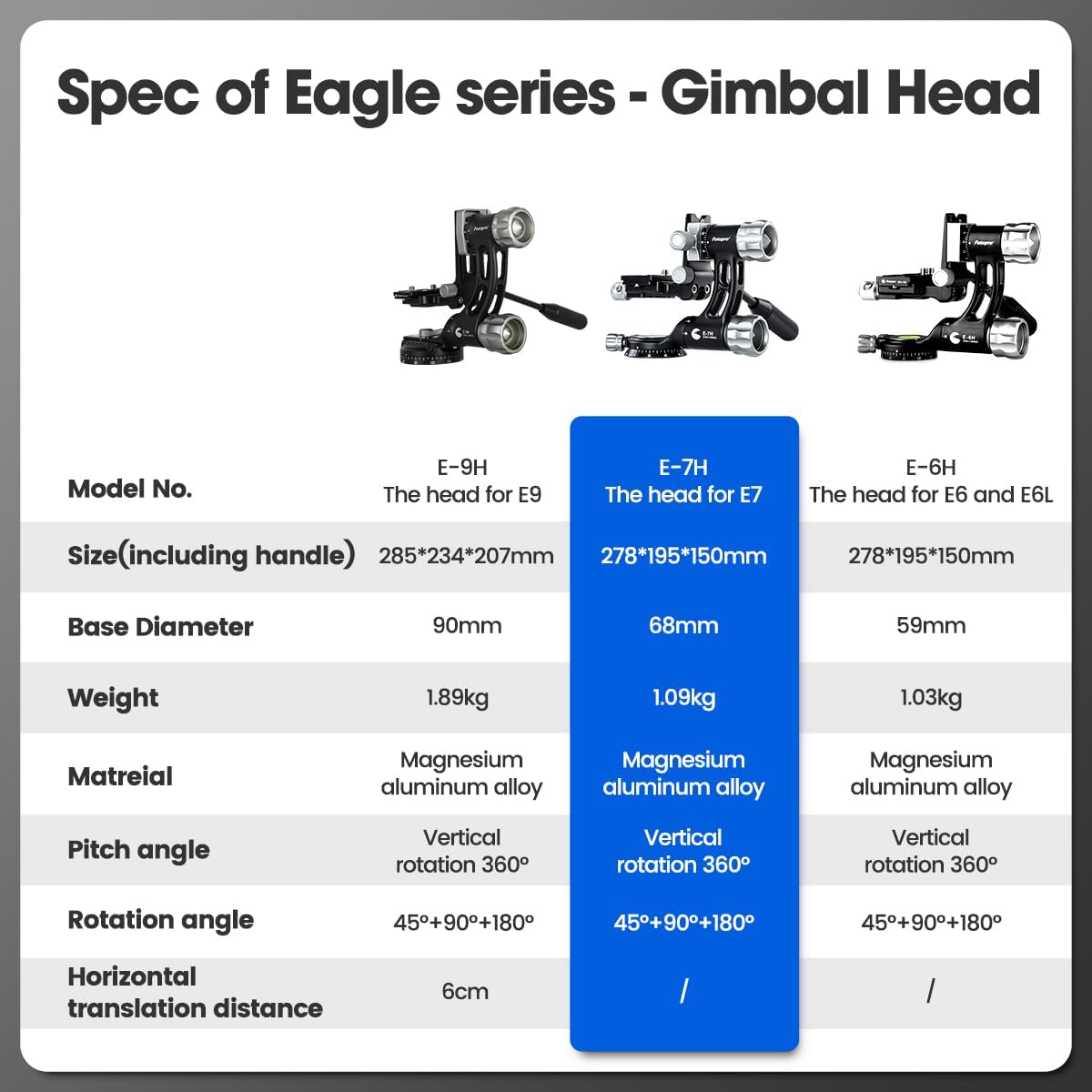
Image: Specifications table comparing different models in the Fotopro Eagle series, highlighting the E-7H's details.
Warranty and Customer Support
The Fotopro E-7H Gimbal Head comes with a Manufacturer Limited, US-Based Service warranty.
For warranty claims, technical assistance, or further inquiries, please contact Fotopro customer support through their official website or the retailer where the product was purchased.
Please retain your proof of purchase for warranty validation.