
1. Introduction
This manual provides essential instructions for the safe and efficient operation, installation, and maintenance of your Perfect Aire 4PACH12000 Window Air Conditioner with Heat Function. This unit is designed to provide both cooling and heating for spaces ranging from 450 to 550 square feet, offering a cooling capacity of 12,000 BTUs and a heating capacity of 11,600 BTUs. Please read this manual thoroughly before using your appliance and retain it for future reference.
2. Product Overview
The Perfect Aire 4PACH12000 is a versatile window-mounted air conditioning unit featuring a self-touch electronic control pad and a full-function remote control. It includes multiple operating modes such as Cool, Heat, Fan, Auto, Sleep, Dry, and Energy Saver. The unit is equipped with a front-mounted, tilt-out air filter for easy maintenance.
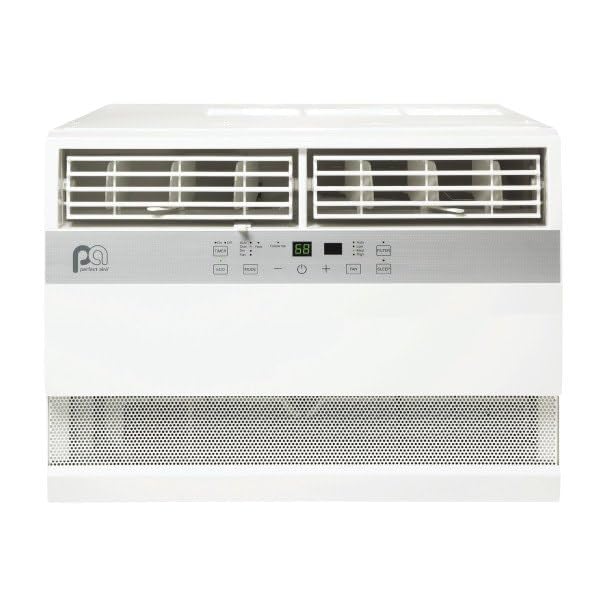
Figure 1: Perfect Aire 4PACH12000 Window Air Conditioner. This image shows the front view of the white window air conditioner unit, highlighting its compact design and control panel area.
3. Setup and Installation
3.1 Unpacking
Carefully remove the unit from its packaging. Inspect for any shipping damage. Ensure all components, including the remote control and installation hardware, are present.
3.2 Location Requirements
This unit is designed for window installation. Choose a sturdy window that can support the unit's weight of approximately 78 pounds. The unit dimensions are approximately 30 inches (depth) x 8 inches (width) x 6 inches (height).
3.3 Electrical Requirements
The 4PACH12000 operates on a 230V electrical supply. Ensure your electrical outlet matches this requirement. It is recommended to have a dedicated circuit for the air conditioner. Consult a qualified electrician for proper installation if you are unsure about your electrical system.
3.4 Window Installation
Follow the detailed instructions provided in the separate installation guide for secure and proper window mounting. Ensure the unit is slightly tilted outwards to allow for proper condensation drainage.
4. Operating Instructions
4.1 Control Panel and Remote Control
The unit can be operated using the self-touch electronic control pad on the unit or the full-function remote control. The remote control allows for convenient adjustment of settings from a distance.
4.2 Setting the Temperature
The adjustable temperature range for this unit is between 62°F (17°C) and 86°F (30°C). Use the temperature up/down buttons on the control panel or remote to set your desired temperature.
4.3 Operating Modes
- Cool Mode: Provides cooling with 3 fan speeds (Low, Med, High).
- Heat Mode: Provides heating with 1 fan speed.
- Fan Mode: Circulates air without cooling or heating, with 3 fan speeds.
- Auto Mode: Automatically selects cooling or heating based on the room temperature and your set temperature.
- Dry Mode: Reduces humidity in the room.
- Sleep Mode: Adjusts temperature and fan speed for comfortable sleeping conditions and energy saving.
- Energy Saver Mode: Cycles the fan on and off with the compressor to save energy.
5. Maintenance
5.1 Air Filter Cleaning
The unit features a front-mounted, tilt-out air filter. For optimal performance and air quality, clean the air filter every two weeks or more frequently depending on usage. To clean, gently pull out the filter, wash it with warm, soapy water, rinse thoroughly, and allow it to air dry completely before reinserting.
5.2 Exterior Cleaning
Wipe the exterior of the unit with a soft, damp cloth. Do not use harsh chemicals or abrasive cleaners.
6. Troubleshooting
If your air conditioner is not operating correctly, please check the following common issues before contacting customer support:
- Unit does not turn on: Ensure the power cord is securely plugged into a 230V outlet. Check the circuit breaker.
- Insufficient cooling/heating: Verify the air filter is clean. Ensure windows and doors are closed. Check if the temperature setting is appropriate for the desired mode.
- Unusual noise: Check for any obstructions around the unit. Ensure the unit is securely installed in the window.
- Water dripping inside: Ensure the unit is slightly tilted outwards for proper drainage.
For more complex issues, refer to the comprehensive troubleshooting guide available on the PerfectAire website or contact customer support.
7. Specifications
| Model Number | 4PACH12000 |
| Cooling Capacity | 12,000 / 11,600 BTUs |
| Heating Capacity | 11,600 BTUs |
| Coverage Area | 450-550 sq ft |
| Temperature Range | 62°F - 86°F (17°C - 30°C) |
| Control Type | Self-touch Electronic Pad, Remote Control |
| Fan Speeds (Cool/Fan) | 3 speeds |
| Fan Speeds (Heat) | 1 speed |
| Operating Modes | Cool, Heat, Fan, Auto, Sleep, Dry, Energy Saver |
| Air Filter | Front-mounted, Tilt-out |
| Power Source | Corded Electric (230V) |
| Form Factor | Window |
| Product Dimensions | 30 x 8 x 6 inches |
| Item Weight | 78 pounds |
8. Warranty Information
This Perfect Aire product comes with a Lifetime, Limited Warranty. Please refer to the warranty card included with your purchase or visit the official PerfectAire website for full details regarding terms, conditions, and registration procedures.
9. Customer Support
For technical assistance, warranty claims, or any questions regarding your Perfect Aire 4PACH12000 unit, please contact PerfectAire customer service. Contact information can typically be found on the PerfectAire website or on the product packaging.


