
1. Introduction
The Traxxas Mini Slash 4X4 is a high-performance 1/16 scale 4WD short course truck designed for durability and speed. Featuring a powerful BL-2s Brushless Power System, it delivers quick acceleration and speeds exceeding 30 mph. Its robust construction, including 1/10 scale driveline components, steel-gear differentials, and heavy-duty U-joint driveshafts, ensures long-lasting performance in various outdoor conditions. The innovative clipless body design allows for quick and easy battery changes and maintenance.
This manual provides essential information for the safe and effective operation, maintenance, and care of your Traxxas Mini Slash 4X4. Please read it thoroughly before operating your vehicle.
2. Safety Information
WARNING: CHOKING HAZARD - Small Parts. Not for children under 3 years. Recommended for ages 14 and up.
- Always operate your RC vehicle in open areas away from people, pets, and obstacles.
- Never operate near public roads or traffic.
- Ensure batteries are charged correctly and handled safely. Refer to battery and charger instructions.
- Keep fingers, hair, and loose clothing away from moving parts.
- Do not operate in wet conditions unless the vehicle is specifically designed for it. The Mini Slash 4X4 is weather resistant, but avoid full submersion.
- Always turn off the vehicle and transmitter when not in use.
3. Included Components
Your Traxxas Mini Slash 4X4 package includes the following items:
- Traxxas Mini Slash 4X4 RC Truck (Orange)
- TQ 2.4GHz Radio System (Remote)
- Traxxas Power Cell NiMH Battery
- 4-amp DC Peak Detecting Fast Charger
- Product Manual
4. Setup
4.1. Charging the Battery
- Connect the 4-amp DC Peak Detecting Fast Charger to a suitable 12V DC power source (e.g., car accessory outlet).
- Connect the Traxxas Power Cell NiMH Battery to the charger. Ensure correct polarity.
- The charger's LED will indicate charging status. Refer to the charger's specific instructions for detailed LED codes.
- Once charging is complete, disconnect the battery from the charger.
4.2. Battery Installation
- To remove the body, depress the tabs located under the nerf bars on both sides of the chassis and lift the body upwards.
- Place the charged battery into the battery compartment on the chassis.
- Connect the battery to the Electronic Speed Control (ESC) connector. Ensure a secure connection.
- Reinstall the clipless body by aligning it with the chassis and pressing down until it snaps securely into place.
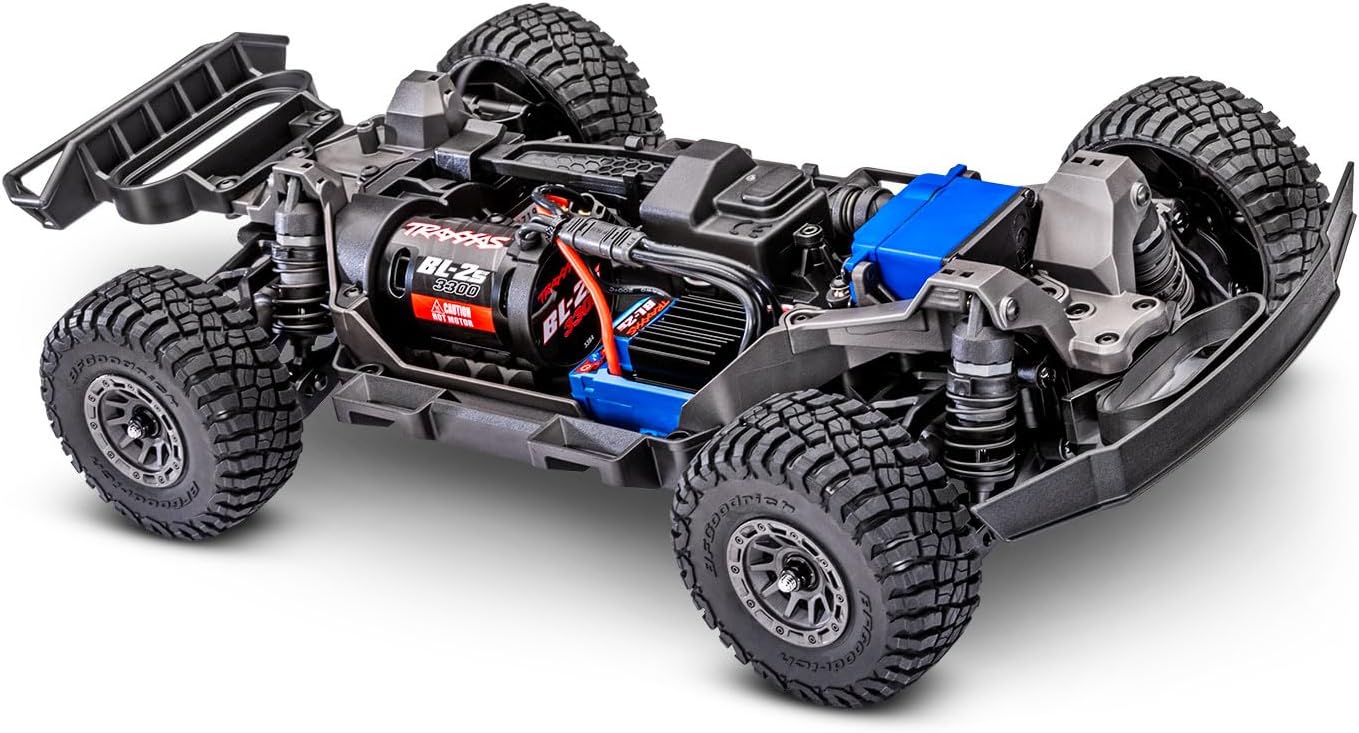
Figure 1: Chassis view of the Traxxas Mini Slash 4X4, showing the battery compartment and internal components.
4.3. Remote Control Setup
- Install 4 AA batteries (not included) into the TQ 2.4GHz radio system transmitter.
- Turn on the transmitter first, then the vehicle's ESC.
- Ensure the transmitter and receiver are properly linked. Refer to the radio system's manual for binding instructions if necessary.
5. Operating Instructions
5.1. Driving Modes
The Electronic Speed Control (ESC) offers three driving modes to suit different skill levels:
- Training Mode: Reduces full throttle power by 50% and applies 100% brakes. Ideal for new drivers to learn control.
- Sport Mode: Provides 100% forward, 100% brakes, and 100% reverse. Standard driving mode.
- Race Mode: Provides 100% forward, 100% brakes, and no reverse. Suitable for competitive racing.
To switch between modes, refer to the ESC's specific instructions in the included Product Manual.
Video: Demonstrates the robust construction and durability of the Traxxas Mini Slash 4X4, highlighting its ability to withstand challenging conditions.
5.2. Basic Operation
- Use the trigger on the transmitter to control acceleration (pull back) and braking/reverse (push forward).
- Use the steering wheel on the transmitter to control left and right turns.
- Start with slow, controlled movements to get a feel for the vehicle's response.
- Gradually increase speed and maneuverability as you become more comfortable.

Figure 2: The Traxxas Mini Slash 4X4 navigating a dirt track, showcasing its off-road capabilities.
Video: Official Traxxas video showcasing the powerful BL-2s Brushless Power System and the overall performance capabilities of the Mini Slash 4X4.
6. Maintenance
6.1. General Care
- After each use, inspect the vehicle for any loose screws, damaged parts, or debris.
- Clean the vehicle regularly to prevent dirt and grime buildup, especially after off-road use.
- Store the vehicle in a dry, cool place away from direct sunlight.
6.2. Drivetrain Maintenance
- Regularly check the steel-gear differentials and 32-pitch gears for wear and tear. Replace as needed.
- Inspect U-joint driveshafts for damage or excessive play.
- Lubricate moving parts as recommended in the detailed Product Manual.
6.3. Cleaning
- Use a soft brush or compressed air to remove loose dirt and dust.
- For stubborn grime, use a damp cloth with mild soap. Avoid excessive water, especially around electronics.
- Ensure the vehicle is completely dry before storing or operating again.
7. Troubleshooting
| Problem | Possible Cause | Solution |
|---|---|---|
| Vehicle not responding | Low battery in vehicle or transmitter; Transmitter/receiver not linked; ESC not powered on. | Charge/replace batteries; Re-link transmitter/receiver; Turn on ESC. |
| Reduced speed/power | Low battery; Training mode activated; Motor/ESC overheating. | Charge battery; Switch to Sport/Race mode; Allow components to cool down. |
| Steering issues | Damaged servo; Loose steering components; Incorrect trim settings. | Inspect/replace servo; Tighten components; Adjust steering trim on transmitter. |
For more detailed troubleshooting, please refer to the comprehensive Product Manual.
8. Specifications
- Model Name: Mini Slash 4X4
- Model Number: 108164
- Brand: Traxxas
- Scale: 1/16
- Drivetrain: 4WD
- Power System: BL-2s Brushless
- Top Speed: 30+ mph
- Chassis Length: 235 mm
- Material: Plastic
- Operation Mode: Remote Control
- Battery: 1 Lithium-Ion Polymer (included)
- Charger: Included
- Remote: Included
- Recommended Age: Adult (Manufacturer Minimum Age: 14 years)
- Usage: Outdoor
- Additional Features: Remote Controlled, Shock Resistant, Weather Resistant
9. Warranty and Support
For warranty information, technical support, or replacement parts, please visit the official Traxxas website or contact their customer service. Details can be found in the included Product Manual or on the Traxxas Store.


