
1. Introduction
This manual provides essential information for the safe and efficient operation of your KA-8205 Portable Speaker. Please read it thoroughly before using the device and keep it for future reference. The KA-8205 is a powerful 200W portable audio system featuring multi-color LED lighting, Bluetooth connectivity, USB input, TF (Micro SD) card slot, and a 3.5mm auxiliary input. It includes a microphone for karaoke or presentations, making it suitable for various events.
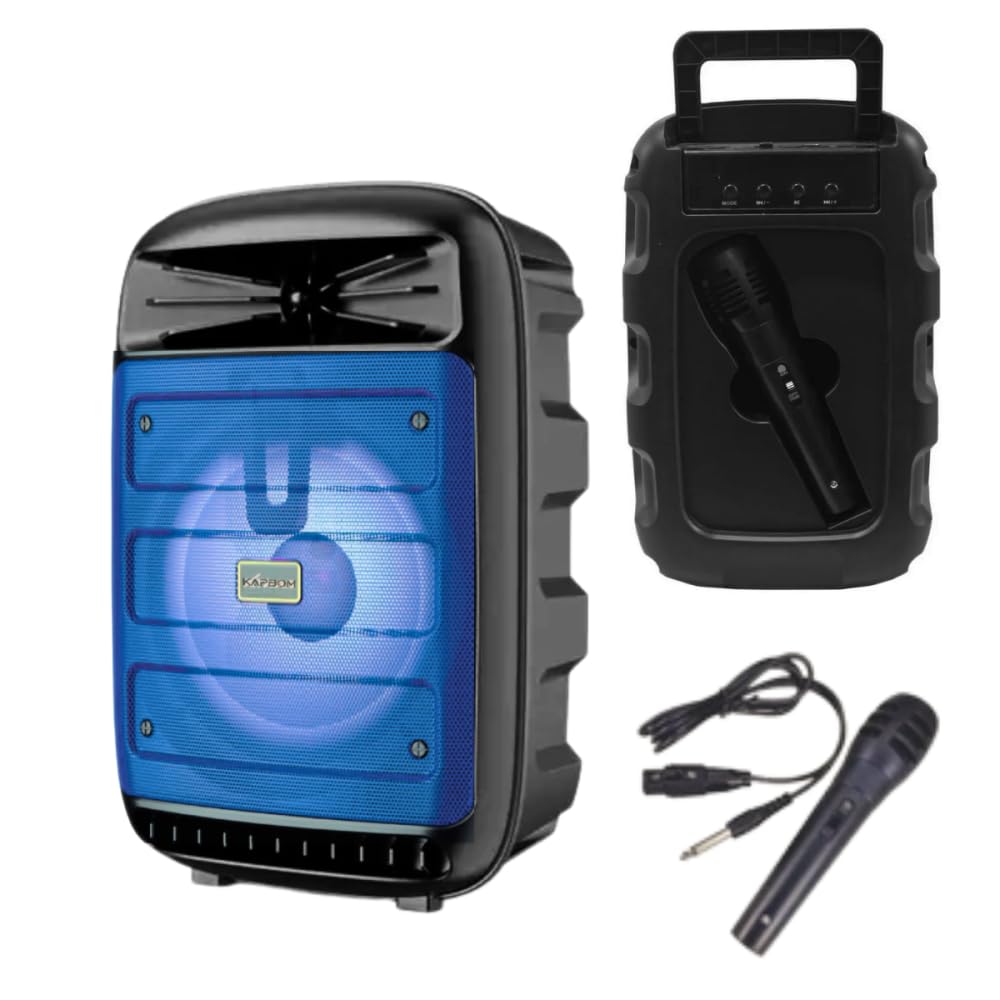
Image 1.1: The KA-8205 Portable Speaker, showcasing its multi-color LED lighting and compact design. The image displays three speakers in blue, red, and green light modes, along with the included microphone and auxiliary cable.
2. Package Contents
Ensure all items are present in the package:
- KA-8205 Portable Speaker
- Microphone
- Auxiliary Cable (3.5mm)
- USB Charging Cable (not explicitly listed but implied for a portable device)
- Instruction Manual (this document)
3. Setup
3.1. Charging the Speaker
Before initial use, fully charge the speaker. Connect the provided USB charging cable to the speaker's charging port and to a compatible USB power adapter (not included) or a computer's USB port. The LED indicator will typically show charging status and turn off or change color when fully charged.
3.2. Powering On/Off
Locate the power button on the speaker. Press and hold the power button for a few seconds to turn the speaker ON. Repeat the action to turn the speaker OFF.
4. Operating Instructions
4.1. Bluetooth Connection
- Turn on the KA-8205 speaker. It will automatically enter Bluetooth pairing mode, indicated by a flashing LED light.
- Enable Bluetooth on your mobile device (smartphone, tablet, etc.).
- Search for available Bluetooth devices and select "KA-8205" from the list.
- Once connected, the speaker will emit a confirmation sound, and the LED indicator will stop flashing.
- You can now play audio from your device through the speaker.

Image 4.1: Front view of the KA-8205 Portable Speaker, illustrating the speaker grille and active blue LED lighting.
4.2. USB Playback
Insert a USB flash drive containing MP3 audio files into the USB port. The speaker will automatically detect the drive and begin playing music. Use the control buttons to navigate tracks and adjust volume.
4.3. TF (Micro SD) Card Playback
Insert a TF (Micro SD) card with MP3 audio files into the designated card slot. The speaker will automatically switch to TF card mode and start playing. Use the control buttons for playback control.
4.4. Auxiliary (AUX) Input
Connect one end of the provided 3.5mm auxiliary cable to the AUX input port on the speaker and the other end to the audio output jack of your external device (e.g., MP3 player, computer). The speaker will switch to AUX mode. Control playback and volume from your external device.
4.5. Microphone Usage
Connect the included microphone to the microphone input port on the speaker. Adjust the microphone volume using the dedicated control knob (if available) or the main volume control. The microphone can be used for karaoke or public speaking.

Image 4.2: Rear view of the KA-8205 Portable Speaker, highlighting the integrated microphone storage slot and the included microphone and auxiliary cable.
4.6. LED Light Modes
The speaker features multi-color LED lights that pulse with the music. There may be a dedicated button to cycle through different light modes or to turn the lights off. Refer to the speaker's control panel for specific button functions.
4.7. Volume and Track Control
Use the volume knob or buttons on the speaker to adjust the master volume. Dedicated buttons (usually labeled with arrows or skip icons) allow you to skip tracks forward or backward during USB, TF card, or Bluetooth playback.
5. Maintenance
- Cleaning: Use a soft, dry cloth to clean the speaker's exterior. Do not use abrasive cleaners, waxes, or solvents.
- Storage: When not in use for extended periods, store the speaker in a cool, dry place away from direct sunlight and extreme temperatures.
- Battery Care: To prolong battery life, avoid fully discharging the speaker frequently. Charge the speaker regularly, even if not in use, to maintain battery health.
- Water Exposure: This speaker is not waterproof. Avoid exposing it to water or excessive moisture.
6. Troubleshooting
| Problem | Possible Cause | Solution |
|---|---|---|
| Speaker does not turn on. | Low battery or no power. | Charge the speaker fully. Ensure the power button is pressed correctly. |
| No sound from the speaker. | Volume too low, incorrect input mode, or device not connected. | Increase volume. Check the input mode (Bluetooth, USB, TF, AUX). Reconnect your device. |
| Bluetooth connection fails. | Speaker not in pairing mode, device Bluetooth off, or too far away. | Ensure speaker is in pairing mode. Turn device Bluetooth off/on. Move device closer to speaker (within 10 meters). |
| Microphone not working. | Microphone not properly connected or volume too low. | Ensure microphone is securely plugged in. Adjust microphone volume. |
7. Specifications
| Feature | Detail |
|---|---|
| Model | KA-8205 |
| Power Output | 200W |
| Connectivity | Bluetooth, USB, TF Card, Auxiliary (3.5mm) |
| Audio Input | Bluetooth, USB, TF Card, Auxiliary (3.5mm) |
| Frequency Response | 20 Hz |
| Noise Level | 85 Decibels |
| Material | Metal, Plastic |
| Dimensions (Packaging) | 33 x 23 x 16 cm |
| Product Weight | 1.4 Kilograms |
| Included Components | Speaker, Microphone, Auxiliary Cable |
| Power Source | Electrical (implies rechargeable battery, charged via USB) |
8. Warranty Information
This product comes with a manufacturer's warranty of 30 days from the date of purchase. This warranty covers manufacturing defects. It does not cover damage caused by misuse, accidents, unauthorized modifications, or normal wear and tear. Please retain your proof of purchase for warranty claims.
9. Customer Support
If you encounter any issues or have questions not covered in this manual, please contact your retailer or the manufacturer's customer support. For optimal performance and longevity, always follow the instructions provided in this manual.