
HUMMINGBIRD MK17
HUMMINGBIRD MK17 DualPro Foil Shaver & Beard Trimmer User Manual
Model: MK17 (HBFS-003-BLK)
Introduction
Thank you for choosing the HUMMINGBIRD MK17 DualPro Foil Shaver & Beard Trimmer. This device is designed for versatile grooming, offering both a close foil shave and precise beard trimming. It features professional barber-grade gold titanium blades, multiple speed settings, a durable metal body, and an IPX7 waterproof design for convenient wet or dry use. Please read this manual thoroughly before first use to ensure safe and optimal performance.
Safety Information
WARNING: Do not use while charging. Keep the charging port away from water. Be cautious when handling sharp blades to avoid injury. Always unplug and allow the device to cool before replacing or cleaning blades. Dispose of used blades responsibly. Do not expose the charging port to liquids. Always unplug the device from the power source before cleaning. Do not use if the charging port is damaged. Always supervise children when using this product.
Package Contents
Verify that all items are present in the package:
- HUMMINGBIRD MK17 DualPro Shaver Unit
- Gold Titanium Double Foil Head with Long Hair Leveler
- Gold Titanium Wide Blade Trimmer Head
- Four Guide Combs (3mm, 6mm, 9mm, 12mm)
- USB-C Charging and Accessory Dock
- Durable Braided USB-C Charging Cable
- Protective Blade Cover
- Cleaning Brush

Image: All components included in the HUMMINGBIRD MK17 DualPro package.
Setup
- Initial Charge: Before first use, fully charge the device. Connect the USB-C charging cable to the charging dock and a suitable USB power adapter (not included). Place the shaver onto the charging dock. The digital display will show the battery percentage increasing. A full charge provides up to 90 minutes of cordless run time.
- Attaching/Swapping Heads: The MK17 DualPro features interchangeable heads.
- To attach a head: Align the desired head (foil shaver or trimmer) with the shaver body and press firmly until it clicks into place.
- To remove a head: Press the "QuickSwap BUTTON" located on the side of the shaver body and gently pull the head away.
- Attaching Guide Combs (Trimmer Head Only): If using the trimmer head for beard trimming, select one of the four guide combs (3mm, 6mm, 9mm, 12mm). Slide the comb onto the trimmer blade until it securely locks.
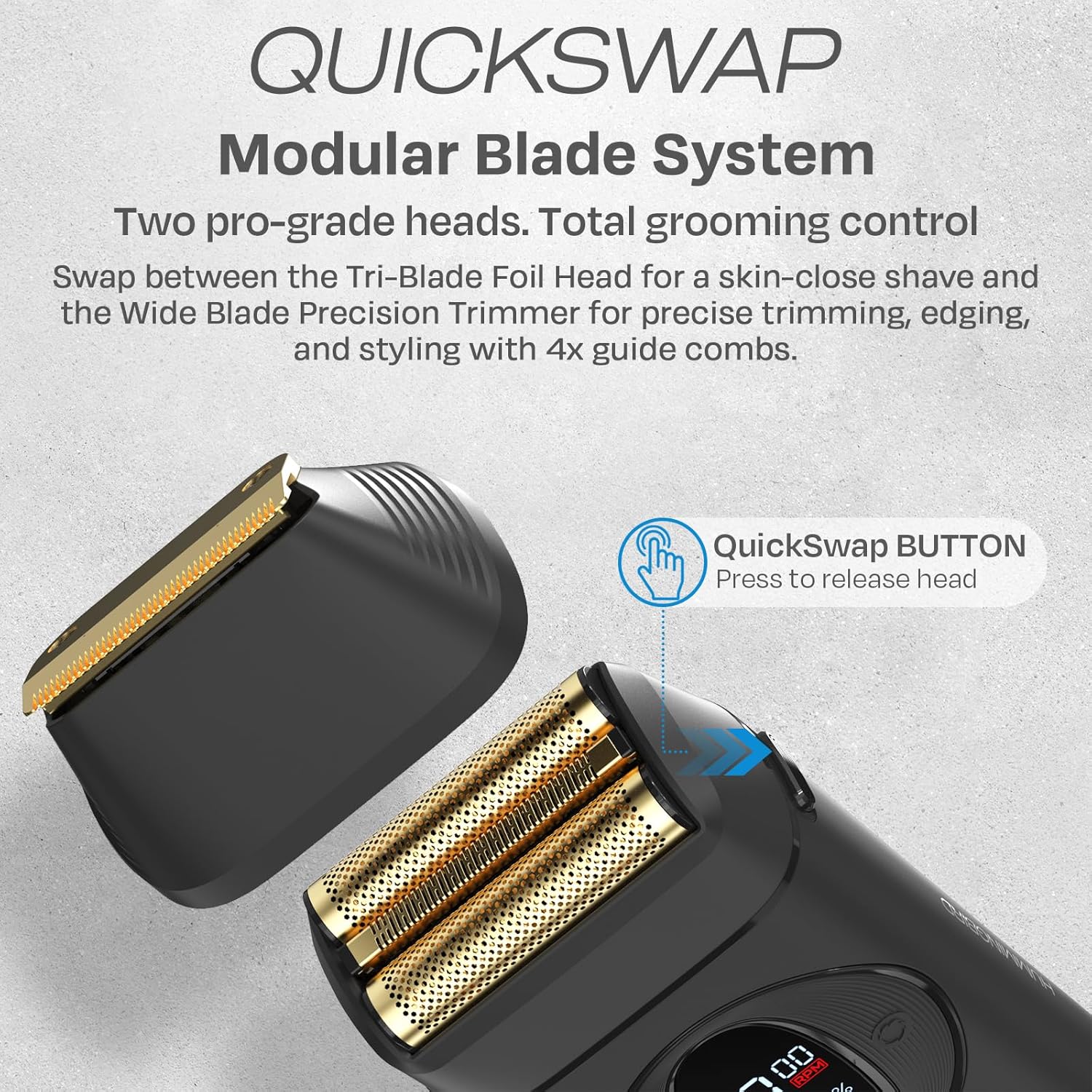
Image: Digital display showing battery percentage and RPM.

Image: QuickSwap Modular Blade System for easy head changes.
Operating Instructions
- Power On/Off: Press and hold the power button for 2 seconds to turn the shaver on or off.
- Adjusting Speed: The shaver has three speed settings (7000 RPM, 8000 RPM, 9000 RPM). Briefly press the power button while the device is on to cycle through the speeds. The current RPM will be displayed on the LED screen.
- Using the Foil Shaver Head: For a close shave, use the gold titanium double foil head. Hold the shaver at a slight angle against your skin and move it in short, gentle strokes against the direction of hair growth. The long hair leveler helps to pre-trim longer hairs for a smoother finish. Can be used wet or dry.
- Using the Trimmer Head: For precise trimming, edging, or styling, attach the gold titanium wide blade trimmer head. Use with or without guide combs depending on desired hair length. Move the trimmer slowly and steadily over the area to be trimmed.
- Wet/Dry Use: The MK17 DualPro is IPX7 waterproof, allowing for use in the shower or with shaving gel/cream. Ensure the charging port is closed and dry before rinsing.
- Travel Lock: To activate the travel lock, press and hold the power button for 5 seconds until a lock icon appears on the display. To deactivate, press and hold the power button for 5 seconds again.

Image: Using the foil shaver head for a smooth finish.

Image: Using the trimmer head for precise beard trimming.

Image: The shaver is IPX7 waterproof for easy cleaning.
Maintenance
- Cleaning the Heads: After each use, remove the shaver or trimmer head by pressing the QuickSwap button. Rinse the head under running water to remove hair and debris. For a more thorough cleaning, use the included cleaning brush to remove any stubborn hair from the blades and foils. Allow the heads to air dry completely before reattaching or storing.
- Cleaning the Shaver Body: The shaver body can be rinsed under running water due to its IPX7 waterproof rating. Ensure the charging port is closed and dry before rinsing. Wipe the body with a soft, dry cloth.
- Blade and Foil Replacement: For optimal performance, it is recommended to replace the foil and trimmer blades every 6-12 months, depending on usage. Replacement blade heads are available for purchase.

Image: Removing and rinsing the shaver head for easy cleaning.
Troubleshooting
| Problem | Possible Cause | Solution |
|---|---|---|
| Shaver does not turn on. | Low battery; Travel lock activated. | Charge the shaver fully; Deactivate travel lock by pressing and holding the power button for 5 seconds. |
| Poor shaving/trimming performance. | Blades/foils are dull or clogged; Incorrect technique. | Clean the blades/foils thoroughly; Replace blades/foils if worn; Ensure proper shaving technique (against hair growth for shaver, slow and steady for trimmer). |
| Shaver not charging. | Charging cable or dock not properly connected; Damaged charging port. | Ensure USB-C cable is securely connected to both the dock and power source; Ensure shaver is correctly seated in the dock; Inspect charging port for damage (do not use if damaged). |
| Excessive noise or vibration. | Hair trapped in blades; Head not properly attached. | Clean the shaver head thoroughly; Reattach the shaver head securely. |
Specifications
- Model Name: MK17 DualPro
- Model Number: HBFS-003-BLK
- Blade Material: Gold Titanium Alloy (Foil & Trimmer)
- Motor Speed: Up to 9,000 RPM (3 speed settings)
- Battery Type: Lithium-Ion
- Battery Life: Up to 90 minutes cordless run time
- Charging: USB-C and Wireless Charging Dock
- Waterproof Rating: IPX7 (Fully washable)
- Body Material: Full Metal
- Display: Digital Battery & RPM Display
- Included Components: Foil Blade Head, Trimmer Blade Head, 4x Trimmer Guide Combs, Charging Dock, USB-C Cable, Protective Cap, Cleaning Brush
- Dimensions: 9.65 x 6.5 x 2.91 inches (Package)
- Weight: 11 Ounces
Warranty and Support
The HUMMINGBIRD MK17 DualPro Foil Shaver & Beard Trimmer comes with a 1-Year Manufacturer Warranty. For any questions, issues, or support needs regarding your purchase, please contact HUMMINGBIRD customer service. Our dedicated team is based in New Jersey and is available to assist you.
For further assistance, please visit the official HUMMINGBIRD store or contact us through the platform where you made your purchase.
Ask a question about this manual
Ask about setup, troubleshooting, compatibility, parts, safety, or missing instructions. Manuals+ will review the question and use this page’s manual context to help answer it.