Introduction
This user manual provides essential information for the safe and efficient use of your LG 8 Kg Top Load Washing Machine, Model T80SPMB1Z. Designed with Smart Inverter Technology and TurboDrum, this appliance offers powerful and energy-efficient washing. Please read this manual thoroughly before operating your washing machine and retain it for future reference.

Figure 1: Front view of the LG 8 Kg Top Load Washing Machine, Model T80SPMB1Z. This image displays the overall design and control panel layout.
1. Setup and Installation
1.1 Unpacking
Carefully remove all packaging materials. Ensure that the following components are included:
- Washing Machine Unit
- Drain Hose
- Inlet Hose
- Cover
- Owner's Manual
1.2 Placement
Place the washing machine on a firm, level surface to prevent vibration and noise during operation. Ensure adequate ventilation around the unit. Avoid direct sunlight or exposure to freezing temperatures.
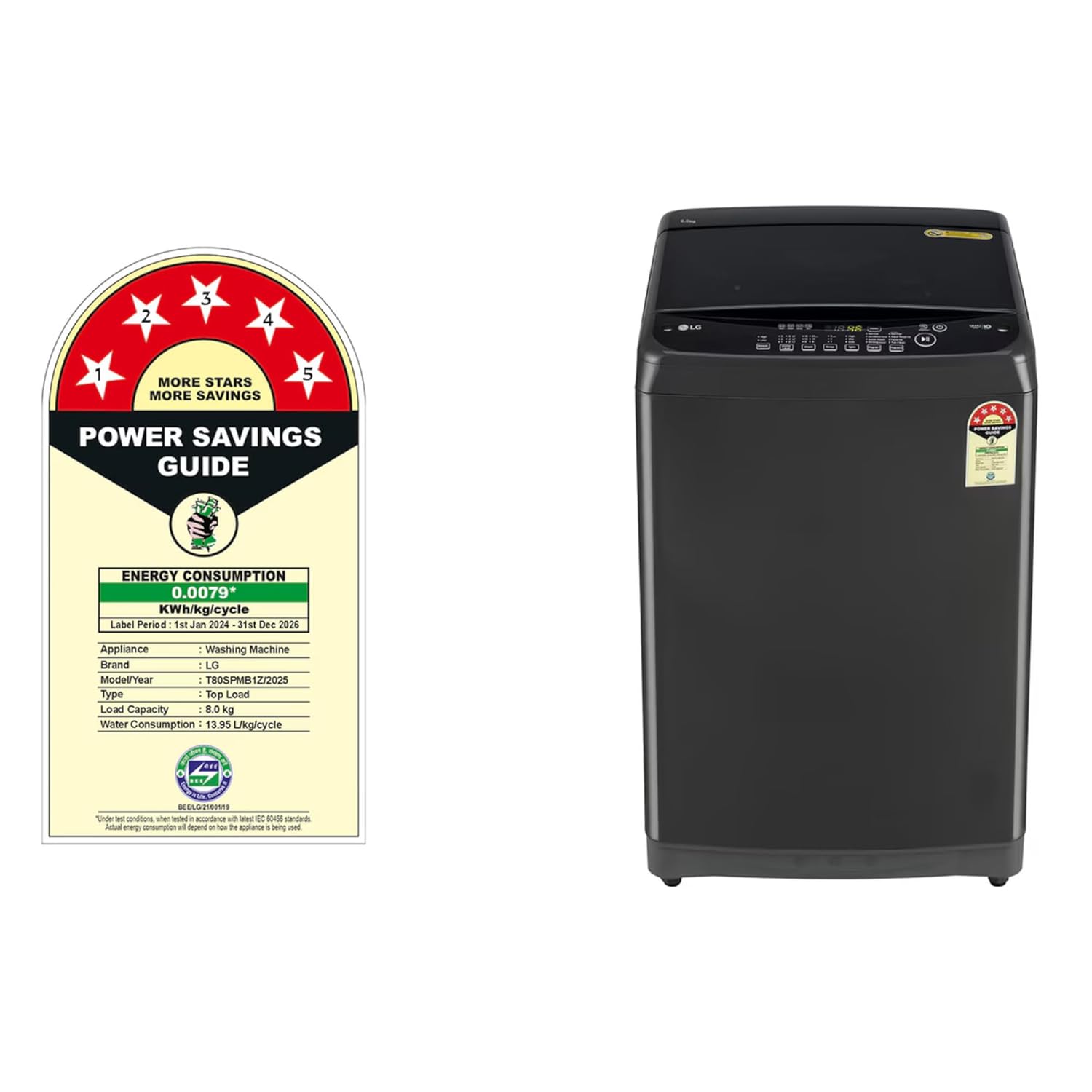
Figure 2: Front view of the washing machine, illustrating its compact design suitable for various laundry spaces.

Figure 3: Rear view of the washing machine, highlighting the location for water inlet and drain hose connections.
1.3 Water Connection
Connect the inlet hose to the water tap and the inlet valve on the back of the washing machine. Ensure all connections are tight to prevent leaks. Position the drain hose securely into a drain pipe or sink, ensuring it is not kinked or blocked.
1.4 Power Connection
Plug the power cord into a grounded electrical outlet. The washing machine operates on 230 Volts. Do not use extension cords or adapters.
2. Operating Instructions
2.1 Loading Laundry
Open the Smart Closing Door and load laundry evenly into the drum. Do not overload the machine; ensure there is enough space for clothes to move freely. The maximum capacity is 8 Kg.

Figure 4: Top view of the washing machine with the lid open, illustrating the spacious drum for laundry loading.
2.2 Adding Detergent and Softener
Add the appropriate amount of detergent and fabric softener to their designated compartments. Refer to the detergent packaging for recommended quantities.
2.3 Selecting a Wash Program
Close the lid. Press the Power button to turn on the machine. Use the program selector on the control panel to choose the desired wash cycle. The machine offers 8 standard cycles and multiple wash programs for various fabric types and soil levels.

Figure 5: Close-up of the control panel, showing program selection buttons, display, and power/start controls.
2.4 Starting the Wash Cycle
Once the program is selected, press the Start/Pause button to begin the wash cycle. The Smart Inverter Motor and TurboDrum Technology will ensure an efficient and powerful wash.
2.5 Auto Restart Function
In case of a power outage, the Auto Restart function will automatically resume the wash cycle from where it left off once power is restored.
3. Maintenance
3.1 Cleaning the Drum
Regularly clean the washing machine drum to prevent odor and residue buildup. Use a dedicated washing machine cleaner or run a hot wash cycle with white vinegar (without laundry) once a month.

Figure 6: Detailed view of the TurboDrum interior, showing the pulsator and water jets for effective cleaning.
3.2 Cleaning the Exterior
Wipe the exterior of the machine with a soft, damp cloth. Avoid abrasive cleaners or solvents that could damage the finish. The corrosion-resistant body ensures long-lasting durability.
3.3 Lint Filter (if applicable)
If your model includes a lint filter, clean it regularly according to the instructions in the full owner's manual to maintain optimal washing performance.
4. Troubleshooting
Before contacting customer service, please refer to the following common issues and their solutions:
| Problem | Possible Cause | Solution |
|---|---|---|
| Machine does not start | Power cord unplugged; Lid not closed properly; Power outage. | Check power connection; Ensure lid is fully closed; Wait for power to restore (Auto Restart will function). |
| No water supply | Water tap closed; Inlet hose kinked or blocked. | Open water tap; Straighten inlet hose; Check water pressure. |
| Excessive vibration/noise | Machine not level; Laundry unevenly distributed; Shipping bolts not removed (if applicable). | Adjust leveling feet; Redistribute laundry; Refer to installation guide for shipping bolt removal. |
| Water not draining | Drain hose kinked or blocked; Drain pump filter clogged. | Straighten drain hose; Clean drain pump filter (refer to full manual). |
5. Product Specifications
| Feature | Detail |
|---|---|
| Brand | LG |
| Model | T80SPMB1Z |
| Capacity | 8 Kilograms |
| Product Dimensions (LxWxH) | 56 x 54 x 92.5 Centimeters |
| Item Weight | 31 kg |
| Maximum Rotational Speed | 800 RPM |
| Noise Level | 54 Decibels |
| Installation Type | Freestanding |
| Control Console | Push Button |
| Number of Standard Cycles | 8 |
| Access Location | Top Load |
| Voltage | 230 Volts |
| Special Features | Auto Restart Function, Multiple Wash Programs, Smart Closing Door, Smart Inverter Motor, TurboDrum™ Technology |
| Included Components | Drain Hose, Inlet Hose, Cover, Owner's Manual |

Figure 7: Diagram illustrating the dimensions of the LG 8 Kg Top Load Washing Machine (560mm depth, 540mm width, 925mm height).

Figure 8: Energy Savings Guide label, indicating the energy consumption and efficiency rating of the appliance.
6. Warranty Information
This LG washing machine comes with a 2-year warranty. To avail warranty services, please retain your Amazon invoice as proof of purchase. For detailed terms and conditions, refer to the owner's manual included with your product or visit the official LG India website.
7. Customer Support
For any queries, service requests, or technical assistance, please contact LG Customer Service:
- Toll-Free: 1800-315-9999
- WhatsApp: 9711709999
- Email: serviceindia@lge.com
- Manufacturer: LG Electronics India Pvt. Ltd.
- Address: 51, Udyog Vihar, Gr. Noida (U.P) – 201306