
1. Introduction
The Pecron D77 DC UPS Battery Backup is designed to provide uninterrupted power to your essential low-power DC devices during power outages. This compact and portable unit features a 76.96Wh battery capacity, multiple output options including 5V, 9V, 12V DC5521 ports, a 5V USB-A port, and PoE support for 15V or 24V devices. It is suitable for use with WiFi routers, modems, security cameras, and other compatible digital devices, ensuring continuous operation and connectivity.
2. Safety Information
- Do not expose the device to water, moisture, or extreme temperatures.
- Avoid dropping or subjecting the device to severe impacts.
- Do not attempt to disassemble, repair, or modify the unit. Refer all servicing to qualified personnel.
- Ensure proper ventilation around the device during operation and charging.
- Use only the provided AC cable for charging the UPS.
- Keep out of reach of children.
3. Package Contents
Verify that all items are present in your package:

Image: Contents of the Pecron D77 package, including the main unit, mounting brackets, AC power cable, DC 5521 bus cable, and the user instruction manual.
- Pecron D77 DC UPS (x1)
- Mounting Brackets (x2)
- AC Cable (x1)
- 5521 Bus / 5521 Busbar Cable (x1)
- User Instruction Manual (x1)
4. Product Overview
The Pecron D77 features a range of input and output ports for versatile connectivity and power delivery. Familiarize yourself with the device's layout:
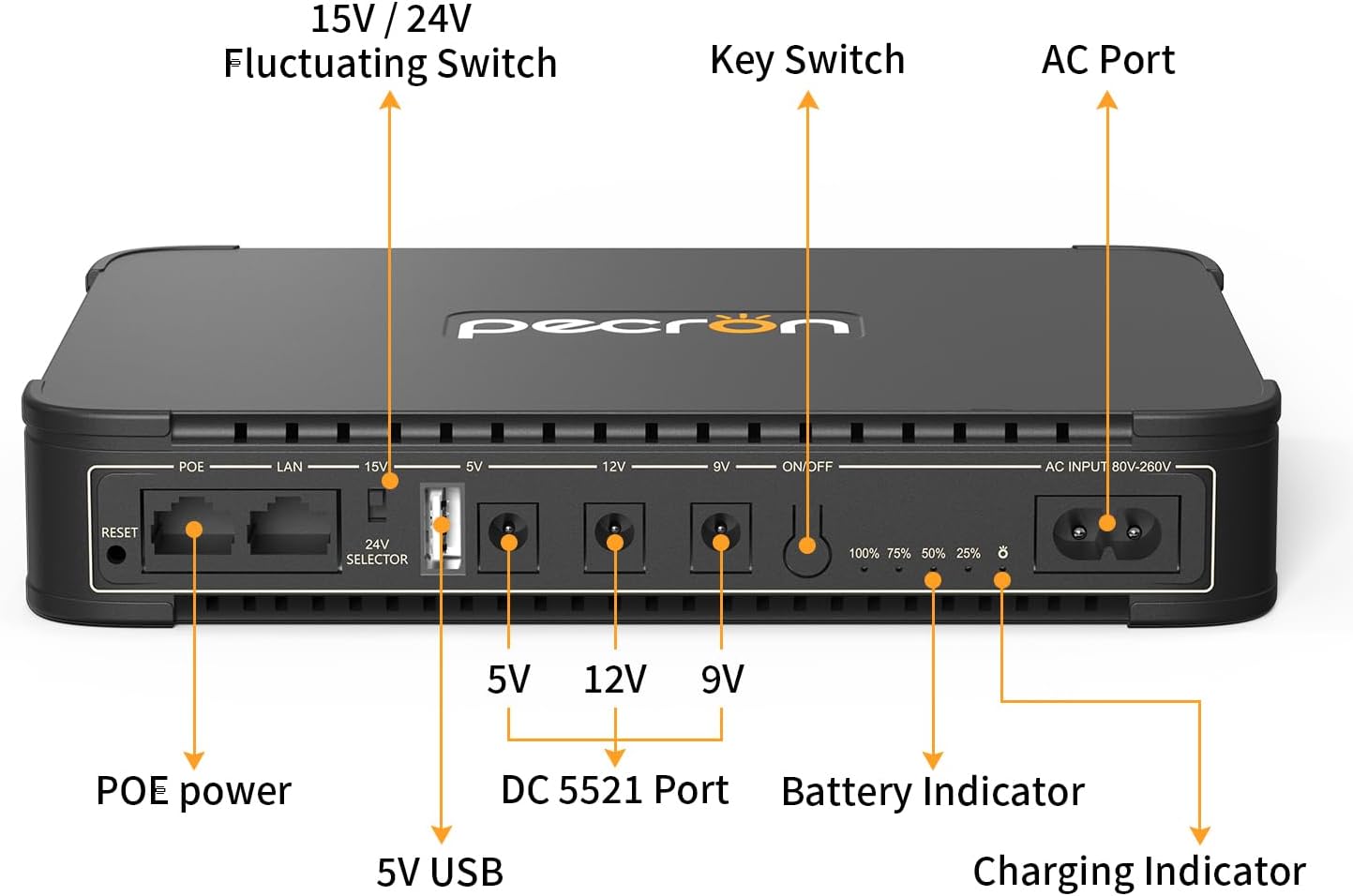
Image: Detailed view of the Pecron D77's ports and indicators. From left to right: Reset button, PoE port, LAN port, 15V/24V Fluctuating Switch, 5V USB port, 5V DC 5521 port, 12V DC 5521 port, 9V DC 5521 port, ON/OFF switch, Battery Indicator LEDs, Charging Indicator, and AC Input port.
Port Descriptions:
- Reset: Button to reset the device.
- PoE: Power over Ethernet port for compatible devices.
- LAN: Standard Ethernet port.
- 15V/24V Selector: Switch to select between 15V and 24V output for PoE.
- 5V USB: USB-A port for charging 5V devices.
- DC 5521 Ports: Three DC output ports providing 5V, 9V, and 12V respectively.
- ON/OFF: Power switch for the unit.
- Battery Indicator: LED lights showing remaining battery capacity (100%, 75%, 50%, 25%).
- Charging Indicator: LED light indicating charging status.
- AC Input: Port for connecting the AC power cable to charge the UPS.
5. Setup
- Initial Charge: Before first use, fully charge the Pecron D77 by connecting the provided AC cable to the AC Input port and plugging it into a wall outlet. The Charging Indicator LED will illuminate, and the Battery Indicator LEDs will show progress. Charging is complete when all battery indicator LEDs are solid.
- Connect Devices:
- For DC devices (e.g., routers, modems, security cameras), identify the correct voltage (5V, 9V, or 12V) required by your device. Connect your device to the corresponding DC 5521 output port using the appropriate cable.
- For PoE devices, select either 15V or 24V using the 15V/24V Selector switch, then connect your PoE device to the PoE port.
- For USB-powered devices, connect them to the 5V USB-A port.
- Power On: Press the ON/OFF switch to power on the Pecron D77. The Battery Indicator LEDs will light up, showing the current charge level.
6. Operating Instructions
Uninterruptible Power Supply (UPS) Function:
When the Pecron D77 is connected to both an AC power source and your devices, it functions as an Uninterruptible Power Supply. In the event of a power outage, the D77 will automatically switch to battery power, providing continuous operation for your connected devices without interruption. When AC power is restored, the unit will automatically recharge while continuing to power your devices.

Image: The Pecron D77 demonstrating its compatibility by powering a Nintendo Switch, a WiFi router, a portable speaker, a smartphone, a security camera, and a flashlight.
Monitoring Battery Level:
The LED Battery Indicator lights provide a quick visual reference of the remaining battery capacity:
- All 4 LEDs lit: 75-100% capacity
- 3 LEDs lit: 50-75% capacity
- 2 LEDs lit: 25-50% capacity
- 1 LED lit: Below 25% capacity (recharge recommended)
7. Maintenance
- Cleaning: Use a soft, dry cloth to clean the exterior of the device. Do not use liquid cleaners or solvents.
- Storage: If storing the unit for an extended period, ensure it is charged to at least 50% and recharge it every 3-6 months to maintain battery health. Store in a cool, dry place away from direct sunlight.
- Battery Care: Avoid fully discharging the battery frequently, as this can reduce its lifespan.
8. Troubleshooting
| Problem | Possible Cause | Solution |
|---|---|---|
| Device does not power on. | Battery is depleted. | Charge the UPS using the provided AC cable. |
| Connected device is not receiving power. | Incorrect voltage selected for DC/PoE port. | Verify the voltage requirement of your device and ensure the correct DC 5521 port or PoE voltage (15V/24V) is selected. |
| Cable connection is loose or incorrect. | Ensure all cables are securely connected to the correct ports. | |
| UPS is overloaded. | Disconnect some devices. Ensure total power draw does not exceed 36W. | |
| UPS is not charging. | AC cable not properly connected. | Check the AC cable connection to both the UPS and the wall outlet. |
| Wall outlet is not functioning. | Test the wall outlet with another device. | |
| Battery indicator LEDs are not accurate. | Battery calibration needed. | Fully discharge the unit, then fully recharge it to recalibrate the battery indicator. |
If the problem persists after attempting these solutions, please contact customer support.
9. Specifications
Image: The Pecron D77 DC UPS unit with its dimensions indicated as 199.6mm length, 144.6mm width, and 34.6mm height. The weight is specified as 700g.
| Feature | Specification |
|---|---|
| Model | D77 |
| Battery Capacity | 76.96Wh |
| Input Voltage | 80-260Vac, 50Hz/60Hz |
| Battery Cell Composition | Lithium Ion (4-cell series Li-ion) |
| Max Output Power | 36W |
| USB Output | 5V 2.6A Max |
| DC Outputs | 9V 2A Max / 12V 2A Max / 5V 2.6A Max / 15V or 24V PoE |
| Product Dimensions | 199.6 x 144.6 x 34.6 mm (7.9 x 5.7 x 1.4 inches) |
| Item Weight | 700g (1.5 pounds) |
| Operating Temperature | 0°C to 45°C |
| Material | Plastic |
10. Warranty and Support
Warranty Information:
Pecron products typically come with a limited warranty covering defects in materials and workmanship. Please refer to the warranty card included in your package or visit the official Pecron website for specific warranty terms and conditions applicable to your D77 DC UPS.
Customer Support:
For technical assistance, troubleshooting, or warranty claims, please contact Pecron customer support through their official website or the contact information provided in your product documentation. When contacting support, please have your product model (D77) and purchase details ready.

