
Introduction
This manual provides comprehensive instructions for the assembly, operation, and maintenance of your Homy Casa L-Shaped Computer Desk, Model 6643. Please read this manual thoroughly before assembly and use to ensure proper setup and safe operation. Keep this manual for future reference.
Safety Information
- Ensure all parts are present and undamaged before beginning assembly. Do not use if any parts are missing or damaged.
- Assemble the desk on a soft, clean surface to prevent scratches.
- Do not overtighten screws during assembly, as this may damage the material.
- Place the desk on a level surface to prevent instability and potential tipping.
- Do not exceed the maximum weight capacity of 150 pounds (68 kg) for the desktop.
- Keep small parts away from children during assembly to avoid choking hazards.
- Regularly check all fasteners to ensure they remain tight.
Package Contents
Please verify that all components listed below are included in your package:
- L-shaped desktop panels (Engineered Wood)
- Monitor shelf panel
- Steel frame components (legs, cross-braces)
- Storage cabinet/bag (if included with specific model)
- Assembly hardware (screws, bolts, hex key, screwdriver)
- Instruction manual
Note: The exact number and type of fasteners may vary. Refer to the included hardware pack for precise details.
Setup and Assembly
Assembly is recommended for 1 person. Tools required: Hex Key, Screwdriver (included). Follow these steps carefully:
- Unpack and Identify Parts: Carefully unpack all components and lay them out on a clean, soft surface. Compare them with the package contents list to ensure everything is present.
- Assemble the Steel Frame:
- Attach the main leg frames using the provided cross-braces and fasteners. Ensure all connections are secure but do not fully tighten screws yet.
- Connect the L-shaped frame sections.
- Attach Desktop Panels:
- Carefully place the L-shaped desktop panels onto the assembled steel frame. Align the pre-drilled holes in the desktop with the holes in the frame.
- Secure the desktop panels to the frame using the appropriate screws. Tighten all screws evenly.
- Install Monitor Shelf:
- Attach the monitor shelf supports to the main desktop using the designated fasteners.
- Place the monitor shelf panel onto the supports and secure it.
- Attach Storage Cabinet/Bag: If your model includes a side storage cabinet or bag, attach it according to the specific instructions provided in the hardware pack.
- Final Tightening: Once all components are assembled, go back and fully tighten all screws and bolts. Do not overtighten.
- Leveling: Place the desk in its desired location. If the desk is uneven, adjust the leveling feet (if present) on the bottom of the legs until stable.
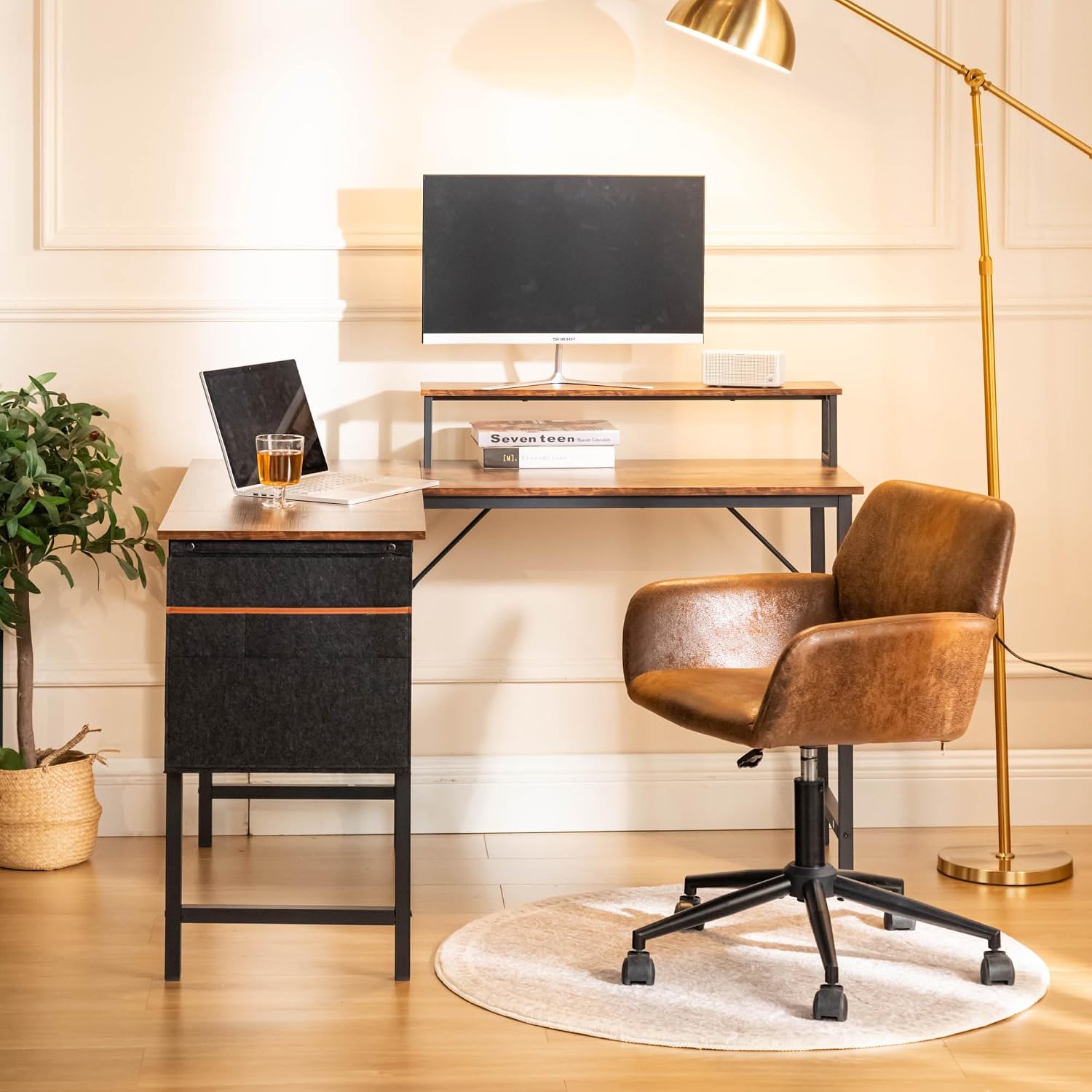

Operating Instructions (Usage)
The Homy Casa L-Shaped Computer Desk is designed for versatile use in home offices, gaming setups, or study areas. Follow these guidelines for optimal use:
- Workspace Utilization: The L-shaped design provides a spacious work area (47.2" x 39.4" x 29.7"). Utilize the corner space efficiently for multiple monitors, laptops, or other equipment.
- Monitor Shelf: Place your monitor(s) on the raised monitor shelf for improved ergonomics, reducing neck and eye strain. This also frees up main desktop space.
- Weight Capacity: Ensure the total weight placed on the desktop does not exceed 150 pounds (68 kg). Distribute weight evenly.
- Storage: Use the integrated storage cabinet or bag (if applicable) for organizing documents, stationery, or other small items to keep your workspace tidy.
- Surface Protection: While the melamine-coated surface is durable and scratch-resistant, consider using coasters for drinks and mouse pads for prolonged mouse use to further protect the finish.


Maintenance
Proper maintenance will extend the life and appearance of your desk:
- Cleaning: Wipe the desk surfaces with a damp cloth. For stubborn marks, a mild soap solution can be used, followed by wiping with a clean, dry cloth. Avoid abrasive cleaners or harsh chemicals.
- Frame Care: The powder-coated steel frame can be cleaned with a damp cloth. Avoid scratching the finish.
- Fastener Check: Periodically check all screws and bolts to ensure they are tight. Retighten as necessary to maintain stability.
- Avoid Direct Sunlight: Prolonged exposure to direct sunlight may cause fading or damage to the desktop finish.
- Heat Protection: Do not place hot items directly on the desktop. Use heat-resistant pads if necessary.
Troubleshooting
| Problem | Possible Cause | Solution |
|---|---|---|
| Desk is wobbly or unstable. | Loose fasteners; uneven floor; incorrect assembly. | Ensure all screws and bolts are fully tightened. Adjust leveling feet on the bottom of the legs. Verify assembly steps were followed correctly. |
| Parts do not align during assembly. | Incorrect orientation of parts; screws overtightened prematurely. | Review the assembly diagrams. Loosen all screws slightly, align parts, then retighten evenly. |
| Scratches on desktop surface. | Sharp objects; abrasive cleaning. | Use protective mats for sharp objects. Avoid abrasive cleaners. Minor scratches may be concealed with furniture repair markers. |
Specifications
| Model: | 6643 |
| Brand: | Homy Casa |
| Type: | L-Shaped Computer Desk |
| Overall Dimensions (L x W x H): | 47.2" x 39.4" x 29.7" (120 cm x 100 cm x 75.4 cm) |
| Monitor Shelf Dimensions (L x W x H): | 31.5" x 5.9" x 5.9" (80 cm x 15 cm x 15 cm) |
| Material: | Engineered Wood (Melamine-coated particle board), Alloy Steel Frame |
| Color: | Vintage Wood Top, Black Frame |
| Weight Capacity: | 150 lbs (68 kg) |
| Item Weight: | 25.5 lbs (11.5 kg) |
| Assembly Required: | Yes |
| Tools for Assembly: | Hex Key, Screwdriver (included) |

Warranty Information
Specific warranty details for the Homy Casa L-Shaped Computer Desk are typically provided at the point of purchase or within the product packaging. Please refer to your purchase receipt or contact the retailer/manufacturer directly for information regarding warranty coverage, terms, and conditions.
Customer Support
If you have any questions regarding the assembly, operation, or maintenance of your Homy Casa L-Shaped Computer Desk, or if you require replacement parts, please contact the retailer where the product was purchased or visit the official Homy Casa website for support. Please have your model number (6643) and purchase information ready when contacting support.
For more information, you may visit the Homy Casa Store on Amazon.
